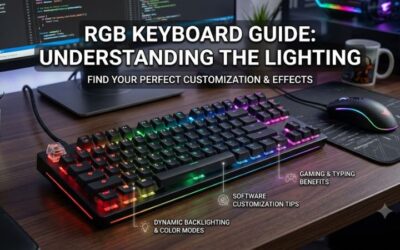
Buying an RK61 is really two decisions disguised as one. The first is which RK61: Royal Kludge sells a wired model built around QMK/VIA programming and a tri-mode wireless model under almost identical names, and picking by name alone can leave you with no Bluetooth — or without the open-source remapping you wanted. The second is whether a 61-key layout suits your games and your typing. This review covers the wired RK61 only, and it is a sourced review: every claim comes from the keyboard’s Amazon listing, the maker’s published specifications or a named published review.
It is written for small-desk gamers weighing a first 60% board, for switch-swappers who want hot-swap sockets without soldering, and for anyone torn between the two RK61 versions. The wired board is compared with the wireless RK61, Redragon’s K617 Fizz and HyperX’s Alloy Origins 60, with every pick chosen from the names and specifications on its Amazon page.
Quick Picks
As an Amazon Associate we earn from qualifying purchases.
| Product | Best for | Key spec from title |
|---|---|---|
| RK ROYAL KLUDGE RK61 Wired | Gamers who want deep key remapping on a small desk | QMK/VIA programmable, hot-swappable PCB |
| RK ROYAL KLUDGE RK61 Wireless | Switching one keyboard between a PC and a tablet | Triple mode Bluetooth 5.0, 2.4GHz and USB-C |
| Redragon K617 Fizz | A first 60% board for a tidy, two-tone desk | Hot-swap sockets, detachable USB-C cable |
| HyperX Alloy Origins 60 | Players who want a metal body that stays planted | Aircraft-grade aluminium body, PBT keycaps |
How to Choose
Decide which RK61 you are actually buying
RK61 is a family name, not a single product. The wired board reviewed here connects by USB-C only and is programmed through QMK/VIA, while the tri-mode RK61 adds Bluetooth 5.0 and a 2.4GHz dongle, drops QMK/VIA for RK’s own software, and runs on a rechargeable battery. Listings for the two sit side by side with near-identical titles and photos, and UnboxRank’s comparison of the versions exists precisely because buyers keep ordering the wrong one. Before anything else, decide whether the keyboard must work away from a cable; that single answer picks the version, and every later choice follows from it.
Check that a 61-key layout fits your games and work
A 60% board deletes the function row, the navigation cluster and the number pad, leaving 61 keys. Everything missing moves behind the Fn key: F-keys share the number row, and on the wired RK61 pressing Fn+Enter toggles the right-hand cluster into arrow keys. That trade buys mouse room, which is why competitive FPS players like the format, but it taxes anyone who lives in spreadsheets, IDEs or strategy games with heavy function-key use. If your daily work needs a numpad or dedicated arrows, no switch or backlight upgrade will fix the layout — look at 65% or tenkeyless boards instead.
Pick a switch type, then check the hot-swap sockets
The wired RK61 is sold with pre-lubed RK switches, and the white listing reviewed here ships with linear reds; clicky blue and tactile brown versions exist on separate listings, so check the variant name before ordering. Feel is only half the decision, though. The PCB is hot-swappable and accepts both 3-pin and 5-pin switches, so a set of aftermarket switches drops in with the included puller and no soldering. That makes the stock switch a starting point rather than a life sentence — but only if the listing you buy from is genuinely the hot-swap version, which is worth confirming on the product page.
Match the software and platform support to your setup
Programming is where the wired RK61 separates itself: QMK/VIA remapping happens through the VIA web app after you load the layout file named in the listing, and it works across Windows and macOS without a vendor account. RK’s own software, used by the wireless model, is Windows-only according to its listing notes. Console players should read the fine print too — the wired listing states that the QMK version is not compatible with PS4, PS5 or Switch consoles, even though it lists PC, laptop and Xbox among supported devices. Match the board to every machine you plan to plug it into.
The 4 Best Options
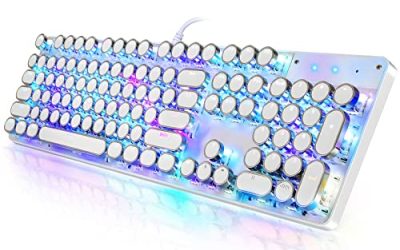
RK ROYAL KLUDGE RK61 Wired 60% Mechanical Gaming Keyboard

The wired RK61 is the version to buy if deep remapping matters more than wireless freedom. Its listing leads with QMK/VIA support, which lets you rebuild the Fn layer, move the arrow keys and record macros from a browser-based editor instead of a vendor app. CyberReview’s long-term review of this wired model credits the hot-swap sockets, RGB and programmability for its value, while flagging the all-plastic build and RGB brightness that varies between colours. UnboxRank’s wired-versus-wireless comparison adds the caution that defines this product: the RK61 name covers several different keyboards, and this one has no Bluetooth at all.
Specs
- Layout: 60% form factor, 61 keys
- Connection: wired only, detachable USB-C cable
- Switches: pre-lubed RK red switches, hot-swappable
- Hot-swap PCB: supports 3-pin and 5-pin mechanical switches
- Backlighting: RGB with 18 RGB modes and 8 monochrome modes onboard
- Software: QMK/VIA programmable for remapping and macros
- Keycaps and case: ABS keycaps, ABS plastic case
- Dimensions: 11.4 x 4 x 1.6 inches; weight 0.56 kg
- Compatibility: Windows, MacOS and Android; PC, laptop and Xbox listed
- In the box: keyboard, USB-C cable, 2-in-1 keycap and switch puller, 4 spare RK switches, user manual
Best for: Gamers and typists who want QMK/VIA control over every key on a compact wired board.
Watch out for: Confirm you are on the wired QMK/VIA listing before ordering — several RK61 variants share near-identical titles, and this listing states the QMK version is not compatible with PS4, PS5 or Switch consoles.
ASIN: B089GN2KBT
RK ROYAL KLUDGE RK61 Wireless 60% Mechanical Keyboard

Choose the tri-mode RK61 instead if the keyboard has to move between a gaming PC and a tablet, laptop or phone. It keeps the same 61-key footprint and hot-swap sockets, and adds Bluetooth 5.0 and a 2.4GHz dongle alongside the USB-C cable. The trade-offs sit in the software and battery: RTINGS, which tested the wireless RK61, could not find a working version of its remapping software and relied on the preprogrammed shortcuts, and the manufacturer advertises only around ten hours of battery life with the backlight in use.
Specs
- Layout: 60% form factor, 61 keys
- Connection: Bluetooth 5.0, 2.4GHz wireless and USB-C wired (triple mode)
- Switches: RK brown tactile switches, hot-swappable
- Backlighting: RGB
- Keycaps: double-shot keycaps
- Battery: rechargeable
- Dimensions: 11.4 x 3.9 x 1.7 inches
- Compatibility: Windows, iOS, MacOS, Linux and Android
- In the box: keyboard, coiled cable, 2.4GHz receiver, keycap puller, 4 spare RK switches, user manual
Best for: Players who rotate one compact keyboard between a PC and mobile devices.
Watch out for: Hot-swap support and keycap material differ between production runs of this model, so verify both on the exact listing before buying replacement switches.
ASIN: B07PC117G5
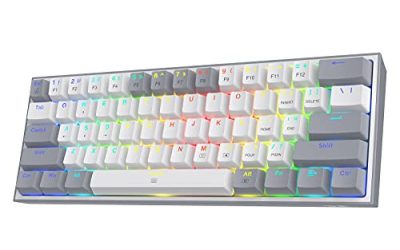
Redragon K617 Fizz 60% Wired RGB Gaming Keyboard

The K617 Fizz is the closest wired rival: another 61-key board with hot-swap sockets, RGB and a detachable USB-C cable, sold in two-tone keycap colours the RK61 does not offer. What you give up is QMK/VIA — customisation runs through Redragon’s own pro software instead — and any choice of switch, because the Fizz ships with linear red switches only. The Inventory notes that its arrow keys sit on Fn plus W, A, S and D, a different layer layout from the RK61’s toggled arrow mode, which matters if you switch between boards.
Specs
- Layout: 60% form factor, 61 keys
- Connection: wired only, detachable USB-C cable
- Switches: hot-swappable linear red switches
- Backlighting: RGB
- Keycaps: white and grey keycaps
- Software: Redragon pro driver/software supported
- Dimensions: 31 x 13.5 x 4 cm
- Enclosure material: ABS plastic
- In the box: keyboard, switch/keycap puller, switch backup box, user manual
Best for: First-time 60% buyers who want hot-swap sockets and a simple wired setup.
Watch out for: There is no switch choice on this model — every K617 Fizz ships with linear red switches, so tactile or clicky fans should look elsewhere.
ASIN: B09BVCVTBC
HyperX Alloy Origins 60 Mechanical Gaming Keyboard

The Alloy Origins 60 is the step-up option for buyers who want a wired 60% board that feels substantial. Its full aircraft-grade aluminium body and double-shot PBT keycaps answer the two most common complaints about the RK61’s plastic case and ABS caps, and CNET has praised the solid construction of HyperX’s design. The catch is permanence: the HyperX Red switches are soldered in place, so there is no hot-swap socket to rescue a worn switch or change the typing feel later, and customisation runs through HyperX’s NGENUITY software rather than QMK/VIA.
Specs
- Layout: 60% form factor, 61 keys
- Connection: wired USB-C, detachable cable
- Switches: HyperX Red linear mechanical switches (soldered, not hot-swappable)
- Keycaps: double-shot PBT keycaps
- Backlighting: RGB LED
- Software: HyperX NGENUITY compatible
- Body: full aircraft-grade aluminium body
- Model number: HKBO1S-RB-US/G
- Dimensions: 11.7 x 4.2 x 1.5 inches; weight 1.72 lb
Best for: Gamers who value build solidity and PBT keycaps over switch customisation.
Watch out for: The switches are soldered, so a failed or unwanted switch cannot be swapped without soldering skills and tools.
ASIN: B08XBQ79MN
Which One Fits Your Situation
You play shooters on a small desk
Pick the wired RK61. The 61-key footprint hands your mouse the space a full-size board would eat, the cable connection removes battery and pairing worries mid-match, and QMK/VIA lets you move the arrow cluster and build macro layers around your game. Just confirm your main titles do not lean on dedicated F-keys before committing to any 60% board.
One keyboard has to serve your PC and your tablet
Pick the wireless RK61. Its Bluetooth 5.0 and 2.4GHz modes exist for exactly this rotation, and RTINGS notes it can pair with up to three devices over Bluetooth, so the desk PC, laptop and tablet can share one board. Accept the shorter battery life and the preprogrammed shortcuts in exchange for losing the cable.
This is your first mechanical keyboard
Pick the Redragon K617 Fizz. It keeps the experiment simple: one wired connection, hot-swap sockets for trying different switches later, and Redragon’s own software instead of a QMK learning curve. If remapping every key already sounds like the hobby itself, step up to the wired RK61 instead — but for a gentle first step into 60% boards, the Fizz asks less of you.
You want a board that feels built to last
Pick the HyperX Alloy Origins 60. The aluminium body does not flex the way the plastic RK61 and K617 cases can, and the PBT keycaps resist the shine that develops on ABS caps. You are trading away hot-swap sockets to get that solidity, so choose it when you are happy with linear red switches for the long term.
Common Mistakes
- Ordering by the RK61 name alone and ending up with the wireless board when you wanted QMK/VIA — or the wired board when you needed Bluetooth.
- Choosing a switch from a photo: red, blue and brown RK61s are separate listings with very different feels, so check the variant named in the title.
- Assuming console support: the wired QMK/VIA listing supports PC, laptop and Xbox, and explicitly excludes PS4, PS5 and Switch.
- Installing another RK61 version’s software or firmware: the listings warn buyers to check the keyboard’s PID first, because the wired and wireless models use different tools.
- Judging the 60% layout in the first hour: arrow and F-key layers take days to learn, and the wired RK61’s Fn+Enter arrow toggle is easier than holding Fn chords.
Frequently Asked Questions
Does the wired RK61 have Bluetooth or 2.4GHz wireless?
No. The wired RK61 connects through its detachable USB-C cable only, with no battery, Bluetooth or dongle in the box. Wireless connectivity belongs to the separate tri-mode RK61 listing, which adds Bluetooth 5.0 and 2.4GHz alongside the cable. If a listing for this keyboard mentions wireless modes, you are looking at the other version.
Can I change the switches on the wired RK61 without soldering?
Yes. The wired RK61 uses a hot-swappable PCB that accepts both 3-pin and 5-pin mechanical switches, and the box includes a 2-in-1 keycap and switch puller plus four spare RK switches. Pull the keycap, pull the switch, press the replacement into the sockets — no soldering iron or desoldering is involved at any step.
Does the wired RK61 work with a Mac?
Yes, according to its listing, which names Windows, MacOS and Android among supported systems. Remapping is handled through the VIA web app in a browser once you load the RK61 layout file the listing points to, so Mac users are not locked out of the QMK/VIA features that make this version attractive. Console support is the limit instead: the listing excludes PS4, PS5 and Switch.
What is the difference between the wired RK61 and the wireless RK61?
Three things. Connection: the wired board is USB-C only, while the wireless adds Bluetooth 5.0 and 2.4GHz plus a rechargeable battery. Software: the wired board uses open-source QMK/VIA, the wireless uses RK’s own Windows software. Focus: the wired model suits a fixed desk and deep remapping; the wireless suits moving between devices. The shared name hides all of it, so check the listing title carefully.