As an Amazon Associate we earn from qualifying purchases
Best White Gaming Keyboard and Mouse Combos for Clean Setups
A white desk setup looks simple until you try to build one. Keyboards come in bright white, mice come in cream, and the two pieces rarely match once they sit side by side under the same light. Add RGB lighting, which reflects differently off white shells than black ones, and a mismatched pair can look worse than a plain black setup. This guide to the best white gaming keyboard and mouse combos focuses on sets that are actually sold together in white, so the keyboard and mouse share a colourway by design rather than by luck.
The five combos below cover the main ways people buy a white set: a premium wireless pair from Logitech G, a full-size wired value set from Redragon, two budget wired combos from MageGee and CHONCHOW, and a compact mechanical set from FELICON for smaller desks. Each entry lists the specs that matter — layout, switch type, connectivity, mouse DPI range — along with the honest trade-off, because white gear also has a maintenance cost that black gear does not.
Quick Picks
| Product | Best for | Key spec |
|---|---|---|
| Logitech G Wireless Gaming Combo (G715 + G705) | Premium wireless white setups | LIGHTSPEED wireless, mechanical TKL keyboard |
| Redragon S101-3 PRO (White) | Full-size wired value with macros | 7,200 DPI mouse, programmable keys |
| MageGee K1 (White) | Budget full-size wired set | 104 keys, mouse up to 3,200 DPI |
| CHONCHOW White Wired Combo | Shared desks and console use | Rainbow backlit, spill-resistant keyboard |
| FELICON 65% Mechanical Combo (White) | Compact desks and mechanical feel | 68-key mechanical keyboard, honeycomb mouse |
How to Choose the Best White Gaming Keyboard and Mouse
Match the shade of white, not just the colour name
“White” is not one colour. Logitech’s Aurora line uses a soft shade called White Mist, Redragon and MageGee use a brighter neutral white, and cheaper sets sometimes lean slightly grey or blue. Within a single combo this is solved for you, which is the main reason to buy a set instead of pairing separates. If you later add a white headset, pad, or controller from another brand, expect a visible difference and place the mismatched item away from the keyboard and mouse so the contrast is less obvious.
Decide between wired and wireless first
Wireless white combos are rare, because most budget sets are wired. The Logitech G pair in this list is the wireless option: the G715 keyboard and G705 mouse connect over LIGHTSPEED or Bluetooth, and the two can share a single USB receiver. Everything else here is wired USB. Wired sets never need charging and never drop a connection mid-match, but two cables crossing a white desk are very visible, so cable routing matters more in a white build than a black one.
Pick the keyboard layout and switch type
Four of these sets use full-size or near-full-size layouts with number pads, which suits players who also work at the same desk. The FELICON set is a 65 percent board with 68 keys and real mechanical blue switches — clicky and tactile, but louder than the membrane boards. The Logitech G715 is a tenkeyless mechanical board with linear GX Red switches. The Redragon, MageGee, and CHONCHOW keyboards are membrane designs: quieter and softer, with less precise key feel than mechanical switches.
Check the mouse half of the set
Combo mice are often an afterthought, so compare the DPI range and shape rather than assuming they are equal. The Redragon mouse reaches 7,200 DPI, the FELICON honeycomb mouse is built for low weight, and the Logitech G705 is a compact contoured shape aimed at smaller hands. If you play shooters at low sensitivity, the sensor ceiling matters less than a shape your grip agrees with.
Plan for keeping white gear clean
White keycaps show skin oil as a grey film and white mouse shells yellow slowly under sunlight and hand contact. Any white combo needs a cleaning routine: a keycap puller and warm soapy water for keycaps, a microfibre cloth for shells, and compressed air for the gaps. Sets with smooth, simple shells are easier to wipe down than heavily textured ones, and a desk pad under both pieces keeps dust off the surfaces you touch most.
The Best White Gaming Keyboard and Mouse Combos
Logitech G Wireless Gaming Combo (G715 Linear + G705)

This bundle pairs two pieces from Logitech’s Aurora Collection: the G715 tenkeyless mechanical keyboard and the G705 wireless mouse, both in the White Mist colourway, so the whites match exactly by design. The G715 uses linear GX Red mechanical switches, per-key LIGHTSYNC RGB, and a soft cloud-shaped palm rest included in the box. Both devices connect over LIGHTSPEED wireless or Bluetooth, and the mouse can pair through the keyboard’s receiver, which frees a USB port. The G705 is a compact, contoured mouse shaped for smaller hands, with its own LIGHTSYNC RGB zones that can be synced with the keyboard’s lighting.
- Strength: The only genuinely matched premium white pair here — same colourway, same lighting software, one shared receiver.
- Strength: Mechanical switches and a tenkeyless layout suit gaming-first desks better than the full-size membrane boards.
- Trade-off: The G705’s compact shape will feel cramped for large hands or palm-grip players.
- Trade-off: Two rechargeable devices means two batteries to manage, and the White Mist finish shows marks that need regular wiping.
Skip it if your hands are large, or if you want a number pad for work at the same desk.
Redragon S101-3 PRO Gaming Keyboard and Mouse (White)

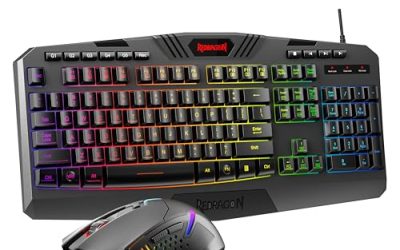
The S101-3 PRO is Redragon’s white version of its long-running value combo: a full-size wired keyboard and a wired gaming mouse in matching white shells. The keyboard is RGB backlit with several lighting effects, has independent macro record keys, dedicated media keys, and support for Redragon’s software so you can record macros and adjust the mouse without reaching for in-game menus. The mouse offers adjustable DPI up to 7,200 with multiple RGB lighting modes. Because both pieces come from one product line and one box, the white tone and the RGB style are consistent across the desk.
- Strength: Macro keys and software support are unusual at this level and genuinely useful for MMO and strategy players.
- Strength: The 7,200 DPI ceiling is the highest mouse range among the wired sets in this list.
- Trade-off: The keyboard is a membrane design, so key feel is softer and less defined than the mechanical boards here.
- Trade-off: Wired only, and the white finish is a bright neutral white that may not match softer off-white accessories.
Skip it if you specifically want mechanical switches, or if you are building a wireless desk.
MageGee K1 Gaming Keyboard and Mouse Combo (White)

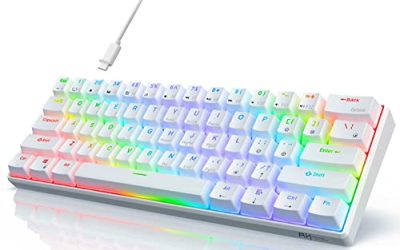
The MageGee K1 is a straightforward wired full-size set in white: a 104-key keyboard with floating doubleshot keycaps and RGB LED backlighting in eight colours with five modes, plus a matching white mouse. The mouse steps through six DPI levels from 600 to 3,200 and carries seven buttons with a seven-colour breathing LED. The keyboard cable uses a gold-plated USB plug with an anti-interference ring, and the keyboard itself is listed as waterproof, which is a practical detail for a light-coloured board that will be cleaned often. There is no software to install — everything is controlled from the keyboard and mouse directly.
- Strength: Full-size layout with a number pad, doubleshot keycaps that resist legend wear, and plug-and-play setup.
- Strength: The mouse’s six DPI steps cover desktop work and most gaming without software.
- Trade-off: The 3,200 DPI ceiling is the lowest here, which competitive shooter players may find limiting.
- Trade-off: Membrane keys and fixed wired cables, with no wireless option in the range.
Skip it if you play at very high sensitivity settings, or if you want per-key RGB customisation through software.
CHONCHOW Gaming Keyboard and Mouse Wired Combo (White)

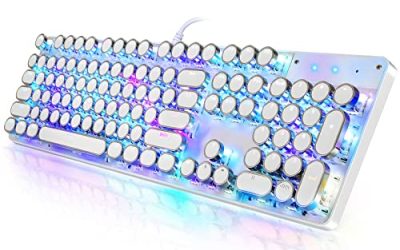
CHONCHOW’s white combo is a full-size wired set built around simplicity: a 104-key rainbow-backlit keyboard with an integrated wrist rest, thin floating keycaps, twelve multimedia keys, and a spill-resistant design, paired with a six-button LED mouse offering four DPI levels — 1,200, 1,800, 2,400, and 3,200. The keyboard supports 26-key conflict-free input and a WIN key lock for gaming sessions. Compatibility covers PC and Mac plus PlayStation and Xbox consoles, which makes it a reasonable pick for a shared desk where the same set gets used for work, homework, and console gaming.
- Strength: Wrist rest, spill resistance, and console compatibility make it the most family- and shared-desk-friendly set here.
- Strength: Rainbow backlighting against the white shell gives a bright, even glow without any software setup.
- Trade-off: The rainbow lighting is a fixed multi-colour pattern rather than per-key RGB you can set to a single colour.
- Trade-off: The mouse tops out at 3,200 DPI and the keyboard is membrane, so it is aimed at casual rather than competitive play.
Skip it if you want a single-colour lighting scheme to match a strict white theme, or mechanical key feel.
FELICON 65% Wired Mechanical Keyboard and Mouse Combo (White)

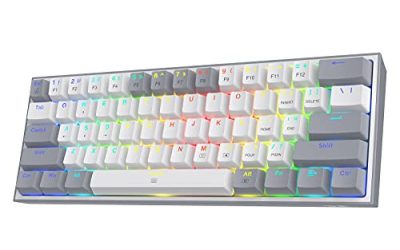
The FELICON set is the compact option: a 68-key mechanical keyboard in white with blue switches and a detachable USB-C cable, a lightweight honeycomb-shell RGB mouse, and a mouse pad included in the box. The keyboard offers multiple RGB backlight modes switched from the board itself, and the two-colour injection-moulded keycaps keep legends readable with the lighting on. The honeycomb mouse uses an optical sensor adjustable up to 3,200 DPI, and the perforated shell keeps weight down for fast flicks while letting the RGB show through. The whole set is sized for small desks, dorm rooms, and laptop stations where a full-size board would crowd the mouse space.
- Strength: Real mechanical switches and a space-saving layout, with the mouse pad included so the white theme extends under both devices.
- Strength: The honeycomb mouse is the lightest-feeling option here for fingertip and claw grips.
- Trade-off: Blue switches are loud — a poor match for shared rooms, calls, or late-night sessions.
- Trade-off: No number pad or dedicated arrow cluster space, and the honeycomb shell collects dust inside the perforations.
Skip it if you need a number pad, quiet keys, or a full-size board for mixed work and play.
Which One Fits Your Situation
You want a fully wireless white battlestation
Choose the Logitech G combo. It is the only wireless set here, the two pieces share one receiver and one lighting system, and the White Mist colourway is matched at the factory. Budget the desk space for a charging routine and keep a cloth nearby, because a premium white set shows neglect faster than any other colour.
You want one wired set for gaming and office work
Choose the Redragon S101-3 PRO if macros and software matter, or the MageGee K1 if you prefer zero software and a number pad with doubleshot keycaps. Both are full-size, both are wired, and both keep the keyboard and mouse in the same bright white tone.
You are furnishing a shared or family desk
Choose the CHONCHOW combo. The wrist rest, spill resistance, and console support fit a desk that several people use, and the fixed rainbow lighting needs no configuration from anyone.
Your desk is small or you travel with your setup
Choose the FELICON 65% set. The compact board leaves room for wide mouse movements, the detachable cable packs easily, and the included pad protects both the desk and the white shells in transit.
Common Mistakes
- Buying a white keyboard and a white mouse from different brands and expecting the shades to match — they rarely do, which is the whole reason combos exist.
- Choosing a white set for the look, then never cleaning it; white keycaps and shells show oil and dust within weeks.
- Assuming every combo mouse is a serious gaming mouse — check the DPI range and shape instead of only looking at the keyboard.
- Picking a clicky mechanical set like the FELICON for a shared room without considering the noise.
- Forgetting that two wired devices need two tidy cable runs; on a white desk, messy black cables undo the clean look you paid for.
- Placing a white setup in direct sunlight for long hours, which speeds up yellowing of the shells.
FAQ
Is a white gaming keyboard and mouse combo harder to maintain?
Yes, somewhat. White surfaces show dust, skin oil, and spills that black gear hides, and shells can yellow slowly in strong sunlight. A weekly wipe with a microfibre cloth and an occasional keycap wash keeps a white set looking new, and the effort is the accepted cost of the colourway.
Do the keyboard and mouse in a combo always match in colour?
Within one boxed combo, yes — the manufacturer produces both pieces in the same colourway, which is the main advantage over buying separates. Matching a combo to other white gear from different brands is where shades start to diverge.
Are combo mice good enough for competitive gaming?
It depends on the set. The Logitech G705 and the Redragon mouse in this list are proper gaming mice with suitable sensors for fast play. The budget wired sets use simpler optical mice capped at 3,200 DPI, which is fine for casual and mid-level play but not aimed at tournament-level shooter use.
Can I use one of these white combos with a console?
The CHONCHOW set lists PlayStation and Xbox compatibility, and the FELICON set lists console support as well. Wireless combos like the Logitech G pair are designed primarily for PC and Mac, so check the listing for your specific console before relying on it.
Should I choose a membrane or mechanical white combo?
Choose mechanical — the Logitech G715 or the FELICON board — if key feel and durability are priorities and you accept either a higher tier of set or louder blue switches in the FELICON’s case. Choose membrane if you want quiet keys and a full-size layout at the value end, as with the Redragon, MageGee, and CHONCHOW sets.