Choosing an NVMe SSD involves more than comparing advertised read and write speeds. ssd dram cache vs hmb explained comes down to where the drive stores its mapping information and how efficiently its controller accesses data. Both designs can work well for gaming, but their differences become important during sustained transfers, multitasking, and demanding storage workloads.
What SSD DRAM Cache vs HMB Really Means
DRAM and HMB address the same underlying storage challenge: helping an SSD controller locate data efficiently. However, they use different memory resources. Dedicated DRAM sits directly on the SSD, while HMB borrows a portion of the computer’s system memory. Understanding their roles helps explain why two NVMe drives with similar advertised speeds can behave differently under heavier workloads.
1. How Dedicated DRAM Works in an SSD
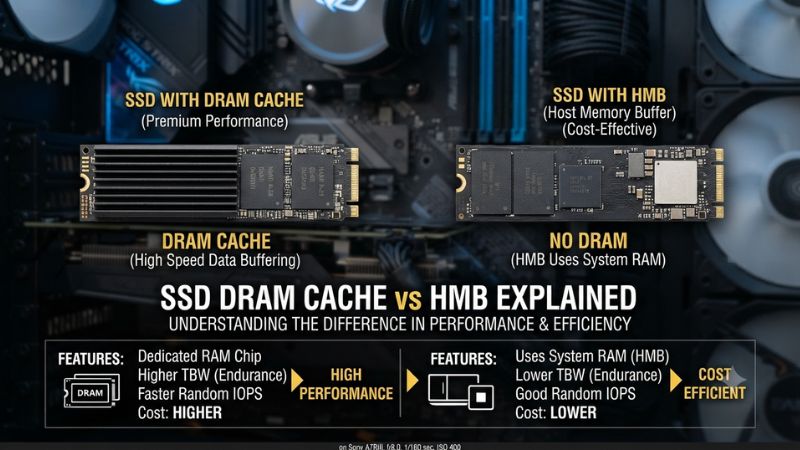
A DRAM-equipped SSD contains a dedicated memory chip connected to its controller. One of its important functions is holding portions of the Flash Translation Layer (FTL) mapping table. This table translates logical addresses requested by the operating system into physical locations in NAND flash.
Keeping frequently needed mapping information in onboard DRAM reduces the need to retrieve it repeatedly from NAND. This can improve access efficiency, particularly during random reads and writes. Depending on the controller and firmware, dedicated DRAM can also support temporary data buffering.
The important distinction in SSD DRAM cache vs HMB is that dedicated DRAM belongs to the storage device. It does not need to reserve the computer’s main memory through the PCIe connection. This makes it a useful design for workloads involving frequent, unpredictable storage requests.
2. What Is Host Memory Buffer (HMB)?
Host Memory Buffer is an NVMe feature that allows a compatible DRAM-less SSD to reserve and use a portion of the computer’s system RAM. Instead of installing a separate DRAM chip, the drive uses this host memory to store selected information needed by its controller.
HMB is particularly useful for caching FTL mapping information. Without onboard DRAM or an alternative mapping strategy, a controller may need to retrieve additional metadata from NAND before locating requested data. HMB helps reduce that overhead.
However, HMB does not turn system RAM into a full replacement for dedicated SSD memory. Accessing host memory involves communication across the PCIe interface, and the available buffer is limited. Its actual benefits depend on the SSD controller, firmware, operating system, and workload.
3. Understanding the Flash Translation Layer
The Flash Translation Layer is an essential part of SSD operation. NAND flash cannot simply overwrite existing data in the same way that an operating system updates a logical file. The controller must manage physical locations, erase blocks, and data movement behind the scenes.
The FTL maintains the relationship between logical addresses and physical NAND locations. Efficiently accessing this mapping information helps the controller respond to incoming storage requests without unnecessary additional operations.
A dedicated DRAM chip can keep substantial mapping information close to the controller. HMB provides an alternative by allowing selected mapping information to reside in host memory. Both approaches aim to reduce mapping-related overhead, but their access paths and resource limitations differ.
4. DRAM Cache Is Not the Same as SLC Cache
One common source of confusion is treating DRAM cache, HMB, and SLC cache as interchangeable technologies. They perform different jobs, even though SSD manufacturers sometimes discuss them together in product specifications.
An SLC cache uses a portion of the SSD’s NAND flash in a faster single-bit-per-cell operating mode to absorb incoming writes. It helps improve burst-write performance before data is moved into the drive’s normal storage configuration.
DRAM and HMB primarily support controller operations, particularly address mapping. An SSD can have onboard DRAM and an SLC cache, or it can use HMB alongside an SLC cache. Neither memory architecture automatically tells you how large the SLC cache is or how fast the drive writes after it fills.
How to Compare SSD DRAM Cache vs HMB
The practical difference becomes clearer when comparing actual workloads rather than relying on sequential speed specifications. Dedicated DRAM generally offers an advantage in demanding random-access and sustained workloads, while HMB can provide an effective lower-cost alternative for everyday computing. Neither architecture alone determines gaming performance or overall SSD quality.
1. Compare the Hardware Architecture
| Feature | Dedicated DRAM SSD | HMB SSD |
| Memory location | On the SSD circuit board | Computer’s system RAM |
| Main purpose | FTL mapping and controller support | Selected FTL mapping information |
| Access path | Directly connected to SSD controller | Through the host interface |
| Host RAM usage | No HMB reservation required | Reserves a portion of system RAM |
| Typical advantage | More consistent access to mapping data | Lower manufacturing cost |
| Main limitation | Additional hardware cost | Depends on host memory and platform support |
Dedicated DRAM offers the controller a local memory resource designed specifically for the drive. HMB instead relies on host memory, introducing additional communication between the SSD and computer.
This distinction matters most when the workload generates many random storage requests or repeatedly accesses mapping information. However, actual results also depend on NAND type, controller design, firmware, capacity, and workload characteristics.
2. Understand the Difference in Gaming Performance
For gaming, the distinction between SSD DRAM cache vs HMB is usually less dramatic than the hardware specifications might suggest. Both types can support Windows installations, game libraries, application loading, and ordinary gaming workloads.
Game loading involves more than raw storage speed. CPU decompression, shader compilation, asset processing, memory availability, and game-engine behavior can all influence loading times. Consequently, a DRAM-equipped SSD does not automatically produce noticeably higher FPS than an HMB-equipped alternative.
HMB drives can be perfectly reasonable gaming storage options, particularly when they offer good NAND, adequate capacity, and competitive overall performance. Dedicated DRAM becomes more attractive when the same drive also handles demanding background storage activity.
For example, consider a PC that runs a large game while downloading another title, recording gameplay, and transferring files. The combined workload can place greater demands on storage than simply launching one game. In that situation, the complete SSD design matters more than the DRAM-versus-HMB label alone.
3. Evaluate Large File Transfers and Sustained Workloads
Large file transfers reveal another important difference. Dedicated DRAM can help maintain efficient controller operations, but it does not guarantee that an SSD will sustain its advertised write speed indefinitely.
Many consumer SSDs use pseudo-SLC caching to accelerate short writes. Once that cache fills, write performance may decrease as the drive writes directly to its normal NAND configuration. This behavior depends on the NAND type, controller, firmware, drive capacity, and available free space.
HMB does not replace the SLC write cache. It primarily supports metadata access, so an HMB-equipped SSD can still have a substantial SLC cache and deliver strong short-duration transfer performance.
When comparing drives for large game installations, video recordings, or repeated file transfers, examine independent sustained-write measurements. Pay particular attention to performance after the SLC cache is exhausted rather than relying exclusively on advertised peak speeds.
4. Consider Compatibility and System Memory
HMB requires an NVMe SSD and a compatible host environment. Its availability and behavior depend on the drive implementation, NVMe support, operating system, and storage driver. A drive’s HMB specification should not be interpreted as a guarantee that every computer will expose identical behavior.
Dedicated DRAM does not require the host to allocate HMB, although the SSD still needs a compatible interface and platform. This makes its memory architecture more independent of host-side HMB support.
| Consideration | DRAM SSD | HMB SSD |
| M.2 compatibility | Depends on drive form factor and motherboard | Same requirement |
| PCIe compatibility | Must match supported interface | Must match supported interface |
| NVMe support | Required for NVMe models | Required |
| Host memory reservation | Not required for dedicated DRAM | Used for HMB |
| Laptop suitability | Depends on physical and electrical compatibility | Same, with host HMB considerations |
| Operating system | Requires compatible storage support | Also requires suitable HMB support |
Before purchasing, check the motherboard or laptop specifications for supported M.2 lengths, PCIe generations, available lanes, and NVMe support. A physically compatible M.2 slot does not necessarily guarantee support for every SSD interface or configuration.
Also, do not assume that having more system RAM automatically improves HMB performance. The SSD’s controller and firmware determine how the buffer is used. Additional installed memory does not necessarily translate into a larger or faster HMB allocation.
How to Choose the Right SSD Architecture
The better choice depends on what the computer does most frequently. A gaming-only system has different storage requirements from a workstation handling video projects, virtual machines, and large datasets. Rather than treating one architecture as universally superior, evaluate the complete drive and its intended workload.
1. When Dedicated DRAM Is Worth Choosing
Dedicated DRAM is worth considering when the SSD will handle demanding storage workloads throughout the day. Frequent random reads and writes, large project files, heavy multitasking, and sustained application activity can benefit from a controller with onboard memory.
It is also an attractive option for users who prefer a drive with fewer dependencies on host-side HMB support. This does not mean every DRAM-equipped SSD is faster than every HMB model, but it provides an important hardware advantage in suitable workloads.
For a primary workstation or a gaming PC that doubles as a content-creation machine, compare dedicated-DRAM models alongside their NAND type, endurance rating, warranty, and independent performance results.
2. When an HMB SSD Makes More Sense
An HMB-equipped SSD can be a sensible choice for mainstream gaming computers, everyday desktops, and laptop upgrades. It avoids the additional cost of a dedicated DRAM chip while retaining a mechanism for improving metadata access.
Modern DRAM-less SSDs can deliver strong sequential throughput and competitive everyday performance. For example, Western Digital’s WD_BLACK SN770 uses an HMB architecture rather than onboard DRAM, demonstrating that DRAM-less does not automatically mean entry-level performance.
HMB models are especially worth considering when their price, capacity, NAND configuration, and warranty make them more attractive than competing alternatives. However, check independent reviews before choosing one for workloads involving sustained writes or heavy random I/O.
3. Check Real Specifications Instead of Marketing Claims
Advertised sequential read and write speeds are useful, but they cannot describe every aspect of SSD performance. A drive with an impressive peak read specification may behave differently during sustained writing, low-queue-depth random access, or mixed workloads.
When comparing SSD DRAM cache vs HMB, examine these specifications:
- NAND type: TLC and QLC have different characteristics, particularly under sustained writing.
- Capacity: Different capacities within one SSD family can have different performance specifications.
- Random performance: Look for random read and write IOPS, especially at lower queue depths.
- Sustained writes: Check what happens after the SLC cache fills.
- Endurance: Compare TBW ratings and warranty conditions.
- Thermal behavior: Check whether the drive needs a heatsink under its intended workload.
- Firmware support: Review available manufacturer utilities, updates, and compatibility information.
Avoid selecting an SSD solely because its product description includes PCIe 4.0, PCIe 5.0, or a high sequential read number. Those specifications describe interface capability and peak throughput, not guaranteed performance in every application.
4. Examples of Both Architectures
Two examples help illustrate why the memory architecture should be considered separately from the advertised speed.
The Samsung 990 EVO Plus is an HMB-equipped NVMe SSD using Samsung V-NAND TLC. Its official specifications list PCIe 4.0 x4 or PCIe 5.0 x2 connectivity, depending on the compatible host configuration. Samsung advertises sequential read speeds of up to 7,250 MB/s for its 2TB and 4TB versions.
The WD_BLACK SN770 is another HMB-based example. Its specifications include PCIe 4.0 x4 connectivity and TLC NAND, with advertised sequential read speeds of up to 5,150 MB/s for the 1TB and 2TB models.
These examples demonstrate that HMB drives can offer substantial advertised throughput. They should not be interpreted as a direct performance comparison because they have different controllers, NAND configurations, capacities, and specifications.
For a meaningful purchase decision, compare independent reviews of the exact capacity you intend to buy. A model’s 1TB results should not automatically be applied to its 2TB or 4TB version.
Frequently Asked Questions
1. Is an SSD with DRAM better than an HMB SSD?
An SSD with dedicated DRAM generally has an architectural advantage because its controller can access onboard memory without relying on host-side HMB. However, a well-designed HMB SSD can still offer excellent performance for gaming and everyday computing.
2. Does HMB reduce available system RAM?
Yes, HMB uses a reserved portion of host memory when the feature is supported and enabled. The amount depends on the SSD and its implementation, so it should not be assumed to consume a fixed amount across all drives.
3. Does an HMB SSD reduce gaming FPS?
No, HMB does not inherently reduce gaming FPS. Its primary role is supporting SSD controller operations, and actual gaming performance depends on the complete system rather than the SSD’s memory architecture alone.
4. Should I replace my HMB SSD with a DRAM SSD?
Not necessarily; replacing an HMB SSD is worthwhile only when a measurable workload limitation or other upgrade requirement justifies the cost. Check actual transfer performance, available capacity, and application behavior before spending money on a replacement.
Final Thoughts
Understanding ssd dram cache vs hmb explained makes SSD shopping easier because it separates memory architecture from headline speed specifications. Dedicated DRAM suits demanding storage workloads, while HMB remains a practical gaming option. Compare sustained performance, NAND type, capacity, and warranty before choosing your next NVMe SSD.