As an Amazon Associate we earn from qualifying purchases
Best Mid Range Gaming Mouse Picks for Serious Play
The mid-range tier is where gaming mice get interesting. Spend less and you start giving up sensor quality; spend more and you mostly pay for exotic extras — higher wireless polling dongles, limited-run shells, bundled charging docks. A good mid range gaming mouse keeps the parts that decide matches: a flawless optical sensor, dependable switches, a shape that fits your grip, and a weight that does not fight your aim. What you give up versus flagship models is usually convenience and polish, not raw tracking performance.
This guide is for players who want that core performance without paying flagship money for features they may never use. It covers five mice that sit squarely in the middle tier: three wired models built around proven flagship-class sensors, one feature-loaded wired mouse with a tilt wheel and extra buttons, and one wireless option for players who want to cut the cord without jumping to the premium bracket. Each pick is compared on sensor, shape, weight, switches, and connectivity so you can match a mouse to your hand and your games instead of chasing spec sheets.
Quick Picks: Best Mid Range Gaming Mouse Options
| Product | Best for | Key spec |
|---|---|---|
| Logitech G403 HERO | All-round wired play | HERO 25K sensor, 87 g with optional added weight |
| Razer DeathAdder V2 | Palm-grip comfort | Focus+ 20K sensor, optical switches, 82 g |
| Razer Basilisk V3 | Buttons and features | Focus+ 26K sensor, 11 programmable buttons, tilt wheel |
| Razer Basilisk V3 X HyperSpeed | Wireless on a mid-tier budget | 5G Advanced 18K sensor, HyperSpeed wireless and Bluetooth |
| Glorious Model O | Lightweight fingertip aim | PixArt 3360 sensor, 67 g honeycomb shell |
How to Choose a Mid Range Gaming Mouse
Sensor quality is the last place to compromise
The good news about this tier is that sensors are rarely the compromise. The HERO 25K in the G403, Razer’s Focus+ line, and the PixArt 3360 in the Model O all track without smoothing, acceleration, or spin-outs at the speeds real players actually move a mouse. Maximum DPI figures are mostly marketing headroom — most competitive players run somewhere between 400 and 3,200 DPI — so judge a sensor by its tracking consistency and lift-off behaviour, not by the biggest number on the box. If a mid-range mouse uses a named flagship-class sensor, its aim performance will feel effectively identical to a flagship in game.
What you actually give up versus flagship models
Understanding the trade-offs keeps expectations honest. In this tier you typically give up: wireless on most models, or wireless limited to the standard 1,000 Hz polling rate rather than the higher polling rates flagships offer through separate dongles; optical or premium mechanical switches rated for fewer total clicks on some models; simpler cables instead of the latest ultra-flexible paracord-style leads; and fewer extras in the box, such as charging docks, grip tape bundles, or swappable shells. None of those change how the sensor tracks. They change convenience, longevity margins, and feel — which is exactly why the middle tier exists.
Wired versus wireless in this tier
Wired mice still dominate the middle tier because removing the battery, radio, and receiver removes cost. A modern wired mouse with a flexible cable and a good mouse bungee feels close to wireless in play, and you never think about charging. Wireless in this tier, represented here by the Basilisk V3 X HyperSpeed, uses a low-latency 2.4 GHz connection that is effectively indistinguishable from wired for casual and ranked play, plus Bluetooth for a second device. The trade-offs are weight — the battery adds grams — and the discipline of charging. Choose wired for the lightest builds and zero maintenance; choose wireless if cable drag genuinely bothers you or your desk setup makes a cable awkward.
Shape and grip decide more than specs
A mouse that fits your hand beats a mouse with a better spec sheet. Ergonomic right-handed shapes like the DeathAdder V2 and Basilisk V3 support palm and relaxed claw grips with a sculpted thumb rest. The G403 uses a simpler, safer ergonomic shape that suits medium hands across grip styles. The Model O is ambidextrous and low-profile, favouring fingertip and claw grips and smaller to medium hands. Measure your hand, be honest about how you hold the mouse, and prioritise shape first, then sensor, then everything else.
Weight and switches
Mid-range weights run from the Model O’s 67 g up to around 100 g for feature-loaded designs. Lighter mice reduce fatigue in fast, low-sensitivity aiming; heavier mice can feel steadier for tracking and give extra buttons somewhere to live. For switches, optical switches (used by the DeathAdder V2 and Basilisk V3) actuate with light and avoid the double-click wear pattern of mechanical contacts, while quality mechanical switches from Omron and Razer still offer crisp, familiar clicks. Either is fine in this tier — shape and sensor matter more.
The Picks in Detail
Logitech G403 HERO

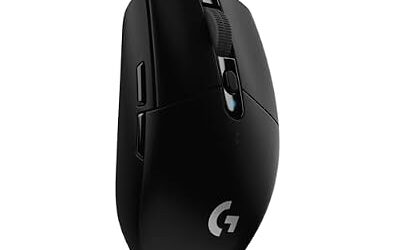
The G403 HERO is the safe all-rounder of this tier: a medium ergonomic shell, rubber side grips, and Logitech’s HERO 25K sensor with 1:1 tracking and zero smoothing. It weighs 87 g and includes an optional 10 g weight for players who prefer a heavier feel. Six programmable buttons cover the essentials, LIGHTSYNC RGB is tasteful rather than loud, and the wired connection keeps things simple and consistent.
- Strength: Flagship-class HERO 25K sensor and a proven shape that fits a wide range of medium hands and grip styles.
- Trade-off: Wired only, and the design is conservative — no tilt wheel, no extra buttons, no ultralight shell.
- Skip it if you want wireless freedom or a sub-70 g mouse for fingertip aiming.
Razer DeathAdder V2

The DeathAdder shape is one of the most copied in gaming, and the V2 pairs it with the Focus+ 20K optical sensor, Razer optical mouse switches that actuate at the speed of light, and a Speedflex cable that reduces drag. At 82 g it stays comfortable through long sessions, with eight programmable buttons, on-board memory profiles, and rubberised side grips. It is the palm-grip pick of this list.
- Strength: Best-in-class ergonomic comfort for palm grip, fast optical switches, and a sensor with smart tracking features.
- Trade-off: The large shell suits medium-to-large hands; small hands and fingertip players may find it bulky, and it is wired only.
- Skip it if your hands are small or you prefer a symmetrical shape.
Razer Basilisk V3

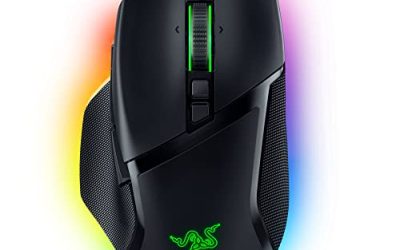
The Basilisk V3 is the feature pick: a Focus+ 26K sensor, 11 programmable buttons, and the HyperScroll tilt wheel that switches between tactile and free-spinning scroll modes and clicks left and right. Second-generation Razer optical switches, a thumb paddle, and extensive Chroma RGB lighting zones make it the most customisable mouse here. At roughly 101 g it is the heaviest pick, which suits players who like a planted, controlled feel.
- Strength: Tilt wheel, extra buttons, and deep customisation make it ideal for mixed gaming and everyday desktop use.
- Trade-off: Heaviest mouse in this roundup, and the extra features are wasted on players who only need two side buttons.
- Skip it if you play fast-paced shooters with a fingertip grip and count every gram.
Razer Basilisk V3 X HyperSpeed
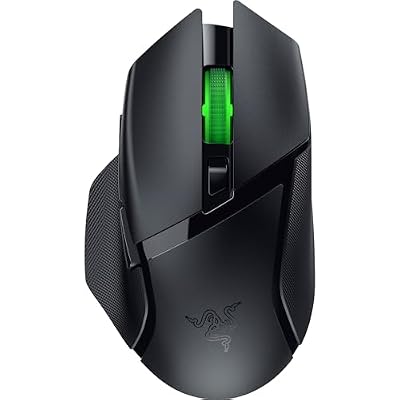
The Basilisk V3 X HyperSpeed is the wireless route into this tier. It uses Razer’s 5G Advanced 18K optical sensor, second-generation mechanical switches, and nine programmable controls, with HyperSpeed 2.4 GHz wireless for gaming and Bluetooth for a laptop or second machine. Battery life stretches to hundreds of hours depending on the connection type, so charging is a rare chore. It keeps the Basilisk family’s ergonomic shape and thumb rest in a cleaner, lighting-light design.
- Strength: Genuine low-latency wireless plus Bluetooth flexibility, long battery life, and a comfortable ergonomic shape.
- Trade-off: Heavier than the wired picks because of the battery, uses a replaceable battery rather than a dock, and polling stays at the standard rate.
- Skip it if you want the lightest possible build or rechargeable-dock convenience.
Glorious Model O
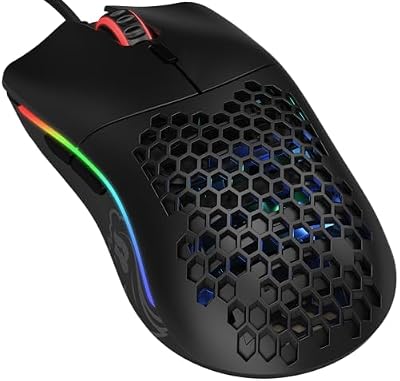
The Model O is the lightweight specialist: a 67 g honeycomb shell, a PixArt 3360 sensor, Omron mechanical switches, a flexible Ascended cord, and pure PTFE feet for a fast glide. The ambidextrous shape and low profile suit claw and fingertip grips, and the 1,000 Hz polling rate keeps reporting standard and consistent. It is a focused esports-style tool with RGB visible through the shell cut-outs.
- Strength: The lightest pick here, with a proven sensor and a glide that rewards fast, wide aim movements.
- Trade-off: The honeycomb shell collects dust and is not for everyone, the switches are mechanical rather than optical, and the shape is less supportive for palm grip.
- Skip it if you rest your whole palm on the mouse or dislike open-shell designs.
Which One Fits Your Situation
You play competitive shooters and aim with your whole arm
Pick the Glorious Model O for its low weight and fast feet, or the G403 HERO if you prefer a solid shell and a slightly heavier, steadier feel. Both sensors track flawlessly at low sensitivities; the choice is shape and weight, not performance.
You palm grip and play long sessions
The DeathAdder V2 is built for you. Its sculpted shell supports the whole hand, the optical switches stay crisp, and the flexible cable keeps drag low through hours of play.
You split time between gaming and desktop work
The Basilisk V3 earns its place with the free-spinning tilt wheel for documents and timelines, extra programmable buttons for macros and shortcuts, and a sensor that is still flagship-class when you switch back to games.
You want wireless without the flagship tax
The Basilisk V3 X HyperSpeed delivers low-latency wireless and Bluetooth in the middle tier. Accept the extra weight and standard polling rate, and you give up almost nothing that matters in real matches.
You are upgrading from an office mouse
Start with the G403 HERO. Its shape is forgiving, its sensor is a genuine flagship part, and it asks nothing of you beyond plugging it in — a clean first step into gaming mice.
Common Mistakes
- Chasing maximum DPI. Anything above a few thousand DPI is headroom you will not use; tracking quality matters, not the headline number.
- Buying the wrong shape for your grip. A perfect sensor in a shell that cramps your hand will still feel wrong every session.
- Assuming wireless always costs more performance. Modern 2.4 GHz connections in this tier are effectively latency-free for real play; judge by weight and convenience instead.
- Ignoring the cable. On wired models, a stiff cable without a bungee can undo the benefit of a light mouse; check cable flexibility.
- Paying flagship prices for extras you will not use. Charging docks, exotic polling dongles, and swappable shells are nice, but they do not improve your aim.
- Forgetting the mouse pad. A worn or inconsistent pad surface undermines any sensor; pair a mid-range mouse with a pad in good condition.
FAQ
Is a mid range gaming mouse good enough for competitive play?
Yes. The sensors in this tier — HERO 25K, Focus+ 20K and 26K, PixArt 3360 — are flagship-class parts that track without smoothing or acceleration. Competitive results depend far more on shape fit, weight preference, and practice than on moving up a price tier.
What do I lose compared with a flagship mouse?
Mainly extras: higher wireless polling rates via add-on dongles, charging docks, lighter exotic materials, and sometimes longer-rated switches. Core tracking, click feel, and build quality in the middle tier are close enough that most players never notice a difference in game.
Should I choose wired or wireless in the mid-range?
Choose wired for the lightest builds, the simplest setup, and no charging. Choose wireless if cable drag annoys you or your desk layout fights a cable. In this tier, wireless latency is no longer a practical concern for casual or ranked play.
How much does weight really matter?
It matters for comfort and aiming style. Low-sensitivity arm aimers usually prefer lighter mice for fast swipes; players who like a deliberate, steady feel often prefer something around 90 to 100 g. There is no correct number — only the one that suits your grip and games.
How long will a mid-range mouse last?
Switch ratings in this tier run from tens of millions of clicks upward, and optical switches avoid the contact wear that causes double-clicking. With normal use, any pick here should serve for years; the shell, cable, and feet typically show wear before the electronics do.