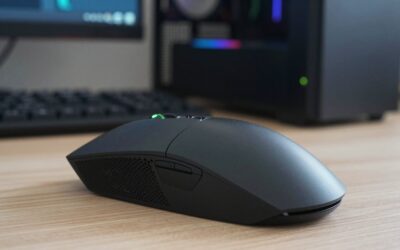
The Switch 2 already turns a Joy-Con 2 into a mouse, so the real decision is not whether you can point at the screen. It is whether a full-size mouse fits your hand and your games better, and which connection the console will actually accept. The Switch 2 reads a standard USB mouse through its dock, wired or through a USB wireless receiver, and that mouse takes priority over Joy-Con mouse mode in games that support mouse controls. Everything else, from battery routine to button count, follows from that connection choice.
This roundup covers couch players who want to sit back from a docked console, desk players working through strategy and RPG sessions, families sharing one console, and players who split time between a Switch 2 and a PC. Every pick comes from the product names and specifications published on its Amazon listing, judged on console fit first and headline sensor numbers second.
Quick Picks
As an Amazon Associate we earn from qualifying purchases.
| Product | Best for | Key spec from title |
|---|---|---|
| Logitech G305 LIGHTSPEED Wireless Gaming Mouse (Lilac) | Couch play with the receiver living in the dock | HERO sensor up to 12,000 DPI |
| Logitech G502 HERO Wired Gaming Mouse | Desk sessions in strategy and RPG games | HERO 25K sensor up to 25,600 DPI |
| Razer DeathAdder Essential Gaming Mouse (Mercury White) | Big right hands on a simple wired setup | 6,400 DPI optical sensor |
| Logitech G203 LIGHTSYNC Wired Gaming Mouse (Lilac) | A first mouse for a shared family console | 8,000 DPI sensor with LIGHTSYNC RGB |
| Redragon M913 Impact Elite Wireless Gaming Mouse | One mouse shared between Switch 2 and PC | 16 programmable buttons |
How to Choose
Start with the connection the console accepts
The Switch 2 talks to a mouse over USB. A wired mouse plugs straight into a USB port on the dock, and a wireless model works when its USB receiver sits in that same port, which is how the console sees it as a standard mouse. A Bluetooth-only mouse is the risky route, because there is no pairing step for gameplay input. Decide where the console lives first: a docked living-room setup favors a receiver you can leave plugged in, while a desk setup makes a cable simple and permanent.
Check that your games support mouse controls
Mouse support on the Switch 2 is decided game by game, not by the console alone. Strategy titles, shooters and sims are the natural fit, and a connected mouse takes priority over the Joy-Con 2 mouse mode in games that offer it. What the game reads is the standard set: left and right click plus the scroll wheel. Long lists of extra buttons and very high DPI ceilings do not unlock extra functions on the console, so judge those features by whether the same mouse will also serve a PC.
Prefer settings that are stored on the mouse
There is no G HUB, Synapse or iCUE running on a Switch 2, so any setting that lives only in PC software will not follow the mouse to the console. On-board memory is the feature that matters here: set your DPI steps and button layout on a PC once, save them to the mouse, and the console sessions inherit them. Mice with a simple hardware DPI button are also easy to live with, because the setting can be changed on the mouse itself without any software at all.
Match shape, weight and battery routine to your sessions
Mouse-controlled Switch 2 games tend to run long, especially strategy and RPG sessions, so shape comfort beats spec-sheet speed. A larger ergonomic shell suits palm grips and bigger hands, while a small symmetrical shell suits fingertip control and younger players. Weight changes how tiring hours of cursor work feel. For wireless picks, decide between the simplicity of a replaceable AA cell with months of life and a rechargeable battery that needs a cable routine, and check whether the receiver stores inside the mouse for travel.
The 5 Best Options
Logitech G305 LIGHTSPEED Wireless Gaming Mouse (Lilac)
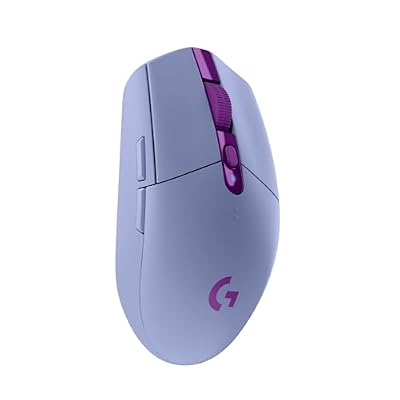
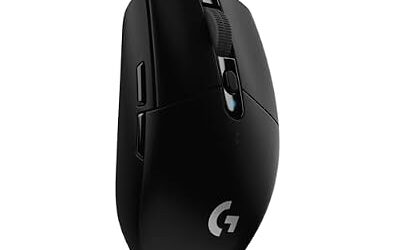
The G305 is the natural couch pick because its LIGHTSPEED receiver can live permanently in the dock, leaving nothing to plug in when a session starts. One AA battery is rated for up to 250 hours of play, so battery swaps are a rare event rather than a routine, and the receiver stores inside the mouse when it travels. The symmetrical shell suits fingertip and claw grips, the HERO sensor is far more precise than console games demand, and on-board memory keeps your DPI steps when the mouse moves between the console and a PC.
Specs
- Connection: LIGHTSPEED wireless via USB receiver, 1 ms report rate
- Sensor: HERO optical, 200 to 12,000 DPI
- Buttons: 6 programmable
- Battery: 1 AA (included), up to 250 hours in performance mode
- Weight: 99 grams with battery, per the listing description
- On-board memory: Yes
- Model number: 910-006020
- Dimensions: not stated
Best for: Docked couch play with no charging routine.
Watch out for: The USB receiver is the only wireless path, since this mouse has no Bluetooth mode. Keep the receiver in the dock or stored in the mouse so it is not lost.
ASIN: B086PJKVVT
Logitech G502 HERO Wired Gaming Mouse

The G502 HERO is the desk anchor of this list: a wired connection that never needs charging, eleven programmable buttons, and a weight system that lets you tune the balance with up to five small weights. On the Switch 2 its standard buttons and wheel do the work in mouse-supported games, while the extra buttons and saved profiles earn their keep when the same mouse spends weekdays on a PC. The right-handed shell is tall and sculpted, which suits palm grips and larger hands during long strategy sessions.
Specs
- Connection: Wired USB
- Sensor: HERO 25K optical, 200 to 25,600 DPI
- Buttons: 11 programmable
- Weight: 121 grams, plus up to five 3.6 gram tuning weights
- On-board memory: Yes
- Lighting: RGB
- Model number: 910-005470
- Dimensions: not stated
Best for: Desk players who want maximum buttons and tunable weight.
Watch out for: The G502 HERO is sold under several regional model numbers with separate listings. Check that the listing shows model 910-005470 before ordering.
ASIN: B07GS6ZS8J
Razer DeathAdder Essential Gaming Mouse (Mercury White)

The DeathAdder Essential strips the formula down to a proven ergonomic shape, a 6,400 DPI optical sensor and five programmable buttons, which is all a Switch 2 game can read anyway. The right-handed shell is one of the larger shapes in this roundup, with room for a relaxed palm grip, and the rubber side grips help during long sessions. Mechanical switches and a simple wired USB connection keep the setup free of batteries, receivers and software, so it works the moment it is plugged into the dock.
Specs
- Connection: Wired USB
- Sensor: Optical, 6,400 DPI
- Buttons: 5 programmable
- Switches: Mechanical
- Dimensions: 5.01 x 2.86 x 1.69 inches
- Item weight: 4.5 ounces (listing figure)
- Model number: RZ01-03850200-R3U1
Best for: Larger right hands that want a simple, durable wired mouse.
Watch out for: This listing is the 2021 Mercury White edition. Confirm the color and model number RZ01-03850200-R3U1 at checkout, since several DeathAdder Essential editions share similar names.
ASIN: B094Q1GJSD
Logitech G203 LIGHTSYNC Wired Gaming Mouse (Lilac)

The G203 LIGHTSYNC is the straightforward first gaming mouse for a shared console: wired, light on features it does not need, and easy for any player to pick up. Its 8,000 DPI sensor and six buttons cover everything Switch 2 games read, the compact symmetrical shape suits smaller hands and fingertip grips, and on-board memory means a DPI step set on a family PC stays put on the console. LIGHTSYNC RGB is purely cosmetic, but it makes the mouse easy to claim as your own in a shared setup.
Specs
- Connection: Wired USB
- Sensor: Optical, up to 8,000 DPI
- Buttons: 6 programmable
- Lighting: LIGHTSYNC RGB
- On-board memory: Yes
- Model number: 910-005851
- Weight: not stated
- Dimensions: not stated
Best for: A first gaming mouse for shared or family consoles.
Watch out for: This listing is the Lilac colorway, and the black and white versions are separate listings. Confirm the color shown at checkout matches what you want.
ASIN: B082J7P19K
Redragon M913 Impact Elite Wireless Gaming Mouse

The M913 is the dual-life pick: a 2.4 GHz receiver for the dock, a USB-C wired mode when the battery runs low, and a sixteen-button layout with twelve side buttons that only really makes sense on a PC. On the Switch 2 it behaves as a standard mouse with a wheel, which is what supported games read, while the button grid waits for PC strategy and MMO sessions. Battery life is rated at up to 45 hours, so it needs a charging routine the G305 avoids, but it never leaves you without a wired fallback.
Specs
- Connection: 2.4 GHz wireless via USB receiver, or USB-C wired
- Sensor: Optical, up to 16,000 DPI
- Buttons: 16 programmable, including 12 side buttons
- Battery: Up to 45 hours
- Lighting: RGB
- Weight: 132 grams (listing data)
- Dimensions: not stated
Best for: Players who split time between the Switch 2 and a PC.
Watch out for: The side-button grid targets PC games. Switch 2 titles read the standard buttons and wheel, so buy this mouse for the dual-use value rather than for console macros.
ASIN: B088B3ZM76
Which One Fits Your Situation
You play from the couch with the console docked
Pick the Logitech G305. Its receiver stays in the dock full time, the AA battery is rated for up to 250 hours, and there is no cable crossing the room. It is the only pick here that asks for nothing at the start of a session: sit down, wake the console, and the mouse is already connected and ready.
You play strategy and RPG games at a desk
Pick the Logitech G502 HERO. The wired connection is permanent, the sculpted shell supports a palm grip through long sessions, and the tunable weights let you set the balance once and forget it. Its eleven buttons exceed what console games read, but they make the same mouse genuinely useful on a PC between console sessions.
The console is shared with family or younger players
Pick the Logitech G203 LIGHTSYNC. It is wired, so there is no receiver to lose and no battery to manage, and its compact symmetrical shape fits smaller hands. The DeathAdder Essential is the alternative here if the shared players have larger hands and prefer a bigger ergonomic shell with the same plug-and-play simplicity.
You split your time between Switch 2 and a gaming PC
Pick the Redragon M913 Impact Elite. Its receiver moves between the dock and your PC, the wired mode covers charging gaps, and the twelve-button side grid that console games ignore becomes the main event in PC strategy and MMO play. One mouse, one setup routine, and on-board settings that travel with it.
Common Mistakes
- Buying a Bluetooth-only mouse and expecting it to pair for gameplay, when the reliable routes are a wired USB connection or a USB wireless receiver in the dock.
- Assuming every Switch 2 game supports a mouse, when support is decided per game and some titles are built around Joy-Con 2 mouse mode instead.
- Paying extra for extreme DPI figures or macro grids for console use, when Switch 2 games read standard buttons and the scroll wheel.
- Losing the USB receiver for a wireless mouse, especially when it is small and the mouse has no Bluetooth fallback.
- Setting DPI and buttons in PC software and expecting those settings on the console without saving them to the mouse’s on-board memory first.
Frequently Asked Questions
Does the Nintendo Switch 2 work with a regular USB mouse?
Yes, in games that support mouse controls. Plug a wired mouse into a USB port on the dock, or plug in a wireless mouse’s USB receiver, and the console recognises it and gives it priority over Joy-Con 2 mouse mode. Support is decided by each game, so check your titles before buying.
Is a wireless mouse reliable enough for Switch 2 play?
A wireless mouse with a USB receiver is the proven route, because the console treats it like a wired mouse once the receiver is in the dock. Low-latency gaming receivers such as LIGHTSPEED are built for exactly this. Bluetooth-only mice are the uncertain option, so choose a model that ships with a receiver.
Do extra buttons and very high DPI help on the Switch 2?
Mostly no. Switch 2 games read the standard left and right buttons and the scroll wheel, so side buttons and macro grids stay idle on the console. DPI still shapes how fast the cursor feels, which is worth setting to taste. Extra buttons earn their place when the same mouse also serves a PC.
Can one mouse cover both a Switch 2 and a PC?
Yes, and it is one of the better reasons to buy from this list. Wired models swap with a single plug, and receiver models swap by moving the receiver. Choose a mouse with on-board memory so the DPI steps you set on the PC are still there when the mouse is plugged into the dock.