Counter-Strike 2 rewards the monitor more than almost any other shooter. Rounds are decided by counter-strafing, jiggle peeks and first-bullet accuracy, so the display must render movement cleanly enough that a shoulder peeking a corner reads as a target, not a smear. Because CS2 runs at very high frame rates on most gaming PCs, the monitor is usually the bottleneck: refresh rate, motion clarity and input lag matter far more than cinematic color.
This roundup picks five monitors matched to how CS2 is actually played. Two are ZOWIE TN panels with backlight strobing. One is a 500Hz IPS screen, one is a 480Hz OLED for players who want 1440p sharpness without giving up speed, and one is a 27-inch 1440p 240Hz IPS option for mixed use.
As an Amazon Associate, we earn from qualifying purchases.
Quick Answer
For CS2, a 24.5-inch 1080p panel at 240Hz or higher is the competitive standard. The BenQ ZOWIE XL2566K leads with 360Hz and DyAc+ strobing, the ASUS ROG Swift OLED PG27AQDP adds 480Hz at 1440p, the Alienware AW2524HF reaches 500Hz on IPS, and the LG UltraGear 27GR83Q-B and ZOWIE XL2546K cover the mid-range at 1440p and 1080p.
Table of Contents
- BenQ ZOWIE XL2566K
- ASUS ROG Swift OLED PG27AQDP
- Alienware AW2524HF
- LG UltraGear 27GR83Q-B
- BenQ ZOWIE XL2546K
- How to Choose
- Who Should Skip
- FAQ
- Final Verdict
BenQ ZOWIE XL2566K

The XL2566K is the monitor most closely associated with professional Counter-Strike, and its priorities map directly onto CS2. The 24.5-inch Fast TN panel runs at 360Hz in 1080p, a size that keeps the radar, kill feed and crosshair inside your natural field of view. That refresh rate translates into visibly smoother tracking when you clear angles.
Its headline feature is DyAc+, BenQ’s backlight-strobing blur reduction, which keeps moving targets defined during counter-strafes and wide swings instead of letting them trail. Black eQualizer lifts shadow detail in dark corners without washing out the image, and Color Vibrance helps enemy models separate from muted map backgrounds. The bundled S-Switch puck, shielding hood and XL Setting to Share profiles round out a premium-tier package aimed at ranked players.
Specs
- Screen size: 24.5 inches, flat
- Panel type: Fast TN
- Resolution: 1920 x 1080 (Full HD)
- Refresh rate: 360Hz
- Motion clarity: DyAc+ blur reduction
- Color features: Black eQualizer, Color Vibrance
- Ports: 2x HDMI 2.0, 1x DisplayPort 1.4, headphone jack
- Stand: height and tilt adjustment, compact base
- Extras: S-Switch controller, shielding hood, XL Setting to Share
ASUS ROG Swift OLED PG27AQDP

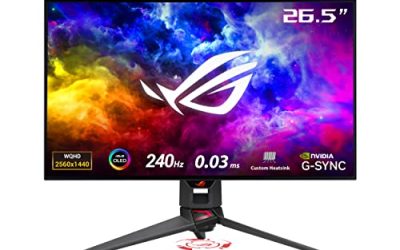
The PG27AQDP is the premium-tier flagship in this roundup and the fastest panel in the group. Its 26.5-inch WOLED screen runs 2560 x 1440 at 480Hz with a 0.03ms gray-to-gray rating, a combination no LCD here can match. CS2 is one of the few games where a strong PC can feed frame rates near that ceiling, and the near-instant pixel response keeps fast pans and flick shots sharply defined without strobing.
The 1440p resolution also earns its place: distant targets on long sightlines render with more pixels, so a head at the far end of a corridor is easier to pick out, and true 10-bit color with DisplayHDR True Black 400 keeps dark interiors readable. DisplayPort 1.4 with display stream compression carries the full 480Hz signal, and two HDMI 2.1 ports cover a console at 120Hz. On a mid-range GPU the ceiling goes unused, so this pick suits players who will actually feed it high frame rates.
Specs
- Screen size: 26.5 inches, flat
- Panel type: WOLED
- Resolution: 2560 x 1440 (QHD)
- Refresh rate: 480Hz
- Response time: 0.03ms gray-to-gray
- Adaptive sync: G-Sync Compatible, FreeSync Premium
- HDR: DisplayHDR True Black 400
- Color: wide DCI-P3 coverage, true 10-bit
- Ports: 1x DisplayPort 1.4 with DSC, 2x HDMI 2.1, USB hub
- Stand: height, tilt, swivel and pivot adjustment
- Extras: custom heatsink, OLED Care, AI Assistant features
Alienware AW2524HF

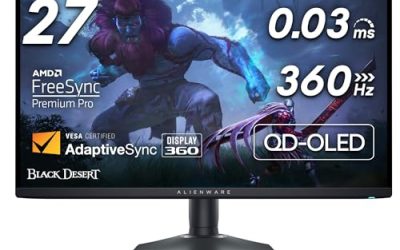
The AW2524HF is the mid-range gateway to the very highest refresh rates. Its 24.5-inch Fast IPS panel runs at 480Hz natively and overclocks to 500Hz over DisplayPort, with a 0.5ms gray-to-gray rating in its fastest mode. That puts it ahead of the 360Hz ZOWIE on raw refresh while keeping the 24.5-inch 1080p format competitive players prefer.
Because it is IPS rather than TN, viewing angles and color are stronger, covering 99 percent of the sRGB gamut at 400 cd/m², which makes it the most comfortable pick here for mixed gaming and everyday use. AMD FreeSync Premium handles tearing when frame rates dip, and the ergonomic stand and four-port USB hub add practical value the stripped-down esports models skip. It has no backlight strobing, so motion clarity sits a step behind the DyAc+ panels, but at 500Hz the gap narrows considerably.
Specs
- Screen size: 24.5 inches, flat
- Panel type: Fast IPS
- Resolution: 1920 x 1080 (Full HD)
- Refresh rate: 480Hz native, 500Hz overclocked via DisplayPort
- Response time: 0.5ms gray-to-gray in extreme mode
- Sync technology: AMD FreeSync Premium
- Brightness: 400 cd/m²
- Color: 99 percent sRGB coverage
- Ports: 2x DisplayPort 1.4, 1x HDMI 2.1, USB 3.2 hub
- Stand: height, tilt, swivel and pivot adjustment
LG UltraGear 27GR83Q-B

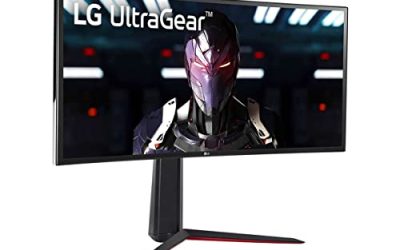
The 27GR83Q-B is the pick for players who want one monitor to cover CS2 and everything else. Its 27-inch IPS panel pairs 2560 x 1440 resolution with a 240Hz refresh rate, so text, player models and distant angles render sharper than at 1080p while motion stays fully competitive.
LG rates the panel at 1ms gray-to-gray with DisplayHDR 400 and a wide color gamut, without the muted look of older TN panels. Both HDMI 2.1 and DisplayPort 1.4 carry the full 1440p 240Hz signal, so it also pairs well with a console. A four-pole headphone output with DTS Headphone:X supports a headset microphone through a single jack. The larger screen asks for more desk depth, and some ranked purists prefer the 24.5-inch format, but for mixed-genre players this is the balanced mid-range choice.
Specs
- Screen size: 27 inches, flat
- Panel type: IPS
- Resolution: 2560 x 1440 (QHD)
- Refresh rate: 240Hz
- Response time: 1ms gray-to-gray
- HDR: DisplayHDR 400
- Adaptive sync: FreeSync Premium, G-Sync Compatible
- Ports: 1x DisplayPort 1.4, 2x HDMI 2.1, USB hub
- Audio: 4-pole headphone jack with DTS Headphone:X
- Stand: height, tilt and pivot adjustment
BenQ ZOWIE XL2546K

The XL2546K is the established mid-range route into serious CS2 play, the model a generation of Counter-Strike players standardized on. The 24.5-inch TN panel runs at 240Hz in 1080p, still the most common configuration in competitive play because it keeps the entire screen, radar included, inside your natural field of view without head movement.
DyAc+ strobing is again the headline: it sharpens moving objects so swinging targets stay defined instead of trailing, which is exactly the motion CS2 produces most. Black eQualizer lifts dark areas without washing out the image, and Color Vibrance pushes saturation so enemy models separate more clearly from the map. The included S-Switch puck and XL Setting to Share make display profiles easy to store and swap. Viewing angles and color are TN-grade, but as a focused competitive tool at a mid-range tier it covers what CS2 actually demands.
Specs
- Screen size: 24.5 inches, flat
- Panel type: TN
- Resolution: 1920 x 1080 (Full HD)
- Refresh rate: 240Hz
- Motion clarity: DyAc+ blur reduction
- Color features: Black eQualizer, Color Vibrance
- Adaptive sync: FreeSync-compatible variable refresh
- Ports: 3x HDMI 2.0, 1x DisplayPort 1.2, headphone jack
- Stand: height, tilt and swivel adjustment
- Extras: S-Switch controller, shielding hood, XL Setting to Share
How to Choose
Start with refresh rate, because it is the spec CS2 rewards most. A 240Hz panel is the competitive baseline, the point where motion becomes clean enough for serious ranked play. Stepping to 360Hz or beyond brings a smaller but real improvement in tracking smoothness, and it only pays off if your PC can hold frame rates near the panel’s ceiling in actual matches. Check your frame rate in real matches before paying a premium-tier price for headroom you cannot feed.
Panel technology decides how that speed looks. TN panels with backlight strobing, such as the ZOWIE DyAc+ models, deliver the cleanest motion at 1080p but give up viewing angles and color depth. Fast IPS narrows the clarity gap at very high refresh rates and is the better all-round desk panel. OLED offers the fastest pixel response and true blacks, at a premium tier and with care needed around static HUD elements over long sessions.
Size and resolution are linked. The 24.5-inch 1080p format dominates competitive Counter-Strike because the whole screen stays in view at a typical desk distance, and the lower resolution keeps frame rates high. A 27-inch 1440p screen adds clarity on long sightlines and doubles as a better general-purpose display, at more GPU load. Finally, the highest refresh rates here need DisplayPort, and strobing cannot run at the same time as variable refresh.
Who Should Skip
Skip this entire category if your PC cannot hold frame rates near 240 in CS2 matches, because a high-refresh panel cannot show frames your GPU never renders; a GPU upgrade would improve your game more. Players who mostly play single-player or cinematic titles should look elsewhere: these panels trade color, contrast and size for speed they will not use. If your desk is shared for work or media, the TN models will disappoint for films and photo tasks. And if you already own a 240Hz esports monitor in good shape, the jump to 360Hz or 500Hz is incremental rather than transformative, so it can wait.
FAQ
Is 240Hz enough for CS2, or should I buy 360Hz?
For most ranked players, 240Hz is enough: it is the standard in competitive play and already delivers clean motion. A 360Hz panel adds smoother tracking that experienced players can feel, but the gain is smaller than the step from 144Hz to 240Hz, and it only appears if your PC sustains frame rates near 360 in matches.
Is 1080p or 1440p better for Counter-Strike 2?
1080p at 24.5 inches is the competitive default because it keeps the whole screen in view and frame rates high on modest hardware. 1440p at 27 inches renders distant targets with more detail, which helps on long sightlines, and modern GPUs handle it well in CS2. Choose 1440p if the monitor also serves other games.
What does DyAc+ do, and do I need it?
DyAc+ is BenQ’s backlight-strobing technology. It flashes the backlight between frames to reduce motion blur, so moving targets stay sharp during fast pans and swings. High refresh rates alone already clean up motion, but many competitive players consider strobing the clearest way to track a moving target. Strobing cannot run together with variable refresh sync.
Can my PC actually run CS2 at 360 frames per second?
A mid-range gaming PC with a recent CPU can hold several hundred frames per second in CS2 at 1080p competitive settings. Frame rates dip in smokes and busy executes, so check your own numbers in a deathmatch before buying a 360Hz or faster panel. If you average well above your current refresh rate, the upgrade will be visible.
Final Verdict
For CS2, buy the fastest panel your PC can feed and your tier allows. The BenQ ZOWIE XL2566K is the all-round competitive pick, pairing 360Hz with DyAc+ clarity in the format professionals use. The ASUS ROG Swift OLED PG27AQDP is the premium choice for 480Hz and 1440p in one screen, while the Alienware AW2524HF reaches 500Hz on a more versatile IPS panel. The LG UltraGear 27GR83Q-B suits mixed use at 1440p 240Hz, and the ZOWIE XL2546K remains the dependable mid-range standard.
Product and ASIN Reference
| Product | ASIN |
|---|---|
| BenQ ZOWIE XL2566K | B0B434LTLF |
| ASUS ROG Swift OLED PG27AQDP | B0D7NXSQ44 |
| Alienware AW2524HF | B0CK3TG7P6 |
| LG UltraGear 27GR83Q-B | B0C63HDHPR |
| BenQ ZOWIE XL2546K | B08G57L985 |