Visual novels turn normal gaming-monitor advice upside down. Titles like STEINS;GATE, The House in Fata Morgana, Clannad and VA-11 Hall-A are novels first and games second: a static illustrated scene, a text box, and hours of reading. Most run at 60 frames per second or less. A 240Hz esports panel, fast response times and low input lag, the specs that dominate gaming roundups, do almost nothing here.
What matters instead is how the screen treats text and artwork over long sessions: pixel density that keeps small fonts clean, accurate color for hand-drawn backgrounds, deep contrast for the genre’s many night scenes, and flicker-free, low-blue-light backlights for five-hour reads. The five monitors below are chosen on those criteria.
As an Amazon Associate, we earn from qualifying purchases.
Quick Answer
For visual novels, buy sharpness and comfort, not speed: these games are static art and pages of dialogue, usually capped at 60 frames per second. A 4K IPS panel keeps text crisp and colors faithful, flicker-free backlights protect long sessions, and the LG DualUp’s tall 16:18 screen fits dialogue and artwork beautifully. The LG 27UP850-W is the safest all-round pick.
Table of Contents
- Quick Answer
- LG UltraFine 27UP850-W
- LG DualUp 28MQ780-B
- Dell UltraSharp U2724D
- Samsung ViewFinity S8 S80UD
- ASUS ProArt Display PA278QV
- How to Choose
- Who Should Skip
- FAQ
- Final Verdict
- Product and ASIN Reference
LG UltraFine 27UP850-W

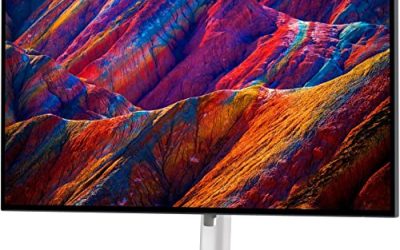
The 27UP850-W is the easiest recommendation in this roundup: a 27-inch 4K IPS panel with the color coverage and comfort features visual novels actually use. At 3840 x 2160 on 27 inches, text renders at about 163 pixels per inch, so dialogue fonts stay crisp even at small sizes. Its 95 percent DCI-P3 coverage is wider than the sRGB space most visual novels are mastered in, and LG factory-calibrates the panel, so colors land where the artists put them.
Comfort hardware is equally well judged. The backlight is flicker-free, Reader Mode warms the color temperature for long text sessions, and the stand adjusts for height, tilt and pivot. USB-C with 96W power delivery makes it a clean one-cable pick for laptop players, and the built-in speakers are serviceable, though headphones do soundtracks more justice. It is a 60Hz panel with no gaming pretensions, exactly the point here.
Specs:
– Panel: 27-inch IPS, anti-glare
– Resolution: 3840 x 2160 (4K UHD), about 163 pixels per inch
– Refresh rate / response: 60Hz, 5ms GtG
– Color: DCI-P3 95 percent, VESA DisplayHDR 400, HDR10, 400 nits typical
– Sync: AMD FreeSync
– Ports: USB-C with 96W power delivery, 2x HDMI, DisplayPort 1.4, USB 3.0 hub
– Audio: built-in speakers, 5W x 2 with MaxxAudio
– Stand / comfort: height, pivot and tilt adjustment, Flicker Safe, Reader Mode
LG DualUp 28MQ780-B

The DualUp stacks the height of two 1440p monitors into one tall sheet of glass, and that 16:18 shape is a genuine asset for reading games. The 2560 x 2880 Nano IPS panel gives dialogue boxes and artwork far more vertical room than a widescreen, so more text stays on screen at once and portrait-oriented illustrations breathe. Color is the other headline: 98 percent DCI-P3 coverage with HDR10 support, the widest gamut in this roundup.
The Ergo stand clamps to the desk edge and floats the panel on an arm with height, tilt, swivel and pivot adjustment. Picture-by-Picture can split the screen into two stacked windows, a novel on top and a guide below, and USB-C with 90W power delivery keeps a laptop setup to one cable. The trade-offs are real: at 300 nits it is the dimmest panel here, the unusual resolution needs scaling care in older titles, and its height demands clear space above the desk.
Specs:
– Panel: 27.6-inch Nano IPS, anti-glare
– Resolution: 2560 x 2880 (SDQHD), 16:18 aspect ratio, about 140 pixels per inch
– Refresh rate / response: 60Hz, 5ms GtG
– Color: DCI-P3 98 percent (typical), HDR10, 300 nits typical, 1000:1 contrast
– Ports: USB-C with 90W power delivery, 2x HDMI, DisplayPort, USB hub
– Audio: built-in speakers, 7W x 2
– Stand: Ergo C-clamp arm, height, tilt, swivel, pivot; Picture-by-Picture
Dell UltraSharp U2724D

Night scenes are where ordinary IPS panels fall down: blacks turn grey and moody artwork flattens. The U2724D answers with IPS Black, doubling native contrast to 2000:1, so the dark bedrooms, rain-soaked streets and candlelit rooms visual novels love keep their depth. Its 27-inch QHD panel is a step down in pixel density from the 4K picks, but text stays clean, and the 120Hz refresh makes scrolling backlogs and menu navigation feel smoother than the 60Hz norm.
Color is creator-grade: full sRGB and Rec.709 coverage, 98 percent DCI-P3, and factory calibration with Delta E below 2. Comfort is the other strength. ComfortView Plus low-blue-light hardware carries a TÜV Rheinland 5-star eye comfort certification, and an ambient light sensor adjusts brightness to the room. One honest caveat: its USB-C port carries video and data only, with no laptop charging, so single-cable laptop players should look at the LG or Samsung picks instead.
Specs:
– Panel: 27-inch IPS Black, matte
– Resolution: 2560 x 1440 (QHD), about 109 pixels per inch
– Refresh rate / response: 120Hz, 5ms GtG in fast mode
– Contrast / brightness: 2000:1, 350 nits, 1.07 billion colors
– Color: sRGB 100 percent, Rec.709 100 percent, DCI-P3 98 percent, Delta E below 2
– Ports: HDMI 2.1, DisplayPort 1.4 in/out, USB-C upstream, USB hub (USB-C downstream 15W)
– Stand / comfort: height, tilt, swivel and pivot, ComfortView Plus, ambient light sensor
Samsung ViewFinity S8 S80UD

The ViewFinity S8 is the quiet all-rounder of the group: a 27-inch 4K IPS panel with HDR10, 1.07 billion colors and 99 percent sRGB coverage, wrapped in a matte finish that kills reflections during daytime reading. Intelligent Eye Care adjusts brightness and color temperature to the room, while Eye Saver Mode and a flicker-free backlight cover long sessions.
Where it earns its place is connectivity. USB-C carries video, data and 90W of charging, a built-in KVM switch lets one keyboard and mouse serve two machines, and the stand pivots into portrait orientation, handy for portrait-format illustrations. It lacks the Dell’s deep contrast and the LG 27UP850-W’s wider gamut, so it wins on balance rather than any single headline spec.
Specs:
– Panel: 27-inch IPS, matte
– Resolution: 3840 x 2160 (4K UHD), about 163 pixels per inch
– Refresh rate / response: 60Hz, 5ms
– Color: HDR10, 1.07 billion colors, sRGB 99 percent, 350 nits
– Ports: USB-C with 90W power delivery, HDMI, DisplayPort, USB hub
– Features: built-in KVM switch, Intelligent Eye Care, Eye Saver Mode, Flicker Free
– Stand: height adjustment, pivot and tilt
– Model: LS27D802UANXGO
ASUS ProArt Display PA278QV
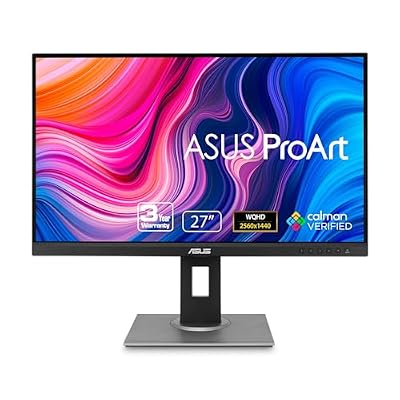
The PA278QV is the budget tier of this roundup, and it spends its money on the right things. The 27-inch QHD IPS panel is factory calibrated to Delta E below 2, with full sRGB and Rec.709 coverage and Calman verification, so artwork looks correct out of the box. ASUS Eye Care adds TÜV-certified flicker-free and low-blue-light modes, and the matte anti-glare finish suits bright rooms.
At about 109 pixels per inch it cannot match the 4K picks for fine text, and its port selection is older: DisplayPort, Mini DisplayPort, HDMI and even DVI-D, with a four-port USB hub but no USB-C. The 75Hz refresh with Adaptive-Sync is a small bonus for the few animated scenes. As a first reading screen, or a second monitor beside a fast gaming panel, it covers the genre’s real needs for the least commitment.
Specs:
– Panel: 27-inch IPS, anti-glare
– Resolution: 2560 x 1440 (WQHD), about 109 pixels per inch
– Refresh rate / response: 75Hz, 5ms GtG, Adaptive-Sync
– Color: sRGB 100 percent, Rec.709 100 percent, Delta E below 2, Calman Verified
– Brightness / contrast: 350 nits, 1000:1
– Ports: DisplayPort, Mini DisplayPort, HDMI, DVI-D, 4x USB 3.0 hub
– Audio: built-in speakers, 2W x 2
– Stand / comfort: tilt, swivel, pivot and height adjustment, ASUS Eye Care
How to Choose
Start with pixel density, not speed. Text is the interface of a visual novel, so pixels per inch decide how clean dialogue looks. A 27-inch 4K panel at about 163 pixels per inch renders fonts with print-like edges; 27-inch QHD at about 109 is still comfortable at arm’s length.
Color coverage is artwork coverage. Most visual novels are mastered in sRGB, so full sRGB coverage with factory calibration matters more than gamut numbers. Wider DCI-P3 panels like the two LG picks add headroom for modern, more saturated art styles, and Delta E below 2 keeps colors faithful.
Contrast carries the night scenes. Standard IPS contrast around 1000:1 greys out the genre’s dark scenes; IPS Black at 2000:1, as in the Dell, keeps them moody without the static-image burn-in risk that makes OLED a cautious choice for a genre where a text box can sit in the same spot for hours.
Comfort features are not decoration. Look for a flicker-free backlight, a low-blue-light mode, a matte finish for daytime rooms, and a stand with real height adjustment. An ambient light sensor helps as sessions run into the night.
Match the ports to your setup. Laptop players should insist on USB-C with power delivery, as on the LG and Samsung picks. Everyone else is fine: HDMI and DisplayPort carry a 60Hz visual novel perfectly well.
Who Should Skip
Skip this entire category if your desk time goes to competitive shooters or fast action games: every pick here is a 60Hz to 120Hz productivity panel, and a high-refresh panel serves those genres far better. Skip the DualUp if low shelves or cabinets hang above your desk, and skip the 4K picks if your PC or laptop is old enough to struggle with 4K desktop scaling. Console players reading from a couch should pass too; a television renders dialogue more comfortably at that distance.
FAQ
Do visual novels need a high refresh rate monitor?
No. Visual novels are mostly static images and text, and nearly all of them run at 60 frames per second or below. A 120Hz panel like the Dell U2724D makes scrolling and menus feel smoother, but the games look identical. Spend the budget on resolution and color instead.
Is 4K worth it for visual novels?
For text, yes: 4K at 27 inches renders dialogue fonts with cleaner edges during long reads. The artwork itself is often drawn at 1080p or 1440p, so backgrounds gain less than text does, and some older titles need display scaling to fill the screen. For desk readers, it is the most felt upgrade there is.
IPS or OLED for visual novels?
IPS is the safer default for this genre. A visual novel can hold the same text box and interface elements on screen for hours, which is exactly the static-image pattern that risks OLED burn-in over time. OLED contrast is lovely for night scenes, but IPS, especially IPS Black, gets you most of the depth with none of the worry.
What size and aspect ratio work best?
A 27-inch 16:9 screen is the standard sweet spot for desk reading. Taller shapes are the interesting alternative: the LG DualUp’s 16:18 panel stacks more text vertically and flatters portrait artwork, and a pivot stand gives a normal monitor the same trick. Ultrawide adds little; most visual novels pillarbox.
Final Verdict
For most readers, the LG UltraFine 27UP850-W is the right buy: true 4K sharpness, wide and accurate color, flicker-free comfort and one-cable USB-C in one package. The LG DualUp is the connoisseur’s pick for tall-screen reading, while the Dell UltraSharp U2724D owns the night scenes with IPS Black contrast. The Samsung ViewFinity S8 balances work and play, and the ASUS ProArt PA278QV proves accurate color does not require a premium tier.
Product and ASIN Reference
| Product | ASIN |
|---|---|
| LG UltraFine 27UP850-W | B08YJMMYBX |
| LG DualUp 28MQ780-B | B09XTD5C7H |
| Dell UltraSharp U2724D | B0CMXGDK5S |
| Samsung ViewFinity S8 S80UD | B0D1DW1Z73 |
| ASUS ProArt Display PA278QV | B088BC5HMM |