Hidden object games are a test of eyesight disguised as a game. Series like Mystery Case Files, Enigmatis and Dark Parables fill every scene with hundreds of painted items, then hide the dozen you need inside clutter, shadow and camouflage. A soft, low-resolution panel turns a brass key in a dark corner into guesswork, while a sharp 4K screen with real contrast keeps the clue visible.
Speed is not the issue here. Hidden object scenes are mostly static, and these games rarely push past 60 frames per second. What matters is pixel density for tiny objects, contrast for dim scenes, accurate color for items that differ only by shade, and flicker-free comfort for long, squinting sessions. Every pick below is a 4K panel chosen on those terms.
As an Amazon Associate, we earn from qualifying purchases.
Quick Answer
For hidden object games, choose sharpness and contrast over refresh rate: a 27-inch or 32-inch 4K IPS panel renders tiny clues cleanly, strong contrast separates objects from shadow, and flicker-free low-blue-light hardware protects your eyes during long searches. The Dell UltraSharp U3223QE leads for dark scenes, the BenQ PD2725U for calibrated color, and the Dell S2722QC is the balanced mainstream pick.
Table of Contents
- Quick Answer
- Dell UltraSharp U3223QE
- BenQ PD2725U
- LG UltraFine 32UN880-B
- ASUS ProArt Display PA279CV
- Dell S2722QC
- How to Choose
- Who Should Skip
- FAQ
- Final Verdict
- Product and ASIN Reference
Dell UltraSharp U3223QE

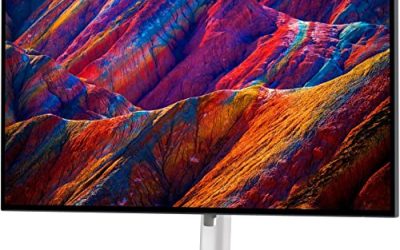
Hidden object scenes love darkness: candlelit studies, foggy gardens, storerooms lit by a single lamp. The U3223QE is built for exactly that problem. Its 31.5-inch IPS Black panel delivers a 2000:1 contrast ratio, double a conventional IPS screen, so a dark object against a dark background keeps its outline instead of melting into gray. At 4K on a screen this size, cluttered scenes also gain breathing room, because you can scan a wide scene without leaning in.
Color coverage is complete for this genre, with full sRGB and Rec.709 coverage plus wide DCI-P3 reach, and DisplayHDR 400 helps torchlit scenes hold their highlights. ComfortView Plus reduces blue light at the panel level without the yellow cast of software filters, which matters when one scene can hold your attention for twenty minutes. The hub is the most complete here: USB-C with 90W power delivery, a KVM switch, Ethernet and daisy-chain output.
Specs
- Screen size: 31.5 inches
- Panel: IPS Black
- Resolution: 3840 x 2160 (4K UHD)
- Refresh rate: 60Hz
- Response time: 5ms GtG in Fast mode
- Contrast ratio: 2000:1
- Brightness: 400 nits
- HDR: VESA DisplayHDR 400
- Color gamut: 100 percent sRGB, 100 percent Rec.709, 98 percent DCI-P3
- Eye care: ComfortView Plus low blue light
- Ports: HDMI, DisplayPort in and out, USB-C with 90W power delivery, USB hub, RJ45 Ethernet
- Stand: height, tilt, swivel and pivot adjustment
BenQ PD2725U

Many hidden object puzzles are really color puzzles: find the red ribbon, the blue bottle, the green key, each in a shade close to something else in the scene. The PD2725U is the color specialist here. Its 27-inch 4K IPS panel is factory calibrated to a Delta E of 3 or less, is Pantone Validated, and covers the full sRGB and Rec.709 gamuts plus 95 percent of DCI-P3, so deliberate shade differences stay readable instead of blending together.
BenQ also leads on eye care, which suits a genre built on sustained staring. The backlight is flicker-free, Low Blue Light modes are built in, and the included Hotkey Puck G2 switches display modes from the desk when a scene turns gloomy. Thunderbolt 3 carries video, data and 65W of charging over one cable, with daisy-chaining and a built-in KVM switch.
Specs
- Screen size: 27 inches
- Panel: IPS
- Resolution: 3840 x 2160 (4K UHD)
- Refresh rate: 60Hz
- Response time: 5ms GtG
- Contrast ratio: 1200:1
- Brightness: 400 nits
- HDR: VESA DisplayHDR 400, HDR10
- Color gamut: 100 percent sRGB, 100 percent Rec.709, 95 percent DCI-P3
- Color accuracy: Delta E of 3 or less, Pantone Validated, factory calibration report
- Eye care: Flicker-Free backlight, Low Blue Light modes
- Ports: Thunderbolt 3 with 65W power delivery and daisy-chain output, HDMI, DisplayPort, USB hub
- Extras: KVM switch, Hotkey Puck G2 controller
- Stand: height, tilt, swivel and pivot adjustment
LG UltraFine 32UN880-B

The 32UN880-B takes a different route to comfort: its Ergo arm adapts the monitor to you. The C-clamp arm extends, retracts, swivels and pivots, so you can pull the 31.5-inch 4K screen closer for a dense search scene and push it back when the scene is solved. Where viewing distance changes how much detail you catch, that flexibility is a genuine gameplay feature.
The panel itself suits painted artwork: 95 percent DCI-P3 coverage with HDR10 support keeps the rich palettes of modern hidden object games looking as intended. Reader Mode lowers color temperature for long sessions, Flicker Safe keeps the backlight steady, and USB-C with 60W power delivery keeps a laptop on one cable. Twin speakers handle ambient soundtracks without extra desk gear.
Specs
- Screen size: 31.5 inches
- Panel: IPS
- Resolution: 3840 x 2160 (4K UHD)
- Refresh rate: 60Hz
- Response time: 5ms GtG
- Contrast ratio: 1000:1
- Brightness: 350 nits
- HDR: HDR10
- Color gamut: 95 percent DCI-P3
- Eye care: Reader Mode, Flicker Safe
- Ports: USB-C with 60W power delivery, 2 x HDMI, DisplayPort, USB hub
- Audio: 2 x 5W built-in speakers
- Stand: Ergo C-clamp arm with height, tilt, swivel, pivot, extend and retract
ASUS ProArt Display PA279CV
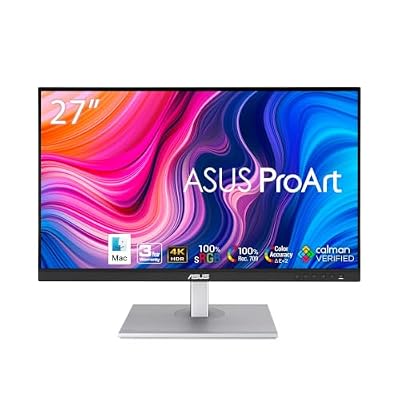
The PA279CV is the calibration-first pick for players who split their desk between games and creative work. Its 27-inch 4K IPS panel is factory calibrated and Calman Verified to a Delta E of under 2, covering the full sRGB and Rec.709 gamuts. In practice that means a sepia-toned seek-and-find scene renders its browns and golds as separate shades, which is exactly the distinction hidden object games use to hide things in plain sight.
ASUS Eye Care pairs a flicker-free backlight with low-blue-light modes, and ProArt Preset lets you save a brighter profile for dark scenes and a calmer one for everyday use. USB-C carries video, data and 65W of charging, and Adaptive-Sync smooths the frame pacing of less polished indie titles. It lacks the wide DCI-P3 reach of the BenQ above, the honest trade in this group.
Specs
- Screen size: 27 inches
- Panel: IPS
- Resolution: 3840 x 2160 (4K UHD)
- Refresh rate: 60Hz
- Response time: 5ms GtG
- Contrast ratio: 1000:1
- Brightness: 350 nits
- Color gamut: 100 percent sRGB, 100 percent Rec.709
- Color accuracy: Delta E under 2, Calman Verified
- Sync: Adaptive-Sync
- Eye care: Flicker-Free backlight, Low Blue Light modes
- Ports: USB-C with 65W power delivery, DisplayPort, 2 x HDMI, USB hub
- Audio: 2 x 2W built-in speakers
- Stand: height, tilt, swivel and pivot adjustment
Dell S2722QC

Not every setup needs a professional calibration pipeline. The S2722QC is the straightforward pick: a 27-inch 4K IPS panel with USB-C, built-in speakers and a clean design for a shared family desk. The 4K resolution still does the important work, rendering small painted objects and item-list text sharply.
Its 99 percent sRGB coverage is more than enough for a genre mastered almost entirely in sRGB. AMD FreeSync keeps frame pacing smooth when an engine stutters, ComfortView reduces blue light for evening sessions, and the dual 3W speakers handle dialogue and ambient music well. USB-C delivers 65W of power, so a laptop needs one cable for picture, sound and charging. The stand adjusts for height, tilt, swivel and pivot.
Specs
- Screen size: 27 inches
- Panel: IPS
- Resolution: 3840 x 2160 (4K UHD)
- Refresh rate: 60Hz
- Response time: 8ms GtG, 4ms in Extreme mode
- Contrast ratio: 1000:1
- Brightness: 350 nits
- Color gamut: 99 percent sRGB, 1.07 billion colors
- Sync: AMD FreeSync
- Eye care: ComfortView low blue light
- Ports: USB-C with 65W power delivery, 2 x HDMI, USB hub
- Audio: 2 x 3W built-in speakers
- Stand: height, tilt, swivel and pivot adjustment
How to Choose
Start with resolution and size together. Pixel density is the spec that finds clues: a 27-inch 4K panel is the sharpest option for a normal desk, while a 31.5-inch 4K screen trades a little density for a larger scene that is easier to scan from a relaxed distance.
Next, weigh contrast against color accuracy. Dark, atmospheric series reward contrast first, and the IPS Black panel in the U3223QE is the strongest tool here for separating objects from shadow. Bright, painterly games reward calibration instead: the PD2725U and PA279CV are factory calibrated, so similar shades stay distinct.
Finally, treat comfort as a core spec: a flicker-free backlight, a low-blue-light mode you will actually leave on, and a stand or arm that sets height and distance properly. Refresh rate is the one place to save, since every pick here runs at 60Hz and these games need no more. Spend on the panel, not the hertz.
Who Should Skip
Skip this roundup if your library is mostly competitive shooters, racing games or fast action titles. Every monitor here is a 60Hz panel chosen for image quality, the wrong trade for games decided by reaction time. Also skip the 4K upgrade if an older PC with basic integrated graphics also has to run demanding 3D games at native resolution. And if you play on a tablet or phone, where touch and portability are half the appeal, a desk monitor solves a problem you do not have.
FAQ
Do hidden object games need a 4K monitor?
They benefit from one more than most genres. The gameplay is literally spotting small items in detailed artwork, and 4K on a 27-inch or 32-inch screen renders those items and the on-screen item lists with far cleaner edges than 1080p. The games themselves are undemanding, so even modest graphics hardware runs them at native 4K.
Which is better for dark scenes, IPS or IPS Black?
IPS Black, among the panel types here. It doubles the contrast of a standard IPS panel to 2000:1, which keeps dark objects separable from dark backgrounds in candlelit or nighttime scenes. Standard IPS still offers wider viewing angles, but for a single player sitting centered, contrast wins more hidden object scenes than angles do.
Can I play hidden object games on these monitors with a console?
Yes. Every pick has HDMI inputs for a PlayStation, Xbox or Switch dock, and the USB-C models also take video from a laptop or Steam Deck over one cable. Console hidden object and adventure titles output at 60 frames per second or below, which matches these panels exactly.
Does screen size or resolution matter more for finding objects?
Both matter, in different ways. Resolution decides whether a tiny object renders as a recognizable shape or a blur, while size decides how comfortably you can scan the whole scene without moving your head. A 27-inch 4K screen maximizes sharpness per inch; a 32-inch 4K screen makes long scanning sessions more relaxed.
Final Verdict
Hidden object games reward the player who notices the most, and the right monitor quietly raises that ceiling. The Dell UltraSharp U3223QE is the best overall pick, pairing IPS Black contrast with a big 4K canvas and the strongest hub. The BenQ PD2725U is the choice when calibrated color decides a puzzle, the LG 32UN880-B when an adjustable arm makes searching comfortable, the ASUS PA279CV for verified sRGB accuracy, and the Dell S2722QC for a clean mainstream setup. None of them will find the last brass key for you. All of them make sure it was visible when you missed it.
Product and ASIN Reference
| Product | ASIN |
|---|---|
| Dell UltraSharp U3223QE | B09TVZHV4W |
| BenQ PD2725U | B0918QXTGN |
| LG UltraFine 32UN880-B | B08BCR862L |
| ASUS ProArt Display PA279CV | B08K2GFDKM |
| Dell S2722QC | B09DTDRJWP |