🛒 Best Price Today on Amazon
Prime members get fast, free shipping on everything above, plus member-only deals. New members get a 30-day free trial — cancel anytime.
Choosing the best b550 motherboard means balancing processor support, memory compatibility, storage, and connectivity rather than paying for features you may never use. AMD’s B550 platform remains a practical option for AM4 gaming builds, especially when you already own a compatible Ryzen processor and DDR4 memory.
How to Choose a B550 Motherboard
Start with your processor, case, and existing components before comparing premium features. B550 boards use AMD’s AM4 socket and DDR4 memory, so they suit compatible Ryzen systems rather than newer AM5 processors. Check the motherboard’s CPU support list and required BIOS version, then compare expansion slots, networking, storage, and rear-panel connections.
Processor and BIOS compatibility
A motherboard’s AM4 socket does not automatically mean it supports every AM4 processor. Ryzen 3000 and Ryzen 5000 desktop CPUs are common B550 targets, but individual models have exceptions, and older BIOS versions may need updating. Check the manufacturer’s CPU support list before purchasing, particularly when pairing a board with a Ryzen 5000 processor.
The MSI MAG B550 Tomahawk is a strong candidate for mainstream Ryzen gaming builds because MSI documents support for compatible Ryzen 3000 and 5000 desktop processors, along with selected Ryzen 4000 G-series chips. Its support list excludes some older APUs, including the Ryzen 5 3400G and Ryzen 3 3200G. Verify the exact processor model rather than relying on the socket name alone.
Memory and expansion requirements
B550 motherboards use DDR4, not DDR5, and typically provide four DIMM slots for dual-channel memory. Maximum capacity and supported memory speeds depend on the specific board, processor, memory modules, and BIOS. A manufacturer’s advertised overclocked memory speed is not a guarantee that every kit will operate at that setting, so consult its qualified vendor list when possible.
For graphics, a compatible Ryzen 3000 or non-G-series Ryzen 5000 processor can enable PCIe 4.0 on the primary graphics slot and CPU-connected M.2 storage, depending on the motherboard design. Many Ryzen G-series APUs limit those connections to PCIe 3.0. If you plan to install a large graphics card, also check the case’s motherboard support, expansion-slot clearance, and space for the card’s cooler.
Storage and networking
Count your current drives before paying extra for a feature-rich board. Many full-size B550 models provide two M.2 sockets and several SATA connections, but the second M.2 socket may use a slower interface or share bandwidth with other slots. Read the manual’s storage table to confirm which connectors remain available when multiple drives and expansion cards are installed.
Networking deserves similar attention. A 2.5Gb Ethernet port can benefit a compatible wired network, while Wi-Fi requires built-in wireless hardware or a separate adapter. Do not assume every B550 board includes Wi-Fi or Bluetooth just because another model in the same product family does. Check the exact product name, rear I/O layout, and internal USB headers for your intended accessories.
Case size, cooling, and upgrade plans
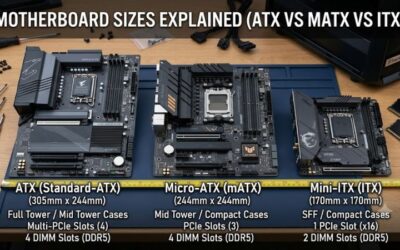
ATX boards offer more room for expansion, while micro-ATX boards can suit smaller cases and more compact builds. Confirm your case supports the chosen form factor and that its front-panel connectors match the motherboard headers. Also inspect the fan headers, CPU power connectors, and available USB headers before deciding whether you need additional splitters or expansion hardware.
VRM heatsinks, fan controls, and firmware-update features matter most when they address your actual build requirements. A higher-priced board is not automatically faster in games when both systems use the same processor, memory configuration, and graphics card. Choose the board that supports your CPU and desired components without forcing unnecessary compromises elsewhere in the PC.
Top Picks: Best B550 Motherboards for Gaming
The right choice depends on local pricing, processor demands, and the connections your build needs. The following shortlist compares four established models using manufacturer specifications and independent editorial coverage where available. These are feature-based recommendations, not a claim that every board has undergone identical laboratory comparisons.
| Product | Best For | Key Spec | Compatibility | Watch Out For |
| MSI MAG B550 Tomahawk | Best Overall | Dual M.2; dual LAN | AM4, DDR4, ATX | No built-in Wi-Fi |
| Gigabyte B550 AORUS Elite V2 | Best Value | Dual M.2; 2.5GbE LAN | AM4, DDR4, ATX | No built-in Wi-Fi on standard model |
| ASUS ROG Strix B550-F Gaming WiFi II | Best For Wireless | Wi-Fi 6E; dual M.2 | AM4, DDR4, ATX | Only two M.2 sockets |
| ASRock B550M Pro4 | Best For Compact Builds | Micro-ATX; dual M.2 | AM4, DDR4, micro-ATX | Gigabit rather than 2.5Gb Ethernet |
Best Overall: MSI MAG B550 Tomahawk
The MSI MAG B550 Tomahawk is a well-rounded choice for a full-size gaming PC built around a compatible Ryzen desktop processor. It provides four DDR4 memory slots, two M.2 sockets, six SATA connections, and 2.5Gb plus 1Gb Ethernet. Its ATX layout also gives builders a useful selection of expansion and cooling headers.
Its principal limitation is the lack of integrated Wi-Fi, so wireless users need a separate adapter or expansion card. Buyers should also check their drive layout because populating the second M.2 socket can affect other expansion connections. Choose this board if you want wired networking and flexible storage; skip it if you need wireless connectivity without additional hardware.
Best Value: Gigabyte B550 AORUS Elite V2
The Gigabyte B550 AORUS Elite V2 is worth comparing when you want a full-size board with substantial core features without paying for a premium wireless package. Gigabyte lists four DDR4 DIMM slots, support for up to 128GB of memory, 2.5GbE networking, and two M.2 sockets. The board also includes heatsinks and Q-Flash Plus BIOS updating.
Its value depends on the price available from reputable retailers, since older AM4 stock can vary considerably by seller. The standard model lacks built-in Wi-Fi, and memory overclocking speeds depend on the CPU and memory configuration. Buy it when its price is competitive with the Tomahawk and its connections suit your build; avoid assuming that every hardware revision has an identical specification.
Best For Wireless: ASUS ROG Strix B550-F Gaming WiFi II
The ASUS ROG Strix B550-F Gaming WiFi II is a strong option when you want wireless networking integrated into an ATX motherboard. ASUS lists Wi-Fi 6E, 2.5Gb Ethernet, four DDR4 DIMM slots, and two M.2 sockets. Its rear I/O also includes USB Type-C, while BIOS FlashBack provides a way to update firmware without relying on a working CPU installation.
The trade-off is that you still get only two M.2 sockets, and wireless performance depends on your router, placement, and local radio conditions. Its price may also exceed simpler B550 alternatives. Choose it if you value built-in wireless networking and the additional connectivity; look elsewhere if you use Ethernet exclusively and can save substantially with a less expensive board.
Best For Compact Builds: ASRock B550M Pro4
The ASRock B550M Pro4 suits builders who want a micro-ATX motherboard without moving to a more restrictive entry-level chipset. It offers four DDR4 memory slots, six SATA connections, two M.2 sockets, and a PCIe 4.0-capable primary graphics interface with supported Ryzen processors. Its smaller form factor can simplify a compact gaming build while preserving useful storage options.
The main compromise is its Gigabit Ethernet rather than 2.5GbE, and micro-ATX provides less room for expansion than a typical ATX board. Confirm case clearance and the precise CPU support list before ordering. It makes sense for a compact PC with conventional wired networking, but users who need integrated wireless or multiple expansion cards should compare other layouts first.
Frequently Asked Questions
Is a B550 motherboard still worth buying in 2026?
Yes, a B550 motherboard can be a sensible purchase in 2026 if you already own a compatible AM4 processor and DDR4 memory. It supports useful gaming features such as PCIe 4.0 with eligible CPUs, NVMe storage, and memory overclocking. For a completely new build, compare the total cost of an AM4 system against an AM5 platform before committing.
Which B550 motherboard is best for a Ryzen 7 5800X3D?
The MSI MAG B550 Tomahawk and ASUS ROG Strix B550-F Gaming WiFi II are both reasonable options for a compatible Ryzen 7 5800X3D build. Check the board’s CPU support list and BIOS requirements, then consider cooling, networking, and storage needs. The processor, graphics card, and game settings will generally matter more to gaming performance than choosing between otherwise suitable B550 boards.
Do B550 motherboards support DDR5 memory?
No, B550 motherboards use DDR4 memory and do not accept DDR5 DIMMs. If you want DDR5, you need a compatible motherboard platform, such as AMD AM5, together with a supported processor and DDR5 kit. DDR4 memory from an existing AM4 system can help reduce upgrade costs when you choose a B550 board.
Does a B550 motherboard improve FPS?
A B550 motherboard does not automatically increase FPS when compared with another suitable motherboard running the same CPU, memory settings, and graphics card. Differences can arise if power delivery, cooling, firmware, or memory configuration causes a system to behave differently. Independent benchmark comparisons should specify the processor, graphics card, resolution, graphics settings, and test source before you draw conclusions.
Final Thoughts
The best b550 motherboard is the one that matches your processor, case, storage, and networking needs at a sensible price. The MSI MAG B550 Tomahawk is a versatile wired-networking option, Gigabyte offers a competitive alternative, ASUS suits wireless builds, and ASRock fits compact systems. Verify CPU support and BIOS requirements before buying.