🛒 Best Price Today on Amazon
Prime members get fast, free shipping on everything above, plus member-only deals. New members get a 30-day free trial — cancel anytime.
For competitive Valorant, 360Hz to 600Hz is the high-end range, 24–25 inches suits the usual esports layout, and 1080p keeps very high frame rates attainable; 1440p OLED makes more sense when image quality also matters. The best monitor for valorant depends on the speed your PC can feed.
How to Choose a Valorant Monitor
Refresh rate should match the frame rates your system can sustain rather than the number printed on the box. At 600Hz, each refresh lasts about 1.67ms; at 500Hz it is 2ms, while 240Hz is about 4.17ms. For Valorant, high refresh can make fast camera movement easier to follow, but the benefit depends on maintaining correspondingly high frame rates.
Refresh Rate and Frame Rate
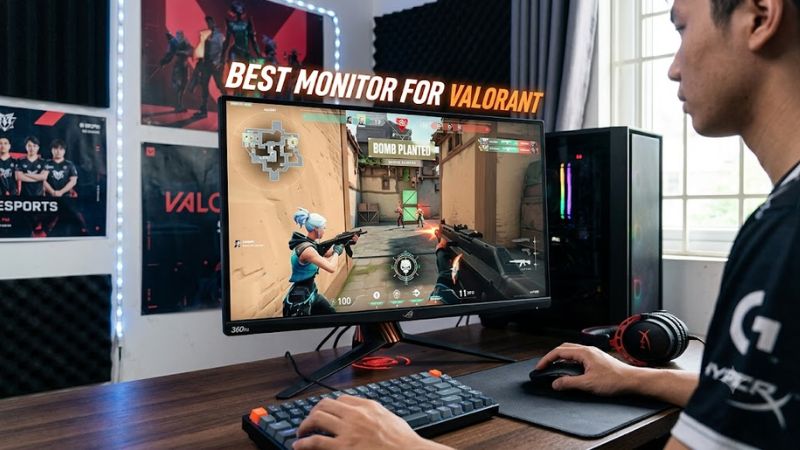
For the best monitor for valorant, 240Hz is a useful baseline for a competitive-focused PC, while 360Hz and above target systems that can render substantially more frames. A 600Hz display such as the ZOWIE XL2586X+ is intended for extremely high frame-rate play, while the XL2546X offers 240Hz with DyAc 2.
The important distinction is refresh rate versus game FPS. A 600Hz panel does not make Valorant render at 600 FPS by itself. PC Gamer describes the XL2586X+ as a 600Hz 1080p TN monitor and measured 6.8ms input delay in its review; its conclusion also notes that powerful hardware is needed to make high frame rates useful.
Panel Type and Motion Clarity
TN remains common in dedicated esports displays because manufacturers can tune these panels for very fast transitions and motion-focused features. The ASUS PG248QP uses an E-TN panel, 540Hz maximum refresh and ULMB 2, while the ZOWIE XL2586X+ combines Fast TN with DyAc 2.
IPS and OLED can make more sense if Valorant is only part of your gaming library. The Alienware AW2524HF uses a 24.5-inch IPS panel at 500Hz, while LG’s newer 27GX790B-B uses a 1440p OLED panel with a 540Hz native mode. Independent measurements from Tom’s Hardware and RTINGS show that these displays combine high refresh with different trade-offs in image quality and motion behavior.
Resolution and Screen Size
For the best monitor for valorant, 1080p at roughly 24–25 inches remains closely aligned with competitive setups because the lower rendering workload helps a capable CPU and GPU reach very high FPS. ZOWIE’s 600Hz XL2586X+ is 24.1 inches and 1920×1080, while ASUS’s PG248QP is 24.1 inches at the same resolution.
A 1440p display gives a sharper desktop and game image but asks the GPU to render substantially more pixels. LG’s 27GX790B-B provides 2560×1440 at 540Hz and can switch to 1280×720 at 720Hz, so it covers both high-resolution gaming and an esports-focused low-resolution mode.
Ports and PC Compatibility
Connection requirements matter at the highest refresh rates. The XL2586X+ supports 1920×1080 at 600Hz through DisplayPort 1.4 or HDMI 2.1, while the PG248QP reaches 540Hz through DisplayPort 1.4 with DSC. A compatible PC therefore needs a GPU output and cable path capable of the selected mode.
For the best monitor for valorant, check the graphics card’s physical outputs before buying, then confirm the monitor’s maximum refresh rate on that connector. The LG 27GX790B-B adds DisplayPort 2.1 and two HDMI 2.1 ports, while the Alienware AW2524HF uses two DisplayPort 1.4 ports and HDMI 2.1.
Top Picks
The four choices below cover dedicated 600Hz esports play, 540Hz NVIDIA-focused gaming, 500Hz IPS, and a 1440p OLED alternative. The specifications come from manufacturer pages, while the performance observations are attributed to independent reviews rather than to PC Gaming Universe testing.
| Product | Best For | Key Spec | Compatibility | Watch Out For |
| ZOWIE XL2586X+ | Best Overall | 24.1″, 1080p, 600Hz, Fast TN | DP 1.4 or HDMI 2.1; PC | TN image quality |
| ZOWIE XL2546X | Best Value | 24.5″, 1080p, 240Hz, DyAc 2 | DP 1.2 or HDMI 2.0; PC | No HDR |
| ASUS ROG Swift Pro PG248QP | Best For NVIDIA esports | 24.1″, 1080p, 540Hz, E-TN | DP 1.4 DSC; G-SYNC | Limited contrast |
| LG UltraGear 27GX790B-B | Best For image quality | 26.5″, 1440p, 540Hz OLED | DP 2.1 or HDMI 2.1; modern PC | OLED VRR flicker |
ZOWIE XL2586X+: Best Overall
The ZOWIE XL2586X+ is the best monitor for valorant when the priority is a dedicated high-refresh esports display. Its 24.1-inch Fast TN panel runs at 600Hz at 1920×1080, includes DyAc 2, and supports PC output at 600Hz through DisplayPort 1.4 or HDMI 2.1.
Its real weakness is specialization. PC Gamer describes the 600Hz model as a niche option for competitive FPS players and notes its roughly $1,000 launch pricing, lack of HDR, and limited appeal for broader entertainment use. Players who prefer richer contrast, OLED image quality, or a lower-cost all-purpose screen should not buy it solely for the refresh-rate number.
ZOWIE XL2546X: Best Value
The XL2546X is the best monitor for valorant for buyers who want ZOWIE’s motion-focused feature set without moving into 500Hz or 600Hz hardware. It uses a 24.5-inch 1080p Fast TN panel at 240Hz and includes DyAc 2, Black eQualizer, Color Vibrance and an S-Switch controller.
Its weakness is image quality outside competitive play. RTINGS reports strong motion handling and low input lag at higher refresh rates, but also notes mediocre contrast, no HDR and high input lag at 60Hz. It should not be the choice for someone who wants a display mainly for HDR movies, cinematic games or console gaming.
ASUS ROG Swift Pro PG248QP: Best For NVIDIA Esports
The ASUS ROG Swift Pro PG248QP is a best monitor for valorant option for users who want NVIDIA-specific esports features. Its 24.1-inch 1080p E-TN panel reaches 540Hz, with native G-SYNC, ULMB 2 and NVIDIA Reflex Analyzer; ASUS specifies DisplayPort 1.4 DSC for its high-refresh PC connection.
Independent results show why its feature set matters. Tom’s Hardware measured a 2ms panel response and 19ms input-lag result in its test setup, while RTINGS reports low input lag and strong motion handling across its VRR range. Those figures come from different methodologies, so they should not be compared as interchangeable measurements.
LG UltraGear 27GX790B-B: Best For Image Quality
The LG 27GX790B-B is the best monitor for valorant for players who also want a premium general-purpose gaming image. Its 26.5-inch Tandem OLED runs at 2560×1440 and 540Hz, with a 720Hz dual mode at 720p, plus DisplayPort 2.1, HDMI 2.1, G-SYNC Compatibility and FreeSync Premium Pro.
The trade-off is different from the TN choices. RTINGS reports near-instantaneous response, low input lag in certain gaming modes and strong image quality, but also distracting VRR flicker when frame rates change quickly and a risk of OLED burn-in with static content. Buyers who want a simpler esports LCD should consider another option.
FAQ
The best monitor for valorant is not automatically the model with the highest refresh rate; the relevant questions are how much FPS the PC can sustain, which connector supports the target mode, whether image quality matters outside Valorant, and whether the panel’s trade-offs fit the setup.
Is 240Hz Enough for Valorant?
Yes, 240Hz can be a sensible target when a PC consistently produces high frame rates but does not justify a 500Hz or 600Hz display. The XL2546X combines 240Hz with DyAc 2, while RTINGS reports fast response and low input lag at higher refresh rates.
Moving to 360Hz, 500Hz, 540Hz or 600Hz reduces the time between displayed frames, but the practical difference depends on FPS, system latency and personal sensitivity to motion changes. A higher refresh monitor cannot compensate for a PC that regularly runs well below the panel’s target refresh rate.
Do You Need 600 FPS for a 600Hz Monitor?
No, the monitor can operate at its selected refresh rate independently of the game’s instantaneous FPS, but very high FPS is needed to provide a new rendered frame frequently enough to make full use of that refresh window. This is why 600Hz monitors are aimed at high-end competitive systems.
PC Gamer’s XL2586X+ review specifically describes the monitor as requiring a powerful PC for high frame rates, while its 600Hz mode is specified at 1920×1080. CPU performance can become important in Valorant because reaching several hundred FPS is not solely a GPU workload.
Should You Choose OLED or TN for Valorant?
Choose based on how the monitor will be used. TN models such as the XL2586X+ and PG248QP emphasize high refresh and motion-focused features, while the LG 27GX790B-B combines 1440p, OLED contrast and 540Hz operation for a wider range of gaming and media use.
OLED brings its own considerations, including possible burn-in from persistent static elements and VRR flicker under changing frame rates. RTINGS documents both characteristics for the LG 27GX790B-B, so an OLED purchase should account for everyday desktop use as well as Valorant sessions.
What GPU Connection Do High-Refresh Monitors Need?
The required connection depends on the monitor and selected mode, not simply on whether the GPU is modern. The XL2586X+ specifies 1080p at 600Hz through DisplayPort 1.4 or HDMI 2.1, while the PG248QP specifies DisplayPort 1.4 DSC and reaches 540Hz there.
For the LG 27GX790B-B, DisplayPort 2.1 or HDMI 2.1 provides the appropriate modern connection options, with 1440p 540Hz and 720p 720Hz dual modes. Check the exact GPU output, cable specification and monitor input before purchase, because the maximum mode can differ by connector.
Final Thoughts
The best monitor for valorant depends on whether the priority is maximum esports refresh, a 240Hz value-oriented setup, NVIDIA-focused features, or a 1440p OLED that also serves other games. Match the monitor to sustainable FPS and connector support first, then weigh panel trade-offs and non-Valorant use.