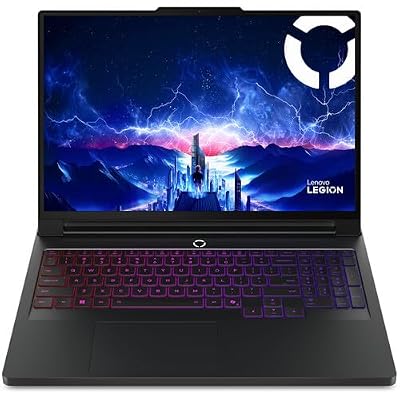
- Top Pick: Lenovo Legion Pro 7i Gen 10 w/Ultra 9, RTX 5090, 64GB RAM, 2TB,16” OLED
- Best Value: msi Raider 18 HX AI 18” 120Hz UHD+ Gaming Laptop: Intel Core U9-285HX, NVIDIA Geforce RTX 5090, 64GB DDR5, 2TB NVMe SSD, Thunderbolt 5, Wi-Fi 7, Win 11 Pro: Black A2XWJG-069US
- Premium Choice: ASUS ROG Strix SCAR 18 (2025) Gaming Laptop, 18” ROG Nebula HDR 16:10 2.5K 240Hz/3ms, NVIDIA GeForce RTX 5090, Intel Core Ultra 9 275HX, 32GB DDR5, 2TB PCIe Gen 4 SSD, Wi-Fi 7, Win 11 Pro, G835LX-XS97
A laptop with an NVIDIA RTX 5090 is the pinnacle of mobile gaming, cramming desktop-class flagship power into a portable chassis. These machines are built for players and creators who refuse to compromise, delivering blistering frame rates at high resolutions, effortless ray tracing, and the muscle to handle the most demanding creative workloads on the go.
- Watch: Laptops With Nvidia RTX 5090 — Video Review
- Design & Build
- Performance
- Pros & Cons
- Alternatives to Consider
- Step-by-Step: Reading an RTX 5090 Laptop Spec Sheet
- Laptop vs Desktop RTX 5090 at a Glance
- Common Mistakes
- Troubleshooting
- Related Guides
- Related Guides
- Frequently Asked Questions
- Verdict
- Related Articles
- Related Guides
This review explores what RTX 5090 laptops deliver, the trade-offs that come with this much power, and which models lead the pack in 2026. We’ll reference real flagships from Lenovo, MSI, ASUS, and Razer so you can see how the top-tier machines differ in cooling, display, and design.
As an Amazon Associate we earn from qualifying purchases at no extra cost to you.






🎮 Get More From Your Setup — Free
Prime Gaming gives you free PC games every month, in-game loot, and a free Twitch channel sub — plus fast free shipping on all the gear above. New members get a 30-day free trial.
Watch: Laptops With Nvidia RTX 5090 — Video Review
Design & Build
RTX 5090 laptops are premium machines, and their builds reflect it. The ASUS ROG Strix SCAR 18 and MSI Raider 18 HX go big with 18-inch chassis and elaborate cooling systems to sustain the GPU’s high power ceiling, prioritizing raw performance and thermal headroom. The Lenovo Legion Pro 7i strikes a balance with a 16-inch OLED display and refined design. The Razer Blade 16 stands apart as the sleekest option, packing 5090 power into a remarkably thin, CNC-aluminum body that’s far more portable than its rivals. Across the board, expect excellent keyboards, high-quality displays, and robust construction, though the bigger machines are heavy desktop replacements rather than travel companions.
Performance
The mobile RTX 5090 is a monster, and pairing it with top CPUs like the Intel Core Ultra 9 275HX or 290HX unlocks its full potential. These laptops chew through AAA games at high settings and resolutions, with the MSI Stealth 18 and Raider offering UHD+ and mini-LED panels that make the visuals sing, while the SCAR 18’s Nebula HDR display delivers high refresh for competitive play. With 32GB to 64GB of DDR5, 2TB SSDs, Thunderbolt 5, and Wi-Fi 7, they’re equipped for serious creative work too, from 4K video editing to 3D rendering. DLSS 4 Multi Frame Generation pushes frame rates to extraordinary levels. The main limiter is thermals and power, so the laptops with the best cooling extract the most performance.
Pros & Cons
- Flagship mobile performance for gaming and creation.
- Stunning high-resolution displays, from OLED to mini-LED.
- Cutting-edge connectivity with Thunderbolt 5 and Wi-Fi 7.
- DLSS 4 support for extreme frame rates.
- Very expensive, sitting at the top of the market.
- Heavy and power-hungry, especially the 18-inch models.
- Short battery life under gaming load.
Alternatives to Consider
If the RTX 5090’s price and heft are too much, an RTX 5080 or 5070 Ti laptop offers most of the gaming experience for less money and weight. Buyers who prize portability above all should look hard at the Razer Blade 16, the thinnest 5090 option. And desktop-bound players might get more performance per dollar from an RTX 5090 desktop, trading mobility for value. But for the ultimate portable powerhouse, these flagships stand alone.
Step-by-Step: Reading an RTX 5090 Laptop Spec Sheet
Two laptops sold under the same GPU name can behave very differently, so work through each listing in a fixed order.
- Find the graphics power rating. NVIDIA publishes a configurable range for the laptop chip, roughly 95W to 150W before extra Dynamic Boost headroom. A chassis tuned near the top of that range generally sustains higher clocks than one near the bottom, so confirm the figure on the listing.
- Check the memory. The mobile part carries 24GB of GDDR7 on a 256-bit bus. A listing that implies something different deserves a closer look.
- Match the processor. Look for a high-end mobile chip in the Core Ultra 9 or Ryzen 9 HX class. A weaker CPU can cap frame rates at 1080p and 1440p, where the GPU is rarely the limit.
- Inspect the display. Note the resolution, refresh rate, and whether a MUX switch or Advanced Optimus is listed, since that decides whether the GPU can drive the panel directly.
- Look at cooling and the charger. A large power adapter and a multi-heat-pipe or vapor-chamber design are normal at this tier. Confirm both on the listing.
Laptop vs Desktop RTX 5090 at a Glance
| Spec | Laptop RTX 5090 | Desktop RTX 5090 |
|---|---|---|
| CUDA cores | 10,496 | 21,760 |
| Video memory | 24GB GDDR7 | 32GB GDDR7 |
| Memory bus | 256-bit | 512-bit |
| Power budget | About 95W to 150W plus boost | 575W total board power |
Common Mistakes
- Judging a model by the GPU name alone and ignoring its power rating.
- Overlooking the number of M.2 storage slots, which matters once game libraries pass a few terabytes.
- Choosing the highest resolution panel without checking that the refresh rate is also high.
- Forgetting the weight and size of the power brick when planning to travel.
Troubleshooting
- Frame rates lower than expected: make sure the laptop is plugged in, set to its top performance mode, and not stuck on integrated graphics.
- A game uses the wrong GPU: open Windows graphics settings and assign the game to the high-performance GPU.
- Black screen after changing GPU mode: restart the machine, since a MUX switch change normally requires a reboot.
Related Guides
- Best GPU For Gaming (2026)
- Nvidia Geforce RTX 5090 Restock (2026)
- Geforce RTX 5060 Ti Graphics Card (2026)
- RTX 50 Series Gaming Laptop Deals (2026)
Frequently Asked Questions
Is a laptop RTX 5090 as fast as the desktop version?
No. The mobile 5090 is powerful but runs at lower power limits than its desktop namesake, so it delivers less raw performance. It’s still the fastest mobile GPU available and handles everything superbly.
Which RTX 5090 laptop has the best cooling?
The larger 18-inch machines like the ASUS ROG Strix SCAR 18 and MSI Raider 18 HX have the most cooling headroom, letting them sustain higher performance. The thin Razer Blade 16 trades some thermal ceiling for portability.
How much RAM should I get?
32GB is plenty for gaming, but 64GB benefits heavy creative multitasking, streaming, and future-proofing. Configs like the Lenovo Legion Pro 7i and MSI Stealth 18 offer 64GB for demanding users.
Can I game on battery?
Only briefly and with reduced performance, since the GPU throttles hard when unplugged. These laptops are designed to game plugged in, so plan to keep the charger handy.
Verdict
RTX 5090 laptops represent the absolute top of mobile gaming. For maximum performance and display quality, the ASUS ROG Strix SCAR 18 and MSI Raider 18 HX are superb; the Lenovo Legion Pro 7i offers a refined OLED experience; and the Razer Blade 16 is the pick if portability matters most. They’re expensive and power-hungry, but nothing else in a laptop comes close to their capability.