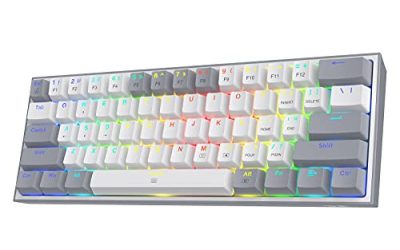
The real question behind the Redragon K673 Pro is whether a compact board can take over a desk built around a full-size gaming keyboard. It keeps the function row and arrow keys that 60% boards drop, adds tri-mode wireless and a gasket mount, and still leaves the number pad behind. So the decision is not about size. It is about which compromises you accept in exchange: a plastic case, budget linear switches and stabilizers that published reviews flag as the weak points of an otherwise complete package.


This review is for three kinds of buyer: first-time mechanical keyboard owners who want wireless without a second purchase later, gamers with small desks who still need a function row, and multi-device users who switch between a PC and a laptop or tablet. It is a sourced review, built from the K673 Pro’s Amazon listing and published reviews rather than personal testing, and the three alternatives were picked the same way, from the names and specifications on their Amazon pages.
Quick Picks
As an Amazon Associate we earn from qualifying purchases
| Product | Best for | Key spec from title |
|---|---|---|
| Redragon K673 PRO | One board for gaming and everyday typing on a budget | 3-modes 81 keys with dedicated knob control |
| EPOMAKER x Aula F75 | Typists who put sound and key feel first | Five-layer padding and knob, hot swappable |
| RK ROYAL KLUDGE RK84 | Buyers who want a few more keys in a 75% frame | 84 keys, triple mode BT5.0/2.4G/USB-C |
| Keychron V1 Max | Mac and Windows users who remap keys often | QMK/VIA programmable macro, gasket mount |
How to Choose
Layout: what 81 keys keep and what they give up
An 81-key 75% layout keeps the function row, arrow keys and a small navigation cluster, which is exactly what most players and office users touch every day. What disappears is the number pad, a dedicated Print Screen row and the spacing between key groups, so data-entry work and games with heavy numpad binds are the real losses. The K673 Pro squeezes its 81 keys into a body closer to a 65% board, according to SlashGear, which saves desk space but leaves the keys tightly packed. Check the listing’s layout diagram against the keys you actually use before ordering.
Three connection modes, three different jobs
Tri-mode sounds like a bonus feature until you assign each mode a job. The 2.4GHz receiver is the low-latency link for gaming on your main PC. Bluetooth is for the laptop, tablet or phone you type on second, and the listing’s Bluetooth 3.0/5.0 support covers older devices as well. USB-C wired mode is the fallback for charging while you type and for firmware or software changes. The K673 Pro stores its 2.4GHz dongle in a socket on the side of the case, per SlashGear, which matters if the board travels in a bag.
Switches and the hot-swap safety net
The K673 Pro ships with linear red switches, which Tom’s Guide identifies as Outemu Reds: smooth, with no tactile bump, so they suit fast repeated presses in games and divide opinion among typists who like feedback. The important detail is the hot-swap socket in the listing title. If the stock switches feel scratchy or too light after a month, you can pull them and fit a different set without soldering or replacing the board. Treat the factory switches as a starting point, and check that any replacements match the socket type the listing describes.
Gasket mount, padding and stabilizers
A gasket mount suspends the plate on soft strips instead of screwing it rigidly into the case, and the K673 Pro’s listing adds sound absorbing pads inside. Tom’s Guide credits the gasket design with keeping the board dampened and praises the RGB backlighting through its shine-through PBT keycaps. The same review is blunt about the trade-off: the stabilizers under the larger keys feel loose, so the spacebar and Shift keys can wobble sideways. If key feel on big keys matters to you, that finding, not the gasket, should drive your decision.
The 4 Best Options
Redragon K673 PRO
The K673 Pro is the reviewed product, and its appeal is how little it asks you to give up for wireless at this level. The listing combines an 81-key 75% layout, tri-mode connection, hot-swap sockets, a control knob and internal sound absorbing pads in an ABS case. Tom’s Guide found the linear switches responsive and the RGB backlighting genuinely impressive through the shine-through PBT keycaps, while naming the loose stabilizers as the main flaw. SlashGear adds that the shortened body leaves less room for a battery than the larger cells common in this class, so heavy RGB use means charging more often.
Specs
- Layout: 75%, 81 keys
- Connectivity: USB-C wired, Bluetooth 3.0/5.0, 2.4GHz wireless
- Switches: Linear Red switch
- Hot-swap socket for switch changes
- Dedicated knob control for backlight brightness and media
- Gasket structure with sound absorbing pads
- RGB backlighting
- Case: ABS plastic
- Series: Ucal; item model number K673
- Compatibility: Windows and macOS
Best for: budget-conscious gamers who want wireless, a function row and a knob in one compact board.
Watch out for: several colorways and variants share the listing, so confirm the exact version in the variant selector, and expect some wobble on the larger keys per Tom’s Guide.
ASIN: B0CLG95X4G
EPOMAKER x Aula F75
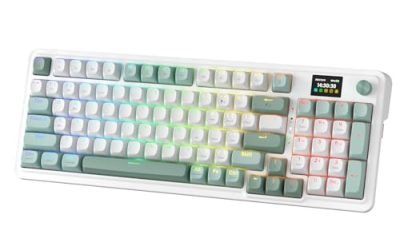
The Aula F75 is the closest rival in shape and intent: another 75% gasket board with a knob, tri-mode connectivity and hot-swap sockets. Its listing leans harder into sound, with five-layer padding where the Redragon lists sound absorbing pads, and the LEOBOG Reaper switch variant linked here is the one many buyers cross-shop against the K673 Pro. Choose it if a softer, quieter stock typing sound matters more to you than the Redragon’s shine-through keycap legends, and if you are comfortable picking between its several switch variants at order time.
Specs
- Layout: 75%
- Gasket structure
- Hot swappable switches
- Five-layer padding
- Knob control
- Connectivity: Bluetooth, 2.4GHz, USB-C
- RGB backlighting
- Switch: LEOBOG Reaper Switch (this variant)
Best for: typists who care most about a padded, muted stock sound in a 75% wireless board.
Watch out for: the listing carries multiple switch and color variants, so check the switch named in the variant you select before ordering.
ASIN: B0CNT61VMZ
RK ROYAL KLUDGE RK84

The RK84 answers the most common objection to 75% boards by fitting 84 keys into the same footprint class, keeping a slightly roomier navigation area. Its listing offers triple-mode connection over Bluetooth 5.0, 2.4GHz and USB-C, hot-swappable switches and RGB backlighting, and the variant linked here uses quiet red switches. It skips the gasket mount and the knob, so it reads as the practical option: more keys, a long-running and widely documented model line, and fewer enthusiast extras. Pick it if extra keys beat a control knob for the way you work and play.
Specs
- Layout: 75%, 84 keys
- Connectivity: triple mode BT5.0, 2.4G, USB-C
- Hot swappable switches
- RGB backlighting
- Switch: Quiet Red Switch (this variant)
- High-capacity battery per listing title
Best for: buyers who want the extra keys of an 84-key layout and proven tri-mode wireless.
Watch out for: RK84 listings exist in both RGB and blue-backlit versions, so confirm the backlight type on the exact listing before buying.
ASIN: B08M3KPXV5
Keychron V1 Max
The V1 Max is the step-up alternative for people who treat the keyboard as something to configure, not just use. Its listing adds QMK/VIA programmable macros on top of a gasket mount, hot-swappable Gateron Jupiter switches and 2.4GHz, Bluetooth 5.1 and wired modes, with a 1000 Hz polling rate listed for the 2.4GHz and wired connections. It is built for Mac as much as Windows, which the K673 Pro only partly matches. Choose it if remapping keys and layers is something you will actually do, rather than a feature you admire in a spec table.
Specs
- Layout: 75%
- Connectivity: 2.4GHz, Bluetooth 5.1, wired
- QMK/VIA programmable macro support
- Hot-swappable Gateron Jupiter Brown Switch (this variant)
- Gasket mount
- RGB backlighting
- Polling rate: 1000 Hz on 2.4GHz and wired, 90 Hz on Bluetooth
- Compatibility: Mac, Windows and Linux
Best for: Mac and Windows users who remap keys, build macros and switch between computers daily.
Watch out for: the listing’s keycaps are not the shine-through type, so legends will not glow in the dark the way the Redragon’s do.
ASIN: B0CR14LGX6
Which One Fits Your Situation
Your first mechanical keyboard, mostly for gaming
Start with the Redragon K673 Pro. It covers the features a first-time buyer is most likely to want within a month: wireless for a clean desk, a function row for games, a knob for volume, and hot-swap sockets so the switch feel can change later without a new board. Its known weaknesses, loose stabilizers and a plastic case, are the kind you notice as preferences form, not the kind that stop you playing.
One keyboard for a PC, a laptop and a tablet
The K673 Pro and the Keychron V1 Max both handle three-device households, but they split on software. The Redragon covers the basics with Bluetooth for the second and third device and the dongle stored in the case. The V1 Max adds QMK/VIA remapping and a Mac-first layout, which suits a mixed Windows and macOS desk. If your second device is Apple and you remap keys, pick the Keychron; if you just type and play, the Redragon is enough.
A quiet board for a shared room or office
Look at the EPOMAKER x Aula F75 first. Its five-layer padding is the strongest sound-dampening claim among these listings, and its linear switch variants keep keystrokes smooth and low. The K673 Pro’s sound absorbing pads help, but Tom’s Guide’s stabilizer finding means the larger keys can still sound and feel loose in a quiet room. The RK84’s quiet red switch variant is the fallback if you also need the extra keys.
You plan to tinker and upgrade over time
Every board here is hot-swappable, so the difference is how far the tinkering goes. The K673 Pro lets you change switches and little else. The V1 Max opens up QMK/VIA layers, macros and per-key remapping, which is where long-term hobbyists end up. Buy the Redragon if you only expect a switch swap; buy the Keychron if you already know you will be remapping keys within the first month of ownership.
Common Mistakes
- Buying a 75% board without checking where the Delete, Home and arrow keys sit, then discovering a favorite shortcut needs a key the layout moved or dropped.
- Judging the K673 Pro by its gasket mount alone and ignoring the stabilizer wobble that Tom’s Guide flagged on the larger keys.
- Ordering the wrong variant: these listings bundle several colorways, switch types and even backlight versions under one page, so the variant selector decides what actually arrives.
- Using Bluetooth for competitive gaming when the 2.4GHz receiver or a cable is the connection the listing intends for low-latency play.
- Assuming the knob only changes volume; on the K673 Pro it also handles backlight brightness, and SlashGear notes it can be programmed further in Redragon’s software.
Frequently Asked Questions
Does the Redragon K673 Pro work with a Mac?
Yes. Tom’s Guide lists Windows and macOS as the supported systems, and the board connects over Bluetooth, 2.4GHz or USB-C, all of which work with current Macs. Expect the usual layout compromises of a Windows-first 75% board, such as legend differences on the modifier keys, rather than full Mac-specific keycaps in the box.
Can you change the switches on the K673 Pro?
Yes. The Amazon listing title specifies a hot-swap socket, so the linear red switches can be pulled and replaced with compatible switches without soldering. That makes the stock switches a starting point rather than a commitment: live with them first, then swap only if the feel or sound is not what you wanted.
Which connection mode is best for gaming?
Use the 2.4GHz receiver or the USB-C cable for gaming, and save Bluetooth for typing on a second device. The listing positions all three modes as equal citizens, but Bluetooth is designed for convenience and multi-device switching, while the receiver and wired links are the ones intended for fast, stable input during play.
Does the control knob only adjust volume?
No. Per the listing, the knob handles backlight brightness as well as media and volume control, and SlashGear reports that it can be programmed to do more through Redragon’s software. That makes it one of the K673 Pro’s more useful extras, since brightness changes are otherwise buried in function-key combinations on most compact boards.