Affiliate disclosure: As an Amazon Associate we earn from qualifying purchases. This post contains affiliate links — we may earn a small commission at no extra cost to you. This never affects our picks. Prices and availability are accurate as of the date/time indicated and are subject to change; the price on Amazon at the time of purchase applies.
- Quick Comparison Table
- 1. NVIDIA GeForce RTX 5080 Founders Edition: Best for maximum 4K headroom
- 2. MSI Gaming RTX 5070 Ti 16G Gaming Trio OC: Best for high-refresh 1440p and entry 4K
- 3. ASUS PRIME GeForce RTX 5070 12GB OC: Best for compact builds
- 4. ASUS Dual GeForce RTX 5060 Ti 16GB OC: Best for memory-hungry games on a mid budget
- 5. GIGABYTE GeForce RTX 5060 WINDFORCE OC 8G: Best for 1080p builds on a tight budget
- How to Choose
- Frequently Asked Questions
- About the Author
- Related Articles
Quick answer: The NVIDIA RTX 5080 Founders Edition is the strongest of the best GPUs here for 4K. The MSI RTX 5070 Ti suits high-refresh 1440p, the ASUS Prime RTX 5070 fits small cases, the 16GB RTX 5060 Ti rewards memory-heavy games, and the Gigabyte RTX 5060 covers 1080p on a budget.
This guide compares five graphics cards that cover the realistic range for a gaming PC, from a 1080p entry card to a 4K-ready flagship. We rank them by target resolution, memory size and physical fit rather than by brand loyalty. All comparisons use each listing’s published specifications; we did not run our own benchmarks, so treat the performance tiers as class guidance and confirm exact figures on each maker’s page before you buy.
Quick Comparison Table
| # | Model | Key specs (per listing) | Best for |
|---|---|---|---|
| 1 | NVIDIA GeForce RTX 5080 Founders Edition | RTX 5080 Founders Edition; other specs not listed | maximum 4K headroom |
| 2 | MSI Gaming RTX 5070 Ti 16G Gaming Trio OC | 16GB GDDR7, 256-bit, 2580 boost clock, DP 2.1a x3, HDMI 2.1b | high-refresh 1440p and entry 4K |
| 3 | ASUS PRIME GeForce RTX 5070 12GB OC | 12GB GDDR7, PCIe 5.0, HDMI/DP 2.1, 2.5-slot, SFF-Ready, dual BIOS | compact builds |
| 4 | ASUS Dual GeForce RTX 5060 Ti 16GB OC | 16GB GDDR7, PCIe 5.0, HDMI 2.1b, DP 2.1b, 2.5-slot, 0dB fans | memory-hungry games on a mid budget |
| 5 | GIGABYTE GeForce RTX 5060 WINDFORCE OC 8G | 8GB GDDR7, 128-bit, PCIe 5.0, DisplayPort and HDMI | 1080p builds on a tight budget |
1. NVIDIA GeForce RTX 5080 Founders Edition: Best for maximum 4K headroom
Specs per the listing: NVIDIA GeForce RTX 5080 Founders Edition. The listing title gives no memory size, clocks or port count, so check the maker page for those before you buy.
This is the top of the group and the card to pick if your monitor is 4K or a high-refresh ultrawide and you want the most graphics power in the list. RTX 5080 class cards sit just under the flagship tier, which makes them the sensible ceiling for most single-GPU builds. Founders Edition boards are NVIDIA’s own reference design, so you get a known size and cooler layout instead of a partner variation.
The trade-off is the build around it. A card in this class pulls a lot of power, so plan for a quality high-wattage supply with the native 16-pin cable, a case with real front-to-back airflow, and a CPU that will not bottleneck it. Pairing it with a 1080p panel wastes most of what it offers.
- Pros: Strongest card here; suits 4K and high-refresh ultrawide; reference design with predictable dimensions
- Cons: Highest power and cooling demands; overkill at 1080p; listing omits memory and clock details

NVIDIA GeForce RTX 5080 Founders Edition
Included for 'Best GPUs for Gaming: Graphics Cards for 1080p to 4K' as a representative home product in this roundup; selection reflects the product set returned for this topic.
View on Amazon2. MSI Gaming RTX 5070 Ti 16G Gaming Trio OC: Best for high-refresh 1440p and entry 4K
Specs per the listing: 16GB GDDR7, 256-bit memory bus, boost clock listed as 2580, three DisplayPort 2.1a outputs, one HDMI 2.1b, NVIDIA Blackwell architecture.
The RTX 5070 Ti tier is where 16GB of video memory and a 256-bit bus show up without the step up to 5080 money, and the Gaming Trio carries a triple-fan cooler to match. For 1440p at high refresh rates, and for 4K when you are willing to tune a few settings, this is the balanced middle of the guide.
The 16GB buffer is the practical advantage over the 12GB card below it: newer titles with high-resolution texture packs are less likely to run into memory limits. The cost is physical size and power draw, so measure your case clearance and confirm your power supply wattage on the maker page before ordering.
- Pros: 16GB GDDR7 on a 256-bit bus; three DisplayPort 2.1a outputs; triple-fan cooler
- Cons: Large card that needs case clearance; needs a capable power supply; listing gives no power rating

msi Gaming RTX 5070 Ti 16G Gaming Trio OC Graphics Card (16GB GDDR7, 256-bit, Extreme Performance: 2580, DisplayPort x 3 2.1a, HDMI 2.1b, NVIDIA Blackwell Architecture)
Included for 'Best GPUs for Gaming: Graphics Cards for 1080p to 4K' as a representative home product in this roundup; selection reflects the product set returned for this topic.
View on Amazon3. ASUS PRIME GeForce RTX 5070 12GB OC: Best for compact builds
Specs per the listing: 12GB GDDR7, PCIe 5.0, HDMI/DP 2.1, 2.5-slot design, Axial-tech fans, dual BIOS, listed as SFF-Ready.
The Prime 5070 is the pick for people building smaller cases. ASUS lists it as SFF-Ready with a 2.5-slot cooler, which keeps it within reach of many compact chassis that cannot take the thicker triple-slot models. RTX 5070 class cards are aimed squarely at 1440p gaming.
Twelve gigabytes is enough for most current games at 1440p but leaves less margin than the 16GB cards if you plan to keep the card for years or run heavy texture settings. The dual BIOS switch is a useful extra if you want a quieter profile for a small, warm case.
- Pros: Short, slim 2.5-slot design; dual BIOS switch; strong 1440p target
- Cons: 12GB is less future-proof than 16GB; not a 4K-first card; compact-case airflow still matters

ASUS PRIME GeForce RTX 5070 12GB GDDR7 OC Edition Gaming Graphics Card | SFF-Ready, PCIe 5.0, HDMI/DP 2.1, 2.5-slot, Axial-tech Fans, Dual BIOS
Included for 'Best GPUs for Gaming: Graphics Cards for 1080p to 4K' as a representative home product in this roundup; selection reflects the product set returned for this topic.
View on Amazon4. ASUS Dual GeForce RTX 5060 Ti 16GB OC: Best for memory-hungry games on a mid budget
Specs per the listing: 16GB GDDR7, PCIe 5.0, HDMI 2.1b, DisplayPort 2.1b, 2.5-slot design, Axial-tech fans, 0dB technology, dual BIOS.
Sixteen gigabytes on a 5060 Ti tier card is the interesting combination here. It gives mid-range GPU power with the memory buffer of cards that sit a tier or two higher, which helps with texture-heavy games and with creative workloads that care about video memory.
The 0dB mode stops the fans at idle and light loads, so the card is silent on the desktop. It is the smarter pick over the 5070 if you play at 1080p or entry 1440p and care more about the longevity of the memory than raw speed.
- Pros: 16GB buffer at a mid tier; fans stop at idle; dual BIOS
- Cons: Slower than the 5070 and above; not a 4K card; ASUS also sells an 8GB sibling, so match the 16GB label

ASUS Dual GeForce RTX 5060 Ti 16GB GDDR7 OC Edition Gaming Graphics Card | PCIe 5.0, HDMI 2.1b, DisplayPort 2.1b, 2.5-slot, Axial-tech Fans, 0dB Technology, Dual BIOS
Included for 'Best GPUs for Gaming: Graphics Cards for 1080p to 4K' as a representative home product in this roundup; selection reflects the product set returned for this topic.
View on Amazon5. GIGABYTE GeForce RTX 5060 WINDFORCE OC 8G: Best for 1080p builds on a tight budget
Specs per the listing: 8GB GDDR7, 128-bit memory bus, PCIe 5.0, DisplayPort and HDMI outputs, WINDFORCE dual-fan cooling, model GV-N5060WF2OC-8GD.
The entry point of this list. A GeForce RTX 5060 class card targets 1080p, and with GDDR7 memory it handles esports titles and most modern games at that resolution comfortably. The WINDFORCE cooler is a simple dual-fan design that suits mid-size cases.
The 128-bit bus and 8GB buffer are the limits to keep in mind. Games with very large textures may force you to lower settings, and it is not the card to buy if you plan a 1440p or 4K upgrade soon. As a first discrete GPU for a 1080p monitor it makes sense.
- Pros: Lowest entry in the guide; GDDR7 memory; simple dual-fan cooler
- Cons: 8GB can limit texture settings; narrower 128-bit bus; poor fit for 1440p or higher long-term

GIGABYTE GeForce RTX 5060 WINDFORCE OC 8G Graphics Card, Cooling System, 8GB 128-bit GDDR7, PCIe 5.0, Manufactured by NVIDIA, DisplayPort & HDMI - Video Output Interface, GV-N5060WF2OC-8GD Video Card
Included for 'Best GPUs for Gaming: Graphics Cards for 1080p to 4K' because the listing adds cooling or gel-infused layers, which is the attribute this article compares.
View on AmazonHow to Choose
Match the card to your monitor
Resolution decides the tier. At 1080p, an RTX 5060 class card is enough and 8GB works for most titles. At 1440p, look at 5070 or 5060 Ti 16GB cards. For 4K or a 5120 x 1440 ultrawide, start at the 5070 Ti and consider the 5080. Buying one tier above your screen leaves room for a later monitor upgrade.
Check video memory before core speed
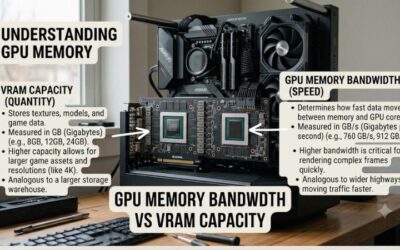
Eight gigabytes is the floor to be careful with. If you play recent games with high-resolution textures, or you edit video, 12GB is the practical minimum and 16GB is the comfortable level. Several models in this guide share a name but come in different memory sizes, so read the capacity in the title, not just the model number.
Plan the power supply and case
Read the maker page for recommended wattage and the connector type. Larger cards use the 16-pin power connector, and a low-end supply without it needs adapters you would rather avoid. Measure card length and thickness against your case: a 2.5-slot card fits small builds, while triple-slot designs need clear room and front airflow.
What to skip
Skip cards whose listings omit the memory size, and avoid paying extra for an overclock label on a model that differs by only a small boost clock. A white or special edition changes the look, not the silicon, so choose it only for appearance. Do not buy a 5080 for a 1080p monitor.
Frequently Asked Questions
How much VRAM do I need for gaming?
Eight gigabytes covers 1080p in most games. For 1440p, 12GB is safer, and 16GB gives the most margin for texture packs, ray tracing and creative apps. Check the capacity in each listing.
Is the 5070 Ti worth it over the 5070?
It adds 16GB of memory and a 256-bit bus, which matters at 1440p high refresh and 4K. If you stay at 1440p with moderate settings, the 12GB 5070 is usually enough.
Will these cards fit a small case?
The ASUS Prime 5070 is listed as SFF-Ready at 2.5 slots. Others are larger. Compare card length and thickness against your case limits on the maker page before you order.
Do I need PCIe 5.0 on my motherboard?
No. These cards list PCIe 5.0 but work in a PCIe 4.0 slot, usually with little real-world difference for gaming. Confirm details on the maker page.
Why does the guide skip older cards?
We kept to current-generation cards that are widely stocked and clearly specified in the listing, so each pick has a documented memory size and a clear target resolution.