Affiliate disclosure: As an Amazon Associate we earn from qualifying purchases. This post contains affiliate links — we may earn a small commission at no extra cost to you. This never affects our picks. Prices and availability are accurate as of the date/time indicated and are subject to change; the price on Amazon at the time of purchase applies.
- Quick Comparison Table
- 1. LG 27GS60QC-B Ultragear: Best for All-Round QHD Gaming
- 2. Dell 27 SE2726HG: Best for 1080p Esports on a Larger Screen
- 3. GIGABYTE GS25F2A: Best for Compact Esports Desk Setups
- 4. MSI MAG 274QRFW X32: Best for High-Refresh Competitive QHD
- 5. LG 27GX704A-B Ultragear OLED: Best for Contrast and Motion Clarity
- How to Choose
- Frequently Asked Questions
- About the Author
- Related Articles
Quick answer: The best FreeSync monitors begin with the LG 27GS60QC-B, a 27-inch QHD 180Hz curved panel with a balanced spec sheet. The Dell SE2726HG and GIGABYTE GS25F2A suit 1080p esports, the MSI MAG 274QRFW X32 suits high-refresh QHD, and the LG 27GX704A suits OLED fans.
This guide compares five FreeSync monitors that cover the main reasons people buy one: a sharper 1440p picture, a very high refresh rate, a lean 1080p esports screen and an OLED upgrade. FreeSync syncs the display refresh to your Radeon or compatible GeForce card to reduce tearing. We compare the specs published in each listing, such as resolution, refresh rate and sync tier. We did not run our own benchmarks or measure panel quality.
Quick Comparison Table
| # | Model | Key specs (per listing) | Best for |
|---|---|---|---|
| 1 | LG 27GS60QC-B Ultragear | 27-inch curved, QHD 2560×1440, 180Hz, 1ms, 1000R, FreeSync, HDR10 | All-round QHD gaming |
| 2 | Dell 27 SE2726HG | 27-inch FHD, 240Hz, IPS, FreeSync Premium | 1080p esports on a larger screen |
| 3 | GIGABYTE GS25F2A | 24.5-inch FHD, 240Hz, 1ms GTG, IPS, FreeSync Premium | Compact esports desk setups |
| 4 | MSI MAG 274QRFW X32 | 27-inch QHD, 320Hz, FreeSync Premium, G-SYNC Compatible | High-refresh competitive QHD |
| 5 | LG 27GX704A-B Ultragear OLED | 27-inch QHD OLED, 240Hz, 0.03ms, FreeSync Premium Pro, HDMI 2.1 | Contrast and motion clarity |
1. LG 27GS60QC-B Ultragear: Best for All-Round QHD Gaming
Specs per the listing: 27-inch curved gaming monitor, QHD (2560×1440), 180Hz, 1ms, 1000R curve, AMD FreeSync, HDR10, 2x HDMI, DisplayPort, Black Stabilizer, DAS, Crosshair and FPS counter features.
QHD at 27 inches is a common pick for gamers because it looks noticeably sharper than 1080p without demanding a flagship graphics card. A 180Hz refresh rate gives smooth motion for shooters and action games, and FreeSync keeps frames matched to the panel when your frame rate dips below the limit.
The 1000R curve gives a mild wraparound feel and suits desk distances of an arm length or so. Some people dislike curved screens for editing or office work with straight lines, but for games it works well. The listing includes in-game aids such as a crosshair and a frame counter, which are fun extras. HDR10 support is listed, but entry-level HDR panels rarely deliver the punchy highlights of premium displays, so treat it as a bonus.
- Pros: QHD resolution; 180Hz; 1ms; gentle 1000R curve; two HDMI plus DisplayPort inputs
- Cons: Curve is not for everyone; HDR is basic at this tier

LG 27GS60QC-B Ultragear 27-inch Curved Gaming Monitor QHD (2560x1440) 180Hz 1ms 1000R AMD FreeSync HDR10 HDMIx2 DisplayPort Borderless Design Black Stabilizer DAS Crosshair FPS Counter - Black
Included for 'Best FreeSync Monitors: QHD, 240Hz Esports and OLED Picks' as a representative home product in this roundup; selection reflects the product set returned for this topic.
View on Amazon2. Dell 27 SE2726HG: Best for 1080p Esports on a Larger Screen
Specs per the listing: 27-inch FHD (1920×1080), 240Hz, IPS panel, AMD FreeSync Premium, TUV 3-Star, 2x HDMI, DisplayPort 1.4, tilt stand.
A 27-inch screen at 1080p has lower pixel density than a QHD panel, so text looks a little softer. The reward is a high 240Hz refresh rate that is much easier to drive, which fits competitive games where frame rate matters more than sharpness. An IPS panel generally offers wider viewing angles and better color than older TN designs.
FreeSync Premium adds low framerate compensation, which keeps motion smooth if your frame rate drops. The stand offers tilt only, so if you want height adjustment, plan on a monitor arm or a small riser. For a graphics card in the mid-range, this monitor lets you hit very high frame rates in esports titles without compromising on screen size.
- Pros: 240Hz refresh; IPS panel; FreeSync Premium; large 27-inch size
- Cons: 1080p looks softer at 27 inches; tilt-only stand

Dell 27 240Hz Gaming Monitor - SE2726HG - 27-inch FHD (1920x1080) Display, in-Plane Switching (IPS) Technology, AMD FreeSync Premium, TÜV 3-Star, 2X HDMI, DisplayPort 1.4, Tilt
Included for 'Best FreeSync Monitors: QHD, 240Hz Esports and OLED Picks' as a representative home product in this roundup; selection reflects the product set returned for this topic.
View on Amazon3. GIGABYTE GS25F2A: Best for Compact Esports Desk Setups
Specs per the listing: 24.5-inch SuperSpeed IPS, FHD 1920×1080, 240Hz, 1ms GTG, AMD FreeSync Premium, HDMI, DisplayPort, tilt adjustable.
At 24.5 inches, 1080p keeps a sharper pixel density than on a 27-inch screen, and this size is a popular choice for esports because the whole image fits comfortably in your field of view. The listed 240Hz refresh rate, 1ms response time and IPS panel give it the specs competitive players look for at a modest size.
This is the most compact monitor in the guide, which suits small desks and dual-monitor layouts. The stand is tilt-only, so check desk height and consider an arm. If you want a more immersive picture or plan to use the screen for creative work, step up to a larger QHD panel. For a focused gaming display, it hits the basics well.
- Pros: 240Hz; 1ms GTG; IPS; compact footprint; FreeSync Premium
- Cons: 1080p only; tilt-only stand; smaller screen

GIGABYTE GS25F2A 24.5" SuperSpeed FHD IPS Gaming Monitor | Black, FHD 1920x1080, 240Hz, 1ms GTG, AMD FreeSync Premium, HDMI, DP, Tilt Adjustable
Included for 'Best FreeSync Monitors: QHD, 240Hz Esports and OLED Picks' as a representative home product in this roundup; selection reflects the product set returned for this topic.
View on Amazon4. MSI MAG 274QRFW X32: Best for High-Refresh Competitive QHD
Specs per the listing: 27-inch QHD (2560×1440), 320Hz, AMD FreeSync Premium, NVIDIA G-SYNC Compatible, HDR Ready, HDMI, VGA port, VESA mount, tilt, 0.5ms, white.
This model combines QHD sharpness with a very high 320Hz refresh rate. To use that rate, you need a graphics card and processor that can push very high frame rates at 1440p, which is realistic in esports titles but not in demanding new releases. If your system cannot reach it, the extra refresh rate is wasted, so pair it with strong hardware.
It also lists G-SYNC Compatible support, so it works well with either graphics card brand. A VESA mount is listed, making it easy to put on an arm. The white finish suits light-themed setups. It is a natural step for players moving up from 1080p who want both resolution and speed.
- Pros: QHD at 320Hz; FreeSync Premium and G-SYNC Compatible; 0.5ms; VESA mount
- Cons: Needs a powerful system to use fully; HDR is only listed as ready
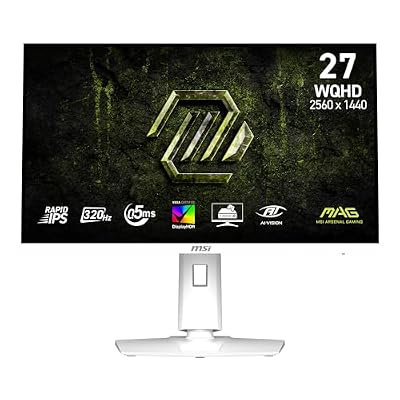
msi MAG 274QRFW X32 27-inch 2560 x 1440 (QHD) Gaming Monitor, 320Hz, AMD FreeSync Premium, NVIDIA G-SYNC Compatible, HDR Ready, HDMI, VGA Port, VESA, Tilt, 0.5ms, White
Included for 'Best FreeSync Monitors: QHD, 240Hz Esports and OLED Picks' as a representative home product in this roundup; selection reflects the product set returned for this topic.
View on Amazon5. LG 27GX704A-B Ultragear OLED: Best for Contrast and Motion Clarity
Specs per the listing: 27-inch QHD OLED, 240Hz, 0.03ms, NVIDIA G-Sync Compatible, AMD FreeSync Premium Pro, VESA DisplayHDR TrueBlack 400, HDMI 2.1, DisplayPort.
OLED panels light each pixel individually, so black areas can turn fully off. That produces strong contrast in dark scenes, and the listed 0.03ms response time suggests very crisp motion. FreeSync Premium Pro adds HDR-focused sync requirements, and DisplayHDR TrueBlack 400 is a certification aimed at OLED-style panels.
The trade-off is the usual OLED care: static elements such as taskbars can cause image retention over long periods, so use screen savers, dark mode and sensible brightness. It is also the most expensive option here. Choose it if you play atmospheric games, watch video on the same screen and want the best picture, rather than purely the lowest cost.
- Pros: OLED contrast; 240Hz; 0.03ms; HDMI 2.1; FreeSync Premium Pro
- Cons: Retention care required; premium option

LG 27GX704A-B 27-inch Ultragear QHD (2650x1440) OLED Gaming Monitor 240Hz, 0.03ms, NVIDIA G-Sync Compatible, AMD FreeSync Premium Pro, VESA Display HDR TrueBlack400, HDMI 2.1, DisplayPort, Black
Included for 'Best FreeSync Monitors: QHD, 240Hz Esports and OLED Picks' as a representative home product in this roundup; selection reflects the product set returned for this topic.
View on AmazonHow to Choose
Resolution and size set the baseline
At 24 to 25 inches, 1080p still looks sharp. At 27 inches, QHD is the better match. Only consider 4K if you have a high-end graphics card; the monitors here do not target that class. Buy resolution first, then refresh rate.
Refresh rate: aim for what your system can drive
Do not pay for 320Hz if your system cannot reach those frame rates. For most players, 144Hz to 180Hz is smooth, and 240Hz is the competitive tier. A refresh rate you cannot fill with frames offers no extra smoothness, so match the monitor to your graphics card.
Understand the FreeSync tiers
Basic FreeSync reduces tearing within a refresh range. FreeSync Premium adds low framerate compensation and a high refresh floor. FreeSync Premium Pro adds HDR requirements. Many FreeSync monitors also work with NVIDIA cards as G-SYNC Compatible, but check the listing. Connect with DisplayPort for best compatibility at high refresh rates.
Panel type, stand and ports
IPS panels give better viewing angles and color; VA panels often have stronger contrast; OLED gives the deepest blacks with some care. Check stand adjustments and VESA mount support, since many of these monitors tilt only. Confirm you have enough HDMI and DisplayPort inputs for consoles and PC, and use a certified cable.
Frequently Asked Questions
Does FreeSync work with NVIDIA graphics cards?
Often yes. Monitors labeled G-SYNC Compatible can use adaptive sync with recent NVIDIA cards. Check the listing and the maker page.
Is 240Hz worth it over 144Hz?
Only if you play fast competitive games and your system can reach those frame rates. For single-player and general use, 144Hz to 180Hz is smooth enough.
Which cable should I use?
DisplayPort is the safest for high refresh rates on PC. Use HDMI 2.1 for consoles or OLED models that list it.
Is a curved monitor better for gaming?
It is a matter of taste. A mild curve like 1000R feels immersive at desk distance, but flat screens are easier for work with straight lines.
Should I worry about OLED burn-in?
Take sensible precautions. Use dark mode, hide static elements, enable the monitor care features, and avoid running maximum brightness for long hours.