Affiliate disclosure: As an Amazon Associate we earn from qualifying purchases. This post contains affiliate links — we may earn a small commission at no extra cost to you. This never affects our picks. Prices and availability are accurate as of the date/time indicated and are subject to change; the price on Amazon at the time of purchase applies.
Quick answer: The best VA monitors here start with the AOC Q27G4XN, a 27-inch QHD 180Hz panel and our top pick for most gamers. The Lenovo Legion 27-2c suits fast-refresh FHD play, the Gigabyte GS32QCA suits big curved QHD screens, and the AOC G24B36N suits compact FHD desks.
VA panels are known for strong contrast, which helps dark scenes in games and movies look deeper than on typical IPS screens. This guide compares four monitors whose listings clearly state a VA panel, using the resolution, refresh rate and features they publish. We did not run our own display measurements, so we cannot quote contrast ratios or response curves; check reviews with measured data if motion clarity matters to you.
Quick Comparison Table
| # | Model | Key specs (per listing) | Best for |
|---|---|---|---|
| 1 | AOC Q27G4XN | 27 inch, 2560×1440, 180Hz, VA, 1ms, HDR, DP 1.4, HDMI 2.0, height adjustable, 3-year warranty | All-round QHD gaming |
| 2 | Lenovo Legion 27-2c | 27 inch curved FHD, fast VA, 280Hz, FreeSync Premium, 0.5ms MPRT | High-refresh FHD esports |
| 3 | Gigabyte GS32QCA | 31.5 inch VA, QHD, 180Hz curved, 1ms MPRT, FreeSync, HDR ready | Large curved QHD screens |
| 4 | AOC G24B36N | 24 inch FHD, VA, 144Hz native / 180Hz OC, 0.5ms, DP 1.4, HDMI 2.1, 3-year warranty | Compact FHD desks |
1. AOC Q27G4XN: Best for All-Round QHD Gaming
Specs per the listing: 27-inch 2K QHD (2560×1440), 180Hz, VA panel, 1ms, HDR, adaptive sync, DP 1.4, HDMI 2.0, height adjustable, earphone out, VESA mount, 3-year warranty.
At 27 inches, QHD hits a pixel density that looks sharper than a 27-inch FHD screen, and 180Hz gives a clear step up from 60Hz or 75Hz without needing a flagship graphics card. The VA panel adds contrast depth, which is the reason to pick this type over a standard IPS panel. A height-adjustable stand and a stated 3-year warranty make it a practical desk monitor, not just a spec sheet.
Note that VA panels can show slower dark-to-dark transitions in fast games, so competitive players should look at independent response data.
- Pros: QHD at 180Hz; height-adjustable stand; 3-year warranty
- Cons: HDR support is basic at this class; VA motion smearing possible

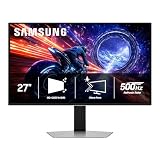
AOC 27 Inch Gaming Monitor 2K QHD 180Hz VA 1ms HDR, Q27G4XN | 2560×1440 Computer Monitor, Adaptive Sync, DP 1.4, HDMI 2.0, Height Adjustable, Earphone Out, VESA, 3-Year Warranty
Included for 'Best VA Monitors for Gaming: QHD and FHD Picks Compared' because the listing lists an explicit depth/thickness, which is the attribute this article compares.
View on Amazon2. Lenovo Legion 27-2c: Best for High-Refresh FHD Esports
Specs per the listing: 27-inch curved FHD display, fast VA panel, 280Hz, AMD FreeSync Premium and VESA Adaptive Sync, 0.5ms MPRT response time.
This monitor puts refresh rate first. At 280Hz it targets players who run fast shooters at very high frame rates, and the fast VA panel is Lenovo’s answer to the slower response times older VA screens had. FHD resolution keeps the graphics load manageable, so a mid-range card can drive it at high frame rates in lighter games.
A 27-inch FHD panel has lower pixel density than a QHD one, so text and fine detail look less crisp. The curve also adds an immersive feel but is a matter of taste for desk work.
- Pros: 280Hz refresh rate; curved fast VA panel; FreeSync Premium
- Cons: FHD on a 27-inch looks softer; stand features not listed

Lenovo Legion 27-2c – Gaming Monitor – 27" Curved FHD Display with Fast VA Panel – 280Hz Refresh Rate – AMD FreeSync™ Premium and VESA Adaptive Sync – 0.5ms MPRT Response Time – Eclipse Black
Included for 'Best VA Monitors for Gaming: QHD and FHD Picks Compared' as a representative home product in this roundup; selection reflects the product set returned for this topic.
View on Amazon3. Gigabyte GS32QCA: Best for Large Curved QHD Screens
Specs per the listing: 31.5-inch VA, QHD (2560×1440), 180Hz, curved, 1ms MPRT, AMD FreeSync, HDR ready, two HDMI 2.0, DisplayPort 1.4, tilt adjustable.
For anyone who wants a bigger canvas, a 31.5-inch curved QHD screen gives a lot of screen real estate for gaming, spreadsheets and movies. The VA panel and curve combine to give an immersive feel, and 180Hz keeps motion smooth. Two HDMI ports and one DisplayPort cover a console plus a PC.
At this size QHD pixel density is lower than on a 27-inch screen, and the listing shows only tilt adjustment, so you may need a monitor arm for ideal positioning. Sit a little further back for best results.
- Pros: Large 31.5-inch curved panel; 180Hz QHD; multiple inputs
- Cons: Tilt-only stand; lower pixel density than 27-inch QHD
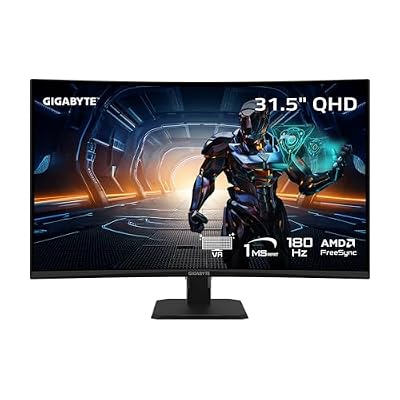
GIGABYTE GS32QCA Advanced Version 31.5" VA QHD 180Hz Curved Gaming Monitor | Black, QHD 2560x1440, 180Hz, 1ms MPRT, AMD FreeSync, HDR Ready, 2X HDMI 2.0, DP 1.4, Tilt Adjustable
Included for 'Best VA Monitors for Gaming: QHD and FHD Picks Compared' as a representative home product in this roundup; selection reflects the product set returned for this topic.
View on Amazon4. AOC G24B36N: Best for Compact FHD Desks
Specs per the listing: 24-inch FHD (1920×1080), VA, HDR ready, 144Hz native with 180Hz overclock, 0.5ms, DP 1.4, HDMI 2.1, adaptive sync, VESA, earphone out, 3-year warranty.
The 24-inch FHD format is the sweet spot for smaller desks and for people who sit close to the screen. At this size FHD looks reasonably sharp, and the graphics card requirement stays low. The listing notes a 144Hz native refresh rate with a 180Hz overclock option, so you get a margin if your system can use it.
Because the overclocked refresh rate is not the native one, some players keep it at 144Hz for stability. It is a sensible monitor for a first gaming setup or a secondary screen.
- Pros: Compact 24-inch size; 144Hz native with 180Hz overclock; HDMI 2.1 port
- Cons: FHD only; overclocked mode may behave differently by system

AOC 24 Inch Gaming Monitor FHD 180Hz Overclocked VA HDR Ready, G24B36N | 1920×1080 LED Monitor, 144Hz Native / 180Hz OC, 0.5ms, DP 1.4, HDMI 2.1, Adaptive Sync, VESA, Earphone Out, 3-Yr Warranty
Included for 'Best VA Monitors for Gaming: QHD and FHD Picks Compared' because the listing lists an explicit depth/thickness, which is the attribute this article compares.
View on AmazonHow to Choose
Know what VA does well and badly
VA panels deliver higher native contrast than most IPS panels, which makes blacks look deeper in dark rooms. The trade-off is that some models show slower pixel transitions in dark scenes, causing smearing in fast motion. If you play competitive shooters, seek reviews with measured response times, and prefer models marketed as fast VA.
Match resolution to screen size
For 24 inches, FHD is fine. For 27 inches, QHD is noticeably sharper. At 31.5 inches, QHD is acceptable but you may prefer 4K if you sit close. Higher resolution needs a stronger graphics card, so check that your card can hold a high frame rate at the target resolution before choosing.
Choose refresh rate by your graphics card
A 144Hz to 180Hz monitor suits most mid-range cards. A 280Hz monitor only pays off if your card can deliver frame rates in that range, which usually means lighter esports games at FHD. Buying a very fast screen for a modest card wastes the feature.
Check ports, stand and curve
Look for DisplayPort 1.4 for high refresh at QHD. HDMI 2.1 helps with consoles. A height-adjustable stand matters for posture, and VESA support lets you add a monitor arm. A curve suits large screens, but flat panels are often preferred for design work.
Think about viewing environment
VA panels show their best contrast when viewed head-on, and colors can shift slightly from the side. If you sit directly in front of the screen in a dim room, that is an advantage; if several people share the screen at angles, IPS may be better. Also set the monitor’s overdrive mode to a middle setting, since the highest setting can add visible overshoot trails. Calibrate brightness for your room to avoid eye strain during long sessions.
Match the panel to the room
If the monitor sits beside a bright window, a curved screen can catch reflections, so consider a matte coating and blinds. In a dark room, VA contrast is at its best and raised black levels are less visible. Choose brightness settings that keep dark scenes readable without washing out highlights.
Frequently Asked Questions
Is VA better than IPS for gaming?
It depends on the priority. VA offers deeper contrast, while IPS usually has faster, cleaner transitions and wider viewing angles. Pick VA for dark-room visuals, IPS for competitive speed.
Does 180Hz matter over 144Hz?
The difference is noticeable but modest. If your graphics card cannot reach those frame rates, you will not see the benefit, so match the monitor to your hardware.
Is a curved monitor worth it?
On larger screens such as 31.5 inches, a curve can feel more immersive. On smaller screens the effect is small, and some people find curves distracting for productivity.
Do I need HDR on a VA monitor?
Entry-level HDR labels such as HDR Ready or HDR10 offer limited visual change. If HDR matters to you, look for more advanced certifications and check independent measurements.
What does MPRT mean?
MPRT is a motion-picture response time measure that is often lower than gray-to-gray figures. It is a marketing metric, so use it as a rough guide rather than a direct comparison between brands.