As an Amazon Associate we earn from qualifying purchases


Best Gaming Mouse for osu! Players: Top Lightweight Picks
osu! is a rhythm game that quietly turns into an aiming game. Every beatmap asks you to snap the cursor to circles, hold it steady through sliders and spin it in fast circles, hundreds of times per song, often for hours at a stretch. That workload punishes a heavy mouse, a sensor that smooths or accelerates your input, and a shape that fights a fingertip grip. Finding the best gaming mouse for osu therefore looks different from shopping for a shooter mouse: raw top-end DPI matters far less than low weight, predictable tracking at low DPI and a shell your fingers can micro-adjust without your palm getting in the way.
This guide is for mouse players at every level, from newcomers deciding whether to stick with mouse instead of a pen tablet, to ranked players chasing cleaner aim on jump-heavy maps. It covers what actually matters in a mouse for osu!, then compares five lightweight models that suit the game’s movement style, with honest trade-offs for each.
Quick Picks
| Product | Best for | Key spec |
|---|---|---|
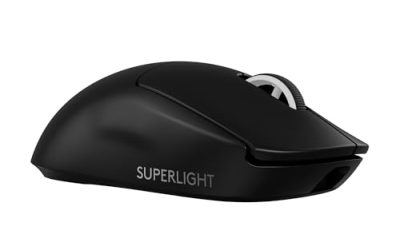
| Logitech G Pro X Superlight 2 | Most players who want one safe pick | 60 g, HERO 2 sensor, 44,000 DPI |
| Razer Viper V3 Pro | Fingertip players who want the lightest flagship | 54 g, Focus Pro 35K sensor, 8K polling |
| Pulsar X2V2 | Claw and fingertip grips on smaller hands | 53 g, PixArt PAW3395, 26,000 DPI |
| Pulsar X2 Crazylight | Players who want the lowest possible weight | 35 g, XS-1 sensor, 32,000 DPI |
| Logitech G305 Lightspeed | A dependable starter mouse | HERO sensor, 12,000 DPI, 250-hour battery |
How to Choose the Best Gaming Mouse for osu!
Weight comes first
In osu!, your cursor rarely stops moving. Streams, jumps and spinners all reward a mouse that starts and stops with minimal effort, and every extra gram is inertia your wrist and fingers have to overcome thousands of times per session. Most competitive mouse players settle somewhere between roughly 35 and 65 grams. Below that range a mouse can start to feel twitchy on slow sliders; above it, long jump patterns get tiring and small corrections feel sluggish. All five mice in this roundup sit in or near that window, which is deliberate.
Sensor stability at low DPI
osu! players typically run low effective sensitivity, often somewhere between 400 and 1,600 DPI combined with an in-game multiplier, because the playfield rewards controlled, repeatable movement. What matters at those settings is not the headline maximum DPI but whether the sensor tracks without smoothing, angle snapping or acceleration. Every mouse here uses a modern optical sensor known for raw, consistent tracking: Logitech’s HERO line, Razer’s Focus Pro, PixArt’s PAW3395 and Pulsar’s XS-1. Any of them will follow fast flicks across the playfield without spinning out, which older or budget office sensors often fail to do.
Shape and grip style
Most osu! mouse players use fingertip or claw grip, because both keep the palm off the shell and let the fingers steer the final few millimetres of a jump. Symmetrical, low-profile shells suit those grips best: they leave room for vertical finger movement and do not lock your hand into one position. Players with larger hands or a relaxed claw may prefer a medium shell like the Superlight 2, while smaller hands often track better on a mini or low-hump shape like the Pulsar X2V2. If you play palm grip, look for a taller rear hump, but know that palm grip generally trades away some of the micro-adjustment speed osu! rewards.
Polling rate and click feel
A 1,000 Hz polling rate is already smooth enough that most players cannot feel the gap to 8,000 Hz, but higher polling does reduce the tiny delay between movement and cursor update, and both flagship picks here support 8,000 Hz wireless polling. Treat it as a nice bonus rather than a requirement, and note that 8K polling drains batteries much faster. Click feel matters more day to day: osu! involves constant tapping, sometimes alternating between mouse buttons and keyboard keys, so switches should be light, crisp and free of double-click behaviour. Optical switches, used by Razer, Pulsar and (in hybrid form) Logitech here, are valued because they resist developing double clicks over time.
Mouse or tablet?
Many top osu! players use a pen tablet, which offers absolute positioning: the pen is always in the same place for the same spot on screen. A mouse uses relative movement, so your cursor position depends on how far you moved. Neither is objectively better; plenty of high-ranked players use a mouse, and a mouse needs no new muscle memory if you already game with one. If you are deciding, the honest answer is that a good lightweight mouse removes hardware as an excuse, and the mice below are all capable of carrying a player as far as their practice takes them.
The Picks in Detail
Logitech G Pro X Superlight 2
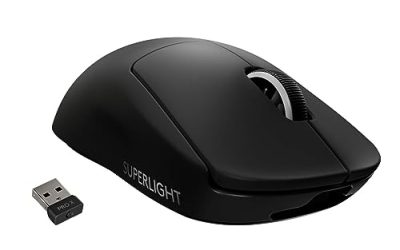
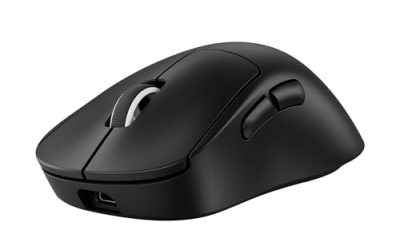
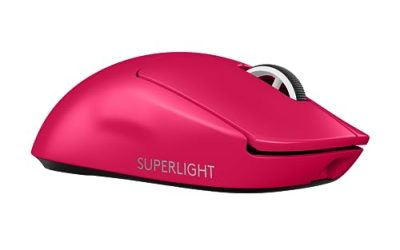
The Superlight 2 is the default recommendation for a reason. At 60 grams with a safe, symmetrical medium shell, it fits the widest range of hand sizes and grip styles in this roundup, and its HERO 2 sensor tracks up to 44,000 DPI with the kind of consistency that makes low-DPI play feel transparent. LIGHTFORCE hybrid switches pair a light optical actuation with a mechanical click feel, and the mouse supports polling rates up to 8,000 Hz over its Lightspeed wireless connection. Battery life is rated up to 95 hours at standard polling, so it comfortably covers a week of long sessions.
- Strength: Balanced shape, top-tier sensor and long battery make it the lowest-risk pick for most osu! players.
- Trade-off: The medium shell can feel bulky for small-handed fingertip players, and the side buttons are not the crispest here.
- Skip it if you have small hands and play pure fingertip grip; the Pulsar options below will feel more agile.
Razer Viper V3 Pro
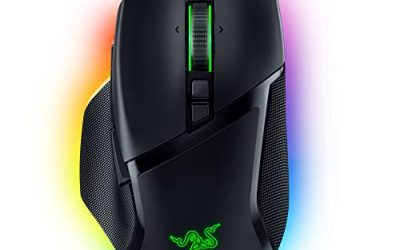
The Viper V3 Pro trims the flagship formula down to 54 grams and pairs it with Razer’s Focus Pro 35K optical sensor and Gen-3 optical switches rated for fast, consistent actuation. Its shape is a flatter, lower symmetrical shell than the Superlight 2, which fingertip and claw players tend to prefer for vertical cursor control, and the included dongle supports true 8,000 Hz wireless polling out of the box. Battery life is rated up to 95 hours at 1,000 Hz, dropping sharply at 8K, so most players will run it at standard polling for daily play and save 8K for focused sessions.
- Strength: Excellent clicks, a shape built for fingertip control and 8K polling included rather than sold separately.
- Trade-off: Battery life falls off quickly at high polling rates, and the flat shape offers little palm support for relaxed grips.
- Skip it if you prefer a taller, more filled-out shell or often forget to charge your gear.
Pulsar X2V2
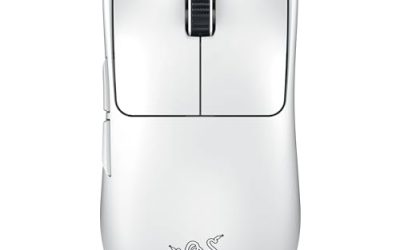
Pulsar designs around grip first, and the X2V2 shows it: a 53-gram symmetrical shell with a low hump and wide waist that suits claw and fingertip players, especially those with small to medium hands. Inside is a PixArt PAW3395 sensor up to 26,000 DPI, optical switches and a 2.4 GHz wireless connection with 1 ms response. For osu! specifically, the shape is the headline: the low rear lets your fingers pull the mouse down into jumps and make fine corrections without the shell pushing back, which suits the constant small adjustments of aim-heavy maps.
- Strength: One of the best fingertip and claw shapes available, with a proven flagship sensor.
- Trade-off: The minimalist build has fewer extras, and the shape can feel too small for large hands or palm grip.
- Skip it if your hands are large or you rest your whole palm on the mouse.
Pulsar X2 Crazylight

The X2 Crazylight pushes weight to an extreme: 35 grams, lighter than many wired mice with their cables removed from the equation. Its XS-1 sensor reaches 32,000 DPI with 750 IPS tracking, optical switches keep clicks consistent, and the mouse is 8K polling compatible with the appropriate receiver setup. In osu!, that near-weightless feel makes fast direction changes and spinners almost effortless, and players who find even 50-gram mice heavy often describe this class of mouse as the first one that disappears in the hand.
- Strength: The lightest option here by a wide margin, which directly reduces fatigue on jump-heavy maps.
- Trade-off: The featherweight shell can feel unstable during slow, precise slider tracking, and achieving 8K polling may require a separate receiver.
- Skip it if you play a lot of low-sensitivity, control-focused maps and prefer some heft to steady your aim.
Logitech G305 Lightspeed

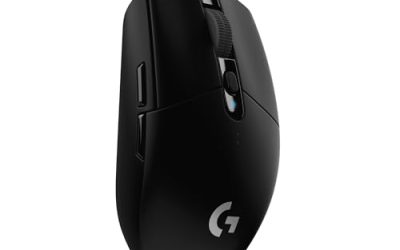
The G305 is the long-standing starter recommendation. Its HERO sensor tracks up to 12,000 DPI with the same no-smoothing behaviour as Logitech’s flagships, the small symmetrical shell suits fingertip and claw grips on smaller hands, and a single AA battery delivers up to 250 hours of play. At around 99 grams with the battery fitted it is noticeably heavier than the other picks, which is its main compromise for osu!, but its shape and sensor are genuinely suited to the game, and it remains a sensible way to find out whether mouse play suits you before spending flagship money.
- Strength: Proven sensor, huge battery life and a grip-friendly small shell at an entry-level position in the range.
- Trade-off: Much heavier than the ultralight picks, uses a replaceable AA battery rather than USB-C charging, and polls at 1,000 Hz only.
- Skip it if you already know you want an ultralight mouse; go straight to the Superlight 2 or X2V2.
Which One Fits Your Situation
You are switching from tablet or just starting out
Start with the G305 or the Superlight 2. Both have forgiving shapes that do not punish an unsettled grip, and the Superlight 2 in particular is a mouse you will not need to replace as you improve. Give mouse play a few weeks of regular sessions before judging it; aim in osu! is mostly practice, not hardware.
You play fingertip grip and chase jump maps
The Viper V3 Pro and Pulsar X2V2 are built for you. Both keep the shell low and light so your fingers do the steering, and both have optical clicks that stay consistent through heavy tapping. Choose the Viper for the larger shell and included 8K dongle, the X2V2 for the more compact, claw-friendly shape.
You play long sessions and fatigue is the problem
Weight is your enemy, so look at the X2 Crazylight first and the Viper V3 Pro second. Dropping to 35 or 54 grams reduces the load on your wrist across a multi-hour session more than any other single change, though it is still worth checking your desk height and grip tension, which cause more strain than hardware does.
You play low sensitivity with big arm movements
The Superlight 2’s medium shell and stable sensor behaviour make it the most predictable option for wide, sweeping aim. The Viper V3 Pro is a close second if you prefer a flatter profile. Pair either with a large, smooth mousepad so you are not lifting and resetting mid-map.
Common Mistakes
- Chasing maximum DPI: Setting 20,000 DPI because the box advertises it makes the cursor nearly uncontrollable. Most osu! players perform best at low, comfortable settings; sensor quality matters, not the ceiling.
- Copying a top player’s settings exactly: Sensitivity, grip and even mouse choice are personal. Use pro setups as a starting range, then adjust to your hand and play style.
- Ignoring the mousepad: A worn or rough pad adds friction that no lightweight mouse can fix. A smooth, consistent surface is part of the setup.
- Blaming the mouse for aim problems: Hardware upgrades help at the margins. If your cursor path is shaky, playtime on aim-focused maps will do more than a new shell.
- Leaving acceleration on: Make sure pointer enhancement and any in-game raw input settings are configured so the game receives your mouse movement unaltered.
- Buying for specifications you will not use: 8K polling and extreme DPI ranges are harmless extras, but shape and weight should decide the purchase.
FAQ
Is a mouse or a tablet better for osu!?
Neither has a fixed advantage. Tablets offer absolute positioning and dominate the very top ranks, but many high-ranked players use a mouse, and a mouse requires no new equipment habits if you already play other games. Choose the input you will practise with most consistently.
What DPI should I use for osu!?
Most mouse players land somewhere between 400 and 1,600 DPI, adjusted with the in-game sensitivity multiplier so a comfortable swipe crosses the playfield. Start near the middle of that range and change it in small steps over days, not minutes, so your muscle memory can settle.
Does polling rate matter for osu!?
At 1,000 Hz the cursor already updates every millisecond, which is smooth for almost everyone. Higher rates such as 8,000 Hz shave off a fraction of that delay and can feel marginally cleaner on high-refresh monitors, at the cost of battery life. It is a refinement, not a requirement.
How light should an osu! mouse be?
Somewhere between about 35 and 65 grams works for most players. Lighter mice reduce fatigue and speed up direction changes, while slightly heavier mice can feel steadier on slow sliders. The picks above cover that whole range so you can match weight to your style.
Can I play osu! well with a heavy or office mouse?
You can play, and skill matters far more than gear, but a heavy mouse with a basic sensor will fight you on fast jumps and may spin out on quick flicks. Any mouse in this guide removes those limits, which is why the G305 remains a popular first upgrade.