Choosing a gaming mouse brand is really choosing a design philosophy. One maker chases the lightest possible shell for flick shots, another builds ergonomic frames for long ranked sessions, and a third packs in swappable buttons so the same mouse suits either hand. Sensors, switches and wireless systems all carry brand signatures, so the logo on the box predicts how the mouse will feel long before the spec sheet does. This guide compares five brands through the mouse that best represents each one today.
Each pick below is the current flagship-style model its brand leads with, taken from the names and specifications on its Amazon listing. Tactical shooter players, multi-genre players and people who split time between a desktop and a laptop will all find a different brand fits best, because each company tunes weight, shape and battery life toward a different kind of player.
Quick Picks
As an Amazon Associate we earn from qualifying purchases.
| Product | Best for | Key spec from title |
|---|---|---|
| Logitech G PRO X SUPERLIGHT 2 DEX | Right-handed ergonomic aim | HERO 2 sensor up to 44,000 DPI |
| Razer Basilisk V3 Pro 35K | Ergonomic all-round flagship | Focus Pro 35K sensor, HyperScroll tilt wheel |
| Corsair M75 WIRELESS | Either-hand button layouts | MARKSMAN sensor up to 26,000 DPI |
| SteelSeries Aerox 3 Wireless | Travel and shared desks | TrueMove Air sensor, IP54 shell |
| HyperX Pulsefire Haste 2 Wireless | PC and laptop with one mouse | HyperX 26K sensor, dual wireless |
How to Choose
Sensor and Wireless System
Every major brand now fields its own flagship sensor, and the differences show up in how tracking behaves at low sensitivity. Logitech G builds around the HERO 2, Razer around the Focus Pro line, SteelSeries around TrueMove sensors co-developed with PixArt, Corsair around its MARKSMAN optical sensor and HyperX around the HyperX 26K. Look at the wireless system too: some mice pair a gaming-grade 2.4 GHz dongle with Bluetooth for a second device, while esports models skip Bluetooth to save weight. Polling rate matters as well, since higher rates demand the included dongle and drain the battery faster.
Shape Families and Grip Fit
Brand catalogs reveal their priorities through shape. HyperX builds its flagship around a symmetrical shell for fingertip and claw grips, while Razer covers both camps with the symmetrical Viper line and the sculpted DeathAdder shape. Logitech G splits its pro line between a symmetrical SUPERLIGHT and the right-handed DEX frame for palm support. SteelSeries shapes the Aerox line for right-handed players who want a low, fast shell, and Corsair answers with swappable magnetic side buttons that let one ambidextrous body serve either hand. Measure your hand, note your grip, and shortlist brands whose flagship shape matches before comparing anything else.
Switch Feel and Click Design
Click design is a brand fingerprint. Logitech G uses LIGHTFORCE hybrid switches that pair an optical actuation point with a mechanical feel, Razer fits its Gen-3 optical switches for near-instant registration, and Corsair builds its flagship buttons around optical switches with a spring-loaded QUICKSTRIKE design. SteelSeries and HyperX take the mechanical route with their own switch choices tuned for a crisp, tactile break. Optical designs also remove the contact wear behind double-click faults, so players who keep a mouse for years should weigh switch type alongside sensor numbers.
Software, Memory and Battery Habits
Each brand locks its settings into its own software: G HUB for Logitech G, Synapse for Razer, iCUE for Corsair, GG for SteelSeries and NGENUITY for HyperX. Check whether the mouse stores profiles onboard, because that decides if your sensitivity and button layout travel to a laptop or tournament PC without the app. Battery claims also follow brand habits, from long Bluetooth endurance figures to shorter high-polling runtimes, so compare the mode you will actually use rather than the biggest number on the box.
The 5 Best Options
Logitech G PRO X SUPERLIGHT 2 DEX

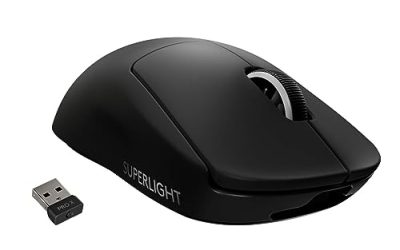
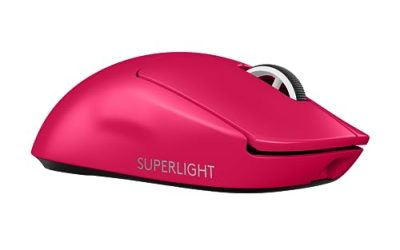
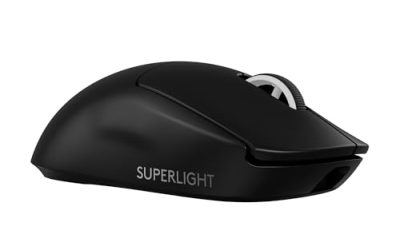
Logitech G is the default recommendation in pro play because its HERO sensors and LIGHTSPEED wireless set the pace for a decade, and the DEX shows the brand widening that lead. It takes the SUPERLIGHT formula and reshapes it into an asymmetrical right-handed frame, so palm and relaxed claw players get support the symmetrical shell never offered. At 60 grams with the HERO 2 sensor, LIGHTFORCE hybrid switches and up to 95 hours of battery life, it suits players who want Logitech G reliability in a shape built for long sessions rather than pure flick speed.
Specs
- Sensor: HERO 2 optical sensor
- Max sensitivity: 44,000 DPI
- Weight: 60 g
- Switches: LIGHTFORCE hybrid optical-mechanical
- Buttons: 5 programmable
- Battery life: up to 95 hours
- Connectivity: LIGHTSPEED wireless, USB-C charging
- Shape: asymmetrical right-handed
- Model: 910-007328
Best for: Right-handed players who want the Logitech G flagship in an ergonomic frame.
Watch out for: The DEX is a separate listing from the symmetrical SUPERLIGHT 2 — confirm model 910-007328 so you do not order the wrong shape.
ASIN: B0DB5JJTC9
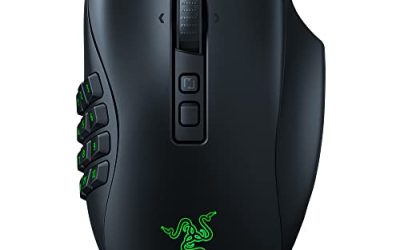
Razer Basilisk V3 Pro 35K

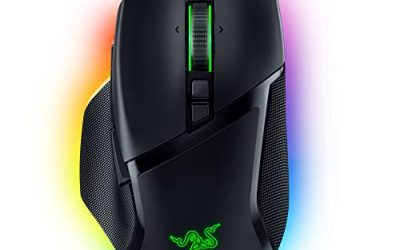
Razer is the brand most players name first, and the Basilisk line is where it shows its all-round ambition rather than pure esports minimalism. The V3 Pro 35K pairs the Focus Pro 35K Optical Sensor Gen-2 with a configurable HyperScroll tilt wheel, 13 customizable controls and Chroma RGB underglow in a sculpted right-handed shell. Gen-3 optical switches handle the clicks, and battery life stretches to 140 hours on HyperSpeed wireless. Choose Razer if you want one flagship that covers shooters, MOBAs and long desktop sessions without swapping mice.
Specs
- Sensor: Razer Focus Pro 35K Optical Sensor Gen-2
- Max sensitivity: 35,000 DPI
- Scroll wheel: Razer HyperScroll tilt wheel
- Switches: Razer Optical Mouse Switches Gen-3
- Controls: 13 customizable
- Battery life: up to 140 hours
- Lighting: Razer Chroma RGB
- Model: RZ01-05240100-R3U1
Best for: Players who want Razer’s ergonomic flagship with a do-everything wheel and controls.
Watch out for: The older Basilisk V3 Pro (30K) and the Phantom colorways sit on separate listings — confirm model RZ01-05240100-R3U1 for the black 35K version.
ASIN: B0DG837JYP
Corsair M75 WIRELESS

Corsair approaches the flagship mouse as a configurable tool rather than a fixed shape. The M75 WIRELESS carries the MARKSMAN 26,000 DPI sensor in an ambidextrous body, then adds magnetic side buttons you can swap or remove on either side, which makes it the rare gaming mouse a left-handed player can set up properly. SLIPSTREAM wireless, Bluetooth and wired modes cover desk and travel use, and iCUE ties the mouse into the lighting and profiles of a wider Corsair setup. Pick Corsair if flexibility matters more than chasing the lowest weight.
Specs
- Sensor: CORSAIR MARKSMAN optical sensor
- Max sensitivity: 26,000 DPI
- Weight: 89 g
- Side buttons: swappable magnetic, both sides
- Connectivity: SLIPSTREAM WIRELESS 2.4 GHz, Bluetooth, USB wired
- Lighting: RGB
- Software: iCUE compatible
- Model: CH-931D011-NA
Best for: Players who want one ambidextrous mouse with a button layout they can rearrange.
Watch out for: This is the white M75 WIRELESS, model CH-931D011-NA — the lighter M75 AIR line uses different model numbers and drops the swappable buttons.
ASIN: B0CTN2SRTH
SteelSeries Aerox 3 Wireless

SteelSeries designs around durability and endurance, and the Aerox 3 Wireless is its statement piece. The perforated shell is sealed with AquaBarrier protection at an IP54 level, something no rival flagship here attempts, and the TrueMove Air sensor was co-developed with PixArt for wireless tracking. Battery life stretches to 200 hours over Bluetooth, with a faster 2.4 GHz mode for play. At 68 grams with three-zone RGB, it fits players who travel with their mouse, play in shared spaces, or simply want gear that shrugs off spills and dust.
Specs
- Sensor: TrueMove Air optical sensor
- Max sensitivity: 18,000 CPI
- Tracking speed: 400 IPS with 40G acceleration
- Weight: 68 g
- Connectivity: Quantum 2.0 Wireless 2.4 GHz and Bluetooth 5.0
- Battery life: up to 80 hours on 2.4 GHz, up to 200 hours on Bluetooth
- Protection: IP54 AquaBarrier water and dust resistance
- Lighting: 3-zone RGB
- Model: 62612
Best for: Players who want long battery life and a shell that tolerates spills, dust and travel.
Watch out for: This Ghost finish is one colorway of model 62612; the wired Aerox 3 and the newer Gen 2 are different listings, so match the model number.
ASIN: B09CHD9TPX
HyperX Pulsefire Haste 2 Wireless

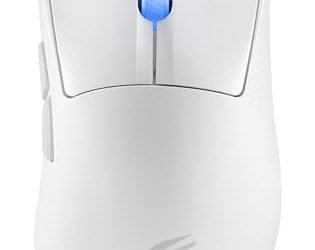
HyperX keeps its lineup deliberately focused, and the Pulsefire Haste 2 Wireless shows the value of that restraint. A solid 61-gram shell avoids the dust-trapping holes of the first Haste, the HyperX 26K sensor covers competitive tracking, and dual wireless modes pair a 2.4 GHz dongle for play with Bluetooth for a laptop. Battery life reaches 100 hours, and NGENUITY handles sensitivity, macros and lighting without demanding much attention. Choose HyperX when you want a dependable, lightweight mouse that disappears into your setup instead of dominating it.
Specs
- Sensor: HyperX 26K Sensor
- Max sensitivity: 26,000 DPI
- Tracking speed: 650 IPS
- Weight: 61 g
- Battery life: up to 100 hours
- Connectivity: 2.4 GHz wireless and Bluetooth
- Polling rate: 1,000 Hz
- Model: 6N0B0AA
Best for: Players splitting time between a gaming PC and a laptop with one lightweight mouse.
Watch out for: The wired Haste 2 is a lighter, separate listing — confirm the wireless model number 6N0B0AA before ordering.
ASIN: B0BX52C4LN
Which One Fits Your Situation
You Play Ranked Shooters Every Night
Take the Razer Basilisk V3 Pro 35K. Its Focus Pro 35K sensor, Gen-3 optical switches and 140-hour battery are built for exactly this routine, and the HyperScroll tilt wheel adds quick weapon swaps and map checks between fights. If your grip leans fingertip rather than palm, look at the symmetrical shells from HyperX or SteelSeries in this guide instead of forcing a sculpted frame.
Your Desk Is Also Your Office
The Corsair M75 WIRELESS earns its place here. Swappable side buttons let you keep game bindings on one layout and work shortcuts on another, Bluetooth covers the laptop on the road, and iCUE can sync lighting and profiles with the rest of a Corsair desk. It is the easiest of the five to justify as a single all-day mouse.
You Travel or Play in Shared Spaces
Choose the SteelSeries Aerox 3 Wireless. The IP54 AquaBarrier shell shrugs off the spills and dust that shared desks and travel bags bring, and Bluetooth stretches battery life to 200 hours between charges. Its 68-gram frame and TrueMove Air sensor still track properly when the session turns competitive, so durability never comes at the expense of aim.
This Is Your First Dedicated Gaming Mouse
Start with the HyperX Pulsefire Haste 2 Wireless. The 61-gram shell, straightforward shape and 100-hour battery make it easy to live with, while the HyperX 26K sensor leaves real headroom as your aim improves. NGENUITY keeps setup light, and Bluetooth pairing means the same mouse follows you from a gaming rig to a school or work laptop.
Common Mistakes
- Buying the brand you know from headsets or keyboards without checking its mouse shapes, when every brand here tunes its flagship shape toward a different grip.
- Assuming a higher DPI figure means better tracking; sensor behavior at your actual sensitivity and the polling mode you use matter more.
- Ordering a special edition or colorway listing by mistake — editions sit on separate product pages, so match the model number, not just the product name.
- Ignoring the software: profiles, firmware and button mapping live in each brand’s own app, and onboard memory decides what travels between PCs.
- Picking the lightest mouse by default when your palm grip needs support — an ergonomic frame can steady aim more than a few saved grams.
Frequently Asked Questions
Which gaming mouse brand is best for competitive shooters?
Razer and Logitech G lead this category: Razer with the Basilisk V3 Pro 35K and its Focus Pro 35K sensor, Logitech G with the HERO 2 across its pro line. The better choice depends on grip — the Basilisk’s sculpted frame supports palm and claw players, while the right-handed DEX and symmetrical shells elsewhere suit other grips better.
Do gaming mouse brands use the same sensors?
No. Each brand here fields its own flagship sensor line: HERO 2 at Logitech G, Focus Pro at Razer, MARKSMAN at Corsair, TrueMove at SteelSeries and the HyperX 26K at HyperX. They differ in tuning, lift-off behavior and how they handle high polling rates, even when headline DPI figures look similar.
Which brand is best for left-handed players?
Corsair, through the M75 WIRELESS. Its ambidextrous body and magnetic side buttons can be arranged on either side, so a left-handed player gets thumb buttons in the right place instead of reaching across the shell. Most rival flagships here are right-handed shapes or symmetrical shells with buttons fixed on the left side only.
Does brand matter more than the individual model?
Brand sets the ecosystem you live in: the software, the sensor tuning, the switch feel and the shape language across the range. Within a brand, though, models vary widely in weight and shape, so use the brand to shortlist two or three makers, then choose the specific mouse that fits your hand and grip.