OCuLink is the detail that changes what a mini PC can become. It carries PCI Express directly to an external device, so a small box can connect to a desktop graphics card through an enclosure and gain the kind of visual power that integrated graphics cannot offer. For data analysis that matters when your work turns to heavy visualisation, machine learning or large interactive dashboards, because the same compact machine can stay small on your desk and still grow.
This guide is for analysts, researchers and home-lab workers who want a Ryzen mini PC with an OCuLink port for data work. Every system below was chosen from the processor, memory, storage and OCuLink support stated in its Amazon listing, so you can compare them on what they actually offer.
Quick Picks
As an Amazon Associate we earn from qualifying purchases
| Product | Best for | Key spec from title |
|---|---|---|
| Minisforum UM890 Pro Ryzen 9 8945HS | A proven desk with dual USB4 and OCuLink | Ryzen 9 8945HS, 32GB DDR5, 512GB SSD, OCuLink |
| GMKtec K11 Ryzen 9 8945HS | A growing setup with a native OCuLink port | Ryzen 9 8945HS, 32GB DDR5, 1TB SSD, OCuLink |
| Minisforum UM880 Plus Ryzen 7 8845HS | A compact desk with OCuLink and triple display | Ryzen 7 8845HS, 32GB DDR5, 1TB SSD, OCuLink |
| GMKtec K8 Plus Ryzen 7 8845HS | A dual-network desk with OCuLink expansion | Ryzen 7 8845HS, 32GB DDR5, 512GB SSD, OCuLink |
| GMKtec K12 Ryzen 7 H 255 | A large-storage desk with OCuLink and three M.2 slots | Ryzen 7 H 255, 32GB DDR5, 1TB SSD, OCuLink |
How to Choose
Understand what OCuLink actually connects
OCuLink carries PCI Express lanes directly between the mini PC and an external device, usually a graphics card in an enclosure. That direct link gives it lower overhead than a USB-based connection, which is why it suits an external GPU. Check the listing for the port itself and for any notes about how it is wired: some boxes have a native OCuLink port, while others provide it through an adapter that sits in an M.2 slot. That detail matters, because an adapter can cost you a storage slot.
Start with the analysis hardware, not the expansion
An OCuLink port is only useful if the box underneath it is already good at data work. Look for an eight-core Ryzen chip, 32GB of DDR5 and a 1TB PCIe 4.0 SSD first, because those decide how your notebooks, spreadsheets and database tools perform every day. The external GPU is a later addition for visualisation or machine learning, not a fix for a weak processor or thin memory. If the base machine cannot hold your datasets, the port will not save it.
Count storage slots before you plan an external GPU
Some OCuLink implementations share an M.2 slot with the adapter, which leaves you with one SSD slot instead of two. That is fine if your datasets live on a network drive or an external SSD, but it is a problem if you planned to keep two internal drives. Check the listing for the number of M.2 slots and any note about the OCuLink adapter using one of them. A box with three M.2 slots, like the K12, gives you more room to keep storage and expansion together.
Check displays, networking and power for the full setup
An external GPU enclosure needs its own power supply and a cable to the mini PC, so plan the desk space and the power outlets before you buy. The mini PC itself should still drive your monitors well on its own, with HDMI, DisplayPort and USB4 outputs for a multi-screen layout. Dual 2.5GbE networking helps when you pull large files from local storage, and Wi-Fi 6 keeps cloud work smooth. Also confirm that the enclosure you plan to use is compatible with the mini PC’s OCuLink implementation.
The 5 Best Options
Minisforum UM890 Pro Ryzen 9 8945HS

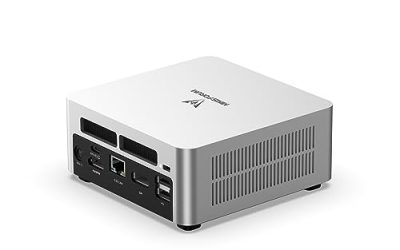
The UM890 Pro is the most proven OCuLink mini PC in this guide, with a long track record and a strong all-round specification. Its eight-core Ryzen 9 8945HS, 32GB of DDR5 and 512GB SSD handle demanding notebook work and large table operations, while dual USB4 ports and dual 2.5GbE networking cover docks, fast storage and local network files. The OCuLink support arrives through an adapter, so check the storage layout before you plan an external GPU.
Specs
- AMD Ryzen 9 8945HS, 8 cores and 16 threads, up to 5.2GHz
- 32GB DDR5 RAM, expandable to 96GB
- 512GB PCIe 4.0 SSD
- AMD Radeon 780M graphics
- OCuLink support
- 2x USB4, 1x HDMI and 1x DisplayPort outputs
- Dual 2.5G Ethernet
- Wi-Fi 6E and Bluetooth 5.2
Best for: A proven analysis desk where OCuLink is a future option rather than a day-one purchase.
Watch out for: The OCuLink connection uses an M.2 adapter on this model, which leaves one fewer SSD slot when the adapter is installed.
GMKtec K11 Ryzen 9 8945HS
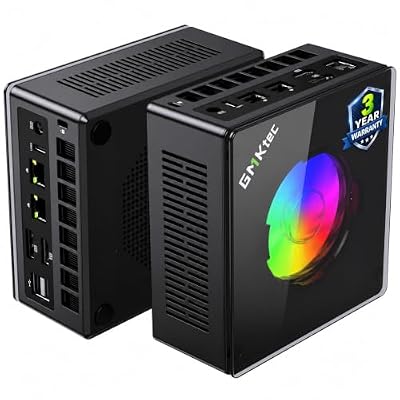
The K11 fits an analyst whose setup is still growing, because its OCuLink port is built into the chassis rather than added through an adapter. Its Ryzen 9 8945HS, 32GB of DDR5 and 1TB SSD cover demanding analysis work today, while dual 2.5GbE ports suit a desk wired into local network storage. The quad-display output is useful when you want code, results, a dashboard and documentation all visible at once.
Specs
- AMD Ryzen 9 8945HS, 8 cores and 16 threads, up to 5.2GHz
- 32GB DDR5 RAM, expandable to 128GB
- 1TB PCIe 4.0 M.2 SSD, dual slots expandable to 8TB
- AMD Radeon 780M graphics
- OCuLink port
- Dual NIC 2.5GbE LAN
- HDMI 2.1, DisplayPort 2.1 and 2x USB4
- Wi-Fi 6 and Bluetooth 5.2
Best for: A growing analysis setup with a native OCuLink port for a future external GPU.
Watch out for: The OCuLink port needs a compatible external GPU enclosure and cable, which are separate purchases.
Minisforum UM880 Plus Ryzen 7 8845HS

The UM880 Plus is the compact OCuLink option for a smaller desk. Its eight-core Ryzen 7 8845HS, 32GB of DDR5 and 1TB SSD handle spreadsheets, SQL work and notebook sessions comfortably, and the triple-display output covers the usual code, results and reference layout. The OCuLink port gives you a path to an external GPU later, and the five USB ports leave room for external drives and office hardware without a hub.
Specs
- AMD Ryzen 7 8845HS, 8 cores and 16 threads, up to 5.1GHz
- 32GB DDR5 RAM
- 1TB PCIe 4.0 SSD
- AMD Radeon 780M graphics
- OCuLink port
- HDMI, DisplayPort and USB4 triple display
- 2.5G LAN
- 5x USB ports and Wi-Fi 6E
Best for: A compact analysis desk where OCuLink is a useful option for later.
Watch out for: Confirm the exact OCuLink implementation in the listing, because some configurations describe the port differently.
GMKtec K8 Plus Ryzen 7 8845HS

The K8 Plus suits an analyst who moves large files across a local network and wants an external GPU path as well. Its Ryzen 7 8845HS and 32GB of DDR5 keep notebook sessions and database tools responsive, while dual 2.5GbE ports give you a wired link to a server or network drive. Dual M.2 slots and an OCuLink port mean the box can grow with your data and, later, with an external graphics card if your work turns toward heavier visual tasks.
Specs
- AMD Ryzen 7 8845HS, 8 cores and 16 threads, up to 5.1GHz
- 32GB DDR5 RAM, expandable to 96GB
- 512GB PCIe 4.0 M.2 SSD, dual slots expandable to 8TB
- AMD Radeon 780M graphics
- OCuLink port
- Dual Intel i226V 2.5Gbps LAN
- HDMI 2.1, DisplayPort 2.1 and 2x USB4
- Wi-Fi 6 and Bluetooth 5.2
Best for: A dual-network desk with large local files and a future external GPU in mind.
Watch out for: Confirm whether the configuration you choose includes Windows 11 Pro, because the K8 Plus is also sold as a barebones kit.
GMKtec K12 Ryzen 7 H 255

The K12 is the storage-friendly OCuLink pick. Its Ryzen 7 H 255, 32GB of DDR5 and 1TB SSD handle demanding analysis work, while three M.2 expansion slots give you room to keep several internal drives even if an OCuLink adapter uses one of them. The quad-display output and dual 2.5GbE networking suit a desk with several screens and a wired link to local storage, and the Radeon 780M graphics drive everyday visual work on their own.
Specs
- AMD Ryzen 7 H 255, 8 cores and 16 threads, up to 4.9GHz
- 32GB DDR5 RAM, expandable to 128GB
- 1TB PCIe 4.0 SSD, 3x M.2 expansion slots
- AMD Radeon 780M graphics
- OCuLink port
- Dual NIC 2.5Gbps LAN
- HDMI 2.1, DisplayPort 1.4 and USB Type-C outputs
- Wi-Fi 6E and Bluetooth 5.2
Best for: A data desk with several internal drives and an OCuLink port for later expansion.
Watch out for: The H 255 is a newer chip name for the Hawk Point family, so check the listing for the exact processor details.
Which One Fits Your Situation
You want the most proven OCuLink mini PC
Choose the Minisforum UM890 Pro. Its Ryzen 9 chip, dual USB4 ports and dual networking cover daily analysis well, and the OCuLink support gives you a tested path to an external GPU later. The 32GB of DDR5 also keeps notebooks, spreadsheets and database tools responsive together, so daily analysis work stays smooth while the port waits for its future use.
You want a native OCuLink port from the start
Choose the GMKtec K11. The built-in port, dual 2.5GbE networking and quad-display output suit a desk that will grow, and the Ryzen 9 and 32GB of memory handle current work without strain. The 1TB SSD also holds a large dataset and its working files, and the dual M.2 slots leave room for a second drive when your storage grows.
Your desk is small but you still want the option
Choose the Minisforum UM880 Plus. It delivers eight cores, 32GB of memory and triple-display output in a compact box, with an OCuLink port ready for a future external GPU. The triple-display output also covers the usual code, results and reference layout, so a compact desk still gets a full three-screen workflow.
You keep several internal drives
Choose the GMKtec K12. Its three M.2 slots leave room for storage even when an OCuLink adapter is in use, and the dual networking suits a desk wired into local files. The dual 2.5GbE networking also suits a desk wired into local storage, so large files move quickly between the mini PC and a server.
Common Mistakes
- Buying a mini PC for its OCuLink port and ignoring a weak processor or thin memory underneath.
- Assuming every OCuLink port is native, when some use an adapter that costs a storage slot.
- Buying an external GPU enclosure before checking it works with the mini PC’s OCuLink implementation.
- Forgetting that an external GPU needs its own power supply and desk space.
- Choosing a single-drive box and then discovering the OCuLink adapter leaves no room for a second SSD.
Frequently Asked Questions
What is OCuLink and why does it matter for data analysis?
OCuLink carries PCI Express directly to an external device, usually a graphics card in an enclosure. For data analysis it matters when your work turns to heavy visualisation, machine learning or large interactive dashboards, because it lets a compact mini PC gain desktop graphics power without becoming a full tower.
Is OCuLink better than USB4 for an external GPU?
Yes, for raw graphics bandwidth, because OCuLink carries PCI Express directly with less protocol overhead than USB4. USB4 is more convenient, because it also carries video, data and charging in one cable. If your priority is maximum external GPU performance, OCuLink is the stronger choice.
Do I need an external GPU for data analysis?
Usually not. Integrated Radeon graphics handle spreadsheets, notebooks, dashboards and multiple monitors. An external GPU only becomes useful for heavy visualisation, machine learning or video work. If that is a possibility, choose a model with an OCuLink port so the option stays open.
Does using OCuLink reduce my storage slots?
It can. Some mini PCs provide OCuLink through an adapter that sits in an M.2 slot, which leaves one fewer SSD slot while the adapter is installed. Check the listing for the number of M.2 slots and any note about the adapter, and prefer a box with three slots if you plan to keep several internal drives.