Simulation games ask a desktop to do two things at once: calculate a complex world and render it convincingly. Flight simulators track weather, traffic and systems while drawing detailed terrain, racing sims model tyres, suspension and track surfaces while holding a steady frame rate, and city builders simulate thousands of agents while the camera moves. A desktop that only has a strong graphics card will stutter when the simulation itself becomes the bottleneck.
This guide is for flight sim pilots, racing drivers, city builders and strategy players who want an Intel-powered prebuilt for simulation games. Every system below was chosen from the processor, graphics card, memory, storage and cooling stated in its Amazon listing, so you can compare the systems on what they actually ship with.
Quick Picks
As an Amazon Associate we earn from qualifying purchases
| Product | Best for | Key spec from title |
|---|---|---|
| iBUYPOWER Element Pro i9-14900KF | A high-end sim with a large game library | Core i9-14900KF, RTX 5070 12GB, 32GB DDR5, 2TB SSD |
| CLX i9-14900KF RTX 4070 Super | A sim with a huge mod and scenery collection | Core i9-14900KF, RTX 4070 Super, 32GB DDR5, 1TB SSD plus 4TB HDD |
| Alienware Aurora ACT1250 Ultra 7 265KF | A liquid-cooled sim that stays quiet | Core Ultra 7 265KF, RTX 5070, 32GB DDR5, 2TB SSD |
| Alienware Aurora ACT1250 Ultra 7 265F | A top-tier sim for dense scenery and traffic | Core Ultra 7 265F, RTX 5080 16GB, 64GB DDR5, 8TB SSD |
| CyberPowerPC Gamer Xtreme i7-14700KF | A liquid-cooled sim with a strong encoder | Core i7-14700KF, RTX 4070 Super 12GB, 32GB DDR5, 2TB SSD |
How to Choose
The CPU carries the simulation, the GPU carries the picture
In simulation games the processor models the world: flight systems, traffic, physics, AI and the thousands of small calculations that make a scene feel alive. The graphics card then renders that world. A twenty-core Intel chip keeps the simulation smooth when the scene gets dense, while a modern RTX card with plenty of video memory handles high-resolution terrain and detailed cockpits. When you compare systems, look for a strong CPU and a graphics card with at least 12GB of video memory, because simulation titles use both heavily.
Memory matters more in sims than in shooters
A flight simulator with add-on scenery, a racing sim with a full grid, or a city builder with a large population all hold a lot of data in memory. Thirty-two gigabytes of DDR5 is the practical baseline here, and 64GB is worth considering if you run heavy add-ons, a second screen with charts or a recording tool at the same time. Check whether the tower has free memory slots, because adding a second kit later is cheaper than replacing the whole machine.
Storage should fit the sim and its add-ons
A base flight simulator install is large, and add-on aircraft, scenery packs and mods can multiply that several times over. A 1TB SSD holds the sim and a few add-ons, but a 2TB drive is the safer choice if you fly with a large scenery library or race with many tracks and cars. A second drive, whether an SSD or a large hard drive, is useful for mods and recordings, because it keeps the main game drive clear and makes backups simpler.
Cooling decides whether the frame rate holds
Simulation sessions run for hours, and a processor that overheats will slow down just when the scene gets busy. Liquid cooling or a large air cooler keeps the CPU steady under a sustained load, and a case with good airflow keeps the graphics card cool as well. Check the listing for the cooling type and the power supply wattage, because a strong CPU and GPU under a sustained load need both. A quiet cooler also matters when you fly with a headset or a microphone nearby.
The 5 Best Options
iBUYPOWER Element Pro i9-14900KF

The Element Pro is built for the top end of simulation play. Its twenty-four-core Core i9-14900KF handles dense traffic, complex systems and large cities without the simulation stuttering, while the RTX 5070 with 12GB of video memory renders detailed scenery and cockpits. Thirty-two gigabytes of DDR5 and a 2TB NVMe SSD hold a large sim library and its add-ons, and the liquid cooling keeps the processor steady through long sessions.
Specs
- Intel Core i9-14900KF CPU
- NVIDIA GeForce RTX 5070, 12GB GPU
- 32GB DDR5 RGB RAM
- 2TB NVMe SSD
- Windows 11 Home
- Keyboard and mouse included
Best for: A high-end simulation setup with a large library of games and add-ons.
Watch out for: Confirm the cooling type and power supply in the listing, because the Element Pro is sold in several configurations.
CLX i9-14900KF RTX 4070 Super

The CLX suits sim players whose scenery and mod collections have outgrown a single drive. Its Core i9-14900KF and RTX 4070 Super handle demanding simulation and rendering together, while 32GB of DDR5 RGB memory keeps large scenes responsive. The combination of a 1TB NVMe SSD for the sim itself and a 4TB hard drive for mods, scenery and recordings means you will not be uninstalling add-ons to make room. The 360mm liquid cooler keeps the processor steady during long flights.
Specs
- Intel Core i9-14900KF, 3.2GHz
- NVIDIA GeForce RTX 4070 Super
- 32GB DDR5 RGB memory
- 1TB NVMe M.2 SSD
- 4TB HDD
- 360mm AIO liquid cooling
- Wi-Fi
- Windows 11 Home
Best for: A simulation library with a huge collection of mods, scenery and recordings.
Watch out for: The hard drive is slower than the SSD, so keep the sim itself and your most-used add-ons on the NVMe drive.
Alienware Aurora ACT1250 Ultra 7 265KF

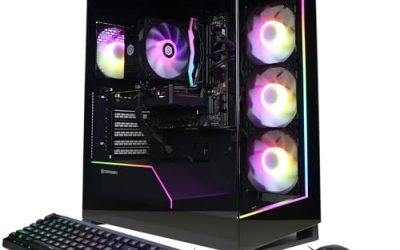
The Aurora ACT1250 with a Core Ultra 7 265KF is the quiet option for long simulation sessions. Its twenty-core processor and RTX 5070 handle flight and racing sims together, while 32GB of DDR5 and a 2TB SSD hold the sim and its add-ons. Liquid cooling keeps the processor cool without a loud air cooler, and the 1000W Platinum-rated power supply leaves headroom for sustained loads. The clear-panel chassis suits a desk where the tower is visible.
Specs
- Intel Core Ultra 7 265KF processor
- NVIDIA GeForce RTX 5070, 12GB GDDR7 graphics
- 32GB DDR5 RAM
- 2TB SSD
- 1000W Platinum rated PSU
- Liquid cooled
- Windows 11 Home
- Clear panel chassis
Best for: A quiet, liquid-cooled simulation setup for long flights and races.
Watch out for: Check the exact graphics and memory configuration in the listing, because the Aurora ACT1250 is sold in many variants.
Alienware Aurora ACT1250 Ultra 7 265F

The Aurora ACT1250 with an RTX 5080 is the top-tier pick for dense scenery and heavy traffic. Its twenty-core Core Ultra 7 265F and RTX 5080 with 16GB of GDDR7 video memory handle high-resolution terrain, detailed cockpits and large cities together, while 64GB of DDR5 and an 8TB SSD hold an enormous sim library, add-ons and recordings on one fast drive. The 1000W power supply and liquid cooling keep the system steady under a sustained load.
Specs
- Intel Core Ultra 7 265F, 20 cores, up to 5.3GHz
- NVIDIA GeForce RTX 5080, 16GB GDDR7
- 64GB DDR5 RAM
- 8TB SSD
- 1000W PSU
- Liquid cooler
- Wi-Fi 7
- Windows 11 Pro
Best for: A top-tier simulation setup with dense scenery, heavy traffic and a huge library.
Watch out for: This is a large, heavy configuration, so confirm the exact specification in the listing before ordering.
CyberPowerPC Gamer Xtreme i7-14700KF

The Gamer Xtreme with a Core i7-14700KF suits sim players who also stream or record their sessions. Its twenty-core processor and RTX 4070 Super with 12GB of video memory handle the simulation and the rendering, while the hardware encoder carries a stream or a local recording without loading the CPU. Thirty-two gigabytes of DDR5 and a 2TB PCIe Gen4 SSD hold the sim and its add-ons, and liquid cooling keeps the processor steady through long races.
Specs
- Intel Core i7-14700KF, 3.4GHz
- NVIDIA GeForce RTX 4070 Super, 12GB
- 32GB DDR5 RAM
- 2TB PCIe Gen4 SSD
- Liquid cooling
- Wi-Fi ready
- Windows 11 Home
Best for: A simulation setup that also streams or records long sessions.
Watch out for: Confirm the exact graphics card and storage configuration in the listing, because the Gamer Xtreme is sold in many variants.
Which One Fits Your Situation
You fly or race with a large add-on library
Choose the iBUYPOWER Element Pro i9-14900KF. Its twenty-four-core CPU, RTX 5070 and 2TB SSD handle dense scenes and a large library together, and the 32GB of memory keeps heavy add-ons responsive. The liquid cooling also keeps the processor steady through long sessions, so frame rates hold when the scene gets dense and the traffic builds.
Your mods and scenery have outgrown one drive
Choose the CLX i9-14900KF RTX 4070 Super. The 1TB NVMe SSD holds the sim itself, while the 4TB hard drive takes mods, scenery and recordings without constant uninstalling. The 360mm liquid cooler also keeps the processor cool during long flights, and the 32GB of memory keeps large scenes responsive while the sim loads.
You want a quiet tower for long sessions
Choose the Alienware Aurora ACT1250 Ultra 7 265KF. Liquid cooling and a strong power supply keep the system steady and quiet through long flights, and the 2TB SSD holds a generous library. The clear-panel chassis also suits a desk where the tower is visible, and the 1000W power supply leaves headroom for sustained loads.
You run the densest scenes at high resolution
Choose the Alienware Aurora ACT1250 Ultra 7 265F with the RTX 5080. Its 64GB of memory, 8TB SSD and 16GB graphics card handle dense traffic, detailed terrain and a huge library at once. The 8TB SSD also holds recordings and mods alongside the sim itself, so you will not need a second drive to keep everything in one place.
Common Mistakes
- Buying a strong graphics card and pairing it with a weak processor, then wondering why the simulation stutters.
- Running a heavy sim with add-ons on 16GB of memory.
- Installing a large sim and its scenery on a small drive, then deleting add-ons to make room.
- Ignoring cooling and letting the processor slow down during a long session.
- Placing the tower where its fans blow straight into a microphone or a headset.
Frequently Asked Questions
What matters most for simulation games, CPU or GPU?
Both, for different jobs. The CPU models the world: flight systems, traffic, physics and AI. The GPU renders that world at your chosen resolution. A balanced system with a twenty-core Intel chip and a modern RTX card keeps both sides smooth. A strong GPU alone will not fix a simulation that is limited by the processor.
How much RAM do I need for flight simulators?
Thirty-two gigabytes of DDR5 is the practical baseline for modern flight simulators with add-on scenery and aircraft. Sixty-four gigabytes is worth considering if you run heavy add-ons, a second screen with charts, and a recording tool at the same time. Check for free memory slots so you can add more later.
Is a 2TB SSD necessary for simulation games?
It is the safer choice if you fly or race with a large add-on library. A base simulator install is large, and scenery packs, aircraft and mods can multiply that several times. A second drive for mods and recordings also helps, because it keeps the main game drive clear.
Does liquid cooling help in simulation games?
Yes, for long sessions. Simulation games load the processor for hours, and liquid cooling keeps it steady under that sustained load. A large air cooler can also work, but check the listing for the cooling type and the power supply wattage before you buy.