In simulation games the graphics card does more than draw pretty pictures. It renders detailed cockpits, dense terrain, weather systems and crowded cities, often across multiple monitors or at high resolution, while the processor models the world underneath. An RTX card with plenty of video memory keeps those scenes smooth, and the hardware encoder lets you record or stream a session without loading the CPU. The right desktop balances both sides instead of overspending on one.
This guide is for flight sim pilots, racing drivers, city builders and strategy players who want an RTX-powered prebuilt for simulation games. Every system below was chosen from the graphics card, processor, memory, storage and cooling stated in its Amazon listing, so you can compare them on what they actually ship with.
Quick Picks
As an Amazon Associate we earn from qualifying purchases
| Product | Best for | Key spec from title |
|---|---|---|
| iBUYPOWER Y40 PRO Ryzen 9 7900X | A high-end sim with a large library | RTX 5070 Ti 16GB, Ryzen 9 7900X, 32GB DDR5, 2TB SSD |
| Alienware Aurora ACT1250 Ultra 7 265F | A tidy sim with a strong power supply | RTX 5070 12GB, Core Ultra 7 265F, 32GB DDR5, 1TB SSD |
| MSI Codex R2 i5-14400F | A first sim rig with a capable RTX card | RTX 4060 Ti, Core i5-14400F, 16GB DDR5, 1TB SSD |
| CyberPowerPC Gamer Xtreme i5-14400F | A compact sim with a large fast drive | RTX 5060 8GB, Core i5-14400F, 16GB DDR5, 1TB SSD |
| iBUYPOWER TraceMesh i7-14700F | A sim that also streams long sessions | RTX 4060 Ti 8GB, Core i7-14700F, 32GB DDR5, 1TB SSD |
How to Choose
Video memory decides how much scenery you can hold
Simulation titles load large textures, detailed terrain and complex cockpits into video memory, and a card that runs out will stutter when the scene changes. Sixteen gigabytes of video memory, as on an RTX 5070 Ti, gives you room for high-resolution scenery and detailed aircraft. Twelve gigabytes suits most sims at 1440p, while 8GB is a starting point for lighter settings or a single monitor. Check the graphics card model and its memory in the listing, because two cards with the same name can ship with different memory sizes.
The CPU still models the world
A strong graphics card cannot fix a simulation that is limited by its processor. Flight systems, traffic, physics and AI all run on the CPU, and a modern multi-core chip keeps those calculations smooth when the scene gets dense. A twenty-core Intel chip or a twelve-core Ryzen 9 both handle that work well, while a ten-core chip suits lighter sims and smaller scenes. When you compare systems, look at the CPU and the GPU together rather than choosing on graphics alone.
Memory and storage should fit the add-on library
Thirty-two gigabytes of DDR5 is the practical baseline for modern sims with add-on scenery, and it leaves room for a second screen with charts or a recording tool. A 1TB SSD holds the sim and a few add-ons, but a 2TB drive is safer if your scenery library is large. Check for a spare M.2 slot or drive bay, because adding a second drive for mods and recordings keeps the main game drive clear and makes backups simpler. A second drive also keeps recordings off the main game drive, so the sim loads quickly even after a long recording session.
Cooling and power keep the frame rate steady
Simulation sessions run for hours, and a graphics card and processor under a sustained load need airflow and a strong power supply. A case with good ventilation, a capable CPU cooler and a power supply rated for the graphics card all help the system hold its performance through a long flight or race. Check the listing for the cooling type and the power supply wattage, and leave space around the tower so its vents can breathe. A tower with a mesh front panel also pulls in cooler air, which helps the graphics card hold its speed through a long race.
The 5 Best Options
iBUYPOWER Y40 PRO Ryzen 9 7900X

The Y40 PRO is the high-end pick for simulation play. Its RTX 5070 Ti with 16GB of video memory renders detailed terrain, cockpits and cities at high resolution, while the twelve-core Ryzen 9 7900X models traffic, systems and physics without stuttering. Thirty-two gigabytes of DDR5 RGB memory and a 2TB NVMe SSD hold a large sim library and its add-ons, and the 240mm liquid cooler keeps the processor steady through long sessions.
Specs
- NVIDIA GeForce RTX 5070 Ti, 16GB GPU
- AMD Ryzen 9 7900X CPU
- 32GB DDR5 RGB 5200MHz RAM
- 2TB NVMe SSD
- 240mm liquid CPU cooling
- Wi-Fi ready
- Windows 11 Home
- Keyboard and mouse included
Best for: A high-end simulation setup with dense scenery and a large add-on library.
Watch out for: Confirm the exact graphics card and storage configuration in the listing, because the Y40 PRO is sold in several variants.
Alienware Aurora ACT1250 Ultra 7 265F

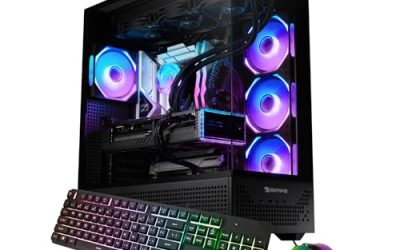
The Aurora ACT1250 with an RTX 5070 suits a sim player who wants a tidy, well-built tower. Its twenty-core Core Ultra 7 265F and RTX 5070 with 12GB of video memory handle flight and racing sims together, while 32GB of DDR5 and a 1TB SSD cover the sim and its most-used add-ons. The 1000W Platinum-rated power supply leaves headroom for sustained loads, and the clear-panel chassis suits a desk where the tower is visible.
Specs
- NVIDIA GeForce RTX 5070
- Intel Core Ultra 7 265F, 32GB DDR5 RAM
- 1TB SSD
- 1000W Platinum rated PSU
- Windows 11 Home
- Clear panel chassis
- Wired keyboard included
Best for: A tidy simulation desk with a strong power supply and room to add storage later.
Watch out for: The 1TB drive fills quickly with a large scenery library, so plan a second drive for add-ons.
MSI Codex R2 i5-14400F

The Codex R2 is the sensible first step into simulation gaming. Its RTX 4060 Ti and ten-core Core i5-14400F handle flight and racing sims at sensible settings, while 16GB of DDR5 and a 1TB M.2 NVMe SSD cover the sim and a modest add-on collection. The 80+ Gold power supply suits the hardware, and the DIY-friendly case makes it easy to add memory or a second drive later. A keyboard and mouse are included, so the tower is ready to play.
Specs
- NVIDIA GeForce RTX 4060 Ti
- Intel Core i5-14400F
- 16GB DDR5 RAM
- 1TB M.2 NVMe SSD
- 80+ Gold PSU
- Wi-Fi
- Keyboard and mouse included
- Windows 11 Home
Best for: A first simulation rig where the budget goes to a capable RTX card and a clear upgrade path.
Watch out for: The 16GB of memory is a starting point for sims, so check the free memory slots before adding heavy add-ons.
CyberPowerPC Gamer Xtreme i5-14400F

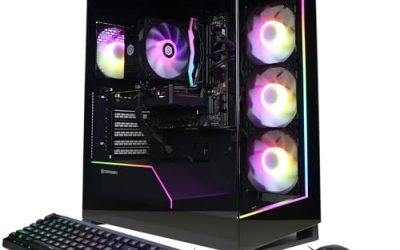
The Gamer Xtreme with a Core i5-14400F and RTX 5060 suits a compact sim setup. Its RTX 5060 with 8GB of video memory and a dedicated encoder handles modern sims and recording together, while 16GB of DDR5 and a 1TB PCIe SSD cover the game and its add-ons. RGB lighting and a compact tower suit a desk where the machine is visible, and the B860 platform leaves room to grow memory and storage later.
Specs
- NVIDIA GeForce RTX 5060, 8GB GDDR7
- Intel Core i5-14400F CPU
- 16GB DDR5 RAM
- 1TB PCIe SSD
- RGB lighting
- Windows 11 Home
Best for: A compact simulation desk with a modern RTX card and a clear upgrade path.
Watch out for: The 8GB of video memory suits lighter settings, so check your target resolution and scenery density before choosing this card.
iBUYPOWER TraceMesh i7-14700F

The TraceMesh suits sim players who also stream or record long sessions. Its twenty-core Core i7-14700F keeps the simulation, audio and overlay tools responsive, while the RTX 4060 Ti with 8GB of video memory and a dedicated encoder carries the game and the broadcast together. Thirty-two gigabytes of DDR5 RGB memory leaves room for charts, chat and a recording tool, and the 1TB NVMe SSD holds the sim and its most-used add-ons.
Specs
- NVIDIA GeForce RTX 4060 Ti, 8GB
- Intel Core i7-14700F
- 32GB DDR5 5600 RGB memory
- 1TB NVMe SSD
- Wi-Fi ready
- Windows 11 Home
Best for: A simulation setup that also streams or records long sessions.
Watch out for: The 1TB drive and 8GB graphics card suit moderate settings, so plan a second drive if your scenery library grows.
Which One Fits Your Situation
You want the strongest graphics card in this guide
Choose the iBUYPOWER Y40 PRO Ryzen 9 7900X. Its RTX 5070 Ti with 16GB of video memory and the twelve-core Ryzen 9 handle dense scenery and a large library together, and the 2TB SSD holds the add-ons. The 240mm liquid cooler also keeps the processor steady through long sessions, so the frame rate holds when the scenery gets dense.
You want a tidy tower with a strong power supply
Choose the Alienware Aurora ACT1250 Ultra 7 265F. The RTX 5070, twenty-core CPU and 1000W power supply suit long sim sessions, and the 1TB drive covers the essentials with room to add storage. The 1000W power supply also leaves headroom for sustained loads, and the clear-panel chassis suits a desk where the tower is visible.
You are buying your first sim rig
Choose the MSI Codex R2 i5-14400F. Its RTX 4060 Ti and DIY-friendly case give you a capable start with a clear path to add memory and a second drive later. The 80+ Gold power supply also suits the hardware, and the included keyboard and mouse mean the tower is ready to play out of the box.
You also stream your sim sessions
Choose the iBUYPOWER TraceMesh i7-14700F. The twenty-core CPU and 32GB of memory keep the sim, the encoder and your stream tools responsive together. The 1TB NVMe SSD also holds the sim and its most-used add-ons, and the dedicated encoder carries the broadcast so the CPU stays free for the simulation itself.
Common Mistakes
- Choosing an RTX card by name alone and ignoring its video memory size.
- Buying a strong GPU and pairing it with a weak processor, then wondering why the simulation stutters.
- Running a heavy sim with add-ons on 16GB of memory.
- Installing a large sim and its scenery on a small drive, then deleting add-ons to make room.
- Blocking the tower’s vents in a tight shelf during a long session.
Frequently Asked Questions
How much video memory do I need for simulation games?
Twelve gigabytes suits most sims at 1440p with detailed scenery, while 16GB gives you room for high-resolution terrain and heavy add-ons. Eight gigabytes is a starting point for lighter settings or a single monitor. Check the exact graphics card and memory in the listing, because cards with the same name can ship with different memory sizes.
Is an RTX 4060 Ti enough for flight simulators?
Yes, at sensible settings. It handles flight and racing sims on a single monitor with moderate scenery, and its hardware encoder helps with recording. For high-resolution displays, dense add-on scenery or multiple monitors, step up to a card with 12GB or 16GB of video memory.
Do I need 32GB of RAM for simulation games?
Thirty-two gigabytes is the practical baseline for modern sims with add-on scenery, especially if you run a second screen with charts or a recording tool. Sixteen gigabytes can work for lighter sims, but check for free memory slots so you can add more later.
Can one desktop handle simulation and streaming at once?
Yes, when the CPU and GPU share the work properly. The RTX encoder carries the broadcast, while a multi-core CPU runs the simulation, audio and overlays. A twenty-core Intel chip or a twelve-core Ryzen 9 with 32GB of memory keeps both sides smooth during long sessions.