🛒 Best Price Today on Amazon
Prime members get fast, free shipping on everything above, plus member-only deals. New members get a 30-day free trial — cancel anytime.
Count the wired devices behind your TV or on your desk: console, streaming box, PC, printer, maybe a network storage drive. If the router only has four ports, that list runs out fast. An unmanaged Ethernet switch fixes it by turning one cable into several, with no setup beyond plugging it in. Under 300 dollars you are well past the entry level, so the real question is how many ports, what speed, and whether you want any smart features.
This guide suits home office workers, gamers, and small-apartment tenants who want a tidy wired network in 2026. Everything here is judged on port count, link speed, housing, and management options as stated in the listings, not on performance claims the titles do not make.
Quick Picks
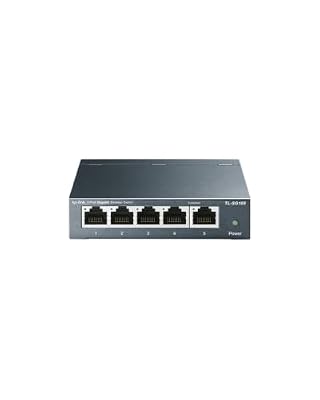
TP-Link TL-SG105, 5-Port Gigabit Unmanaged Ethernet Switch, Network Hub, Ethernet Splitter, Plug & Play, Fanless Metal Design, Shielded Ports, Traffic Optimization


As an Amazon Associate we earn from qualifying purchases. Product prices and availability are accurate as of the date/time indicated.

NETGEAR 5-Port Gigabit Ethernet Unmanaged Network Switch (GS305) | Home Network Hub, Office Ethernet Splitter, Plug-and-Play, Silent Operation, Desktop or Wall Mount, Essentials Model


As an Amazon Associate we earn from qualifying purchases. Product prices and availability are accurate as of the date/time indicated.

TP-Link 8 Port Gigabit Ethernet Network Switch - Ethernet Splitter | Plug & Play | Fanless | Sturdy Metal w/ Shielded Traffic Optimization | Unmanaged | Lifetime Protection (TL-SG108)


As an Amazon Associate we earn from qualifying purchases. Product prices and availability are accurate as of the date/time indicated.

TP-Link LS1005G, LiteWave 5 Port Gigabit Ethernet Unmanaged Switch | Desktop Ethernet Splitter, Unshielded Network Switch, Plug & Play, Fanless Quiet


As an Amazon Associate we earn from qualifying purchases. Product prices and availability are accurate as of the date/time indicated.

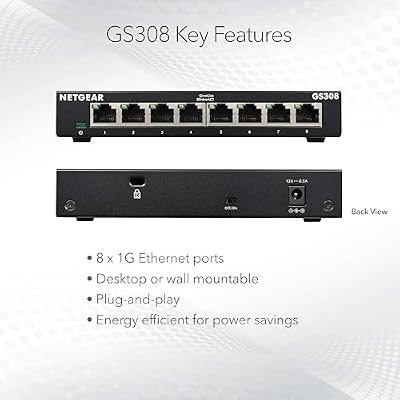
NETGEAR 8-Port Gigabit Ethernet Unmanaged Network Switch (GS308) | Home Network Hub, Office Ethernet Splitter, Plug-and-Play, Silent Operation, Desktop or Wall Mount, Essentials Model


As an Amazon Associate we earn from qualifying purchases. Product prices and availability are accurate as of the date/time indicated.

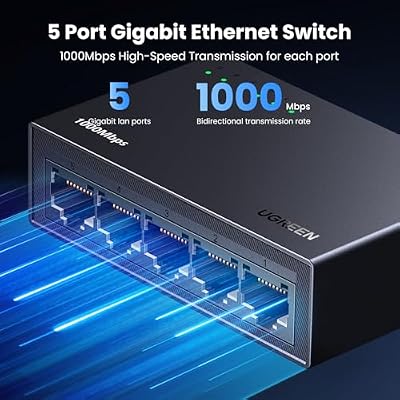
UGREEN Ethernet Switch, 5 Port Gigabit Plug & Play Ethernet Splitter | Wall Mount & Desktop Network Switch Hub, Unmanaged, Compact, with LED, Fanless Quiet, for Internet Cable, Laptop, Router, NAS



As an Amazon Associate we earn from qualifying purchases. Product prices and availability are accurate as of the date/time indicated.

TP-Link TL-SG105S-M2, 5 Port Multi-Gigabit 2.5G Unmanaged Ethernet Switch | Ethernet Splitter, Plug & Play, Desktop/Wall Mount, Silent Operation


As an Amazon Associate we earn from qualifying purchases. Product prices and availability are accurate as of the date/time indicated.

VCELINK 1000Mbps Passive Ethernet Selector, CAT6 Ethernet Switch, 1-Pack | Power-Free Passive Operation, PoE Support, 1000Mbps Ethernet on off Switch


As an Amazon Associate we earn from qualifying purchases. Product prices and availability are accurate as of the date/time indicated.
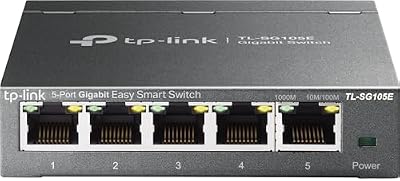
TP-Link 5-Port Gigabit Ethernet Easy Smart Switch | Plug and Play | Desktop | Sturdy Metal w/Shielded Ports | Limited Lifetime Replacement (TL-SG105E), Black


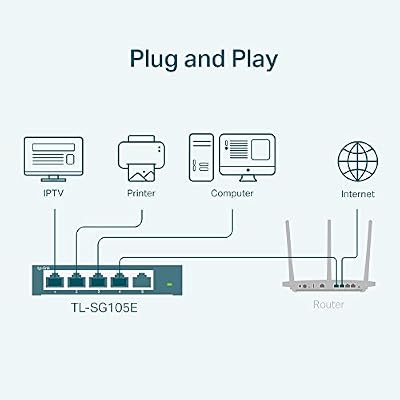

As an Amazon Associate we earn from qualifying purchases. Product prices and availability are accurate as of the date/time indicated.
| Product | Best for | Key spec from the title |
|---|---|---|
| TP-Link TL-SG105 | Small desk setup | 5-port gigabit, fanless metal, shielded ports |
| NETGEAR GS305 | Quiet home network hub | 5-port gigabit unmanaged, silent operation |
| TP-Link 8 Port Gigabit | Mid-size home office | 8 ports, fanless, sturdy metal |
| TP-Link LS1005G | Light, basic splitting | LiteWave 5-port, unshielded, fanless |
| NETGEAR GS308 | Growing wired setups | 8-port gigabit unmanaged, silent |
| UGREEN 5 Port Switch | Wall mounting | Wall mount and desktop, LED, fanless |
| TP-Link TL-SG105S-M2 | Faster NAS and PC links | 5-port multi-gigabit 2.5G |
| TP-Link TL-SG105E | Light network tweaking | Easy Smart, lifetime replacement |
| TP-Link TL-SG116 | Rooms with many devices | 16-port gigabit, desktop or wall mount |
How to Choose
Count ports, then add a spare
Write down every device you want wired, including the uplink cable that goes back to the router, which uses one port by itself. A five-port switch gives four usable ports for devices. Eight ports suit a typical office or living room, and sixteen cover a house with cabling in several rooms. Because new gadgets show up over time, buying one size larger than today’s count avoids a second switch later.
Speed standard: gigabit or 2.5G
Gigabit (1000 Mbps) is plenty for streaming, gaming, and ordinary file sharing. A 2.5G switch such as the TL-SG105S-M2 only pays off when the devices at both ends of a cable also support 2.5G, for example a recent PC, NAS, or router. A fast switch will not speed up a gigabit-only device. Confirm port specifications on your equipment before paying for extra bandwidth.
Unmanaged versus Easy Smart
Unmanaged models work the moment you plug them in. A smart-managed model like the TL-SG105E adds a configuration page for features such as traffic settings. If you have never wanted to change network behavior, skip management and pick plain. If you plan to separate a work laptop from smart-home gadgets, the extra controls could matter. Do not pay for features you will never open.
Housing, noise, and where cheaper models cut corners
Most listings here advertise fanless operation, so noise is not a concern. Metal housings and shielded ports, as in several TP-Link models, resist knocks and interference, while unshielded plastic units save cost. Check mounting options if desk space is tight. The corners budget models cut are usually the case material, the lack of mounting holes, and the absence of any warranty promise, so read those title details closely.
The 9 Best Options
TP-Link TL-SG105
A five-port gigabit unmanaged switch for anyone who simply needs to add a few wired connections behind a monitor or TV. The title lists plug and play use, a fanless metal design, shielded ports, and traffic optimization. It is an easy starting point for a first wired network, and the model number is easy to find if you need a spare. Students with a dorm-room console and a laptop, or remote workers who want a cable to the PC and another to a VoIP phone, are the kind of buyers this size serves well.
- Strength: fanless metal construction keeps it silent and sturdy.
- Strength: shielded ports are named in the title.
- Trade-off: five ports fill up quickly if you add a printer and storage drive.
Skip it if you already have more than four devices to connect.
NETGEAR GS305
This 5-port gigabit unmanaged switch is built for a home network hub, with plug-and-play setup and silent operation as headline features. A desktop-friendly design suits a shelf, a bedside table, or an office corner. People who want a recognizable alternative to TP-Link and no configuration will find the listing straightforward. It also suits a parent setting up a homework corner who would rather not explain network settings to anyone, because the whole job is plugging in cables and power.
- Strength: silent operation is stated outright.
- Strength: plug-and-play behavior means no software setup.
- Trade-off: no management features appear in the title.
Skip it if you want smart-switch tweaks or more than five ports.
TP-Link 8 Port Gigabit Switch
An eight-port gigabit splitter that takes the TL-SG105 idea and gives it more room. The title highlights plug and play, fanless operation, sturdy metal, shielded ports, and traffic optimization in an unmanaged package. A home office with a PC, console, printer, and a few smart devices will not run out of sockets soon. The extra three ports compared with a five-port model are cheap insurance for a future streaming box or a second laptop dock, and the metal case is meant to survive being tucked under a desk.
- Strength: eight ports leave breathing room beyond today’s devices.
- Strength: sturdy metal is listed alongside fanless cooling.
- Trade-off: it is unmanaged, so no per-port control.
Skip it if five ports are enough or you want smart features.
TP-Link LS1005G LiteWave
A lightweight option for shoppers who want a basic desktop splitter with five gigabit ports. The title is upfront that it is an unshielded network switch with plug-and-play setup and fanless, quiet operation, which makes it a modest pick for light home use like a TV cabinet. A renter who needs to link a smart TV, a game console, and a streaming box without drilling into walls will find the plain design adequate, as long as the cable runs stay short and tidy.
- Strength: honest labeling about being unshielded avoids surprises.
- Strength: quiet, fanless design suits living rooms.
- Trade-off: it lacks the shielded ports and metal case found on other TP-Link models.
Skip it if the cables run near noisy electronics or you want a rugged case.
NETGEAR GS308
The eight-port sibling of the GS305, aimed at people growing from a small hub to a fuller home network. The title lists gigabit unmanaged operation, plug-and-play setup, and silent operation, with a desktop form factor suited to an office or media console. A household with a gaming PC, a console, a work laptop dock, and a printer can wire all of it and still have a port left, which keeps the router’s own jacks free for the modem and a mesh node.
- Strength: eight gigabit ports give room for consoles, PCs, and streaming gear.
- Strength: silent operation again suits shared living spaces.
- Trade-off: it offers no smart management, according to the listing.
Skip it if you want fewer ports in a smaller footprint.
UGREEN 5 Port Ethernet Switch
The most flexible placement option in the group: the title states wall mount and desktop use, a compact body, an LED indicator, and fanless operation. Renters who prefer cables hidden behind a TV or inside a closet will appreciate the mounting choice. Because the body is compact, it also fits next to a modem on a small shelf, where a larger metal unit might crowd the other equipment around it.
- Strength: both wall and desktop placement are supported.
- Strength: LED lights make it easy to see activity at a glance.
- Trade-off: only five gigabit ports, same as cheaper rivals.
Skip it if you need eight or more ports.
TP-Link TL-SG105S-M2
This is the multi-gigabit option, with five 2.5G ports in an unmanaged, plug-and-play body that works on a desktop or wall. It speaks to buyers who already have 2.5G gear, such as a recent PC, router, or storage box, and want the switch to keep pace. Video editors moving large project files to a storage box are a typical example, because the faster link only helps when each side of the cable can use it. Otherwise, a gigabit switch is the more sensible spend.
- Strength: 2.5G ports allow faster links between compatible devices.
- Strength: desktop and wall mounting plus silent operation are listed.
- Trade-off: the speed boost is wasted if your devices only support gigabit.
Skip it if nothing on your network supports 2.5G.
TP-Link TL-SG105E Easy Smart
For those who want a little control without a full managed switch, this five-port gigabit unit is labeled Easy Smart. The title also mentions plug and play, desktop use, sturdy metal with shielded ports, and a limited lifetime replacement. A hobbyist who wants to peek at port activity, or a freelancer who may later separate guest or smart-home traffic, gets room to grow without leaving the entry tier.
- Strength: the lifetime replacement terms reduce long-term risk.
- Strength: smart features can be left alone until needed.
- Trade-off: only five ports for an enhanced switch.
Skip it if you will never open a settings page.
TP-Link TL-SG116
A sixteen-port gigabit unmanaged switch for homes wired room by room or a small shop. The title lists desktop or wall mounting, a fanless build, sturdy metal with shielded ports, and traffic optimization. A family home with wall jacks in the living room, bedrooms, and office can patch everything into one box in a utility closet, or a small studio can hang it above a desk and keep the floor clear.
- Strength: sixteen ports mean one switch can serve many devices.
- Strength: wall mounting helps tidy cabling.
- Trade-off: it is overkill for a single desk setup.
Skip it if you only have a handful of devices.
Which One Fits Your Situation
A console, PC, and TV on one shelf
The NETGEAR GS305 or the TP-Link TL-SG105 handles this with room for one extra device and silent running.
A home office with printer, NAS, and several PCs
Move up to the TP-Link 8 Port Gigabit or the NETGEAR GS308. Eight ports keep the desk uncluttered without a second box.
A 2.5G router and a fast storage drive
The TP-Link TL-SG105S-M2 is the only multi-gigabit choice listed, which matters when both ends of the cable support it.
A closet or wall-mounted network
The UGREEN 5 Port Switch fits small spaces, while the TP-Link TL-SG116 suits a full house with many wall jacks.
Common Mistakes
- Forgetting that the uplink to the router uses one port.
- Paying for 2.5G when every connected device is gigabit-only.
- Choosing a smart model and never using its features.
- Ignoring mounting needs, then finding the switch has no wall option.
- Counting a passive on/off selector as a switch. The VCELINK-style selector only toggles one cable and does not split a connection, so it was not reviewed here.
Related guides
- Gaming Chairs For Back Pain With Lumbar Support
- Gaming Keyboards For Fps With Rapid Trigger
- Travel Backpack With Laptop Compartment
Frequently Asked Questions
Does a switch slow down my internet?
Not noticeably. A switch passes traffic at line speed, and your internet connection is still limited by your plan and router.
Do I need a managed switch at home?
Most homes do not. Unmanaged models work immediately, while Easy Smart adds optional settings for people who like to adjust their network.
Will a 2.5G switch work with gigabit devices?
Yes, devices connect at the speed they support. You only gain 2.5G speed on links where both ends support it.
Can I plug one switch into another?
Yes, a short cable between them extends the network. Keep chains short to avoid confusing cable runs.
Top picks from this guide
TP-LinkTP-Link LS1005G, LiteWave 5 Port Gigabit Ethernet Unmanaged Switch |…VCELINKVCELINK 1000Mbps Passive Ethernet Selector, CAT6 Ethernet Switch, 1-Pack |…NETGEARNETGEAR 5-Port Gigabit Ethernet Unmanaged Network Switch (GS305) | Home…TP-LinkTP-Link 8 Port Gigabit Ethernet Network Switch - Ethernet Splitter…