🛒 Best Price Today on Amazon
Prime members get fast, free shipping on everything above, plus member-only deals. New members get a 30-day free trial — cancel anytime.
Wi-Fi is fine until the router sits on the ground floor and the console, desktop, or smart TV lives in a bedroom two floors up behind a brick wall. A powerline kit solves that by sending the network signal across the electrical wiring you already have, so one adapter plugs in next to the router and the other plugs in wherever you need a wired port. For a gamer, the appeal is simple: a cable-like connection without drilling holes or running Ethernet down a staircase.
This guide is for buyers who want a working kit under 100 dollars, which in 2026 covers everything from entry-level speed classes to kits that bundle a Wi-Fi extender. The nine kits and add-on units below range from a 100 Mbps nano pair to an AV2000 unit with two gigabit ports, so the real question is not which one is fastest on the box, but which one matches your router port, your wall outlets, and whether you also need wireless coverage at the far end.
Quick Picks

TP-Link AV2000 Powerline Ethernet Adapter, Passthrough, 2 Gigabit Ports | Powerline Network Adapter, 2x2 MIMO, Ethernet Over Power, Plug Pair & Play, Power Saving (TL-PA9020P KIT)


As an Amazon Associate we earn from qualifying purchases. Product prices and availability are accurate as of the date/time indicated.

TP-Link AV600 Powerline Ethernet Adapter Kit with 100 Mbps Port | Plug Pair &Play, Power Saving, Nano Sized Powerline Network Adapter (TL-PA4010 KIT)


As an Amazon Associate we earn from qualifying purchases. Product prices and availability are accurate as of the date/time indicated.

TP-Link AV1000 Powerline Ethernet Adapter KIT - Gigabit Port, Nano Size | Plug Pair &Play, Ethernet Over Power, Power Saving Mode, Network Adapter (TL-PA7017 KIT)


As an Amazon Associate we earn from qualifying purchases. Product prices and availability are accurate as of the date/time indicated.

TP-Link AV1000 Powerline Ethernet Adapter, Gigabit Port, Add-On Unit | Nano Size, Plug Pair & Play, Ethernet Over Power, Power Saving Mode, Network Adapter (TL-PA7017)


As an Amazon Associate we earn from qualifying purchases. Product prices and availability are accurate as of the date/time indicated.

TP-Link AV1000 Powerline Ethernet Adapter WiFi Extender Kit, Passthrough | Includes AV1000 Powerline Adapter and AC1200 Dual Band Extender, Gigabit Port, OneMesh, Plug Pair & Play (TL-WPA7617 KIT)


As an Amazon Associate we earn from qualifying purchases. Product prices and availability are accurate as of the date/time indicated.

TP-Link AV1000 Powerline Ethernet Adapter+AX1500 Wi-Fi 6 WiFi Extender KIT | AV1000 Powerline Network Adapter&AX1500 Dual-Band Extender, Gigabit Port, EasyMesh, Plug & Play, TL-WPA7817 KIT


As an Amazon Associate we earn from qualifying purchases. Product prices and availability are accurate as of the date/time indicated.

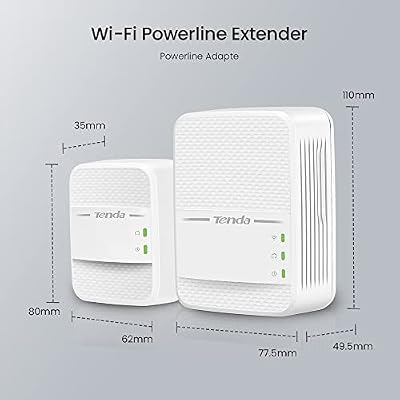
Tenda AV1000 WiFi Powerline Adapter Kit with Gigabit Ports, Powerline Extender with AC650 Dual Band WiFi, Plug and Play, for HD/3D/4K Video Streaming and Gaming (PH10)


As an Amazon Associate we earn from qualifying purchases. Product prices and availability are accurate as of the date/time indicated.

TRENDnet Powerline 500 AV Nano Adapter Kit,TPL-406E2K,Plug & Play Install | Includes 2 x TPL-406E Adapters, Cross Compatible With Powerline 600-500-200, Windows 10, 8.1, 8, 7, Vista, XP


As an Amazon Associate we earn from qualifying purchases. Product prices and availability are accurate as of the date/time indicated.
| Product | Best for | Key spec from the title |
|---|---|---|
| TP-Link AV2000 kit | Two wired devices at the far end | 2 gigabit ports, passthrough, 2×2 MIMO |
| TP-Link AV600 TL-PA4010 KIT | Basic streaming on the cheapest path | AV600 with a 100 Mbps port, nano size |
| TP-Link AV1000 passthrough kit | Keeping the wall outlet usable | Gigabit port, passthrough, noise filtering |
| TP-Link AV1000 nano kit | Tight outlet spaces | Gigabit port, nano size, power saving mode |
| TP-Link AV1000 add-on unit | Expanding an existing AV1000 setup | Single unit, gigabit port, nano size |
| TP-Link AV1000 with AC1200 extender | Wired port plus dual-band Wi-Fi | AC1200 dual band extender, passthrough |
| TP-Link AV1000 with AX1500 extender | Wired port plus Wi-Fi 6 coverage | AX1500 Wi-Fi 6 dual-band extender |
| Tenda AV1000 WiFi kit | Streaming video in a room with weak Wi-Fi | AC650 dual band Wi-Fi, gigabit ports |
| TRENDnet Powerline 500 AV nano kit | Older networks and simple setups | Two TPL-406E adapters, plug and play |
How to Choose
Match the speed class to the job
The AV number on the box is a theoretical link rate shared across the wiring, not the speed you will see in a download. Still, it sorts kits into tiers. An AV600 kit with a 100 Mbps port cannot deliver more than 100 Mbps to your device no matter what the powerline link does, so it suits video streaming and web browsing but not a fast fiber plan. AV1000 kits with a gigabit port remove that ceiling at the Ethernet jack. Check the port line in the listing: a gigabit port is the practical minimum if your internet plan is above 100 Mbps.
Decide whether you need passthrough
Passthrough means the adapter has a built-in outlet, so you do not lose a wall socket. That matters when the only outlet near your desk or TV is already feeding a power strip. Without passthrough, you would need to plug the adapter into the wall and move your other gear elsewhere. Powerline signals can also be degraded when the adapter shares a power strip with noisy electronics, so passthrough models that filter noise are worth a look if the outlet is crowded.
Add Wi-Fi only if you need it at the far end
Some kits pair a powerline adapter with a Wi-Fi extender, such as an AC1200 dual-band or an AX1500 Wi-Fi 6 unit. They make sense when the remote room needs both a wired jack for a console and wireless coverage for phones and laptops. If you only need Ethernet for one device, a plain kit costs less and has fewer settings to manage. Match the extender standard to your devices: Wi-Fi 6 only helps if your phones or laptops support it.
Check wiring, outlets, and expansion
Powerline works best when both outlets share the same electrical circuit and panel. Avoid plugging adapters into surge protectors or extension cords that filter the signal. If you might add a third room later, look for kits where the extra adapter can be bought as an add-on unit within the same family. Compatibility between generations is not guaranteed, so verify that older and newer units can join one network before mixing them. Budget kits usually cut corners on port count, Wi-Fi band support, and noise filtering rather than on the powerline chip itself.
The 9 Best Options
TP-Link AV2000 Powerline Adapter
This is the top speed class in the lineup and the only listing with two gigabit ports on the adapter. That makes it the clear pick for someone who wants to connect both a console and a smart TV, or a PC and a switch, in the same room. The title lists 2×2 MIMO and passthrough, so the outlet stays free.
- Strength: two gigabit ports mean no extra switch for two wired devices.
- Strength: passthrough keeps the wall socket usable.
- Trade-off: the highest speed class is wasted if your router only has a single slow port or your wiring is poor.
Skip it if you only have one device to connect and want the smallest adapter possible.
TP-Link AV600 TL-PA4010 Kit
The TL-PA4010 is the entry point. It is nano sized, advertises a power saving feature, and ships as a pair that you plug in and pair automatically. The catch is the 100 Mbps port named in the title, which caps the connection well below gigabit speeds.
- Strength: nano size blocks fewer outlets.
- Strength: power saving helps if the adapter stays plugged in all day.
- Trade-off: the 100 Mbps port is a hard limit for fast internet plans.
Skip it if you game online on a fiber connection or move large files, since the port will bottleneck you.
TP-Link AV1000 Passthrough Kit
A step up from the nano pair, this kit adds a gigabit port, passthrough, and noise filtering. The noise filtering claim is relevant for rooms where the adapter shares an outlet bank with chargers or a TV. It is the straightforward choice for one wired device and one free outlet.
- Strength: passthrough plus noise filtering suits crowded outlet areas.
- Strength: gigabit port avoids the AV600 bottleneck.
- Trade-off: only one Ethernet port per adapter.
Skip it if you want a smaller nano profile or need a second wired device in the remote room.
TP-Link AV1000 Nano Kit
Same AV1000 class and gigabit port, but without passthrough and in a nano body that sits close to the wall. It lists a power saving mode, making it a decent pick for a set-and-forget bedroom setup. If the outlet is the only socket you can reach, though, the lack of passthrough matters.
- Strength: nano size fits behind furniture and in tight spots.
- Strength: gigabit port with power saving mode.
- Trade-off: no passthrough outlet listed in the title.
Skip it if the outlet is already needed for another plug.
TP-Link AV1000 Add-On Unit
This is a single adapter, not a pair. It is intended to join an existing compatible AV1000 setup, so it is the right buy only if you already own a matching kit. Use it to add a third room, such as a garage workstation, without paying for another full pair.
- Strength: lowest cost way to extend an existing network.
- Strength: gigabit port and nano size match the kit in the same family.
- Trade-off: it does nothing alone.
Skip it if you are starting from scratch with no existing powerline adapter.
TP-Link AV1000 with AC1200 Wi-Fi Extender Kit
This bundle combines an AV1000 powerline adapter with an AC1200 dual-band extender, plus passthrough and a gigabit port. It suits a remote room that needs one wired console or PC and wireless for everything else. Having both pieces in one purchase simplifies setup compared with buying them separately.
- Strength: wired and wireless in one kit.
- Strength: dual-band AC1200 coverage with a gigabit port.
- Trade-off: Wi-Fi 5 is older than the Wi-Fi 6 option below.
Skip it if you have no need for extra wireless coverage and just want a wired link.
TP-Link AV1000 with AX1500 Wi-Fi 6 Extender Kit
The newer pairing swaps in an AX1500 Wi-Fi 6 dual-band extender alongside the AV1000 powerline adapter and gigabit port. It is the better pick for households with phones, tablets, and laptops that already support Wi-Fi 6 and want the extended room to use the newer standard.
- Strength: Wi-Fi 6 extender with dual-band support.
- Strength: AV1000 powerline backbone with a gigabit port.
- Trade-off: the extra Wi-Fi hardware is wasted if your devices only support older standards.
Skip it if your router and client devices are all older Wi-Fi 5 gear.
Tenda AV1000 WiFi Powerline Kit
Tenda pairs an AV1000 powerline link with an AC650 dual-band Wi-Fi unit and gigabit ports, and the title points to HD, 3D, and 4K video streaming. It is a sensible compromise for a bedroom or den where you want one wired device and a usable wireless signal without the larger extender footprint.
- Strength: built-in dual-band Wi-Fi at the remote end.
- Strength: gigabit ports and plug-and-play setup.
- Trade-off: AC650 is a lower Wi-Fi tier than the AC1200 or AX1500 kits.
Skip it if the remote room has many wireless devices that will strain a modest Wi-Fi class.
TRENDnet Powerline 500 AV Nano Kit
The TPL-406E2K includes two TPL-406E adapters and is aimed at plug-and-play simplicity. The Powerline 500 class is the oldest speed tier here, and the listing mentions compatibility with other powerline generations, which can help if you already own earlier adapters.
- Strength: nano size with straightforward setup.
- Strength: listed as cross compatible with other powerline generations.
- Trade-off: the 500 class is the slowest tier in this guide.
Skip it if you want gigabit-class headroom for modern internet plans.
Which One Fits Your Situation
You want a console and a TV wired in the same room
Go with the TP-Link AV2000. Two gigabit ports on the adapter remove the need for a separate switch, and passthrough keeps the outlet free for a power strip.
The remote room needs both wired and wireless
The TP-Link AV1000 with AX1500 extender is the better fit if your devices support Wi-Fi 6. If they do not, the AC1200 bundle gives similar function at an older standard, and the Tenda kit works for lighter wireless needs.
You have an existing AV1000 kit and want one more room
Buy the TP-Link AV1000 add-on unit. It joins the family you already own, so you avoid paying for a second full pair.
You only need to stream video on a budget
The TP-Link AV600 TL-PA4010 kit or the TRENDnet Powerline 500 pair will cover streaming and browsing, as long as your connection is not fast enough to need gigabit at the wall.
Common Mistakes
- Plugging an adapter into a surge protector or extension cord, which can weaken or block the signal.
- Buying an AV600 kit with a 100 Mbps port and expecting gigabit speed from a fast internet plan.
- Assuming any two adapters will pair, instead of checking that they belong to compatible generations.
- Ignoring which outlets share a circuit; adapters on separate panels often perform poorly.
- Paying for a Wi-Fi 6 extender when none of your devices support Wi-Fi 6.
Related guides
- Gaming Chairs For Back Pain With Lumbar Support
- Gaming Keyboards For Fps With Rapid Trigger
- Travel Backpack With Laptop Compartment
Frequently Asked Questions
Does a powerline adapter work in any room?
It needs both outlets to be on the same electrical system, and results vary by wiring age and noise. Test pairing in the rooms you plan to use before committing to a final layout.
Is AV2000 twice as fast as AV1000?
The numbers describe the maximum link rate on the box, not guaranteed throughput. Real speeds depend on wiring quality and the distance between outlets, so treat the label as a tier rather than a promise.
Can I mix kits from different brands?
Sometimes, but the listing should state cross-brand compatibility. The TRENDnet kit mentions compatibility with other powerline generations, while mixing other brands is safer when both adapters follow the same standard.
Do I need a powerline kit with Wi-Fi?
Only if the far room needs wireless coverage too. If you plan to plug in a console or PC, a wired-only kit is simpler and usually cheaper.
Top picks from this guide
TP-LinkTP-Link AV1000 Powerline Ethernet Adapter WiFi Extender Kit, Passthrough |…TRENDnetTRENDnet Powerline 500 AV Nano Adapter Kit,TPL-406E2K,Plug & Play Install…TP-LinkTP-Link AV600 Powerline Ethernet Adapter Kit with 100 Mbps Port…TendaTenda AV1000 WiFi Powerline Adapter Kit with Gigabit Ports, Powerline…