🛒 Best Price Today on Amazon
Prime members get fast, free shipping on everything above, plus member-only deals. New members get a 30-day free trial — cancel anytime.
The classic situation: you built or bought a desktop, the router lives two rooms away, and running a cable through the wall is not happening. A USB Wi-Fi adapter is the fix, and under 100 dollars it is easy to overspend on speed your connection cannot deliver. The real decisions are which Wi-Fi generation your router speaks, whether the adapter needs a USB 3.0 port, and whether a small dongle or an antenna-on-a-stand design will hold a signal through your walls.
This guide is for desktop owners, laptop users with a failing internal card, and anyone setting up a gaming PC far from the router. The listings run from tiny AC600 nanos to AX1800 Wi-Fi 6 adapters with external antennas. As 2026 router upgrades become common, a Wi-Fi 6 adapter is worth considering, but an older router will not benefit, so match the adapter to the network you actually have.
Quick Picks

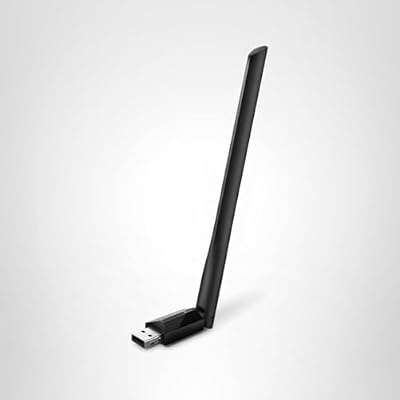
TP-Link AC600 USB WiFi Adapter for Desktop PC - USB Wireless Adapter for PC | WiFi dongle for PC with 2.4GHz, 5GHz High Gain Dual Band 5dBi Antenna, Supports Win11/10/8.1/8/7/XP, Black (Archer T2U Plus)


As an Amazon Associate we earn from qualifying purchases. Product prices and availability are accurate as of the date/time indicated.

TP-Link Nano AC600 USB WiFi Adapter for Desktop PC- 2.4G/5G Dual Band | USB Wireless Adapter, Travel Size Network Transceiver WiFi dongle, Support Windows (11,10, 8.1, 8, 7, XP/Mac OS X 10.9-10.14)


As an Amazon Associate we earn from qualifying purchases. Product prices and availability are accurate as of the date/time indicated.

TP-Link AC1300 USB WiFi Adapter for Desktop PC 2.4/5G Dual Band WiFi Dongle | Wireless Adapter for PC, MU-MIMO PC WiFi Adapter, USB 3.0, Support Win11, 10, 8.1, 8, 7, XP/Mac OS X 10.9-10.14 (Archer T3U)


As an Amazon Associate we earn from qualifying purchases. Product prices and availability are accurate as of the date/time indicated.

UGREEN WiFi Adapter for Desktop PC, AX900 USB WiFi 6 Adapter | 5GHz/2.4GHz Dual Band, Built-in Driver for Windows 10/11


As an Amazon Associate we earn from qualifying purchases. Product prices and availability are accurate as of the date/time indicated.

TP-Link USB WiFi 6 Adapter for Desktop PC,AX1800 Dual Band WiFi Antenna | USB Wireless Network Adapter with 2.4/5GHz, High Gain 5dBi Antenna, WPA3, MU-MIMO Supports Windows 11/10 (Archer TX20U Plus)


As an Amazon Associate we earn from qualifying purchases. Product prices and availability are accurate as of the date/time indicated.

USB WiFi Adapter, AC600 Mbps Dual Band 2.4/5Ghz Wireless Mini Network Adapter 802.11 , Support PC Desktop Laptop MAC Book Windows Notebook


As an Amazon Associate we earn from qualifying purchases. Product prices and availability are accurate as of the date/time indicated.

TP-Link USB WiFi 6 Adapter for PC-1800 Mbps, High Gain Antennas, 5/2.4GHz | USB 3.0 WiFi Dongle, Plug and Play Wireless Adapter for Desktop, 2×High Gain Antenna, WPA3, Win11/10 Only (Archer TX30U Plus)


As an Amazon Associate we earn from qualifying purchases. Product prices and availability are accurate as of the date/time indicated.

Nineplus Wireless USB WiFi Adapter for PC - 1300Mbps Dual 5Dbi Antennas 5G/2.4G WiFi Adapter for Desktop PC Laptop Windows11/10/7, Wireless Adapters for Desktop Computer Network Adapters


As an Amazon Associate we earn from qualifying purchases. Product prices and availability are accurate as of the date/time indicated.
| Product | Best for | Key spec from the title |
|---|---|---|
| TP-Link AC600 (high-gain antenna) | Budget desktop upgrade | AC600 dual band, 5dBi high-gain antenna |
| TP-Link Nano AC600 | Laptops and travel | Nano size, 2.4G/5G dual band |
| TP-Link AC1300 | Mid-speed gaming | AC1300, MU-MIMO, USB 3.0 |
| UGREEN AX900 WiFi 6 | Easy driverless setup | AX900 Wi-Fi 6, built-in driver, Windows 10/11 |
| TP-Link AX1800 (5dBi antenna) | Wi-Fi 6 desktop | AX1800, 5dBi antenna, WPA3 |
| AC600 Dual-Band Mini Adapter | Simplest low-cost option | AC600 dual band, mini size |
| TP-Link AX1800 USB 3.0 (dual antennas) | Strongest signal reach | 1800 Mbps, USB 3.0, 2 high-gain antennas |
| Nineplus AC1300 | Dual-antenna Wi-Fi 5 | 1300Mbps, dual 5dBi antennas |
How to Choose
Match the Wi-Fi generation to your router
AC means Wi-Fi 5, and AX means Wi-Fi 6. An AX adapter on an AC router works but runs at Wi-Fi 5 speeds. If your router predates Wi-Fi 6, an AC1300 unit is often the sensible value pick, while an AX1800 makes sense when you have or plan to buy a newer router.
USB 3.0 for faster speeds
Speeds beyond roughly 480 megabits per second really need a USB 3.0 port, since USB 2.0 throttles the link. The AC600 class works fine on USB 2.0, but the AC1300 and AX1800 should go into a blue or labeled USB 3 port. A short extension cradle can also pull the adapter away from the noisy back of a case.
Antennas versus nano designs
External antennas aim a stronger signal through walls and floors, which helps when the router is distant. Nano adapters stay almost flush with the port, so they are ideal for laptops but weaker at range. If the router is far from your desk, favor antennas; if you move around, favor nano.
Drivers, security, and what to ignore
Plug-and-play and built-in drivers save a trip to a second computer to download software. Look for WPA3 support if your router offers it. Ignore speed totals that add the 2.4GHz and 5GHz bands together, because no single connection reaches that number. The 5GHz band is faster but shorter-range, while 2.4GHz travels farther through walls at lower speeds, so a dual-band adapter lets your PC pick whichever suits the room. Where budget models cut corners is antenna quality and driver updates.
The 8 Best Options
TP-Link AC600 (high-gain antenna)
A dual-band AC600 adapter with a 5dBi high-gain antenna, positioned for desktop PCs. It is the value choice when your router is in the same house but not the same room, and your main uses are browsing, video calls, and streaming. The external antenna can be angled for a better signal, which matters because a desktop tower often sits on the floor or behind a monitor where reception is worst. For a bedroom or a spare-room PC, it is a sensible first step before anything fancier.
- Strength: An external antenna improves reach over bare nano sticks.
- Strength: Dual band gives you both 2.4GHz and 5GHz options.
- Trade-off: AC600 speeds are modest for large downloads.
Skip it if you game competitively or move large files often.
TP-Link Nano AC600
A travel-size AC600 adapter on 2.4G and 5G dual band. It barely sticks out of the port, which suits laptops, work trips, and anyone who bumps ports often. Because it has no external antenna, range is its limitation, and it works best when the router is nearby. People who swap between a home desk and a coffee shop will like that it can stay plugged in while the laptop goes into a bag, though a stiff knock can still strain the port, so remove it when packing.
- Strength: Tiny and unobtrusive in a laptop port.
- Strength: Dual band flexibility for crowded areas.
- Trade-off: Lower range with no external antenna.
Skip it if your router is several rooms away.
TP-Link AC1300
An AC1300 adapter with MU-MIMO and a USB 3.0 interface, with Windows 11 support listed. MU-MIMO helps when several devices share the router, and the USB 3.0 connection gives the speed ceiling room to breathe. It suits a gaming or streaming desktop on a Wi-Fi 5 router. A household where a phone, a TV, and a console all use the router at once is where multi-user features earn their keep. Plug it into a USB 3 port, ideally on the front or top of the case, for the cleanest connection.
- Strength: USB 3.0 lets the adapter run at full speed.
- Strength: MU-MIMO helps in busy households.
- Trade-off: Wi-Fi 5 only, with no Wi-Fi 6 gains.
Skip it if your router is already Wi-Fi 6 and you want those features.
UGREEN AX900 WiFi 6
A Wi-Fi 6 adapter at AX900 with 5GHz and 2.4GHz dual band and a built-in driver for Windows 10 and 11. The built-in driver means plug-in-and-go, which is a relief when a PC has no other internet access. It suits someone who wants the newest standard without more configuration. A fresh Windows install has no network drivers for many adapters, so a plug-in-and-go design removes that catch-22 and lets a new build reach Windows Update straight away.
- Strength: Built-in driver simplifies setup.
- Strength: Wi-Fi 6 for newer routers.
- Trade-off: AX900 is below the AX1800 models in listed speed.
Skip it if you need long-range antennas or top speed.
TP-Link AX1800 (5dBi antenna)
A Wi-Fi 6 adapter at AX1800, dual band, with a high-gain 5dBi antenna and WPA3 security listed. It targets desktops that need a modern link to a modern router, with the antenna helping the signal reach through obstructions. Wi-Fi 6 also handles crowded apartment buildings better than older standards, because it manages many devices more efficiently. Buyers with a recent router and a desktop that sits far from it get the most out of this one.
- Strength: Wi-Fi 6 speed class with WPA3 security.
- Strength: External high-gain antenna aids range.
- Trade-off: Needs a Wi-Fi 6 router to show its benefits.
Skip it if your router is older, since the extra cost buys nothing.
AC600 Dual-Band Mini Adapter
A generic AC600 dual-band mini adapter that lists support for desktops, laptops, Mac, and Windows machines. Its pitch is simplicity and broad compatibility. The title names no major brand, so check support pages and driver availability before relying on it. For a spare computer, a guest machine, or a quick fix on an old laptop, a plain adapter like this does the job, but it is not the one to trust for a main work PC that must stay online.
- Strength: Small and simple for basic connections.
- Strength: Broad listed compatibility, including Mac.
- Trade-off: Less-known maker, so driver support may be thin.
Skip it if you want the reassurance of an established networking brand.
TP-Link AX1800 USB 3.0 (dual antennas)
A Wi-Fi 6 adapter at 1800 Mbps with USB 3.0, plug-and-play setup, and two high-gain antennas. The pair of antennas is its selling point for distance, which helps in homes with several walls between desk and router. Because the speed class needs a fast port, plug it into a USB 3 socket and use a short extension cradle to keep it away from metal. It is the adapter that gets the most out of a Wi-Fi 6 router across a big house.
- Strength: Two high-gain antennas improve reach.
- Strength: USB 3.0 supports the AX1800 speed class.
- Trade-off: Larger footprint on the back of a PC.
Skip it if desk space is tight or your router is Wi-Fi 5.
Nineplus AC1300
A 1300Mbps dual-band adapter with two 5dBi antennas, listing Windows 11, 10, and 7 support. It is the Wi-Fi 5 option for people who want antennas and extra speed without moving to Wi-Fi 6. The extra Windows version coverage is helpful for older machines that still run a previous release, which most newer adapters no longer mention. It is a reasonable pick for a secondary desktop in a basement or an upstairs office.
- Strength: Dual antennas for range.
- Strength: Supports older Windows versions too.
- Trade-off: Lesser-known brand than the TP-Link or UGREEN options.
Skip it if you want a bigger-name support network or the simplest possible setup.
Which One Fits Your Situation
Your router is far from your desktop
Pick the TP-Link AX1800 USB 3.0 with dual antennas, or the Nineplus AC1300 if your router is Wi-Fi 5. Both pair two antennas with a fast port, and a USB extension cradle lets you place them on the desk top where the signal is clearest.
You travel with a laptop
The TP-Link Nano AC600 stays flush with the port and is easy to pack. It slips into a laptop bag, so there is little to pack or forget.
You just built a new PC with no internet access
The UGREEN AX900 WiFi 6 has a built-in driver, so you can get online quickly and download the rest.
Your router is a few years old
The TP-Link AC1300 delivers solid speed with MU-MIMO and avoids paying for Wi-Fi 6. That leaves budget for a better router later, at which point you could move up to a Wi-Fi 6 adapter.
Common Mistakes
- Buying Wi-Fi 6 for a Wi-Fi 5 router and expecting an upgrade.
- Plugging a fast adapter into a USB 2.0 port.
- Judging by the combined band speed number.
- Putting the adapter behind the case where metal blocks the signal.
- Skipping driver checks for unknown brands.
Related guides
- Gaming Chairs For Back Pain With Lumbar Support
- Gaming Keyboards For Fps With Rapid Trigger
- Travel Backpack With Laptop Compartment
Frequently Asked Questions
Is a USB adapter better than the built-in Wi-Fi on my laptop?
Sometimes, when the built-in card is old or damaged. A modern external adapter can add Wi-Fi 6 or stronger antennas.
Do I need drivers?
Some adapters have built-in drivers. Others require a download, so keep a spare connection handy, such as a phone hotspot or an Ethernet cable, so you can fetch the software the first time.
Will it work on Mac or Linux?
Only if the listing says so. Check supported operating systems before buying.
Can it replace Ethernet?
For many uses, yes, but wired connections remain steadier for competitive gaming. If a cable is possible, it still beats any adapter for consistent latency.