🛒 Best Price Today on Amazon
Prime members get fast, free shipping on everything above, plus member-only deals. New members get a 30-day free trial — cancel anytime.
A desktop with no wireless is a common situation for builders: most boards below the top tier ship with Ethernet only, or with a Wi-Fi chip two generations behind your router. A PCIe Wi-Fi card fixes that in a few minutes, and with a ceiling of under 300 dollars, you are not limited to the cheapest option. The question is how much wireless standard you actually need, because the jump from Wi-Fi 6 to 6E to 7 changes both the radio bands and the router you must own to benefit.
These nine cards suit builders who run a desktop far from the router, gamers chasing lower latency, and anyone adding Bluetooth for headsets and controllers. The comparison relies only on what each listing states: standard, band count, Bluetooth version, chipset, antenna design, and platform support. When a title is vague about something like drivers, we point out what to confirm. In 2026, the practical divide is simple: Wi-Fi 6 cards are for dual-band homes, 6E adds a clean 6 GHz band, and Wi-Fi 7 only pays off with a Wi-Fi 7 router.
Quick Picks

TP-Link WiFi 6 PCIe WiFi Card for Desktop PC- AX1800 Dual Band,Bluetooth5.2 | Network Card, WPA3, 5/2.4Ghz, 802.11ax Wireless Adapter, MU-MIMO, Ultra-Low Latency, Support Win11, 10 Only (Archer TX20E)


As an Amazon Associate we earn from qualifying purchases. Product prices and availability are accurate as of the date/time indicated.

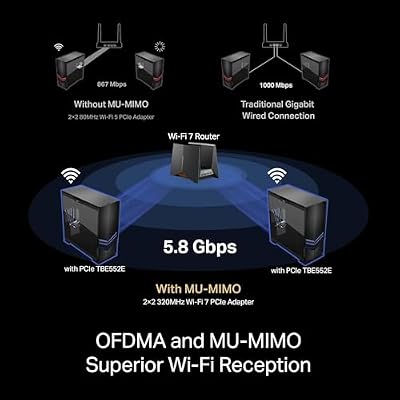
TP-Link BE9300 PCIe WiFi 7 Card for PC|Tri-Band, High-Gain Antenna, BT5.4 | PCIe Network Card| MLO, WPA3, 6/5/2.4GHz, Support AMD/Intel Motherboard, Not Compatible with Win10/Linux (Archer TBE552E)




As an Amazon Associate we earn from qualifying purchases. Product prices and availability are accurate as of the date/time indicated.

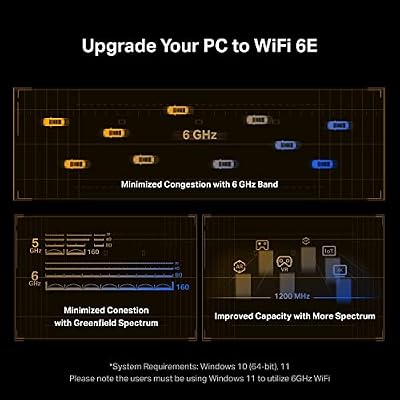
TP-Link WiFi 6E AXE5400 PCIe WiFi Card for PC, Tri Band BT5.3, Intel AX210 | WPA3, 802.11ax Wireless Adapter with MU-MIMO, OFDMA, Ultra-Low Latency, for Windows 10,11 - Archer TXE72E



As an Amazon Associate we earn from qualifying purchases. Product prices and availability are accurate as of the date/time indicated.
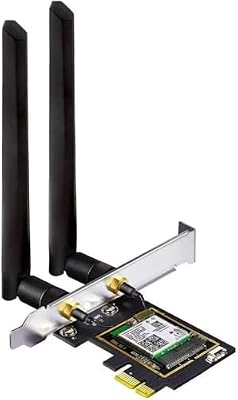
OKN WiFi 6E AX5400 PCIe WiFi Card for Desktop PC (Intel AX210) Bluetooth 5.3, WPA3, 802.11AXE Tri Band Wireless Adapter with MU-MIMO, OFDMA, Ultra-Low Latency, Supports Windows 11, 10 (64bit)


As an Amazon Associate we earn from qualifying purchases. Product prices and availability are accurate as of the date/time indicated.

TP-Link WiFi 6E Intel AX210 AXE5400 PCIe WiFi Card for PC - Magnetic Base | Tri Band Wireless Adapter for Desktop PC Dual Antenna, Bluetooth 5.3 (USB Port), WPA3, MU-MIMO, OFDMA,802.11ax- Archer TXE75E


As an Amazon Associate we earn from qualifying purchases. Product prices and availability are accurate as of the date/time indicated.

TP-Link WiFi 7 BE9300 PCIe WiFi Card for Desktop PC| Tri-Band,BT5.4 w/Base | 6/5/2.4GHz, Multicolor Status LED Wireless Adapter, Support AMD/Intel, Not Compatible with Windows 10/Linux-Archer TBE550E


As an Amazon Associate we earn from qualifying purchases. Product prices and availability are accurate as of the date/time indicated.

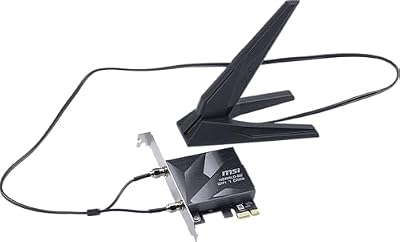
MSI Herald WiFi 7 PCIe Card for Desktop PC BE9400 Tri-Band, Bluetooth 5.4, 6GHz, MLO, 320MHz, 5.8Gbps


As an Amazon Associate we earn from qualifying purchases. Product prices and availability are accurate as of the date/time indicated.

BZIZU WiFi 6 PCIe Card - Intel AX200, 3000Mbps Dual Band, Bluetooth 5.2 | Low-latency gaming, 4K streaming, Windows 11/10, WPA3, MU-MIMO, dual 5dBi antennas, low-profile bracket


As an Amazon Associate we earn from qualifying purchases. Product prices and availability are accurate as of the date/time indicated.

WiFi 6E AX210 WiFi Card,PCIe WiFi Wireless Network Card with Bluetooth 5.3,AX5400 Tri-Band PC Wireless Card,Supports OFDMA & MU-MIMO, Ultra-Low Latency, WPA3, Low-Profile Bracket, Windows 10/11


As an Amazon Associate we earn from qualifying purchases. Product prices and availability are accurate as of the date/time indicated.
| Product | Best for | Key spec from the title |
|---|---|---|
| TP-Link AX1800 WiFi 6 Card | Dual-band homes on a budget | AX1800, Bluetooth 5.2, WPA3 |
| TP-Link BE9300 WiFi 7 Card | Wi-Fi 7 routers | Tri-band, MLO, Bluetooth 5.4, high-gain antenna |
| TP-Link AXE5400 WiFi 6E Card | Clean 6 GHz without a premium | Intel AX210, tri-band, Bluetooth 5.3 |
| OKN AX5400 WiFi 6E Card | Alternative 6E option | Intel AX210, tri-band, Bluetooth 5.3 |
| TP-Link AXE5400 with Magnetic Base | Repositionable antennas | Intel AX210, dual antenna, magnetic base |
| TP-Link BE9300 with Base and LED | Wi-Fi 7 with an antenna base | Tri-band, Bluetooth 5.4, multicolor status LED |
| MSI Herald WiFi 7 | Fastest listed link rate | BE9400, 320MHz, 5.8Gbps |
| BZIZU AX200 WiFi 6 Card | Older dual-band routers | Intel AX200, 3000Mbps, dual 5dBi antennas |
| AX210 WiFi 6E Card (generic) | Lowest-fuss 6E upgrade | AX5400 tri-band, Bluetooth 5.3 |
How to Choose
Match the card to your router
A card can only use the standard your router speaks. If your router is Wi-Fi 6, a Wi-Fi 7 card will connect at Wi-Fi 6 speeds, though it may still add range benefits and newer Bluetooth. Wi-Fi 6E adds the 6 GHz band, which is far less crowded than 5 GHz in apartments. Wi-Fi 7 adds multi-link operation and wider 320MHz channels, and both need a compatible router to show their value.
Understand the speed labels
Numbers like AX1800, AX5400, and BE9300 are combined theoretical maximums across bands, not what a single device will see. A realistic link speed is a fraction of that figure, limited by router, distance, and walls. Use the label to compare tiers, not to promise real throughput, and ignore any card that markets only the biggest number.
Check the chipset and platform support
Intel AX200 and AX210 are common, well-supported chipsets, and several cards here name them. That matters for driver availability and stability. Confirm that your operating system is supported, since listings sometimes mention Windows 11 and 10 only. You also need an open PCIe slot and a free internal USB header if the card uses one for Bluetooth, which is worth checking in the manual.
Look at antennas and mounting
Many desktops hide behind a case, which blocks the signal. Cards with external antennas on a base or a magnetic mount let you place them on the desk or above the case. Higher-gain antennas help in rooms with thick walls. Also check whether the bracket comes in a low-profile version if your case is small.
The 9 Best Options
TP-Link AX1800 WiFi 6 Card
This is the modest, dual-band entry in the list: AX1800 on 5 and 2.4 GHz, Bluetooth 5.2, WPA3 security, and MU-MIMO. It is aimed at a home with a Wi-Fi 6 or older dual-band router, where tri-band features would go unused. Think of it as a sensible cable-free upgrade for a desktop with no wireless at all. The lack of a 6 GHz band keeps it affordable, and for a household that mostly browses, streams, and video-calls, that is a fair trade. Move the antenna off the back of the case if you can.
- Strength: Bluetooth 5.2 and WPA3 are included in a budget-tier card.
- Strength: dual-band design suits routers without 6 GHz.
- Trade-off: no 6 GHz means no escape from crowded airwaves.
Skip it if your router already supports 6 GHz or Wi-Fi 7.
TP-Link BE9300 WiFi 7 Card
The BE9300 brings Wi-Fi 7 to the desktop with tri-band support, MLO, WPA3, Bluetooth 5.4, and a high-gain antenna. It works with both AMD and Intel boards. MLO lets a device use more than one band at once, which can improve consistency when your router supports it. It is a forward-looking buy for those planning a router upgrade this year, since the card will not need replacing when the new router arrives.
- Strength: Wi-Fi 7 features and Bluetooth 5.4 future-proof the build.
- Strength: supports AMD and Intel platforms.
- Trade-off: benefits only show up with a Wi-Fi 7 router.
Skip it if your router is older and you have no upgrade planned.
TP-Link AXE5400 WiFi 6E Card
This Wi-Fi 6E option uses an Intel AX210 chipset, tri-band radios, Bluetooth 5.3, WPA3, MU-MIMO, and OFDMA, and it advertises ultra-low latency. The 6 GHz band is the main attraction, because it is usually quiet in dense housing. It is the middle-of-the-road pick for people who want modern wireless without paying for Wi-Fi 7.
- Strength: Intel AX210 is a widely supported chip.
- Strength: 6 GHz access reduces interference.
- Trade-off: you need a 6E router to use the third band.
Skip it if your router only broadcasts 5 and 2.4 GHz.
OKN AX5400 WiFi 6E Card
OKN’s version of the AX210 6E card lists the same core features: AX5400, Bluetooth 5.3, WPA3, MU-MIMO, OFDMA, and tri-band support. It targets buyers comparing brands on the same chip and willing to look past the most familiar logo. Since the chipset is shared with the TP-Link models, the differences come down to antenna design, bracket, and support.
- Strength: the same Intel AX210 chipset as bigger-name rivals.
- Strength: tri-band coverage with modern Bluetooth.
- Trade-off: a less familiar brand may mean slower support.
Skip it if you prefer a widely known name for warranty.
TP-Link AXE5400 with Magnetic Base
This Wi-Fi 6E card also uses the Intel AX210, with a magnetic base and dual antennas, tri-band operation, and Bluetooth 5.3. The magnetic base is the point: you can stick the antennas on top of a metal case, away from the signal-blocking back panel. It suits desktops tucked under desks or pushed into a cabinet, where the rear panel hides the antennas from the room.
- Strength: magnetic base improves antenna placement.
- Strength: AX210 chipset and Bluetooth 5.3.
- Trade-off: external antennas add desk clutter.
Skip it if you want a tidy build with no cables on show.
TP-Link BE9300 with Base and LED
This Wi-Fi 7 variant adds a base for the antennas and a multicolor status LED, along with tri-band support on 6, 5, and 2.4 GHz, Bluetooth 5.4, and support for AMD and Intel platforms. The LED is a cosmetic touch that suits a lit-up build. Like its sibling, it leans on a Wi-Fi 7 router for full benefit.
- Strength: antenna base helps with placement.
- Strength: multicolor LED gives status at a glance.
- Trade-off: LEDs may be unwanted in a dark room.
Skip it if you want the sleeker antenna-on-card version.
MSI Herald WiFi 7
MSI’s Herald card is rated BE9400 with tri-band operation, Bluetooth 5.4, 6 GHz, MLO, 320MHz channels, and a 5.8Gbps maximum. The listed ceiling is the highest in the group. It appeals to builders who like pairing motherboard-brand parts, or who want the biggest theoretical figure for a future router. Remember that the 5.8Gbps number is a combined best case, not a speed any one device will see.
- Strength: highest listed throughput and 320MHz support.
- Strength: Bluetooth 5.4 and MLO round out the Wi-Fi 7 package.
- Trade-off: the title says little about antenna design.
Skip it if your router cannot use Wi-Fi 7 features.
BZIZU AX200 WiFi 6 Card
The BZIZU uses an Intel AX200 chipset at 3000Mbps on dual bands, with Bluetooth 5.2, WPA3, MU-MIMO, and two 5dBi antennas. The listing mentions low-latency gaming, 4K streaming, and Windows 11 and 10 support. It is a solid choice for homes running Wi-Fi 6 routers. The external antennas help signal reach, which matters if the desktop sits in a corner or a different room from the router.
- Strength: Intel AX200 is a proven chipset.
- Strength: dual 5dBi antennas improve reception.
- Trade-off: no 6 GHz band.
Skip it if you plan to move to a 6E or Wi-Fi 7 router soon.
AX210 WiFi 6E Card (Generic)
This unbranded 6E card lists an AX210 chip, Bluetooth 5.3, AX5400 tri-band speeds, OFDMA, MU-MIMO, and ultra-low latency. It is the lowest-fuss way into 6E. With a generic label, review the images and instructions carefully, and confirm what accessories are included, such as the Bluetooth cable and a low-profile bracket.
- Strength: AX210 and 6 GHz at a simple tier.
- Strength: Bluetooth 5.3 included.
- Trade-off: the brand is not named, so support is less clear.
Skip it if you want a named manufacturer behind the warranty.
Which One Fits Your Situation
You own a Wi-Fi 7 router
The MSI Herald WiFi 7 or the TP-Link BE9300 WiFi 7 Card lets you use multi-link features and wider channels.
You live in a crowded apartment building
A 6E card such as the TP-Link AXE5400 gives you access to the quieter 6 GHz band.
Your desktop sits under a desk
The TP-Link AXE5400 with Magnetic Base lets you place antennas where the signal is better.
You have an older dual-band router
Go with the TP-Link AX1800 WiFi 6 Card or the BZIZU AX200 and skip features you cannot use.
Common Mistakes
- Buying Wi-Fi 7 hardware without a Wi-Fi 7 router.
- Treating AX or BE speed labels as real-world throughput.
- Forgetting that Bluetooth may need an internal USB header.
- Leaving antennas behind the case where the metal blocks the signal.
- Skipping driver checks for your Windows version.
Related guides
- Gaming Chairs For Back Pain With Lumbar Support
- Gaming Keyboards For Fps With Rapid Trigger
- Travel Backpack With Laptop Compartment
Frequently Asked Questions
Do I need a PCIe x16 slot?
No. These cards usually fit a small x1 slot, so your graphics card keeps the long one. Confirm the slot type in the manual.
Is Wi-Fi 6E worth it over Wi-Fi 6?
If your router supports 6 GHz and you live in a busy area, yes. Otherwise the benefit is small.
Will the card work on Linux?
Intel chipsets such as the AX200 and AX210 generally have wider driver support, but check the listing for details.
Do I still need Ethernet?
For the lowest latency, a cable still wins. A good card narrows the gap when running cable is not practical, for example in a rental or a room far from the router, and it also gives you Bluetooth for headsets and controllers.