🛒 Best Price Today on Amazon
Prime members get fast, free shipping on everything above, plus member-only deals. New members get a 30-day free trial — cancel anytime.
Understanding fp16 vs fp32 gpu performance explained helps clarify why modern graphics cards can advertise dramatically different floating-point performance numbers. FP16 uses less memory and can process more operations on compatible hardware, while FP32 offers greater numerical accuracy and range. This guide explains their differences, gaming applications, hardware support, and practical performance trade-offs.
What FP16 and FP32 GPU Performance Really Comes Down To
FP16 and FP32 describe how GPUs represent floating-point numbers during calculations. The difference affects numerical accuracy, memory requirements, and potential processing throughput. However, a GPU’s advertised FP16 performance does not automatically translate into higher gaming FPS. Understanding the underlying hardware and software workload is essential before interpreting these specifications.
1. Understanding FP16 and FP32 Floating-Point Formats
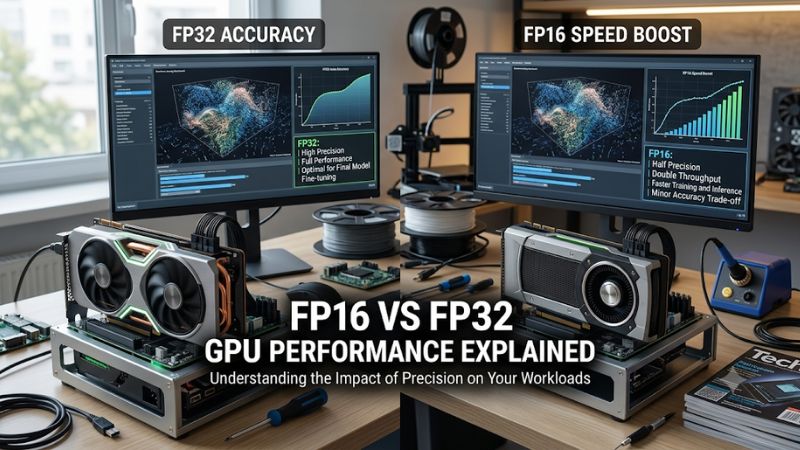
FP16, also called half precision, stores each floating-point value using 16 bits. Its representation contains one sign bit, five exponent bits, and ten fraction bits. This format requires less storage than FP32, making it useful for applications that process large quantities of numerical data.
FP32, or single precision, uses 32 bits per value, including one sign bit, eight exponent bits, and 23 fraction bits. It supports a much wider numerical range and greater precision. These characteristics make FP32 appropriate for calculations where small numerical differences or large value ranges matter.
| Specification | FP16 | FP32 |
| Storage per value | 16 bits | 32 bits |
| Sign bits | 1 | 1 |
| Exponent bits | 5 | 8 |
| Fraction bits | 10 | 23 |
| Maximum finite value | 65,504 | Approximately 3.4 × 10³⁸ |
| Numerical precision | Lower | Higher |
| Memory requirement | Lower | Higher |
| Typical applications | AI, image processing, selected shaders | General graphics, physics, scientific computing |
The important distinction is that smaller data does not automatically mean better calculations. FP16 works well when the application can tolerate its limited precision and numerical range. FP32 remains necessary when calculations require more accurate intermediate results.
2. Why FP16 Can Deliver Higher GPU Throughput
Modern GPU architectures can execute multiple lower-precision operations using specialized or packed arithmetic instructions. For example, compatible hardware may process two FP16 values in parallel within resources that would otherwise handle a single FP32 operation. This increases potential arithmetic throughput.
However, the actual advantage depends on the GPU architecture and instruction type. Some GPUs provide dedicated acceleration for specific FP16 workloads, while others offer more limited improvements. Data conversions, instruction scheduling, and workload characteristics can also reduce the expected performance advantage.
FP16 can additionally reduce register usage and data movement in suitable workloads. AMD’s GPUOpen documentation describes how packed half-precision operations can reduce vector register pressure on compatible architectures. This can improve shader occupancy when register availability is a limiting factor.
3. Why FP32 Still Matters for PC Gaming
FP32 remains important because game engines perform calculations involving geometry, lighting, physics, animation, and other rendering operations. Some of these calculations require sufficient numerical precision to prevent visible inaccuracies or unstable results.
Consider a game rendering complex lighting across a large environment. Small numerical differences can accumulate during certain calculations, potentially affecting reflections, shadows, or other visual effects. Developers must determine whether lower precision is acceptable for each operation rather than reducing precision across the entire rendering pipeline.
FP32 also provides greater flexibility for calculations involving very large or very small values. Consequently, using FP16 everywhere is not a practical graphics optimization strategy. Modern rendering pipelines often benefit more from selecting an appropriate precision for individual operations.
4. What Doesn’t Help: Comparing Peak TFLOPS Alone
One common mistake when researching GPUs is comparing FP16 and FP32 TFLOPS as if they directly represent gaming performance. TFLOPS measure theoretical floating-point processing throughput, not the number of frames a graphics card can render each second.
A GPU advertising substantially higher FP16 throughput may perform similarly to another card in conventional games if those games primarily use FP32 arithmetic or are limited by memory bandwidth, geometry processing, or other hardware resources.
It is also important to distinguish standard FP16 arithmetic from Tensor Core acceleration. NVIDIA Tensor Cores accelerate suitable matrix multiplication workloads, particularly those used in AI and machine learning. Their advertised throughput should not be treated as equivalent to ordinary shader processing performance.
How to Understand and Evaluate FP16 vs FP32 GPU Performance
Evaluating FP16 versus FP32 requires looking beyond specification sheets. The useful question is whether a particular application can use lower-precision arithmetic efficiently without introducing unacceptable numerical errors. For PC gaming, this distinction separates theoretical compute capability from actual rendering improvements and helps explain why different GPUs benefit differently.
1. Identify the Workload Before Comparing Precision
Start by identifying what the GPU is actually calculating. Conventional graphics shaders, matrix multiplication, neural network inference, and image processing have different computational requirements. FP16 may offer substantial advantages in one workload while producing little improvement in another.
For example, AI inference can benefit from reduced-precision matrix operations because large quantities of similar calculations are performed repeatedly. Conventional game rendering does not necessarily use the same mathematical structure. A GPU’s AI acceleration specifications therefore cannot independently establish its performance in traditional rasterized games.
2. Check Whether the GPU Supports Efficient FP16 Operations
Hardware support is an important consideration when interpreting FP16 performance. Different GPU generations implement half-precision calculations differently, and advertised capabilities do not necessarily indicate identical execution behavior.
For AMD Radeon graphics cards, consult the relevant RDNA architecture documentation and GPU instruction references. For NVIDIA GeForce cards, distinguish CUDA-core FP16 execution from Tensor Core operations. Also consider the graphics API, compiler, and driver support used by the application.
For developers working with DirectX, HLSL provides minimum-precision types such as min16float. However, minimum precision does not necessarily force hardware to execute calculations at exactly 16 bits. A driver may use FP32 instead. Explicit native 16-bit shader types have different requirements.
3. Use Mixed Precision Instead of Forcing One Format
Mixed precision combines FP16 and FP32 calculations within the same workload. This approach allows developers to use lower precision for operations that tolerate it while retaining FP32 for calculations requiring greater numerical accuracy.
For example, image-processing operations involving color values and vectors may be suitable candidates for FP16. More sensitive calculations involving large numerical ranges or accumulated errors may remain in FP32.
NVIDIA’s mixed-precision documentation also describes FP16 matrix operations with FP32 accumulation. This approach retains higher-precision accumulation while benefiting from lower-precision inputs. It is particularly relevant to AI workloads and should not be confused with a universal gaming optimization.
4. Benchmark Performance and Check Visual Accuracy
A useful performance comparison requires identical hardware, software, workloads, and operating conditions. Developers should compare the same shader or application using different precision configurations rather than relying on theoretical specifications.
For gaming-related shader development, evaluate GPU execution time, register usage, occupancy, memory traffic, and numerical differences. AMD Radeon GPU Profiler and NVIDIA Nsight Graphics can help investigate relevant GPU workloads.
Visual validation matters just as much as execution speed. Check for changes in lighting, color calculations, temporal stability, reflections, and other effects affected by reduced precision. If FP16 introduces artifacts or requires expensive conversions, retaining FP32 may be the better engineering decision.
| Setting or Step | Where | Effect | Risk |
| Identify precision requirements | Shader or application source code | Determines which calculations can use FP16 | Misclassifying sensitive calculations |
| Check native FP16 support | GPU architecture documentation and API capabilities | Confirms available hardware acceleration | Assuming all FP16 instructions perform equally |
| Implement mixed precision | HLSL, CUDA, or compatible compute framework | Balances throughput and numerical accuracy | Conversion overhead and precision loss |
| Benchmark and validate | GPU profiler and application output | Measures actual performance and visual differences | Misleading results from inconsistent test conditions |
These steps are primarily intended for developers and technical users investigating GPU workloads. Ordinary gamers do not need to manually convert game calculations between FP16 and FP32. Game engines and graphics drivers manage these implementation details.
FAQ: FP16 vs FP32 GPU Performance
1. Is FP16 Faster Than FP32 on Every GPU?
No, FP16 is not necessarily faster than FP32 on every GPU or workload. Compatible architectures can execute certain FP16 operations more efficiently, but performance depends on hardware instructions, software implementation, and computational requirements.
Some workloads benefit from packed arithmetic or dedicated acceleration, while others experience little improvement because of conversion overhead or unrelated performance bottlenecks. Always distinguish theoretical throughput from measured application performance.
2. Does FP16 Improve Gaming FPS?
FP16 can improve gaming performance when a game’s rendering pipeline uses compatible lower-precision calculations efficiently. However, it does not automatically increase FPS simply because a graphics card supports FP16.
Most gaming performance depends on several factors, including GPU architecture, shader execution, memory bandwidth, CPU performance, and game optimization. An FP16 TFLOPS specification alone cannot predict average FPS or 1% low performance.
3. Do NVIDIA and AMD GPUs Support FP16?
Yes, modern NVIDIA and AMD GPU architectures support various forms of FP16 processing, although their capabilities and execution efficiency differ by generation and workload.
NVIDIA provides FP16 execution through CUDA cores and specialized Tensor Core operations on supported architectures. AMD Radeon GPUs also support FP16 operations, including packed arithmetic on compatible architectures. Check the specific GPU’s documentation rather than assuming identical capabilities across product generations.
4. Should Gamers Prioritize FP16 or FP32 TFLOPS When Buying a GPU?
Gamers should prioritize relevant gaming benchmarks, not FP16 or FP32 TFLOPS in isolation. Real-world performance at the intended resolution and graphics settings provides much more useful purchasing information.
Consider average FPS, 1% lows, VRAM capacity, memory bandwidth, ray tracing performance, power consumption, and available features. FP16 capabilities become more relevant when evaluating AI workloads, supported compute applications, and developer-focused GPU acceleration rather than conventional gaming performance.
Final Thoughts
Understanding fp16 vs fp32 gpu performance explained reveals why floating-point throughput numbers require careful interpretation. FP16 offers potential efficiency advantages, while FP32 provides greater numerical accuracy and range. For gamers, prioritize real-world benchmarks; for developers, use mixed precision where appropriate and validate both performance and visual accuracy.