🛒 Best Price Today on Amazon
Prime members get fast, free shipping on everything above, plus member-only deals. New members get a 30-day free trial — cancel anytime.
Choosing between a GPU with more video memory and one with higher memory bandwidth requires understanding what each specification actually does. gpu memory bandwidth vs vram capacity is not simply a comparison of numbers: one determines how much graphics data fits in memory, while the other determines how quickly the GPU can move that data. Both affect gaming performance, but in different ways.
What GPU Memory Bandwidth vs VRAM Capacity Really Comes Down To
Memory capacity and bandwidth solve different hardware problems. VRAM capacity determines how much graphical information the GPU can keep readily accessible, while bandwidth measures the rate at which that information can travel between memory and the graphics processor. Understanding these differences helps explain why a card with more VRAM is not automatically faster.
1. What VRAM Capacity Actually Determines
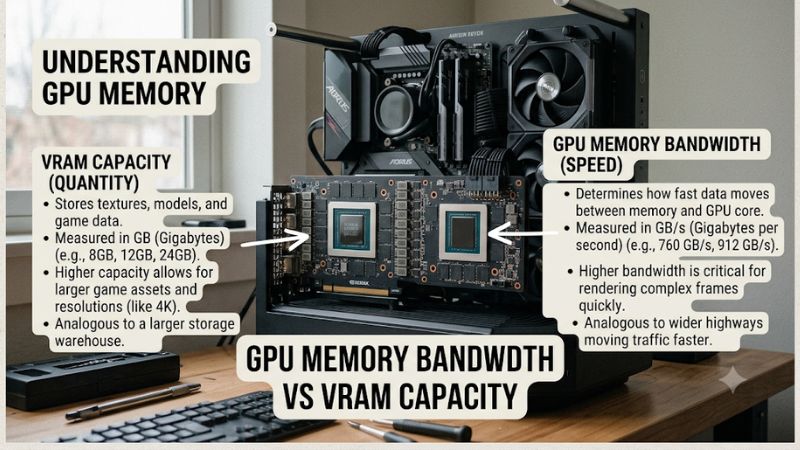
VRAM, or Video Random Access Memory, is dedicated memory on a graphics card. It stores textures, geometry, shaders, frame buffers, and other assets required during rendering. Its capacity, measured in gigabytes (GB), determines how much data the GPU can accommodate without relying on slower system-memory transfers or reducing asset quality.
For gaming, VRAM requirements depend on resolution, texture quality, ray tracing, and the specific game engine. Higher resolutions generally require larger rendering resources, while high-resolution textures can consume substantial memory. When capacity becomes insufficient, players may encounter texture pop-in, inconsistent frame times, or reduced graphics quality.
2. How GPU Memory Bandwidth Affects Performance
Memory bandwidth describes how much data the GPU’s memory subsystem can transfer per second. It is commonly expressed in gigabytes per second (GB/s). A higher bandwidth can help the graphics processor access large amounts of graphical data more quickly, particularly when rendering workloads generate substantial memory traffic.
Bandwidth depends on factors such as memory data rate and memory interface width. However, a wider memory bus does not automatically mean a faster GPU. Cache systems, memory compression, architecture, and the GPU’s processing capabilities also influence real-world performance. Consequently, bandwidth figures should be considered alongside the complete graphics architecture.
3. Why Neither Specification Works Independently
The practical difference between gpu memory bandwidth vs vram capacity becomes clearer when a game places different demands on the graphics card. A GPU might have enough capacity for high-resolution textures but lack sufficient bandwidth to feed its processing units efficiently. Conversely, a card with excellent bandwidth can still struggle when its memory capacity is exhausted.
These limitations can produce different performance symptoms. Bandwidth-related limitations may restrict rendering throughput, while insufficient VRAM can cause stuttering, texture degradation, or memory-management overhead. Neither specification alone determines average FPS, 1% lows, or overall gaming smoothness.
What Doesn’t Help When Comparing GPU Memory
Comparing graphics cards using only their memory size or advertised bandwidth can lead to misleading conclusions. A larger memory pool does not automatically improve frame rates, and a higher bandwidth figure does not guarantee better performance in every game.
Avoid these common assumptions:
- More VRAM always means higher FPS.
- A wider memory bus always indicates a faster GPU.
- Identical VRAM capacities mean two graphics cards perform similarly.
- High allocated VRAM automatically means a game has exhausted available memory.
- A card with higher bandwidth is always the better 4K gaming option.
The better approach is to examine memory specifications alongside GPU architecture, independent benchmarks, resolution, and actual game requirements.
How to Compare GPU Memory Bandwidth and VRAM Capacity
The most useful comparison starts with your gaming workload rather than a specification sheet. Resolution, graphics presets, ray tracing, and the GPU architecture determine which memory characteristic deserves more attention. The following table explains how to interpret common scenarios and what to prioritize when choosing between graphics cards.
| Gaming scenario | VRAM priority | Bandwidth priority | What to prioritize |
| 1080p competitive gaming | Moderate | Important | Overall GPU performance |
| 1440p high-quality gaming | High | High | Balanced memory specifications |
| 4K gaming | Very high | High | Capacity and bandwidth together |
| Ray tracing | High | High | Sufficient VRAM and strong GPU architecture |
| High-resolution texture packs | Very high | Moderate to high | Adequate VRAM capacity |
| GPU compute and large datasets | Very high | Very high | Workload-specific memory requirements |
Step 1. Match VRAM Capacity to Your Gaming Resolution
Resolution is an important starting point because rendering larger images increases the amount of graphics data a GPU must manage. Moving from 1080p to 1440p or 4K can increase memory requirements, particularly when combined with high-resolution textures, complex environments, and advanced lighting effects.
However, resolution alone cannot determine the correct VRAM requirement. Different game engines manage assets differently, and some automatically adjust texture quality when memory becomes constrained. Consider the games you actually play, their recommended graphics settings, and independent memory-usage measurements before deciding how much capacity you need.
Step 2. Check Memory Bandwidth Alongside GPU Architecture
When comparing graphics cards, examine memory bandwidth, memory type, interface width, and GPU architecture together. GDDR6 and GDDR7 memory operate at different data rates, so comparing bus width without considering memory speed provides an incomplete picture.
For example, NVIDIA’s GeForce RTX 50 Series specifications illustrate how capacity and bandwidth can differ across models. The RTX 5090 has 32GB of GDDR7 and 1,792 GB/s of bandwidth, while the RTX 5070 has 12GB of GDDR7 and 672 GB/s. These figures describe different hardware configurations, not isolated evidence that bandwidth alone determines gaming performance.
Step 3. Examine Real Gaming Performance and Memory Usage
Independent benchmarks are more useful than theoretical specifications when deciding between two GPUs. Look for comparisons conducted on the same test system, using identical game versions, resolutions, graphics presets, and upscaling settings. Average FPS provides an overview, while 1% lows help reveal inconsistent frame delivery.
Pay attention to memory usage as well as reported allocation. A game reserving a large amount of available VRAM does not necessarily require every allocated gigabyte. TechSpot’s 2024 investigation into modern PC games illustrates why this distinction matters. Its testing identified situations where insufficient capacity caused substantial performance and frame-time problems, while other games managed memory more effectively.
Step 4. Consider Cache Technology and Your Upgrade Budget
Modern GPUs do not rely exclusively on external memory bandwidth. Cache systems can retain frequently accessed data closer to the processing units, reducing some trips to external VRAM. AMD’s Infinity Cache is one example of this approach, helping explain why comparing raw bandwidth across different GPU architectures can be misleading.
For an upgrade, compare the complete graphics card rather than paying a premium for one attractive memory specification. Consider GPU processing capability, VRAM capacity, memory bandwidth, power consumption, cooling, and PSU requirements. A balanced card that fits your gaming resolution is generally a better purchase than one selected solely for its largest memory number.
FAQ: GPU Memory Bandwidth vs VRAM Capacity
1. Is VRAM Capacity More Important Than Memory Bandwidth for Gaming?
VRAM capacity is more important when a game exceeds the available graphics memory, while bandwidth matters when the GPU needs to transfer large amounts of data efficiently. Neither specification is universally more important.
For modern AAA games, insufficient VRAM can cause texture degradation, stuttering, and inconsistent frame times. However, sufficient capacity does not automatically produce high FPS if the GPU has limited processing power or memory throughput. Compare both specifications alongside independent gaming benchmarks.
2. Does Higher GPU Memory Bandwidth Increase FPS?
Higher memory bandwidth can improve FPS when a game is limited by memory throughput, but it does not guarantee higher frame rates. Games with different rendering workloads place different demands on the memory subsystem.
If a game is primarily limited by shader performance, ray-tracing hardware, or CPU performance, additional bandwidth might produce little improvement. This is why GPU comparisons should include identical benchmark conditions instead of relying on bandwidth figures alone.
3. Is 16GB VRAM Better Than 12GB VRAM for 1440p Gaming?
A 16GB graphics card offers more memory headroom than a 12GB model, but it is not automatically faster. The difference becomes relevant when a particular game or graphics configuration requires more than the smaller card can comfortably accommodate.
For 1440p gaming, consider texture quality, ray tracing, game requirements, and the GPU’s processing performance. A faster 12GB GPU can outperform a slower 16GB model in games that fit comfortably within both memory capacities.
4. Should I Prioritize Memory Bandwidth or VRAM for 4K Gaming?
For 4K gaming, prioritize sufficient VRAM capacity and strong memory bandwidth together rather than choosing one specification in isolation. Higher resolutions and demanding graphics settings can increase both memory requirements and data-transfer demands.
Also examine the GPU’s rendering performance, ray-tracing capabilities, and upscaling support. If you regularly use demanding texture settings, ray tracing, or high-resolution content, additional VRAM headroom can be valuable, provided the graphics card has enough processing power to deliver the performance you expect.
Final Thoughts
Understanding gpu memory bandwidth vs vram capacity helps you avoid choosing a graphics card based on specifications alone. VRAM determines how much graphics data fits, while bandwidth affects how quickly it moves. For modern gaming, prioritize sufficient capacity, strong bandwidth, and overall GPU performance. Compare real benchmarks before upgrading.