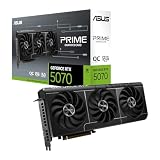
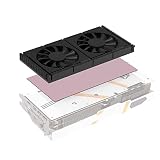
🛒 Best Price Today on Amazon
Prime members get fast, free shipping on everything above, plus member-only deals. New members get a 30-day free trial — cancel anytime.
The Alphacool Core GeForce RTX 5080 Aorus Master and Windforce water block is the best overall pick in this group for most custom-loop builders, because it is a complete card-specific block with a backplate that covers two Gigabyte card lines. A GPU water block is a copper cold plate that replaces the stock air cooler on one specific graphics card, so coolant carries away the heat instead of fans. Owners of an ASUS RX 9070 XT or a ROG Astral RTX 5090 should look at the matching blocks below, and anyone who wants a starter loop should read the notes on the generic kit and the CPU block, which are not GPU blocks.
Quick List
- Alphacool Core RTX 5080 Epic-X – best for an RTX 5080 card that matches the Epic-X block layout, with a chrome-plated copper base and aRGB
- Alphacool Core RTX 5080 Aorus Master and Windforce – best for Gigabyte Aorus Master and Windforce RTX 5080 cards
- Alphacool Core RX 9070 XT TUF + Prime – best for ASUS TUF and Prime Radeon RX 9070 XT cards
- DIY 240mm Water Cooling Kit – best only as a generic starter-loop kit; not a card-specific GPU block
- Thermal Grizzly DeltaMate for ROG Astral RTX 5090 – best for ROG Astral RTX 5090 owners who want a premium block with an RGB window
- Thermal Grizzly Mycro Pro RGB (AMD AM5) – a CPU water block, not a GPU block; best for AM5 or AM4 processors
Which One Is Right for You?
| If you… | Choose |
|---|---|
| own a Gigabyte Aorus Master or Windforce RTX 5080 | Alphacool Core RTX 5080 Aorus Master and Windforce |
| own an ASUS TUF or Prime RX 9070 XT | Alphacool Core RX 9070 XT TUF + Prime |
| own a ROG Astral RTX 5090 and want a premium block | Thermal Grizzly DeltaMate |
| own a card that matches the Epic-X RTX 5080 block | Alphacool Core RTX 5080 Epic-X |
| are building your first loop and want a complete bundle | DIY 240mm Water Cooling Kit (confirm what it includes) |
| want to cool an AMD CPU in the same loop | Thermal Grizzly Mycro Pro RGB |
The first rule of GPU water blocks is that they are almost always card-specific. A block for one PCB layout will not fit another, even when two cards share the same GPU chip. Find your exact card model, then check the block maker’s compatibility list before you plan the rest of the loop.

Alphacool Core Geforce RTX 5080 Epic-X GPU Water Block with Backplate | Chrome-Plated Copper Base, Brass Connectors, Aluminum Backplate, aRGB Lighting, 180×124×34 mm
Included for '6 Best GPU Water Blocks (October 2026) Buying Guide' because the listing specifies Chrome-Plated Copper Base and Brass Connectors, details this guide uses to compare options.
View on Amazon
Alphacool Core Geforce RTX 5080 Aorus Master and Windforce GPU Water Block with Backplate
Included for '6 Best GPU Water Blocks (October 2026) Buying Guide' as a relevant option in this category; details come from the product listing.
View on Amazon
Alphacool Core RX 9070 XT TUF + Prime GPU Water Block with Backplate
Included for '6 Best GPU Water Blocks (October 2026) Buying Guide' as a relevant option in this category; details come from the product listing.
View on Amazon
DIY 240mm Water Cooling Kit, DIY 240mm Cooler CPU/GPU Block Pump Reservoir with LED Fan Heat Sink Computer Water Cooling Connectors Kit, Liquid CPU Cooler Kit
Included for '6 Best GPU Water Blocks (October 2026) Buying Guide' because the listing specifies Liquid CPU Cooler Kit, details this guide uses to compare options.
View on Amazon
Thermal Grizzly DeltaMate GPU Water Block ROG Astral RTX 5090
Included for '6 Best GPU Water Blocks (October 2026) Buying Guide' as a relevant option in this category; details come from the product listing.
View on Amazon
Thermal Grizzly Mycro Pro RGB - CPU AMD AM5 Waterblock Also fits AM4 - G1/4 High Performance Liquid Cooling Block, Precision-Machined Nickel-Plated Copper Cold Plate, 0.2 mm Microfins and Filter
Included for '6 Best GPU Water Blocks (October 2026) Buying Guide' because the listing specifies CPU AMD AM5 Waterblock Also fits AM4 and G1/4 High Performance Liquid Cooling Block, details this guide uses to compare options.
View on AmazonAll 6 Picks in Detail
1. Alphacool Core GeForce RTX 5080 Epic-X GPU Water Block – Best for Matching Epic-X RTX 5080 Cards
As an Amazon Associate we earn from qualifying purchases at no extra cost to you.

This Alphacool Core block pairs a chrome-plated copper base with brass connectors, an aluminum backplate and aRGB lighting, per the listing name. In the retailer data I reviewed, the block is listed for PNY RTX 5080 and RTX 5070 Ti cards of the Epic-X family; because the listing name itself does not say which cards, confirm the compatibility list on the product page. It suits a builder who owns a matching card and wants a lit block with a full backplate.
- Base: chrome-plated copper, per the listing
- Connectors: brass, as stated
- Backplate: aluminum, included
- Lighting: aRGB, per the title; connector details: confirm on listing
- Ports and size: four G1/4 ports and roughly 180 mm long in retailer data; confirm on listing
Pros
- Full-cover design with a backplate in the box
- aRGB lighting for builds with lit components
Cons
- Narrow compatibility, so the wrong card means the wrong block
- Cannot be reused if you change graphics cards
Compared with the Aorus Master and Windforce block, it follows the same Core design, but it fits a different set of cards. It suits a builder who likes the look of a lit acrylic top and plans a visible loop, and who has already checked that the card in the case matches the block’s list. If you are still choosing the graphics card, shop for the card and the block together, since block availability can decide which model is practical to cool.
2. Alphacool Core GeForce RTX 5080 Aorus Master and Windforce GPU Water Block – Best for Gigabyte RTX 5080 Cards

This is the Core block for Gigabyte Aorus Master and Windforce RTX 5080 cards, with a backplate, according to the listing name. Because it names two card lines, this block reaches a larger group of owners than a block for a single premium model. It suits an RTX 5080 owner who has a matching card and wants a straightforward, widely available full-cover block. Confirm the exact card revision on the compatibility list, since vendors sometimes change PCB layouts between versions.
- Fit: Gigabyte Aorus Master and Windforce RTX 5080, per the listing name
- Backplate: included, as stated
- Design: Core series full-cover block
- Materials and lighting: confirm on listing
- Ports: confirm thread and spacing on listing
Pros
- Covers two card lines under one block
- Backplate included in the same package
Cons
- Only useful if your exact card matches
- Lighting and material details are not in the listing name
Against the Epic-X block, it targets a different set of cards, while the design philosophy is the same. It suits a first-time block buyer who wants a mainstream card, a complete package and an uncomplicated mount, with fewer exotic parts to worry about. Before you remove the stock cooler, make sure you have the right screwdriver bits, spare thermal paste and a clean place to set the original cooler, in case you ever need to return the card to stock.
3. Alphacool Core RX 9070 XT TUF + Prime GPU Water Block – Best for ASUS TUF and Prime Radeon Cards

The Core block for the RX 9070 XT is named for ASUS TUF and Prime cards and includes a backplate. Retailer data lists chrome-plated copper construction, four G1/4 ports and an acrylic top with aRGB, and notes fit for both the XT and non-XT versions of those ASUS cards; confirm the exact models on Alphacool’s compatibility list. It suits a Radeon owner who wants to move a hot, high-power card to liquid cooling.
- Fit: ASUS TUF and Prime RX 9070 XT, per the listing name
- Backplate: included, as stated
- Construction: chrome-plated copper cooler, per retailer data
- Ports: four G1/4, according to retailer data
- Size: roughly 220 mm long in retailer data; confirm clearance on listing
Pros
- Fits both XT and non-XT variants of the named ASUS cards, per retailer data
- Full-cover design keeps memory and power stages cooled
Cons
- Longer than the RTX 5080 blocks in this list, so case clearance needs checking
- Card-specific; not reusable on other brands
Compared with the RTX 5080 blocks, it is the only Radeon block here, so it is the pick for AMD owners. It suits a Radeon builder with a compact loop in a roomy case, where the extra length is not an obstacle and the card’s heat output makes liquid cooling worthwhile. Measure the space between the card slot and the front of the case or radiator before ordering, because a longer block plus fittings can collide with a front-mounted radiator.
4. DIY 240mm Water Cooling Kit – A Generic Kit, Not a Card-Specific Block

This listing is a generic do-it-yourself 240 mm liquid cooling kit that mentions a CPU and GPU block, pump, reservoir, LED fan, connectors and a heat sink. It is not a block for a specific modern graphics card, and the listing name does not state which sockets or cards it fits. Treat it as a beginner starter bundle, not as a recommendation for an RTX 50-series or RX 9000-series card, and confirm every compatibility detail on the page before you buy.
- Radiator size: 240 mm, per the listing name
- Contents: CPU and GPU block, pump, reservoir, fan, connectors, per the title
- Lighting: LED fan, as stated
- GPU compatibility: not stated; confirm on listing
- Intended use: DIY loop starter, according to the title
Pros
- One box covers many of the parts for a small loop
- A way to learn how loops are built
Cons
- Generic blocks rarely fit current GPUs
- Listing does not state compatibility or materials
Choose it only for learning or for older hardware; a card-specific block like the Alphacool or Thermal Grizzly ones is the right path for a current GPU. It suits a curious builder who wants to understand pumps, reservoirs and tubing before committing to a premium build. If you do try a kit like this, treat it as a separate project and do not plan on it cooling a current high-power card without confirming fit with the seller.
5. Thermal Grizzly DeltaMate GPU Water Block for ROG Astral RTX 5090 – Best for Premium RTX 5090 Cooling

Thermal Grizzly’s DeltaMate is a block for the ROG Astral RTX 5090. Thermal Grizzly describes two interlocked nickel-plated copper sections, one over the GPU die and one over memory and power delivery, with 0.2 mm slots and fins, an RGB-lit viewing window, and 2-port direct terminals with an optional pass-through terminal sold separately; it ships with Thermal Grizzly paste and pads according to the maker. It suits RTX 5090 owners who accept a demanding installation in exchange for a high-end block.
- Fit: ROG Astral RTX 5090, per the listing name
- Construction: nickel-plated copper cold plates, per Thermal Grizzly
- Fin geometry: 0.2 mm slots and fins, 2.5 mm fin height, per Thermal Grizzly
- Lighting: RGB window, according to the maker; confirm LED count and connector on listing
- Terminals: direct 2-port; pass-through optional, per the maker
Pros
- Narrow fin geometry aimed at strong heat transfer
- Includes paste and pads from the same maker, per Thermal Grizzly
Cons
- Installation is intricate and meant for experienced builders
- Works only with the named Astral card
Compared with the Alphacool blocks, it targets the most powerful card in this group and is built for a single model. It suits an enthusiast who has already planned the loop, owns a matching Astral card and values a polished finish and a viewing window. Allow extra time for the install, read the maker’s fitting guide in full, and keep the original cooler and screws in case you need to restore the card.
6. Thermal Grizzly Mycro Pro RGB (AMD AM5) – A CPU Block, Not a GPU Block
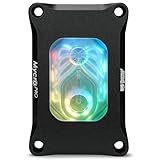
This listing is a CPU water block for AMD AM5 that also fits AM4, not a graphics card block. Thermal Grizzly describes a nickel-plated copper cold plate with 0.2 mm microfins, a built-in filter, G1/4 ports and RGB lighting. It is useful in a loop that cools both a processor and a GPU, but it does nothing for a graphics card on its own. It is placed last because it does not match the topic.
- Type: CPU water block, per the listing
- Sockets: AMD AM5, also fits AM4, as stated
- Cold plate: nickel-plated copper, per the title
- Fins: 0.2 mm microfins, according to the maker
- Ports and lighting: G1/4 and RGB; confirm connector on listing
Pros
- Precision-machined cold plate for CPU cooling
- Includes a filter, per the maker
Cons
- Does not cool a GPU
- Intel processors are not covered by this AMD version
Compared with every other entry, it is the only one meant for a processor, so it belongs in a combined loop rather than in a GPU upgrade. It suits a builder who already picked a GPU block and wants a matching CPU block from the same maker in the same loop. If your goal is only to cool a graphics card, skip it and put the budget toward a radiator and pump instead.
Specs Compared
| Product | Cools | Fits | Base or plate | Ports | Lighting |
|---|---|---|---|---|---|
| Alphacool Core RTX 5080 Epic-X | GPU | Epic-X RTX 5080 family; confirm on listing | Chrome-plated copper with aluminum backplate | Four G1/4 in retailer data | aRGB |
| Alphacool Core RTX 5080 Aorus Master and Windforce | GPU | Aorus Master and Windforce RTX 5080 | Confirm on listing; backplate included | Confirm on listing | Confirm on listing |
| Alphacool Core RX 9070 XT TUF + Prime | GPU | ASUS TUF and Prime RX 9070 XT | Chrome-plated copper in retailer data; backplate included | Four G1/4 in retailer data | aRGB in retailer data |
| DIY 240mm Water Cooling Kit | CPU and GPU, generic | Not stated; confirm on listing | Confirm on listing | Confirm on listing | LED fan |
| Thermal Grizzly DeltaMate | GPU | ROG Astral RTX 5090 | Nickel-plated copper per maker | G1/4 per retailer data | RGB window |
| Thermal Grizzly Mycro Pro RGB | CPU | AMD AM5, also AM4 | Nickel-plated copper | G1/4 | RGB |
How We Chose These
This page is based on desk research rather than on building loops. We began with the product set drawn from current catalog listings and read each name for the card model, backplate and materials. We then checked Alphacool and Thermal Grizzly product information and retailer specification fields for dimensions, ports and construction. We prioritized listings that name a specific card, since a block that does not match your PCB is useless. Two of the six listings are not GPU blocks, and we say so plainly rather than stretching them to fit. Where a detail was not stated, we tell you to confirm it on the product page. We did not measure cooling performance, so we make no temperature claims.
What to Look For
Match the block to your exact card
A GPU water block is built around one printed circuit board layout. Cards sharing a chip from different brands often use different layouts, and even revisions of one model can change. Use the block maker’s compatibility list and match your card’s full model name, not just the GPU name. If you cannot find your exact card, do not guess: choose a card-specific block that lists it, or consider a reference-design block only if your card uses the reference board.
Materials and plating
Cold plates are usually copper with nickel or chrome plating. Mixing metals in a loop can cause galvanic corrosion, so check the block maker’s guidance about aluminum parts and coolants. Retailer data for the RX 9070 XT block advises clear coolants only, so read the manual that comes with each block, and note that aluminum backplates sit outside the coolant path, which reduces the concern. Keep every wetted part of the loop compatible and flush a new loop before filling.
Ports, fittings and clearance
Most blocks use G1/4 threaded ports, which accept standard fittings. Count the ports: four ports allow you to run in and out on either side or link two blocks. Check block length, since the RX 9070 XT block listed here runs longer than the RTX 5080 blocks. Verify that the card plus fittings fits between the motherboard and the case panel.
Sizing the loop
A common rule of thumb is that roughly 100 W of heat per 120 mm of radiator gives good results at moderate fan speeds, though thick radiators and high fan speeds handle more. Worked example: a graphics card with a board power near 360 W plus a processor near 150 W puts around 500 W into the loop, which points to about 480 mm of total radiator surface, such as a 360 mm unit plus a 120 mm, or two 240 mm units. Check your card’s actual power on the maker’s page, since it varies by model.
A quick fit check before you order
First, read the exact model name from the card’s box or sticker, including any suffix such as OC or Prime. Second, find that name on the block maker’s compatibility list. Third, measure the free space around the card and compare it to the block’s length and thickness. Fourth, confirm that your case has a mounting point for the reservoir, pump and radiator you need. Fifth, check that the block includes the thermal pads and backplate hardware your card needs, because missing a pad can leave memory chips uncooled.
Coolant, maintenance and pump basics
A loop needs a pump, a reservoir, tubing or hard tubes, fittings, a radiator with fans, coolant and a drain point. Clear coolants show clean and are less likely to stain acrylic, while dyed or pastel coolants can clog fine fins over time. Plan to flush and refill the loop on a regular schedule, and check the fin spacing before running anything thick. Fine fins, like the 0.2 mm ones described for the Thermal Grizzly parts, are more sensitive to debris, so a filter helps.
Installation and leak safety
Removing the stock cooler may void the card warranty, so check your card maker’s terms. Work with the PC unplugged and use anti-static precautions. After assembling the loop, leak-test it with the system powered down and the graphics card unplugged where possible, running the pump for a long period while watching every joint. Keep a towel under the loop, use only coolant approved for your parts, and never run the pump dry.
Questions
Will a GPU water block fit any RTX 5080?
No. Blocks are made for specific board layouts, so check your exact card model against the maker’s compatibility list before buying.
Do I need a backplate with a water block?
A backplate protects and stiffens the card and often cools components on the rear. The Alphacool blocks in this list include one, which saves you from sourcing one separately.
Is a CPU block like the Mycro Pro useful for a GPU upgrade?
Not for the graphics card itself. It cools an AMD processor, so it matters only if you plan to cool the CPU in the same loop.
Can I use a generic DIY kit on a modern graphics card?
Generic kits rarely include a block that fits current GPUs, and the listing here does not state compatibility. A card-specific block is the safer choice.
How much radiator do I need?
A rough guide is 100 W of heat per 120 mm of radiator at moderate fan speed. Add up your GPU and CPU power and size up from there.
Does water cooling void my warranty?
Removing the stock cooler can affect warranty coverage, depending on the manufacturer. Read your card maker’s terms before you start.
Update History
- October 20, 2026 – Initial publication; product set drawn from current catalog listings.
- Check the product page for current specifications and availability before buying.
Sources
- Manufacturer product and specification pages for Alphacool and Thermal Grizzly
- Retailer listing titles and specification fields for every product covered