🛒 Best Price Today on Amazon
Prime members get fast, free shipping on everything above, plus member-only deals. New members get a 30-day free trial — cancel anytime.
The acer GPU Support Bracket is the best overall pick in this group for most builders because its listing states a 70 to 120 mm adjustment span and a magnet-equipped non-slip base, which together fit the widest range of cases and PSU shrouds. A GPU anti-sag bracket is a small adjustable stand or brace that holds up the free end of a heavy graphics card so the card does not droop under its own weight. If your case is unusually tall or you prefer a stand you can reposition easily, the other listings below cover different base styles and adjustment ranges.
Quick List
- Graphics Card GPU Brace Support (L, 74-120mm) – best for a plain large-size stand with a stated 74 to 120 mm span
- Uyubao GPU Support Bracket – best for a magnet-equipped stand that clamps to a steel surface
- California JOS GPU Support Bracket – best for a height-adjustable large bracket sold as a single black unit
- acer GPU Support Bracket – best for the widest stated range with a magnet and a non-slip base
- GPU Support Bracket with Bottom Adhesive – best for cases where a magnet will not grip
- upHere Graphics Card GPU Brace Support – best for adjustable length and height in a black and white finish
Which One Is Right for You?
| If you… | Choose |
|---|---|
| want the widest listed height range with a magnetic, non-slip base | acer GPU Support Bracket |
| need a stand for a steel PSU shroud or case floor | Uyubao GPU Support Bracket |
| want to adjust both length and height | upHere Graphics Card GPU Brace Support |
| have a plastic or aluminum surface where magnets will not hold | GPU Support Bracket with Bottom Adhesive |
| want a simple height-adjustable large stand in black | California JOS GPU Support Bracket |
| want a basic large stand with a clearly stated 74 to 120 mm range | Graphics Card GPU Brace Support (L, 74-120mm) |
Brackets look interchangeable, but the base is what separates them. A magnetic base stays put on steel and is easy to relocate, adhesive grips non-magnetic surfaces but is harder to move, and a plain non-slip pad depends on weight and friction. Decide based on what your case floor or PSU shroud is made of, then check that the adjustment span covers your measured gap. If two listings both fit, favor the one that states its range and base type in the title, because it removes a source of surprise on delivery day. Also remember that one stand is usually enough for a single card, and that a very long triple-slot card may benefit from the support sitting closer to the end than the middle.

Graphics Card GPU Brace Support, Video Card Sag Holder Bracket, GPU Stand (L, 74-120mm)
Included for '6 Best GPU Anti Sag Brackets (October 2026) Reviews & Picks' because the listing specifies Video Card Sag Holder Bracket and GPU Stand (L, details this guide uses to compare options.
View on Amazon
Uyubao GPU Support Bracket, Gpu Anti Sag Bracket, Graphics Card GPU Brace Support, Video Card Sag Holder Bracket, GPU Stand with Magnet & Non-Slip Sheet, L(74-120mm)
Included for '6 Best GPU Anti Sag Brackets (October 2026) Reviews & Picks' because the listing specifies Gpu Anti Sag Bracket and Graphics Card GPU Brace Support, details this guide uses to compare options.
View on Amazon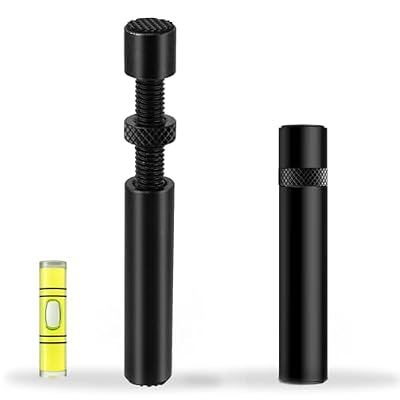
California JOS GPU Support Bracket Graphics Card Brace Anti-Sag Holder Height Adjustable Video Card Stand Large(1 PCAK, Black)
Included for '6 Best GPU Anti Sag Brackets (October 2026) Reviews & Picks' because the listing specifies Black), details this guide uses to compare options.
View on Amazon
acer GPU Support Bracket, GPU Stand with Magnet Non-Slip Base,(L, 70-120mm)
Included for '6 Best GPU Anti Sag Brackets (October 2026) Reviews & Picks' because the listing specifies GPU Stand with Magnet Non-Slip Base and 70-120mm), details this guide uses to compare options.
View on Amazon
GPU Support Bracket, Graphics Card Support, GPU Brace, Video Card Holder Bracket with Bottom Adhesive, GPU Stand, Adjustable Anti Sag GPU Stand 35-120mm, Support GPU 4090 Thickness Support up to 75mm
Included for '6 Best GPU Anti Sag Brackets (October 2026) Reviews & Picks' because the listing specifies Graphics Card Support and GPU Brace, details this guide uses to compare options.
View on Amazon
upHere Black&White Graphics Card GPU Brace Support Video Card Sag Holder/Holster Bracket,Adjustable Length and Height Support,G27654
Included for '6 Best GPU Anti Sag Brackets (October 2026) Reviews & Picks' because the listing specifies Adjustable Length and Height Support and G27654, details this guide uses to compare options.
View on AmazonAll 6 Picks in Detail
1. Graphics Card GPU Brace Support (L, 74-120mm) – Best for a Plain Large Stand
As an Amazon Associate we earn from qualifying purchases at no extra cost to you.

This unbranded large-size brace is described as a video card sag holder and GPU stand with a 74 to 120 mm span. It suits a builder who has measured the gap beneath the card, found it falls within that range, and wants a straightforward stand without extras. Because the listing name gives no detail on the base or material, confirm both on the product page before ordering.
- Size class: L (large), per the listing name
- Adjustment span: 74 to 120 mm, as stated
- Type: video card sag holder bracket and GPU stand
- Base style: confirm on listing
- Material and finish: confirm on listing
Pros
- Clearly stated range makes it easy to check against your measurements
- A simple stand design with few parts to fail
Cons
- Listing name says little about the base, pad or material
- Narrower stated minimum height than the acer, which starts at 70 mm
Compared with the acer, it offers a similar top of the range but a slightly higher starting height, so it suits cases with a bit more room under the card. Choose it if you want to read one clear number off the listing, measure once and be done, and you do not need extras such as a magnet or a length slider. It is also a sensible pick for a second build, where you already know the gap from the first and just need a matching stand.
2. Uyubao GPU Support Bracket – Best for a Magnetic Stand

The Uyubao is described as a GPU anti-sag bracket and graphics card brace with a magnet, and the listing name continues with non-slip wording that is cut off in the catalog, so confirm the full feature list. The magnet makes it a good match for builds with a steel case floor or steel PSU shroud, since the stand will stay where you place it while you route cables. It is less useful if your shroud is plastic or aluminum.
- Product type: GPU support bracket and anti-sag brace, per the listing
- Base: magnet, as stated; confirm the non-slip details on the listing
- Adjustment range: confirm on listing, since the name does not give it
- Material: confirm on listing
- Color: confirm on listing
Pros
- A magnetic base prevents the stand from sliding during cable work
- Easy to reposition when you swap a card or clean the case
Cons
- Magnets only grip steel, so non-magnetic surfaces need another approach
- Adjustment range is not stated in the visible listing name
Choose it over the plain 74 to 120 mm stand when you want the stand to stay put, and over the adhesive bracket when you may move it later. It suits builders who open the case often, such as tinkerers who swap cards, test fans or clean filters, and who value a stand that can be lifted away and put back in the same spot within seconds.
3. California JOS GPU Support Bracket – Best for a Height-Adjustable Large Stand

The California JOS bracket is a graphics card brace and anti-sag holder with an adjustable height, sold in a large size as a one-pack in black. It is a good fit for builders who want a simple adjustable stand that matches a dark build. The listing name does not give the numeric adjustment range, so measure your gap and confirm the range on the product page.
- Size class: Large, per the listing name
- Pack size: one bracket, as stated
- Finish: black, per the listing
- Adjustment: height adjustable, according to the title
- Numeric range and base style: confirm on listing
Pros
- Black finish blends into most dark cases
- Height adjustment lets you fine-tune support under the card
Cons
- No numeric range in the listing name
- Base material and grip are not stated, so confirm before relying on it
Compared with the upHere, this one is described mainly as height adjustable, while the upHere advertises both length and height adjustment. It suits a builder whose card is a standard dual-fan or triple-fan model with an obvious low point to support, and who values a clean all-black look more than a long feature list. Before buying, ask the seller or read the product page for the real numeric span so you can match it to your measured gap.
4. acer GPU Support Bracket – Best for the Widest Range With a Magnetic, Non-Slip Base

The acer-branded bracket is listed as a GPU stand with a magnet and a non-slip base, in a large size with a 70 to 120 mm range. That range is the widest minimum-to-maximum stated across the six listings, which makes it the safest first choice for builders who are not sure of their exact gap. It suits most mid-tower and full-tower builds where a steel floor or PSU shroud is available, and the non-slip pad helps where it is not.
- Size class: L, as shown in the listing name
- Adjustment span: 70 to 120 mm, per the listing
- Base: magnet with a non-slip surface, as stated
- Type: GPU support bracket and stand
- Material and weight rating: confirm on listing
Pros
- Broadest stated range of the group, from 70 mm up
- Magnet plus non-slip base gives two ways to stay in place
Cons
- A magnet does nothing on non-steel surfaces
- Load rating is not stated in the listing name
Against the Uyubao, it offers a stated range while the Uyubao does not, which makes it easier to plan around. It suits a first-time builder with a mainstream tower case, because the combination of a wide span and a grippy base removes most of the guesswork. If you own a very compact case or a very tall one, check the extremes of the range against your measurement before assuming it will fit.
5. GPU Support Bracket with Bottom Adhesive – Best for Surfaces Magnets Cannot Grip

This generic bracket pairs an adjustable anti-sag stand with a bottom adhesive pad. It suits builds where the surface under the card is plastic, aluminum or painted in a way that magnets cannot hold. Adhesive grips well but is harder to reposition, so decide on the stand location before peeling the backing, and avoid pressing it down on surfaces you plan to keep spotless.
- Type: GPU support bracket, graphics card support and brace, per the listing
- Base: bottom adhesive, as stated
- Adjustment: adjustable anti-sag stand, according to the title
- Numeric range: confirm on listing
- Material: confirm on listing
Pros
- Works on non-magnetic surfaces where other stands cannot hold
- Stays in place during transport once positioned
Cons
- Adhesive is harder to move and may leave residue
- No numeric range appears in the visible listing name
Pick it over the magnetic stands only when your surface is non-steel, and over the plain 74 to 120 mm stand when you need something fixed in place. It suits a builder who moves a PC to LAN events or between rooms and wants the stand to stay put during the trip, or a case with a smooth plastic shroud that makes sliding likely. Clean the surface with a dry cloth first so the adhesive can bond, and press firmly for the time the adhesive instructions state.
6. upHere Graphics Card GPU Brace Support – Best for Adjustable Length and Height

The upHere brace is listed as adjustable in both length and height, in a black and white finish with a model number of G27654. Length adjustment matters when the best contact point is toward the free end of the card rather than directly below the fans. It suits builders with an unusual card shape or a case where the ideal support point is not directly below the card.
- Adjustment: adjustable length and height, per the listing
- Finish: black and white, as stated
- Model number: G27654, according to the listing
- Numeric range: confirm on listing
- Base style: confirm on listing
Pros
- Two adjustment axes offer more flexibility for placing the support
- Distinct black and white finish suits light-colored builds
Cons
- More adjustable parts can mean more points that need tightening
- Numeric limits are not stated in the visible listing name
Compared with the California JOS bracket, the upHere offers the extra length axis, while the JOS is described mainly by height. It suits tinkerers who like to fine-tune, and builds in which the best support point sits toward the end of the card, past the last fan. If you do not need that flexibility, a simpler stand will be quicker to set up and has fewer parts to loosen over time.
Specs Compared
| Product | Size class | Stated range | Base style | Adjustment | Finish |
|---|---|---|---|---|---|
| Graphics Card GPU Brace Support (L, 74-120mm) | L | 74 to 120 mm | Confirm on listing | Adjustable height | Confirm on listing |
| Uyubao GPU Support Bracket | Confirm on listing | Confirm on listing | Magnet; non-slip details: confirm on listing | Confirm on listing | Confirm on listing |
| California JOS GPU Support Bracket | Large | Confirm on listing | Confirm on listing | Height adjustable | Black |
| acer GPU Support Bracket | L | 70 to 120 mm | Magnet with non-slip base | Adjustable height | Confirm on listing |
| GPU Support Bracket with Bottom Adhesive | Confirm on listing | Confirm on listing | Bottom adhesive | Adjustable | Confirm on listing |
| upHere Graphics Card GPU Brace Support | Confirm on listing | Confirm on listing | Confirm on listing | Adjustable length and height | Black and white |
How We Chose These
This guide is based on desk research rather than on installing the brackets. We began with the product set drawn from current catalog listings and read each listing name for stated size, adjustment range, base style and finish. Brackets are simple hardware, so the facts that decide a recommendation are the numeric range, the base grip and whether the stand can be repositioned. We favored listings that state a range and a base type, and we say plainly where a listing does not. We also consulted general PC hardware guidance on how card weight and slot design cause droop. We did not measure sag or load capacity, so this page makes no claims about weight ratings.
What to Look For
Why graphics cards sag
A modern graphics card is held at two points: the I/O bracket screwed to the case and the PCIe slot on the motherboard. The rest of the card is a lever. Many large modern cards weigh well over 1 kg, and the weight at the free end pulls the card downward and slightly twists the slot. A bracket under the free end shares the load. Droop is not always harmful in the short term, but visible bending, a cracked-looking slot latch or a card that tilts in a vertical mount are signs to add support.
Measure the gap first
Adjustment span is the most important number. With the card installed, measure from the underside of the card to the surface where the stand will sit, which is usually the PSU shroud or the case floor. Worked example: if you measure 95 mm, a stand with a 74 to 120 mm span fits comfortably with room to fine-tune, while a stand that tops out at 90 mm will not reach. Measure at the exact spot you plan to place the stand, since shrouds and vents are often not flat.
Base type: magnet, adhesive or pad
A magnetic base is the easiest to live with if your surface is steel: it holds firm and moves when you want it to. An adhesive base is permanent and works on plastic or aluminum, but it is harder to adjust. A plain non-slip pad depends on friction and weight and can creep during transport. If you plan to ship the PC or move it often, remove the stand first or use an adhesive base and confirm it holds before moving.
Contact point and pad
Place the bracket under a solid part of the card, such as the cooler shroud or the backplate edge, near the free end. Avoid pressing on a fan, a bare circuit board or components near the edge. The support should take the weight, not lift the card: adjust until the card is level, then stop. Over-extending the stand can push the card up and strain the slot in the other direction.
Materials, padding and finish
Look for a contact pad made of rubber or soft foam, because bare metal or hard plastic can mar a shroud or backplate. Metal bodies tend to feel more rigid than plastic ones, but the listings here do not state the material, so confirm it on the product page. A threaded or telescoping column that locks firmly matters more than looks, since a stand that slowly collapses defeats the purpose. Finish is a matter of taste: black blends into most builds, and white or two-tone suits light-themed cases.
Installation in five steps
First, power down and unplug the PC, then open the side panel. Second, measure the gap under the card at the point you plan to support. Third, set the stand to slightly less than that height and place it on a clean surface. Fourth, extend it until it just touches the underside, so the card is level but not lifted. Fifth, check that no cable is pinched and close the case. Recheck the stand after the first week, because settling and vibration can change the contact.
Case layout and clearance
Check that the stand will not collide with PSU shroud vents, cable bundles or a front fan. In vertical mounts, a floor stand may not apply, and you may need a different kind of support. Also keep power cables free of the stand so no cable is pinched.
Questions
Do I really need an anti-sag bracket?
Not every card needs one, but large heavy cards benefit. If you can see the card bending away from the motherboard or you plan to move your PC, a bracket is low-effort insurance for the slot.
Will a bracket void my warranty?
Brackets sit under the card and do not modify it, so they should not affect a card warranty, but you should check your card maker’s terms. Keep the stand clear of the PCB to avoid damage.
How do I choose the correct size?
Measure the gap between the underside of the card and the surface below it, then pick a stand whose stated range covers that number with a few millimeters to spare. Confirm the range on the product page.
Is a magnetic base safe near electronics?
A small magnet on a stand is generally not a concern for current solid-state PC hardware, but check the maker’s guidance for any drive you value, and keep it away from exposed circuit boards and drives you value. Place it on the shroud or floor, not on components.
Can I use a bracket in a vertical GPU mount?
Floor stands do not usually apply in a vertical mount, because the card is parallel to the glass. Use the mount’s own support and check the case manual.
Should I remove the bracket when moving the PC?
Yes, or confirm it is firmly fixed, because a loose stand can shift in transit and press on components. Reinstall and re-level it after moving.
Update History
- October 20, 2026 – Initial publication; product set drawn from current catalog listings.
- Check the product page for current specifications and availability before buying.
Sources
- Retailer listing titles and specification fields for every product covered
- General PC building guidance on PCIe slot and graphics card mounting