🛒 Best Price Today on Amazon
Prime members get fast, free shipping on everything above, plus member-only deals. New members get a 30-day free trial — cancel anytime.
The Corsair Premium PCIe 5.0 x16 175mm riser is the best overall pick for most vertical-GPU builds on a current platform, because it is rated for the newest PCIe generation, uses a flexible cable and keeps the run short enough for tidy routing. A PCIe riser cable is a shielded extension that moves the graphics card away from the motherboard slot so it can sit vertically behind a glass panel or in a compact layout. If your board and card only run Gen 3 or Gen 4, the NZXT 4.0 model and the three GLOTRENDS 3.0 cables are sensible, lower-spec alternatives, and the TRYX STRING is the other Gen 5 option.
Quick List
- GLOTRENDS 200mm PCIe 3.0 – best for older Gen 3 platforms and standard-length vertical mounts
- Corsair Premium PCIe 5.0 175mm – best for Gen 5 builds that need a short, flexible run
- GLOTRENDS 250mm PCIe 3.0 – best for mid-tower cases that need extra reach
- GLOTRENDS 300mm PCIe 3.0 – best for large cases and unusual card placement
- TRYX STRING PCIe 5.0 200mm – best for high-end RTX 50 and Radeon 9000-era cards in vertical mounts
- NZXT PCIe 4.0 x16 200mm – best for Gen 4 systems and NZXT-style vertical GPU brackets
Which One Is Right for You?
| If you… | Choose |
|---|---|
| run a Gen 5 motherboard and a very new graphics card | Corsair Premium PCIe 5.0 175mm or TRYX STRING PCIe 5.0 200mm |
| want a Gen 4 cable that suits mainstream RTX 40 or Radeon 7000 cards | NZXT PCIe 4.0 x16 200mm |
| have an older PC with a Gen 3 slot and a GTX 10, GTX 16 or RTX 20 card | GLOTRENDS 200mm PCIe 3.0 |
| need a few extra centimeters to reach a slot in a mid-tower | GLOTRENDS 250mm PCIe 3.0 |
| own a full tower or a case where the bracket sits far from the slot | GLOTRENDS 300mm PCIe 3.0 |
| want the shortest run and the easiest bend | Corsair Premium PCIe 5.0 175mm |
The deciding factor is the PCIe generation your motherboard and graphics card actually negotiate. A cable rated below that generation is the most common cause of black screens and sudden speed drops in vertical builds. After generation, pick the shortest length that reaches your bracket without a hard kink.

GLOTRENDS 200mm PCIe 3.0 x16 GPU Riser Cable, 90 Degree Right Angle | GTX 10/16 & RTX 20 Ready, RX 5000/Vega Ready, Gen 3 and Gen 2 GPU, EMI Shielded
Included for '6 Best PCIe Riser Cables for GPUs (October 2026) Complete Guide' because the listing specifies 90 Degree Right Angle and GTX 10/16 & RTX 20 Ready, details this guide uses to compare options.
View on Amazon
Corsair Premium PCIe 5.0 x16 175mm Riser Cable – Black | Ultra-Flexible, Durable, Easy to Install
Included for '6 Best PCIe Riser Cables for GPUs (October 2026) Complete Guide' because the listing specifies Black and Ultra-Flexible, details this guide uses to compare options.
View on Amazon
GLOTRENDS 250mm PCIe 3.0 x16 GPU Riser Cable, 90 Degree Right Angle
Included for '6 Best PCIe Riser Cables for GPUs (October 2026) Complete Guide' because the listing specifies 90 Degree Right Angle, details this guide uses to compare options.
View on Amazon
GLOTRENDS 300mm PCIe 3.0 x16 GPU Riser Cable, 90 Degree Right Angle | GTX 10/16 & RTX 20 Ready, RX 5000/Vega Ready, Gen 3 and Gen 2 GPU, EMI Shielded
Included for '6 Best PCIe Riser Cables for GPUs (October 2026) Complete Guide' because the listing specifies 90 Degree Right Angle and GTX 10/16 & RTX 20 Ready, details this guide uses to compare options.
View on Amazon
TRYX STRING PCIE 5.0 Riser Cable Vertical GPU Mount RTX 5090/5080 9070XT | 200mm, 16-Pin, 128GB/s, Gold-Plated Connector, Near-Zero Signal Loss, EMI Shield, Flexible, RTX 4090/5070 7900XT
Included for '6 Best PCIe Riser Cables for GPUs (October 2026) Complete Guide' because the listing specifies 200mm and 16-Pin, details this guide uses to compare options.
View on Amazon
NZXT PCIe 4.0x16 Riser Cable - AB-RC200-B1 - Flexible and Shielded Riser Cable - High-Speed Performance - 200mm Length
Included for '6 Best PCIe Riser Cables for GPUs (October 2026) Complete Guide' because the listing specifies AB-RC200-B1 and Flexible and Shielded Riser Cable, details this guide uses to compare options.
View on AmazonAll 6 Picks in Detail
1. GLOTRENDS 200mm PCIe 3.0 – Best for Gen 3 Platforms
As an Amazon Associate we earn from qualifying purchases at no extra cost to you.

This 200 mm cable is built for older systems. The listing names support for GTX 10 and 16 series cards, RTX 20 series cards, and Radeon RX 5000 and Vega cards, and it describes the connector as 90-degree right angle with EMI shielding. It is the pick for someone refreshing a Gen 3 build with a vertical mount and a card that does not need more than Gen 3 bandwidth.
- Length: 200 mm
- Interface: PCIe 3.0 x16, backward compatible with Gen 2 according to the listing
- Connector style: 90-degree right angle
- Shielding: EMI shielding stated in the title
- Card support named: GTX 10/16, RTX 20, RX 5000, Vega
Think about the practical side before buying. Older platforms often pair with older cases that have only a few vertical-mount options, so check whether your bracket leaves the cable a clear path. This cable also makes a good spare for a secondary or retro build, where Gen 3 bandwidth is all the card can use anyway, and the shielded design is there to reduce interference from nearby fans and cables.
Pros
- Matches the speed of Gen 3 platforms with no wasted capability
- Standard length suits most mid-tower vertical brackets
Cons
- Not intended for Gen 4 or Gen 5 cards running at full speed
- Shielding and conductor details beyond the title should be confirmed on the listing
Compared with the 250 mm version in this list, it is the tidier choice when your bracket is close to the slot, while the longer cable only makes sense when you actually need the reach.
2. Corsair Premium PCIe 5.0 x16 175mm – Best for Short Gen 5 Runs

Corsair positions this as an ultra-flexible riser that is easy to install, and the listing names PCIe 5.0 x16 and a 175 mm length. The short length is a strength: signal quality at Gen 5 speeds depends heavily on cable length, so a compact run is a safer bet than a long one. It suits people who want a clean vertical GPU and a brand with a broad range of case accessories.
- Length: 175 mm
- Interface: PCIe 5.0 x16
- Color: black, per the listing
- Build: described as ultra-flexible and durable
- Connector angle and bracket compatibility: confirm on listing
Fitment is the main thing to verify. The cable is short and flexible, so it works best when the bracket sits near the motherboard slot, and it is worth reading the listing for the exact connector orientation. Because Gen 5 is demanding, avoid pairing it with other long extensions or adapters in the same signal path, and keep the cable away from sharp edges and tight clamps that could stress the shielding.
Pros
- Rated for the newest generation, so it stays useful after a GPU upgrade
- Short, flexible cable is easier to route
Cons
- 175 mm may not reach brackets placed farther from the slot
- Gen 5 capability is wasted on a Gen 3 or Gen 4 platform
Next to the TRYX STRING, it trades 25 mm of length for a more familiar brand and a simpler flexible design, so choose the Corsair when your bracket is close and the TRYX when you need the extra reach.
3. GLOTRENDS 250mm PCIe 3.0 – Best for Extra Reach in Mid-Towers
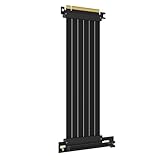
The 250 mm version of the GLOTRENDS right-angle riser gives you 50 mm more than the base model. That extra length helps when the vertical bracket sits lower or farther from the slot than the usual layout, or when a thick card needs a gentler bend. The listing title is shorter than the 200 mm and 300 mm models, so confirm the card support list on the product page before ordering.
- Length: 250 mm
- Interface: PCIe 3.0 x16
- Connector style: 90-degree right angle
- Card support list: confirm on listing (the sibling models name GTX 10/16, RTX 20 and RX 5000)
- Shielding: confirm on listing
This is a convenience purchase for owners who already know the shorter model falls short. Measure along the real route of the cable, including the bend near the card, and leave a little slack rather than pulling the cable taut. Keep in mind that a longer Gen 3 cable is still a Gen 3 cable, so the extra length does not add any speed.
Pros
- More slack for awkward bracket positions
- Same Gen 3 platform match as the 200 mm model
Cons
- Longer cable means more bulk to hide in the case
- Gen 3 only, so it holds back newer cards
It sits between the 200 mm and 300 mm cables of the same family, so measure first and buy the shortest length that reaches without tension.
4. GLOTRENDS 300mm PCIe 3.0 – Best for Large Cases

At 300 mm, this is the longest cable in the list and the one to consider for full towers, open-air frames and cases where the card mount is far from the motherboard slot. The listing carries the same card support language as the 200 mm model: GTX 10 and 16 series, RTX 20 series, RX 5000 and Vega, with Gen 3 and Gen 2 support and EMI shielding.
- Length: 300 mm
- Interface: PCIe 3.0 x16, Gen 2 compatible per the listing
- Connector style: 90-degree right angle
- Card support named: GTX 10/16, RTX 20, RX 5000, Vega
- Shielding: EMI shielding stated in the title
Only buy this length if you have measured and the shorter options will not reach. Large cases often have a clear route behind the motherboard tray, which lets you hide the excess. Use cable ties or velcro straps to keep the spare length away from fans, and avoid coiling it tightly, because coils concentrate bends and can trap heat near the connectors.
Pros
- Reaches mounts that shorter cables cannot
- Good fit for older builds in roomy cases
Cons
- Long runs are the most sensitive to signal loss, so it is a poor choice for fast new cards
- Excess cable can block airflow if not tied down
Compared with the 250 mm cable, it only earns its place when the shorter length genuinely cannot reach.
5. TRYX STRING PCIe 5.0 200mm – Best for Flagship Cards in Vertical Mounts

The listing aims this riser at the newest high-end cards, naming RTX 5090, RTX 5080 and Radeon 9070 XT, with a vertical GPU mount design and a 200 mm length. It also mentions gold-plated connectors, a 128GB/s figure and near-zero signal loss. Treat the bandwidth figure as the combined two-direction rating of a Gen 5 x16 link, and confirm the exact construction on the product page.
- Length: 200 mm
- Interface: PCIe 5.0 x16
- Contacts: gold-plated connector, per the listing
- Stated bandwidth: 128GB/s (combined both directions)
- Card support named: RTX 5090, RTX 5080, Radeon 9070 XT
Flagship cards are heavy and hot, so plan the whole vertical mount rather than only the cable. Make sure the bracket supports the card at both ends, that the intake fans have a gap behind the glass, and that the card’s power cable has a gentle bend. The listing names the newest high-end cards, but the cable will also work in any x16 slot that matches its generation, subject to the usual fit checks.
Pros
- Designed with current flagship cards in mind
- Gen 5 rating keeps the link at full speed on a new platform
Cons
- Heavy cards still need a proper bracket, because the cable cannot carry the weight
- Overkill for a Gen 3 or Gen 4 system
Next to the Corsair 5.0 riser, it gives you 25 mm more length at the same generation, which matters in cases with a deeper vertical bracket.
6. NZXT PCIe 4.0 x16 200mm – Best for Gen 4 Builds
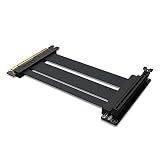
The NZXT AB-RC200-B1 is a flexible, shielded Gen 4 riser at 200 mm. Gen 4 is the sweet spot for most current systems, since mainstream RTX 40 series and Radeon 7000 series cards use Gen 4 x16 or Gen 4 x8 links. It is a natural companion for NZXT cases that use a vertical GPU bracket, although you should confirm the bracket sold separately works with your case.
- Length: 200 mm
- Interface: PCIe 4.0 x16
- Model number: AB-RC200-B1
- Build: flexible and shielded, per the listing
- Bracket: not stated in the title; confirm on listing
Case compatibility is the main question with this cable. NZXT designs its riser around its own vertical bracket, so owners of other cases should compare the mounting hole spacing and the slot position before ordering. A Gen 4 cable is also a sensible choice for a build that may add a Gen 5 board later but still runs a Gen 4 card, since the card cannot go faster than its own interface.
Pros
- Right generation for the largest group of modern systems
- Shielded and flexible, which helps routing
Cons
- Not a Gen 5 cable, so it limits a Gen 5 card on a Gen 5 board
- Bracket compatibility depends on your case
It is the mainstream middle ground between the Gen 3 GLOTRENDS cables and the two Gen 5 options.
Specs Compared
| Model | Length | PCIe generation | Connector style | Stated card support |
|---|---|---|---|---|
| GLOTRENDS 200mm | 200 mm | 3.0 x16 (Gen 2 compatible) | 90-degree right angle | GTX 10/16, RTX 20, RX 5000, Vega |
| Corsair Premium 175mm | 175 mm | 5.0 x16 | confirm on listing | confirm on listing |
| GLOTRENDS 250mm | 250 mm | 3.0 x16 | 90-degree right angle | confirm on listing |
| GLOTRENDS 300mm | 300 mm | 3.0 x16 (Gen 2 compatible) | 90-degree right angle | GTX 10/16, RTX 20, RX 5000, Vega |
| TRYX STRING | 200 mm | 5.0 x16 | vertical mount design, gold-plated | RTX 5090/5080, Radeon 9070 XT |
| NZXT AB-RC200-B1 | 200 mm | 4.0 x16 | confirm on listing | confirm on listing |
How We Chose These
This guide is built from research, not from handling the cables. We started with the six riser listings in the current catalog, read each product name and specification field, and compared the stated PCIe generation, length and connector style. We then checked the generation and bandwidth figures against the PCI-SIG specification summaries and manufacturer product pages for the brands involved. We favored cables whose listing states a generation, because that is the number that decides whether the link runs at full speed. Where a listing does not state a detail, the table says to confirm it on the product page rather than guessing.
What to Look For
Match the PCIe generation to your platform
PCIe doubles its per-lane rate with each generation. A Gen 3 x16 link carries roughly 16 GB/s in each direction, Gen 4 doubles that to about 32 GB/s, and Gen 5 reaches about 63 GB/s. A riser adds a cable, two extra connectors and more signal loss, so a cable that is only rated for Gen 3 may cause instability when the system tries to run Gen 4 or Gen 5. The safest rule is to buy a riser rated at or above the highest generation your motherboard slot and graphics card support.
If you already own a Gen 3 cable and a Gen 4 board, many BIOS menus let you force the slot to Gen 3, which typically costs a small amount of performance on mid-range cards and is often acceptable for experimentation.
Length and routing
Measure from the motherboard slot to the vertical bracket along the path the cable will take, not in a straight line. Add 20 to 30 mm for the bend radius. Shorter is better for signal integrity, especially at Gen 5. A 175 or 200 mm riser covers most mid-tower layouts, 250 mm helps with lower brackets, and 300 mm is mainly for full towers and open frames. Avoid folding the cable tightly, which can damage shielding and cause errors.
Connector orientation and clearance
The right-angle design on the GLOTRENDS cables keeps the cable running parallel to the motherboard, while other risers exit straight. Check which direction your case expects the cable to come from. Also check that the card, once mounted vertically, still has room to breathe. Most cases need at least 20 to 30 mm between the fans and the glass panel; a card pressed against glass can run hotter.
Support the card, not the cable
A riser is not a structural part. The graphics card’s weight belongs on a proper bracket attached to the case chassis, and the cable simply carries the signal. Flagship cards that occupy three slots or more can weigh well over 1.5 kg, so use a bracket that fixes the rear bracket plate and the end of the card.
A worked example: a build with a Gen 5 board, an RTX 5080-class card and a bracket 150 mm from the slot works best with a 175 or 200 mm Gen 5 cable. The same card on a Gen 4 board is fine with a Gen 4 cable. A GTX 1660 on an older Gen 3 board would be perfectly served by a 200 mm Gen 3 cable.
Cable construction and shielding
Riser cables carry a bundle of high-speed differential pairs, one pair for each lane in each direction. Quality shows up in the shielding around those pairs, the consistency of the conductor spacing and the way the connectors are soldered or crimped. Look for a listing that mentions shielding, EMI protection or gold-plated contacts, but remember that a claim in a title is not proof of quality. Reputable brands publish the supported PCIe generation, which is the most useful figure to compare.
Flat ribbon designs bend easily in one direction and badly in the other, while round or braided designs bend more freely. Whichever you pick, never twist the cable or force a sharp fold at the connector, because the stress travels along the solder joints.
Installation checklist
Power the system off and unplug the PSU before connecting anything. Seat the riser into the motherboard slot first, route the cable to the bracket, and only then install the graphics card. Press the card into the riser’s connector until the latch clicks, if it has one, and screw the rear plate to the bracket. Boot into the BIOS and confirm the slot shows the expected generation and an x16 width. Check the link again under load with a monitoring tool, because some marginal cables only fail when traffic rises.
Signs of a bad link
Typical symptoms of a marginal riser include a black screen at boot, random driver resets, the card showing at x8 or x4 instead of x16, and reduced frame rates. Utilities such as GPU-Z show the live link width and speed, which is the quickest way to confirm what you are running. If errors appear, reseat both ends, drop the slot to a lower generation in the BIOS, or move to a cable with a higher rating.
Questions
Does a PCIe riser cable reduce graphics performance?
A good riser rated for the right generation should carry the full link with negligible difference. Problems appear when the cable is below the generation your system negotiates or when it is very long. Check the live link speed in GPU-Z after installing.
Can I use a PCIe 3.0 riser on a PCIe 4.0 motherboard?
It can work, but it is not guaranteed at full Gen 4 speed. Many users force the slot to Gen 3 in the BIOS to keep the system stable. A Gen 4 or Gen 5 rated cable avoids the compromise.
Is a PCIe 5.0 riser worth it for a Gen 4 card?
Not for speed, because the card only uses Gen 4 anyway. It can be worth it if you plan to upgrade to a Gen 5 card and want to avoid buying a second cable. The extra cable quality may also help signal margin.
How long should the riser cable be?
Choose the shortest length that reaches your bracket with a gentle bend. Most mid-tower cases need 175 to 250 mm, and 300 mm is for larger cases. Longer cables have more signal loss.
Will a riser work with any case?
No. The case needs a vertical mount bracket or an expansion slot layout that lets the card stand off the motherboard. The cable alone does not create that mounting position. Confirm the bracket and spacing your case supports.
Does a riser cable carry the graphics card’s power?
The slot provides up to 75 W through the riser, and the card still takes the rest from its own power connectors. Use a cable with good wire gauge in the slot power pins and keep the PSU cables connected to the card as normal.
Update History
- October 20, 2026 – Initial publication; product set drawn from current catalog listings.
- Check the product page for current specifications and availability before buying.
Sources
- Retailer listing titles and specification fields for the six riser cables
- Manufacturer product pages for Corsair, NZXT, TRYX and GLOTRENDS
- PCI-SIG public summaries of PCIe 3.0, 4.0 and 5.0 per-lane data rates