🛒 Best Price Today on Amazon
Prime members get fast, free shipping on everything above, plus member-only deals. New members get a 30-day free trial — cancel anytime.
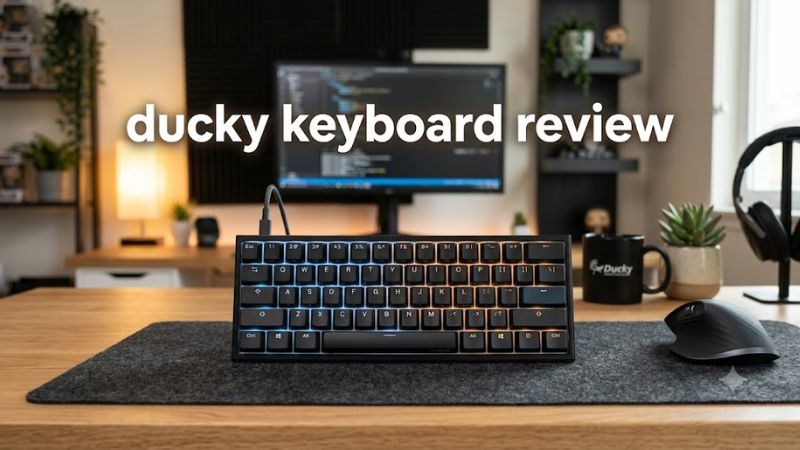
Ducky keyboards appeal to PC gamers who want durable mechanical switches, distinctive designs, and satisfying typing feedback. This ducky keyboard review examines the One 3 lineup, its gaming strengths, practical limitations, pricing considerations, and alternatives to help you decide whether a Ducky keyboard deserves a place on your desk.
How to Choose a Ducky Keyboard
Choosing a Ducky keyboard starts with your desk space, preferred switch feel, customization needs, and budget. The brand offers different layouts and feature sets, so the right model depends on how you divide your time between gaming, typing, and everyday work rather than appearance alone.
1. Pick the Right Keyboard Size
A full-size keyboard suits players who regularly use a number pad for spreadsheets, shortcuts, or productivity tasks. Tenkeyless (TKL) models remove the number pad to leave more room for mouse movement, while compact 65% and 60% layouts reduce the footprint further.
The Ducky One 3 family includes these different form factors, although exact availability depends on the model and retailer. Before purchasing, check the physical layout and confirm whether you need dedicated arrow keys, a function row, or navigation keys for everyday use.
2. Choose Mechanical Switches Carefully
Ducky keyboards are available with different mechanical switch options, depending on the specific model and configuration. Linear switches move without a pronounced tactile bump, tactile switches provide a noticeable response, and clicky switches produce an audible click as well as tactile feedback.
Your preferred switch affects typing comfort and noise more than the keyboard’s color scheme does. Linear switches are often suitable for players who prefer uninterrupted key travel, while tactile switches can appeal to people who want more physical feedback. Clicky switches may be distracting in shared rooms or voice chats.
3. Check Keycaps, Lighting, and Customization
The One 3 lineup features double-shot PBT keycaps on reviewed configurations, giving the keys a textured feel and helping legends resist wear. Many versions also include RGB lighting, but keycap legends that do not transmit light can remain difficult to read in a dark room.
Hot-swappable switches are another important advantage of compatible One 3 models because they allow switch replacement without soldering. However, hot-swapping does not mean every switch is automatically compatible. Check socket compatibility, switch-pin requirements, and the exact keyboard variant before buying replacement parts.
4. Decide Which Features Matter Most
Ducky’s traditional mechanical boards emphasize physical build quality and onboard controls rather than a comprehensive companion application. This approach suits buyers who prefer a keyboard that works without relying on a separate customization program, but it can frustrate users who want an easy interface for remapping keys or managing profiles.
Wireless connectivity is another deciding factor. The One 3 is a wired family, so it is not the right choice if Bluetooth or a 2.4GHz wireless connection is essential. If you want wireless operation, investigate Ducky’s other product lines or consider a competing keyboard with the connectivity you need.
Ducky Keyboard Review: Models, Features, and Value
Ducky’s lineup now extends beyond its traditional One 3 mechanical keyboards, so buyers should compare the older wired design with newer options before committing. The One 3 remains attractive for conventional mechanical typing, while the One X targets adjustable actuation and rapid-trigger gaming, and the OK-M emphasizes customization and a more compact layout.
Ducky One 3: Best for Traditional Mechanical Gaming
The Ducky One 3 is a strong choice for gamers who prioritize conventional mechanical switches, durable keycaps, and a stable wired setup. Official specifications list Cherry MX switch options, double-shot PBT keycaps, a detachable USB-C cable, and N-key rollover. Available layouts include full-size, TKL, 65%, and 60% models.
Independent reviews support its appeal for both gaming and typing. RTINGS reports low input latency and good build quality, while noting that the keycap legends do not shine through and that the keyboard lacks dedicated companion software. Those drawbacks matter if you play in a dark room or regularly configure complex macros.
Ducky One X: Best for Adjustable Actuation
The Ducky One X is the more relevant option for players seeking modern competitive-gaming features. Its official specifications list inductive linear switches with adjustable actuation, Rapid Trigger, multi-point triggering, hot-swappable switches, and a gasket-mounted structure with seven layers of acoustic dampening.
The full-size model also supports USB, 2.4GHz wireless, and Bluetooth connectivity. Its web-based configuration software requires a wired connection, and the manufacturer lists PC, Linux, and Intel-based Mac compatibility. Buyers should confirm operating-system support before choosing it for an Apple Silicon Mac.
Ducky OK-M: Best for Customization
The Ducky OK-M family is designed for buyers who want a more modern mechanical keyboard with compact layouts and software-based customization. The manufacturer lists 65%, 75%, and 98% layouts, double-shot PBT keycaps, hot-swappable switches, a gasket mount, and VIA support for remapping keys and configuring macros.
One caution is that the official product page contains conflicting connectivity descriptions: its overview advertises multiple connection modes, while its specification list says wired only. Confirm the exact variant’s connectivity with the seller before ordering. The OK-M is worth considering for customization, but the configuration should match your needs rather than relying on the product-family description alone.
Ducky Keyboard Comparison
The following comparison highlights the practical differences between the three families. Prices are omitted because a reliable, current US retail price for each specific configuration could not be established.
| Product | Best For | Key Spec | Compatibility | Watch Out For |
| Ducky One 3 | Traditional mechanical gaming | Cherry MX switches, PBT keycaps, hot-swap sockets | Wired USB; verify the selected layout and operating system | No dedicated configuration software |
| Ducky One X | Competitive gaming features | Inductive switches, Rapid Trigger, adjustable actuation | USB, 2.4GHz, Bluetooth; verify OS support | Configuration software requires a wired connection |
| Ducky OK-M | Compact layouts and customization | Gasket mount, hot-swappable switches, VIA support | Verify the specific variant’s connectivity and OS support | Official connectivity information is inconsistent |
Specifications: Ducky’s official product pages. Independent performance findings are available for the One 3, but the three models should not be treated as directly benchmarked against one another.
What Is the Value of a Ducky Keyboard?
The value proposition depends on the model and its current selling price. The One 3 can make sense for buyers who value conventional switches, solid construction, and hot-swapping. However, an older keyboard is not automatically a bargain: compare its actual checkout price with newer alternatives offering wireless connectivity or more extensive software customization.
The One X is easier to justify when adjustable actuation and Rapid Trigger are priorities, while the OK-M may appeal to people who want VIA-based remapping. Neither feature set is necessary for every gamer. If you mainly play casual games, a less expensive mechanical keyboard with your preferred switches may offer better value.
FAQ
Are Ducky keyboards good for gaming?
Yes, Ducky keyboards are good for gaming, particularly if you value mechanical switches, dependable wired connectivity, and customizable key feel. RTINGS reports low latency for the One 3, while the One X adds adjustable actuation and Rapid Trigger. Choose based on the games you play and the features you will actually use.
Do Ducky keyboards work with Windows and Mac?
Ducky keyboard compatibility depends on the model. The One 3 connects through USB, while the One X supports PC, Linux, and Intel-based Macs according to its manufacturer. Before buying for macOS, check the exact model’s operating-system support and whether its configuration tools work on your computer.
Are Ducky keyboards worth the price?
Ducky keyboards can be worth buying if their build, switch options, and customization match your priorities. The One 3 suits traditional mechanical-keyboard fans, while the One X is more appropriate for players who want adjustable actuation. Compare current US retail prices and return policies before deciding, especially when considering older stock.
Can you replace switches on a Ducky keyboard?
Yes, the One 3 and One X support hot-swappable switches, and the OK-M family also advertises hot-swapping. You can replace compatible switches without soldering, but socket and switch compatibility still matter. Check the manual for your exact model before removing switches or purchasing replacements.
Final Thoughts
This Ducky keyboard review points to three distinct choices: the One 3 for traditional mechanical gaming, the One X for adjustable actuation, and the OK-M for software customization. No single model suits everyone. Compare the exact layout, connectivity, switch features, and current price before choosing the keyboard that fits your setup.