🛒 Best Price Today on Amazon
Prime members get fast, free shipping on everything above, plus member-only deals. New members get a 30-day free trial — cancel anytime.
Choosing the right elgato capture card comparison starts with how you play and what you want to record. The 4K S suits many console creators, the 4K X targets high-refresh-rate gaming, and the internal 4K Pro suits compatible desktop PCs. Here is how their specifications, connections, and trade-offs compare.
How to Choose an Elgato Capture Card
The right capture card depends on more than its maximum resolution. Check the resolution and frame rate you want to record, the signal your gaming display needs, your computer’s available connection, and your budget. These factors help distinguish an affordable recording device from one designed for demanding high-refresh-rate setups.
Capture resolution and frame rate
Resolution determines image detail, while frame rate affects how fluid the recorded footage looks. A card supporting 4K60 capture can record 4K footage at up to 60 frames per second, provided the source signal, recording software, and computer support that mode. For competitive games, 1440p or 1080p at a higher frame rate may be more useful.
Do not confuse capture specifications with passthrough specifications. Passthrough sends the incoming video signal to your monitor, while capture sends video to your recording or streaming application. A device that passes through 4K at 120 Hz might not record that signal at the same resolution and frame rate. Check both capabilities before buying.
HDMI 2.0 versus HDMI 2.1
HDMI 2.0 is sufficient for many 4K60 console setups, while HDMI 2.1 offers the additional bandwidth needed for supported high-refresh-rate 4K signals. Elgato’s external 4K S uses HDMI 2.0, whereas the 4K X uses HDMI 2.1. Your console or GPU, monitor, and cables must also support the desired video mode.
Variable Refresh Rate (VRR) matters if your display and gaming platform use it to reduce tearing. Confirm that the capture card supports passthrough for your required signal, and check any HDR restrictions separately. Support for HDR passthrough does not automatically mean the card can record HDR at every resolution and frame rate.
USB external or PCIe internal
An external USB capture card is convenient for laptop users, console streamers, and people who switch between gaming systems. Models such as the 4K S and 4K X connect to a computer through USB-C, but the port’s supported USB generation and bandwidth matter. A USB-C connector alone does not confirm that the computer supports the required transfer speed.
An internal PCIe card is a better fit for a desktop that has a suitable expansion slot and enough room around it. The 4K Pro uses PCIe, so it is not an option for a typical laptop or a desktop without a compatible slot. Check the motherboard layout and available expansion resources before choosing an internal card.
Software, audio, and computer requirements
Capture hardware does not replace recording software or a capable host computer. Elgato devices work with supported applications such as OBS Studio, while compatibility and available features depend on the card and operating system. Check the manufacturer’s current system requirements instead of assuming every Windows or macOS computer will perform equally well.
Audio routing also deserves attention. Console party chat, microphone commentary, and game audio may follow different paths depending on the platform and configuration. Some cards offer a 3.5 mm analog audio input, but its presence does not guarantee that every headset or chat setup will work without adjustments. Plan your audio connections before purchasing accessories.
Elgato Capture Card Comparison: Top Picks
For most buyers, the choice comes down to the 4K S for everyday 4K60 recording, the 4K X for high-refresh-rate HDMI 2.1 setups, or the 4K Pro for a desktop streaming workstation. The HD60 X remains relevant for existing owners and discounted stock, but Elgato has identified the 4K S as its successor.
Elgato Game Capture 4K S: Best Value for 4K60
The 4K S is a strong choice for console creators who want 4K recording without paying for HDMI 2.1 capture hardware. Its published specifications include 4K60 capture, 1440p capture at up to 144 Hz, USB-C connectivity at 5 Gbps, and HDMI 2.0 passthrough. It supports Windows, Mac, and iPad workflows.
Its limitation is the HDMI 2.0 interface and the lower maximum capture modes compared with the 4K X. HDR capture is also restricted to supported resolution and frame-rate combinations. Choose the 4K S for 4K60 content and supported high-frame-rate 1440p recording; consider the 4K X if you need 4K capture above 60 fps.
Elgato Game Capture 4K X: Best for High-Refresh-Rate Gaming
The 4K X targets creators who want to preserve more of the detail and motion in a high-end gaming setup. It uses HDMI 2.1 and USB-C 3.2 Gen 2 at 10 Gbps, with published capture support up to 4K144 and passthrough up to 4K144. It also supports high-refresh-rate 1080p and 1440p modes.
The trade-off is its higher purchase price and the need for a compatible USB connection and HDMI signal chain. HDR is not available at every capture resolution and frame rate, so check Elgato’s supported-mode chart before planning a recording workflow. It is most useful when both your source and display can take advantage of the additional bandwidth.
Elgato Game Capture 4K Pro: Best for Desktop Streaming
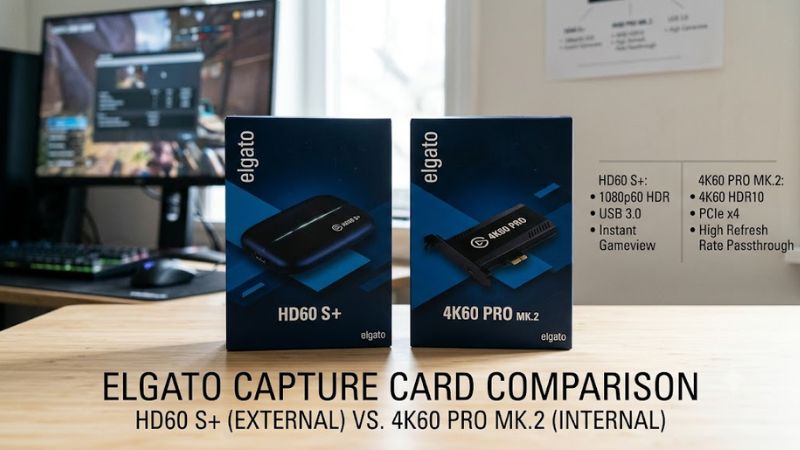
The 4K Pro is an internal capture card for desktop PCs and more demanding streaming configurations. It supports HDMI 2.1, passthrough up to 8K60, capture up to 4K60, and HDR10 recording. Its PCIe 2.0 x4 connection fits a desktop workflow where USB bandwidth or external cabling is not the preferred approach.
It costs more than the external 4K S, and it requires a compatible PCIe slot, a Windows computer, and adequate CPU and GPU resources. It is not suitable for laptops. Choose it when desktop integration and advanced passthrough matter more than portability; the 4K X is the more practical alternative if you want an external device.
Elgato Game Capture HD60 X: Best for Existing 1080p60 Setups
The HD60 X remains useful for people who already own it or find suitable remaining stock. It supports capture up to 4K30 SDR, 1440p60, and 1080p60 HDR under supported conditions, along with 4K60 passthrough and a USB 3.0 connection. Its HDMI 2.0 design suits many conventional console recording setups.
However, Elgato lists the HD60 X as discontinued and points buyers toward the 4K S. Its maximum capture frame rate at 4K is lower than the 4K S, and it cannot capture 1440p at the same high frame rates as that successor. Compare the actual retail price and warranty before buying remaining stock rather than assuming an older card is automatically cheaper.
Quick comparison table
| Product | Best For | Key Spec | Compatibility | Watch Out For |
| Elgato 4K S | Best value for 4K60 | 4K60 capture; USB-C 5 Gbps | Windows, Mac, iPad | HDMI 2.0; limited maximum capture modes |
| Elgato 4K X | High-refresh-rate capture | Up to 4K144 capture; USB 10 Gbps | Windows, Mac, iPad | Requires suitable USB and HDMI bandwidth |
| Elgato 4K Pro | Desktop streaming | 4K60 capture; 8K60 passthrough | Windows desktop with PCIe 2.0 x4/x8/x16 slot | Not compatible with laptops |
| Elgato HD60 X | Existing 1080p60 setups | 4K30 capture; 4K60 passthrough | Windows and macOS, subject to requirements | Discontinued; limited remaining retail stock |
The figures above describe supported maximum modes, not a guarantee that every resolution, frame rate, and HDR combination works together. Refer to the official product specifications and compatibility documentation for your intended signal.
FAQ
Is the Elgato 4K S better than the HD60 X?
Yes, the 4K S supports 4K60 capture compared with the HD60 X’s 4K30 maximum and supports higher capture frame rates at 1440p. It is the more capable option for new purchases, particularly for newer consoles. The HD60 X may still suit existing 1080p60 workflows if the price and condition make sense.
Is the Elgato 4K X worth the extra money?
The 4K X is worth considering if you need HDMI 2.1 and capture above 4K60, including supported 4K120 or 4K144 modes. If you mainly publish 1080p or 4K60 videos, the 4K S may provide better value. Compare the specific capture mode you need rather than buying based on the highest advertised number alone.
Do Elgato capture cards work with OBS Studio?
Yes, supported Elgato capture cards can work with OBS Studio, although available features depend on the model, operating system, and signal configuration. Connect the card, install the required software or drivers where applicable, and add the device as a video capture source in OBS. Confirm that the selected video and audio formats match the incoming signal.
Do I need a powerful PC for an Elgato capture card?
You need a computer that meets the chosen card’s system requirements and can handle your recording or streaming workload. The 4K Pro specifies Windows 10 64-bit or newer, an Intel Core i5 from the specified generation or a Ryzen 5 3600 or better, a GeForce GTX 10-series GPU or better, and a compatible PCIe slot. Check each product’s current requirements before buying.
Final Thoughts
The best elgato capture card comparison comes down to matching capture quality to your existing equipment. Choose the 4K S for 4K60 recording, the 4K X for supported high-refresh-rate HDMI 2.1 capture, or the 4K Pro for a desktop workstation. Before ordering, verify your exact video mode, connection, and operating system against Elgato’s official specifications.