🛒 Best Price Today on Amazon
Prime members get fast, free shipping on everything above, plus member-only deals. New members get a 30-day free trial — cancel anytime.
Choosing the best b850 motherboard means balancing power delivery, storage expansion, connectivity, and price rather than paying extra for features your gaming PC may never use. AMD’s B850 platform supports AM5 desktop processors and DDR5 memory, making it a practical foundation for modern Ryzen builds. The right board depends on your case, CPU, and upgrade plans.
How to Choose a B850 Motherboard
The right board should match your processor, case, memory, and preferred storage configuration before you compare premium features. B850 models share a chipset family, but their power delivery, network controllers, rear ports, expansion slots, and firmware options differ. Focus on the features your build will actually use instead of selecting by branding alone.
Processor and Platform Compatibility
Start by confirming the exact CPU support list for your chosen motherboard. B850 boards use AMD’s AM5 socket and support Ryzen 7000, 8000, and 9000 desktop processor families, subject to the individual model’s CPU list and BIOS version. The best b850 motherboard for a new gaming system should also leave room for your planned processor upgrade.
Memory compatibility matters just as much. These boards use DDR5, not DDR4, so existing DDR4 kits cannot be reused. Check the manufacturer’s supported memory list for your kit and enable EXPO only after confirming stable operation. Advertised overclocked memory speeds depend on the processor’s memory controller, module configuration, and firmware.
Power Delivery and Cooling
Voltage regulator module design affects how consistently a motherboard supplies power under sustained CPU workloads. A well-cooled VRM is useful for higher-power Ryzen processors and prolonged rendering, compiling, or gaming sessions. However, a large phase-count figure alone does not establish overall quality; component ratings, heatsinks, airflow, and independent thermal measurements matter too.
For a mainstream gaming CPU, a reputable B850 board with adequate power delivery is usually more sensible than paying for an expensive flagship design. Check independent reviews for VRM temperature results, including the test processor, ambient conditions, workload, and fan setup. Without comparable measurements, avoid assuming that one board runs cooler merely because its heatsinks look larger.
Expansion, Storage, and Networking
Check the number of M.2 sockets and their PCIe generations before buying. Many B850 models provide PCIe 5.0 support for an NVMe drive, while other sockets use PCIe 4.0. Read the manual’s lane-sharing notes because populating particular M.2 sockets can reduce the availability or bandwidth of other expansion slots on some models.
Networking can also affect long-term convenience. Wi-Fi 7 may suit a compatible wireless network, while 2.5Gb Ethernet is adequate for many wired home connections. Some boards provide faster Ethernet, additional USB ports, or better audio connectivity. These features add value when they match your equipment, but they do not directly increase gaming frame rates.
Case Fit and Upgrade Planning
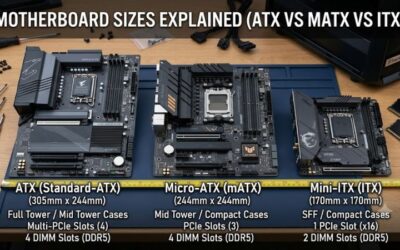
Confirm the motherboard’s physical dimensions before ordering. ATX boards need a case that supports ATX, while Micro-ATX models can fit compatible smaller cases. Also check clearance around the graphics card, CPU cooler, memory modules, and front-panel connectors. A large GPU may cover some lower expansion slots even when the board technically offers them.
The best b850 motherboard for a compact build may differ from the right option for a spacious tower with several NVMe drives. Plan around the number of drives you expect to install, your USB requirements, and the network connection you actually have. Verify the exact product revision and regional specification before purchase because similarly named models can differ.
Top Picks: Four B850 Motherboards Worth Comparing
These recommendations cover different build priorities, from all-round gaming to lower-cost systems and premium connectivity. They are based on manufacturer specifications and independent coverage, not on PC Gaming Universe performing its own hardware evaluations. Prices change by retailer, so compare current US listings before deciding whether an upgrade is worth the difference.
| Product | Best For | Key Spec | Compatibility | Watch Out For |
| MSI MAG B850 TOMAHAWK WIFI | Best Overall | Wi-Fi 7, 5Gb Ethernet, three M.2 sockets | AM5, DDR5, ATX | Costs more than basic boards |
| GIGABYTE B850 AORUS ELITE WIFI7 | Best Value | Wi-Fi 7, PCIe 5.0 graphics support | AM5, DDR5, ATX | 2.5Gb Ethernet rather than 5Gb |
| ASRock B850 Steel Legend WiFi | Best for Multiple NVMe Drives | Four M.2 sockets | AM5, DDR5, ATX | Slot sharing needs attention |
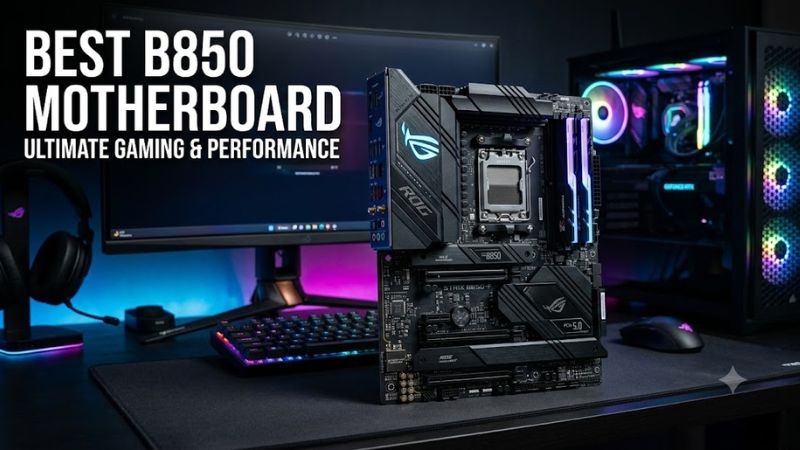
| ASUS ROG Strix B850-F Gaming WiFi | Best Premium Features | Wi-Fi 7, PCIe 5.0 support | AM5, DDR5, ATX | Higher price can approach X870 |
Best Overall: MSI MAG B850 TOMAHAWK WIFI
The MSI MAG B850 TOMAHAWK WIFI is a strong all-round choice for gaming PCs that need substantial connectivity without moving to a flagship chipset. Its manufacturer-listed features include AM5 support, DDR5 memory, Wi-Fi 7, 5Gb Ethernet, and three M.2 sockets. It is particularly appealing for a single-GPU desktop with wired networking and room for additional storage.
Buy it if you want a balanced ATX board for a Ryzen gaming build and expect to keep the platform for several years. Its extra networking capability is useful when paired with compatible equipment, but it does not improve game performance by itself. If you need only basic connectivity, a less expensive board may provide the same practical gaming experience.
Best Value: GIGABYTE B850 AORUS ELITE WIFI7
The GIGABYTE B850 AORUS ELITE WIFI7 is a sensible alternative when you want modern connectivity without paying for every premium feature. It combines the AM5 platform with DDR5 support, Wi-Fi 7, and PCIe 5.0 graphics expansion. Its feature mix suits mainstream gaming builds that need current-generation connectivity and a conventional ATX layout.
Choose this model when its current price is meaningfully lower than the Tomahawk’s and 2.5Gb Ethernet meets your needs. The trade-off is the absence of the Tomahawk’s 5Gb Ethernet connection. Buyers who need faster wired networking or a different rear-I/O layout should compare the full manufacturer specifications before choosing between them.
Best for Multiple NVMe Drives: ASRock B850 Steel Legend WiFi
The ASRock B850 Steel Legend WiFi stands out for storage-focused systems because it offers four M.2 sockets. That can suit a gaming PC used for a large game library, media projects, or several separate NVMe drives. Its AM5 socket and DDR5 memory support also make it suitable for a new Ryzen desktop, subject to the processor support list.
Its main limitation is that installing drives can affect other expansion options. ASRock documents lane-sharing arrangements that buyers should review before populating every socket. Choose it if storage capacity matters more than keeping every expansion slot available. A simpler board may be a better purchase if you plan to install only one or two drives.
Best Premium Features: ASUS ROG Strix B850-F Gaming WiFi
The ASUS ROG Strix B850-F Gaming WiFi targets builders who want a feature-rich ATX board, Wi-Fi 7, and PCIe 5.0 support. It is a candidate for a high-end Ryzen gaming system where rear connectivity, expansion, and firmware options matter alongside the CPU and graphics card. Check the precise model name because newer revisions may carry additional suffixes.
Its key drawback is price: premium B850 models can approach the cost of entry-level X870 alternatives. Before paying extra, compare the exact USB configuration, M.2 layout, Ethernet speed, and expansion requirements. Buy this board when its specific features justify the difference, rather than assuming that a more expensive motherboard will deliver more frames per second.
FAQ: Choosing the Right B850 Board
Is B850 Good for a Gaming PC?
Yes, B850 is a capable platform for a modern Ryzen gaming PC. It supports AM5 desktop processors, DDR5 memory, CPU overclocking, and PCIe 5.0 capabilities, although exact slot configurations vary by motherboard. A well-matched B850 board can support a high-performance gaming build without requiring a more expensive chipset.
Motherboard choice alone rarely determines gaming frame rates when comparing boards with adequate CPU power delivery and similar configurations. Graphics card selection, processor performance, game settings, and cooling generally have a much larger impact. Independent motherboard benchmark results are most useful when they disclose the workload, test system, and measurement conditions.
Does B850 Support Ryzen 9000 CPUs?
Yes, B850 motherboards support Ryzen 9000 desktop processors, subject to each board’s official CPU support list and required BIOS version. Confirm compatibility before assembly, especially if the motherboard has been sitting in retail inventory. Some units may need a firmware update before they can boot with a particular processor.
Check whether the specific board includes BIOS Flashback or a similar firmware recovery and update feature. Follow the manufacturer’s instructions for the correct firmware file and USB preparation. Never interrupt a firmware update, and do not assume that every board in the same chipset family uses an identical update procedure.
Is PCIe 5.0 Necessary for Gaming?
No, PCIe 5.0 is not a requirement for most gaming systems. A compatible PCIe 4.0 graphics card can run in a suitable PCIe 5.0 motherboard slot, with the negotiated connection determined by the hardware and slot configuration. The performance difference depends on the device and workload rather than the generation label alone.
PCIe 5.0 storage can offer high sequential transfer rates for supported workloads, but loading games does not necessarily improve in proportion to advertised SSD bandwidth. Check which M.2 socket supports each generation and whether using it affects other slots. Prioritize capacity, reliability, and price if your main goal is storing and playing games.
Should You Buy B850 or X870?
Choose B850 when you want a modern AM5 gaming platform and its USB, storage, and expansion options meet your needs. Consider X870 when its additional connectivity, including required USB4 support, offers a clear benefit for your peripherals or workflow. Compare individual motherboard specifications rather than assuming every model provides the same ports.
For many gaming PCs, money saved on the motherboard can be allocated to a faster graphics card, a larger SSD, or better cooling. That trade-off is worthwhile only after confirming the cheaper board supports your processor, memory, and expansion plans. Compare total system cost and the features you will actually use before buying.
Final Thoughts
The best b850 motherboard depends on your budget, storage needs, and connectivity priorities. The MSI MAG B850 TOMAHAWK WIFI is a strong all-round pick, while Gigabyte offers a compelling alternative for value-focused builds. Compare current prices, confirm CPU and case compatibility, and choose the features that fit your gaming setup.