🛒 Best Price Today on Amazon
Prime members get fast, free shipping on everything above, plus member-only deals. New members get a 30-day free trial — cancel anytime.
For best motherboard for overclocking ram, the key factors are memory topology, BIOS controls, CPU platform, and DIMM configuration rather than raw VRM phase counts. Current DDR5 boards span AM5 and LGA1851, with some two-DIMM designs focused on high memory frequencies and others prioritizing capacity and expansion.
How to Choose a Motherboard for RAM Overclocking
The right board depends first on how far you want to push DDR5 and which processor platform you already own. For this roundup, the important criteria are DIMM layout, platform compatibility, firmware controls, and physical or power requirements, with the ROG Crosshair X870E Apex, ROG Maximus Z890 Apex, MSI MAG B850 Tomahawk Max WiFi, and ASRock X870E Taichi OCF covering different approaches.
Check the DIMM Layout
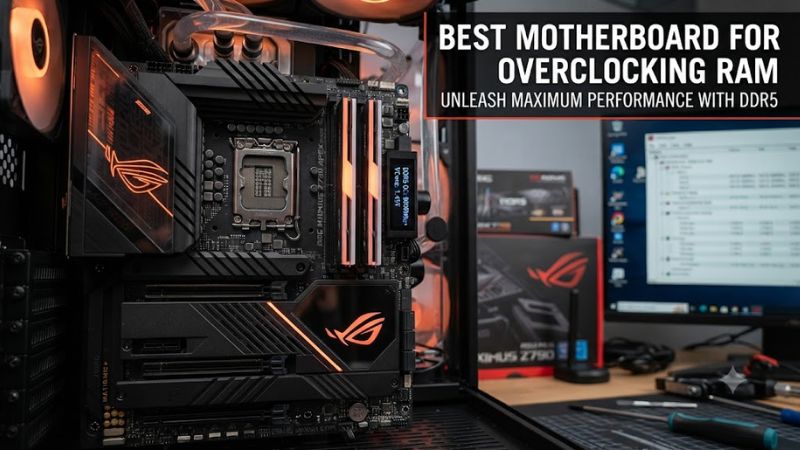
For high-frequency memory tuning, a two-DIMM motherboard can leave more room for aggressive memory configurations than a four-DIMM design. The ROG Crosshair X870E Apex has two DDR5 slots and supports up to 8200+ MT/s with Ryzen 9000, while the ROG Maximus Z890 Apex supports up to 9600+ MT/s with compatible configurations.
The ROG Crosshair X870E Apex is therefore aimed at builders who want a focused AM5 memory-tuning platform, while the Maximus Z890 Apex targets Intel systems with similarly specialized memory hardware. Both still require the CPU and memory kit to cooperate with the advertised overclocked data rates, so a motherboard rating should not be treated as a guaranteed operating speed.
Match the CPU Platform
A motherboard cannot cross between AMD AM5 and Intel LGA1851 processors, so platform selection comes before memory tuning. The MSI MAG B850 Tomahawk Max WiFi supports Ryzen 7000, 8000, and 9000 processors on AM5, while the MSI MEG Z890 Unify-X supports Intel Core Ultra processors using the LGA1851 socket.
For AMD buyers, the B850 Tomahawk Max WiFi provides a mainstream four-DIMM route to DDR5 tuning, with up to 8400+ MT/s listed for Ryzen 9000 configurations. Intel buyers can instead use the Z890 Unify-X, whose two-DIMM design and 9600+ MT/s memory specification are specifically suited to high-frequency DDR5 configurations.
Look at BIOS and Tuning Controls
Memory overclocking involves more than selecting an advertised frequency. BIOS support for EXPO or XMP, memory timing controls, voltage adjustment, memory training behavior, and recovery features can affect how practical manual tuning becomes. ASUS lists EXPO and AEMP support on the Crosshair X870E Apex, while Intel’s Z890 Apex supports XMP and AEMP III.
The ASRock X870E Taichi OCF adds physical controls aimed at enthusiasts, including Rapid OC buttons, voltage measurement points, Safe Boot, Retry, Slow Mode, and LN2 Mode. That makes it particularly relevant when the goal is manual experimentation rather than simply enabling a memory profile.
Verify Case and Power Compatibility
The best motherboard for overclocking ram still has to fit the PC around it. The MSI B850 Tomahawk Max WiFi is a standard ATX board measuring 12 by 9.6 inches and uses a 24-pin ATX connector plus two CPU power connectors and an additional 8-pin PCIe power connector. Check your case clearance and PSU cable availability before purchase.
The Crosshair X870E Apex is also ATX at 30.5 by 24.4 cm and requires a 24-pin main connector, two 8-pin CPU connectors, and an 8-pin PCIe connector. The Taichi OCF uses a 24-pin ATX connector, two 8-pin 12V connectors, and a 6-pin graphics power connector, making PSU cabling an important part of the build plan.
Top Picks for RAM Overclocking
These four boards cover two-DIMM enthusiast designs, a more affordable four-DIMM AM5 option, and an AMD overclocking-focused model. Their advertised memory speeds are platform-dependent, and manufacturers explicitly note that supported rates vary with the processor and memory configuration.
| Product | Best For | Key Spec | Compatibility | Watch Out For |
| ASUS ROG Maximus Z890 Apex | Best Overall | 2 DIMMs, DDR5-9600+ OC | LGA1851, Core Ultra 200, DDR5, ATX | High-end platform cost |
| MSI MAG B850 Tomahawk Max WiFi | Best Value | 4 DIMMs, DDR5-8400+ OC | AM5 Ryzen 7000/8000/9000, DDR5, ATX | Four-DIMM layout is less specialized |
| ASUS ROG Crosshair X870E Apex | Best For AM5 Memory Tuning | 2 DIMMs, DDR5-8200+ OC with Ryzen 9000 | AM5 Ryzen 7000/8000/9000, DDR5, ATX | 128GB maximum |
| ASRock X870E Taichi OCF | Best For Manual OC Controls | 2 DIMMs, DDR5-8400+ OC with Ryzen 9000 | AM5 Ryzen 7000/8000/9000, DDR5, ATX | Specialist feature set |
ASUS ROG Maximus Z890 Apex
The ROG Maximus Z890 Apex is the strongest fit for an Intel-focused memory-tuning build because it combines two DDR5 DIMM slots with support up to 9600+ MT/s OC. It uses the LGA1851 socket for Intel Core Ultra processors and provides extensive tuning hardware, including BCLK controls, measurement points, Safe Boot, Retry, and LN2 controls.
Buy it if high-frequency DDR5 tuning is central to an LGA1851 system and you want dedicated enthusiast controls. Do not buy it merely for ordinary gaming memory settings, because its specialized layout and high-end feature set are harder to justify when you have no intention of manually tuning RAM. Its ATX format also requires a case that accepts full-size ATX hardware.
MSI MAG B850 Tomahawk Max WiFi
The MAG B850 Tomahawk Max WiFi is the practical value choice for AM5 because it retains four DDR5 slots while supporting up to 8400+ MT/s OC with Ryzen 9000 configurations. It also provides a PCIe 5.0 x16 graphics slot, two CPU power connectors, 5Gb Ethernet, and Wi-Fi 7, giving the board broader everyday functionality than a specialist two-DIMM design.
Buy it when you want memory tuning without building around a specialist overclocking board. Do not choose it solely because its advertised maximum is high: four-DIMM configurations can place different demands on the CPU memory controller and memory kit, and MSI states that supported speeds vary with CPU and memory configuration. The board is ATX, so compact cases are unsuitable.
ASUS ROG Crosshair X870E Apex
The ROG Crosshair X870E Apex is the AM5 choice for builders who want a two-DIMM layout and extensive firmware and hardware controls. ASUS lists support for Ryzen 9000, 8000, and 7000 processors, with up to 8200+ MT/s OC for Ryzen 9000 and 128GB maximum memory capacity. It also includes EXPO, AEMP, BCLK controls, and dedicated memory cooling accessories.
Buy it when your AM5 build prioritizes memory tuning over maximum DIMM capacity. Do not choose it if you specifically need four memory modules or more than 128GB, because the board has two DIMM slots and a 128GB stated limit. Its ATX dimensions are 30.5 by 24.4 cm, and the platform requires an AM5-compatible Ryzen processor and DDR5 memory.
ASRock X870E Taichi OCF
The X870E Taichi OCF is designed around enthusiast-level manual tuning, with two DDR5 slots, 22+2+1 power phases using 110A SPS components, and up to 8400+ MT/s OC listed for Ryzen 9000 processors. ASRock also provides physical OC controls, voltage measurement points, LN2 Mode, and several recovery switches for experimentation.
Buy it when hands-on BIOS adjustment and hardware-level recovery controls matter more than mainstream expansion choices. Do not buy it for a conventional four-DIMM capacity-focused system, because it has two slots and a 128GB maximum. It remains an ATX AM5 board, while its additional power connectors mean the PSU should have the required CPU and graphics leads.
FAQ: RAM Overclocking Motherboards
The main questions are whether a motherboard controls the final memory speed, whether two DIMMs are preferable, whether chipset choice matters, and whether a high advertised frequency means every kit will reach it. Manufacturer specifications make clear that memory speed depends on the processor and memory configuration as well as the motherboard.
Does the best motherboard for overclocking ram guarantee a higher RAM speed?
No, the best motherboard for overclocking ram does not guarantee a particular memory speed because the CPU’s memory controller, DIMM configuration, BIOS, and memory kit all influence the result. ASUS and MSI both qualify their maximum DDR5 figures according to processor and memory configuration.
A motherboard specification is therefore better treated as an indicator of its intended operating range and available tuning controls. For example, the Crosshair X870E Apex lists 8200+ MT/s with Ryzen 9000, while the Maximus Z890 Apex lists up to 9600+ MT/s OC, but those figures do not mean every processor and kit combination will operate there.
Are two DIMM slots better for RAM overclocking?
Two DIMM slots are often preferable for a specialized high-frequency memory build because they allow the board to focus its memory routing around two modules rather than four. The ROG Crosshair X870E Apex and ASRock X870E Taichi OCF both use two DDR5 slots, while the B850 Tomahawk Max WiFi uses four.
That does not make four-DIMM boards unsuitable for memory tuning. Four slots provide more capacity flexibility, and the B850 Tomahawk Max WiFi still lists up to 8400+ MT/s OC for Ryzen 9000. The important distinction is whether your priority is extreme frequency tuning or a broader range of memory configurations.
Does AMD or Intel matter for RAM overclocking?
Yes, AMD and Intel require different motherboard platforms, memory-profile ecosystems, and processor compatibility checks. AM5 boards such as the Crosshair X870E Apex support AMD Ryzen processors and EXPO, while Z890 boards such as the Maximus Z890 Apex target Intel LGA1851 processors and support Intel XMP.
The memory kit should therefore match the platform rather than being selected only by its advertised MT/s figure. Check the motherboard memory support list, CPU generation, number of modules, and profile type before buying, because manufacturer specifications explicitly state that supported memory behavior varies by CPU and configuration.
Is a high RAM speed rating enough to choose a motherboard?
No, a high RAM speed rating alone is not enough because motherboard layout, BIOS controls, memory compatibility, CPU support, and system requirements also matter. Current enthusiast boards add features such as memory profiles, diagnostic controls, BCLK adjustment, and recovery switches that can be useful during manual tuning.
For a normal gaming PC, those specialist features may matter less than expansion, storage, networking, and capacity requirements. For a dedicated memory-tuning system, however, a two-DIMM board with extensive firmware controls can better match the intended workload than choosing a motherboard from its maximum advertised frequency alone.
Final Thoughts
Choosing the best motherboard for overclocking ram means matching the memory topology and tuning controls to your CPU platform, RAM kit, case, and PSU. The Z890 Apex targets Intel enthusiasts, while the Crosshair X870E Apex and Taichi OCF focus on AM5 tuning; the B850 Tomahawk Max WiFi offers a broader four-DIMM approach.