🛒 Best Price Today on Amazon
Prime members get fast, free shipping on everything above, plus member-only deals. New members get a 30-day free trial — cancel anytime.
A 360Hz display makes the most sense when your PC can sustain high frame rates in competitive games. The best 360hz monitor for competitive fps depends on whether you prioritize OLED response, IPS motion tools, NVIDIA VRR features, or lower-cost 1440p performance. Here are four current choices with documented trade-offs.
How to Choose a 360Hz Monitor
Choosing the best 360hz monitor for competitive fps starts with matching the panel to your games, then checking the GPU and connection needed for 360Hz. Resolution, motion handling, adaptive sync, and panel longevity all matter, but none replaces a PC capable of delivering the frame rates you actually want.
Choose 1440p for sharper competitive play
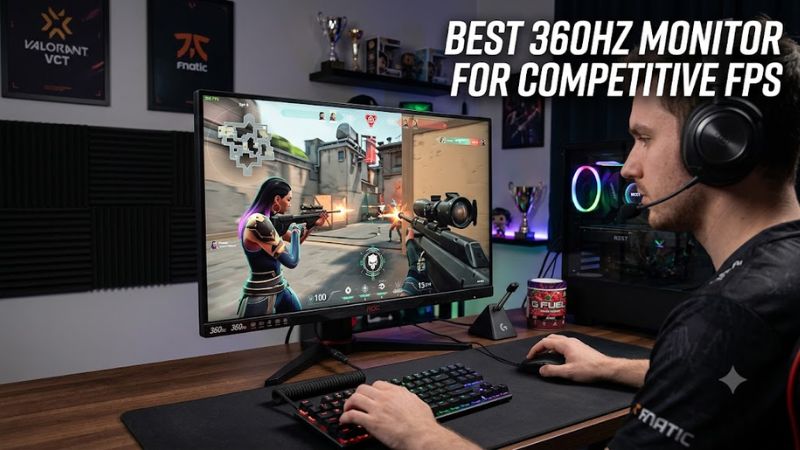
At 27 inches, 2560×1440 provides more detail than 1080p while retaining a 360Hz target. ASUS XG27AQNGV and MSI MPG 272QRF X36 use 1440p IPS panels, while MSI MPG 271QRX and Alienware AW2725DF use 1440p QD-OLED.
A 1440p 360Hz setup places more rendering demand on the GPU than 1080p 360Hz. There is no universal GPU requirement because games differ greatly in frame-rate demand. For these PC displays, DisplayPort is the connection to prioritize when the goal is the full 360Hz refresh rate.
Match the panel to your motion priorities
OLED panels offer near-instantaneous response behavior, while fast IPS models can combine high refresh with dedicated strobing. RTINGS describes the MSI MPG 271QRX as near-instantaneous, while TFTCentral measured 2.4ms G2G average at 360Hz on the ASUS XG27AQNGV using its Normal overdrive mode.
For VRR combined with backlight strobing, ASUS XG27AQNGV and MSI MPG 272QRF X36 use NVIDIA G-SYNC Pulsar. Pulsar requires compatible NVIDIA hardware, so it is not equally useful across every GPU platform. Both monitors still provide conventional VRR modes for broader compatibility.
Check connectivity before buying
For a 360Hz PC setup, the connection can matter as much as the panel. MSI lists DisplayPort 1.4a at 2560×1440 up to 360Hz on the MPG 272QRF X36, while ASUS lists DisplayPort 1.4 for 360Hz on the XG27AQNGV. Their HDMI inputs are limited to 120Hz for these specifications.
MSI’s MPG 271QRX offers DisplayPort 1.4a, HDMI 2.1, and USB-C DisplayPort Alt Mode, all supporting 2560×1440 at up to 360Hz. Dell’s AW2725DF reaches 1440p 360Hz through DisplayPort, while HDMI is limited to 144Hz, making DisplayPort the practical PC connection.
Consider OLED care and room conditions
OLED is attractive for competitive FPS because pixel response is extremely fast, but static elements can contribute to burn-in risk over time. MSI includes OLED Care 2.0 and a three-year burn-in warranty on the MPG 271QRX, while Dell lists three-year burn-in coverage for the AW2725DF.
LCD models avoid OLED-specific burn-in concerns, but their image characteristics differ. MSI MPG 272QRF X36 and ASUS XG27AQNGV use IPS panels with 1000:1-class native contrast, while QD-OLED models provide much deeper blacks. Room brightness, static desktop use, and gaming habits should guide this trade-off.
Top Picks
These four picks cover the main ways to use 360Hz in 2026: 1440p IPS with G-SYNC Pulsar, 1440p QD-OLED, and OLED options with broader connectivity. The best 360hz monitor for competitive fps therefore depends on GPU support, panel preference, and whether strobing or OLED contrast matters more.
| Product | Best For | Key Spec | Compatibility | Watch Out For |
| MSI MPG 272QRF X36 | Best Overall | 27-inch 1440p Rapid IPS, 360Hz | DisplayPort 1.4a; RTX 30-series or newer for Pulsar | Pulsar adds latency; 1000:1 contrast |
| MSI MPG 271QRX QD-OLED | Best Value | 26.5-inch 1440p QD-OLED, 360Hz | DP 1.4a, HDMI 2.1, USB-C DP Alt Mode | Firmware matters for lowest input lag; VRR flicker |
| ASUS ROG Strix XG27AQNGV | Best For NVIDIA | 27-inch 1440p IPS, 360Hz | DP 1.4; compatible NVIDIA GPU for Pulsar | HDMI tops out at 120Hz; IPS contrast |
| Alienware AW2725DF | Best For OLED | 26.7-inch 1440p QD-OLED, 360Hz | DisplayPort for 360Hz; FreeSync Premium Pro | OLED burn-in risk; lower HDMI refresh |
MSI MPG 272QRF X36 — Best Overall
The MSI MPG 272QRF X36 combines 2560×1440, 360Hz Rapid IPS, and G-SYNC Pulsar. MSI specifies 400-nit SDR brightness, 500-nit peak HDR brightness, and DisplayPort 1.4a. DisplayNinja measured 2.15ms display latency at 360Hz with Pulsar and ULMB2 disabled.
Its main weakness is platform dependence. DisplayNinja reports that Pulsar requires a GeForce RTX 30-series or newer GPU, while measured latency increased to 4.74ms at 360Hz with Pulsar in its later firmware measurements. Buyers using Radeon or Arc should treat Pulsar as unavailable rather than assuming universal support.
MSI MPG 271QRX QD-OLED — Best Value
The MSI MPG 271QRX pairs a 26.5-inch 2560×1440 QD-OLED panel with 360Hz, 0.03ms GtG, HDMI 2.1, DisplayPort 1.4a, and USB-C with 90W power delivery. MSI’s US store currently lists it at $579.99, giving it a relatively low current price for this specification set.
RTINGS describes its response time as near-instantaneous and notes low input lag after the relevant firmware update. The main caveats are VRR flicker with changing frame rates and the need for current firmware for the lowest input lag. That makes firmware status an important purchase and setup detail.
ASUS ROG Strix XG27AQNGV — Best For NVIDIA
The ASUS XG27AQNGV is a 27-inch 1440p IPS monitor built around 360Hz and G-SYNC Pulsar, with a 25-inch emulation mode for players who prefer a smaller image area. ASUS announced a $649 MSRP, while current US retail listings remain around that level.
TFTCentral measured 1.0ms average display lag at 360Hz and about 2.4ms G2G average using Normal overdrive. Pulsar requires a compatible NVIDIA GPU, while ordinary VRR can also work with AMD systems. HDMI is limited to 120Hz, so DisplayPort is required for the full PC refresh rate.
Alienware AW2725DF — Best For OLED
Alienware’s AW2725DF uses a 26.7-inch 2560×1440 QD-OLED panel at 360Hz with a 0.03ms manufacturer-rated GtG response time. Dell currently lists it at $649.99 and provides three-year burn-in coverage. RTINGS confirms its native 1440p 360Hz configuration and strong PC gaming performance.
The trade-off is OLED ownership rather than refresh performance. Static interface elements can contribute to burn-in risk despite warranty coverage and panel-care features. Dell also limits QHD to 360Hz over DisplayPort and 144Hz over HDMI, so competitive PC buyers should plan around DisplayPort.
FAQ: 360Hz Competitive FPS Monitors
A 360Hz monitor shows its full value when the PC, game settings, and connection can support high frame rates. The questions below separate refresh rate, resolution, GPU compatibility, and panel behavior so buyers can match the specification to their actual setup.
Is 360Hz worth it for competitive FPS?
Yes, 360Hz can be useful when your system consistently produces frame rates near that refresh rate and your games benefit from low-latency motion. At 360Hz, one refresh cycle lasts about 2.78ms, compared with about 4.17ms at 240Hz, so the timing difference is measurable even though its practical value varies.
The best 360hz monitor for competitive fps is not simply the display with the lowest advertised response figure. Panel response, display latency, refresh configuration, and frame delivery all contribute. A monitor operating well below 360Hz cannot provide the complete timing benefit of its maximum refresh mode.
Do you need an expensive GPU for 360Hz?
No, there is no single GPU requirement for 360Hz because the required hardware varies by game, resolution, and settings. Competitive titles at 1440p can have very different frame-rate demands from heavier shooters. The sensible target is hardware capable of reaching your desired frame rate without unacceptable settings compromises.
For NVIDIA-specific motion features, explicit requirements do exist. DisplayNinja reports that G-SYNC Pulsar on MSI MPG 272QRF X36 requires a GeForce RTX 30-series or newer GPU. Standard VRR is a separate compatibility path and does not create the same Pulsar requirement.
Is 1440p better than 1080p at 360Hz?
1440p provides more image detail than 1080p, particularly on 27-inch panels, but it also increases rendering demand. Current 360Hz choices such as MSI MPG 272QRF X36, ASUS XG27AQNGV, MSI MPG 271QRX, and Alienware AW2725DF all use 2560×1440 panels.
That does not make 1080p unsuitable for competitive FPS. A smaller 1080p display can fit a player’s preferred viewing distance and may require less GPU work to reach very high frame rates. The choice should follow the games played, available hardware, and preference for sharper detail alongside refresh rate.
Should you choose OLED or IPS for competitive FPS?
Choose OLED if near-instantaneous pixel response and deep contrast are priorities; choose IPS if you prefer LCD behavior, brighter typical output on some models, or NVIDIA’s current Pulsar implementations. RTINGS describes the MSI MPG 271QRX as near-instantaneous, while TFTCentral measured strong IPS response on ASUS XG27AQNGV.
The remaining differences are practical. OLED carries burn-in risk from prolonged static content, while IPS does not have that OLED-specific concern. IPS Pulsar models can reduce persistence blur during VRR, but the feature depends on compatible NVIDIA hardware. Both panel types fit competitive play when configured around the system.
Final Thoughts
The best 360hz monitor for competitive fps comes down to 1440p IPS motion tools versus 1440p QD-OLED response and contrast. MSI MPG 272QRF X36 and ASUS XG27AQNGV target NVIDIA Pulsar users, while MSI MPG 271QRX and Alienware AW2725DF emphasize OLED performance, with compatibility and ownership trade-offs clearly defined.