- Top Pick: Corsair XENEON Edge 14.5" 2K Portable LCD HDMI USB C Touchscreen – Smoke
- Best Value: Corsair XENEON Edge 14.5" 2K Portable LCD HDMI USB C Touchscreen – Crystal
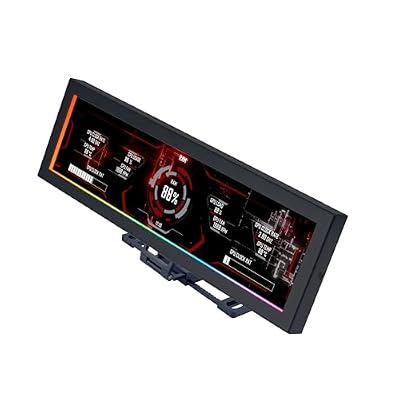
- Premium Choice: Lian Li 8.8" Universal Screen for PC – Adjustable Mounting for Any Computer Setup – Customizable ARGB Frame – PC Temperature Display Panel – LCD Screen Display – Mini Monitor – SM088X (US88 v1 Black)
The Corsair Xeneon Edge is a different kind of monitor, a 14.5-inch touchscreen designed to live inside or beside your PC as a secondary display for system stats, controls, and widgets. Rather than a primary gaming panel, it is a customizable info hub that turns spare case space or desk real estate into a glanceable dashboard.
This review looks at the Xeneon Edge and its accessories on Amazon, alongside comparable secondary display options, weighing build quality, mounting flexibility, and real-world usefulness. If you love a tricked-out battlestation with live monitoring, this niche panel is worth understanding.
As an Amazon Associate we earn from qualifying purchases at no extra cost to you.


![Futanwei Screen Protector for Corsair Xeneon Edge Touchscreen Monitor 14.5" - [3 Pack] HD Clear Soft PET Film [Anti-Fingerprint] [Anti-Scratch] [Bubble Free] Compatible for Corsair Xeneon Edge Monitor](https://m.media-amazon.com/images/I/41xE2ZzSKtL._SL160_.jpg)


🎮 Get More From Your Setup — Free
Prime Gaming gives you free PC games every month, in-game loot, and a free Twitch channel sub — plus fast free shipping on all the gear above. New members get a 30-day free trial.
Watch: Corsair Xeneon Edge Monitor — Video Review
Design & Build
The Xeneon Edge is a slim 2K LCD touchscreen available in Smoke and Crystal finishes, built to mount magnetically inside a case, on a desk, or against other surfaces thanks to its versatile bracket system. Corsair’s build quality is excellent, with a clean aluminum frame and a bright, responsive touch panel. Accessories like the underside mount bracket and screen protectors expand where and how you can place it. Compared to alternatives like the Lian Li 8.8-inch universal screen, the Edge is larger and more flexible in placement.
Performance
As a secondary display, the Xeneon Edge shines at showing live system data such as temperatures, clock speeds, and fan curves through Corsair’s iCUE software, or hosting widgets, media controls, and chat windows. The 2K resolution keeps text and graphics sharp, and the touchscreen makes interacting with controls intuitive. It is not intended for gaming or primary productivity, but as a customizable monitoring and control surface it adds genuine convenience and flair to an enthusiast build, especially in iCUE-based ecosystems.
Pros & Cons
- Flexible mounting: Magnetic bracket works in-case, on-desk, or on surfaces.
- Sharp touchscreen: Responsive 2K panel for widgets and controls.
- iCUE integration: Displays live system stats and fan controls.
- Premium build: Clean aluminum frame in two finishes.
- Niche use: Not a primary or gaming display.
- Ecosystem reliance: Best features tie into Corsair’s iCUE software.
Alternatives to Consider
If you want an in-case status panel, the Lian Li 8.8-inch universal screen with its ARGB frame is a smaller, more case-focused option. For a genuine secondary work display, an ultrawide like the INNOCN 34-inch offers far more usable space. But for a flexible, touch-enabled monitoring hub, the Xeneon Edge stands alone.
Related Guides
- Best Monitor For Gaming And Work (2026)
- Best And Cheapest Gaming Monitors (2026)
- Multi Screen Monitor (2026)
- Monitor 21 9 Curved (2026)
- Largest Ultrawide Monitor (2026)
Frequently Asked Questions
What is the Corsair Xeneon Edge used for?
It serves as a secondary touchscreen for displaying system stats, widgets, media controls, and chat, mounted inside a case or on a desk. It is a customizable info and control surface, not a primary monitor.
Does it require Corsair iCUE software?
Its most powerful features, like live system monitoring and fan control, integrate with iCUE. It can display other content too, but the ecosystem integration is a key draw.
Can I mount it inside my PC case?
Yes. The magnetic bracket and accessories like the underside mount let you position it inside a case, and its slim profile fits many builds. Check clearance for your specific case.
Is the touchscreen worth it?
The touchscreen makes interacting with controls and widgets intuitive without a mouse. For an enthusiast who values quick, glanceable control, it adds real convenience.
Verdict
The Corsair Xeneon Edge is a specialized but genuinely useful secondary display for enthusiasts who want a customizable monitoring hub. Its flexible mounting, sharp 2K touchscreen, and iCUE integration make it a standout for tricked-out battlestations, and accessories like the underside bracket and screen protectors extend its versatility. If you love live system data and a polished build, the Edge is a distinctive addition, though mainstream users seeking a work display should look elsewhere.