
🛒 Best Price Today on Amazon
Prime members get fast, free shipping on everything above, plus member-only deals. New members get a 30-day free trial — cancel anytime.

Dell 24 240Hz Gaming Monitor - SE2426HG - 23.8-inch FHD (1920x1080) 240Hz Display, in-Plane Switching (IPS) Technology, AMD FreeSync™ Premium, TÜV 3-Star, 2X HDMI, DisplayPort 1.4, Tilt
Included for 'IPS vs VA vs OLED: Essential Guide for Clear, Top Gaming' because the listing specifies SE2426HG and 23.8-inch FHD (1920x1080) 240Hz Display, details this guide uses to compare options.
View on AmazonDell 27 240Hz Gaming Monitor - SE2726HG - 27-inch FHD (1920x1080) Display, in-Plane Switching (IPS) Technology, AMD FreeSync Premium, TÜV 3-Star, 2X HDMI, DisplayPort 1.4, Tilt
Included for 'IPS vs VA vs OLED: Essential Guide for Clear, Top Gaming' because the listing specifies SE2726HG and 27-inch FHD (1920x1080) Display, details this guide uses to compare options.
View on AmazonSelecting the right gaming monitor requires understanding how display technologies process light and color. When comparing ips vs va vs oled panels, each architecture offers distinct physical tradeoffs for frame reproduction and image contrast. Choosing the proper technology ensures your graphics card delivers optimal visual output.
What IPS vs VA vs OLED Really Comes Down To
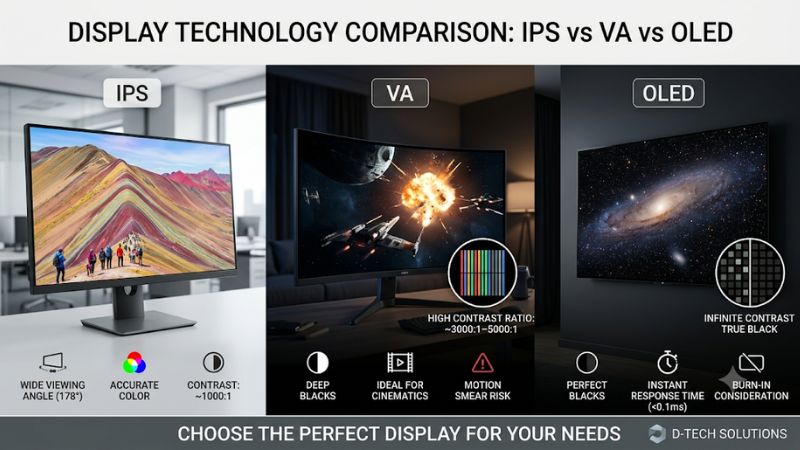
Evaluating ips vs va vs oled technologies comes down to liquid crystal alignment and pixel illumination methods. In-plane switching focuses on wide viewing angles and consistent color rendering. Vertical alignment maximizes static contrast ratios for deep black reproduction. Self-emitting organic pixels provide instant response times.
IPS Color Consistency and Motion Speed
In-Plane Switching panels align liquid crystals parallel to the glass substrate. This orientation preserves accurate color hues across 178-degree horizontal and vertical viewing angles without color shift. Modern Fast IPS designs achieve 1ms Gray-to-Gray response times, making them highly reliable for high-framerate competitive games.
The primary physical limitation of standard IPS architecture is native contrast, which typically tops out between 1000:1 and 1500:1. In dark rooms, black areas can exhibit a slight glow due to backlight bleed. However, for bright rooms and color-sensitive work alongside gaming, IPS provides stable performance across varied viewing positions.
VA Native Contrast and Dark Scene Depth
Vertical Alignment panels orient liquid crystals perpendicularly when inactive, blocking backlight illumination far more effectively than IPS designs. This allows VA displays to achieve native contrast ratios between 3000:1 and 5000:1. Dark room scenes in single-player titles display deep blacks rather than washed-out charcoal shades.
The tradeoff for high contrast in standard VA panels involves pixel transition speed, particularly during dark-to-light state changes. Transition times on dark transitions can slow to 10ms or 15ms on entry-level models, causing visible dark smearing behind moving objects. Curved panel designs help minimize color shifts along the screen edges.
OLED Self-Emitting Pixels and Instant Response
Organic Light-Emitting Diode displays remove backlights entirely by employing self-emissive subpixels that turn off individually. This self-illuminating structural design creates true per-pixel dimming and theoretically infinite static contrast ratios. High-dynamic-range content produces bright highlights immediately adjacent to pitch black.
Because subpixels emit light directly without waiting for physical liquid crystals to rotate, OLED panels deliver pixel response times under 0.1ms Gray-to-Gray. When evaluating ips vs va vs oled options for motion clarity at 240Hz, OLED panels suppress perceived trailing motion far better than traditional LCD panels under identical frame rates.
What Doesn’t Help
Applying software-based brightness boosters or artificial color saturation profiles does not improve physical panel performance. Raising digital brightness above native backlight capabilities dilutes dynamic range without improving native contrast. Display calibration should focus on hardware LUT settings rather than desktop software tweaks.
Third-party driver utility scripts and registry modifications cannot change hardware response times or backlight zone behavior. Relying on aggressive display overdrive settings can introduce inverse ghosting artifacts and overshoot halos around moving objects. Panel limitations must be solved through monitor selection rather than OS hacks.
How to Choose Your Gaming Panel: Step by Step
Selecting the ideal monitor requires matching your hardware capabilities to display characteristics. You must analyze GPU frame output, ambient lighting, primary game genres, and panel settings when considering ips vs va vs oled options. Following a structured selection process ensures you invest in panel features that actively enhance your workstation.
| Setting | Where | Effect | Risk |
| Fast IPS Drive Mode | Display OSD Menu | Reduces pixel transition blur | Overshoot halos if set too high (undo: revert OSD overdrive) |
| Native Contrast Profile | Monitor Picture Settings | Maximizes dark-room black levels | Crushes shadow detail in bright rooms (undo: reset color preset) |
| Windows HDR Mode | Windows Display Settings | Enables per-pixel local dimming | Lowers static text clarity on desktop (undo: press Win+Alt+B) |
| OLED Pixel Refresh | Monitor Maintenance OSD | Cleans image retention artifacts | Temporary screen blackout during cycle (undo: allow cycle to finish) |
Step 1: Identify Target Refresh Rate and GPU Output
Begin by assessing your graphics card output at native resolutions like 1440p or 4K. A graphics processor like the NVIDIA GeForce RTX 4070 can drive high framerates in esports titles, justifying a 240Hz refresh rate. Higher refresh rates demand fast pixel transitions so individual display frames remain distinct and free from motion blur.
Ensure your system supports necessary display interfaces such as DisplayPort 1.4 or HDMI 2.1 to bandwidth-saturate target resolutions. Driving 1440p at 240Hz without display stream compression requires full interface bandwidth. Matching system framerates to display refresh capability prevents unnecessary screen tearing and stuttering.
Step 2: Evaluate Ambient Lighting and Room Setup
Examine the lighting environment where your PC workstation is located before selecting panel hardware. Brightly lit rooms with direct sunlight benefit from high peak brightness LCD displays that easily overpower ambient reflections. Matte display coatings further reduce reflections in high ambient light environments during daytime sessions.
Dim or dark rooms highlight the contrast limitations of standard IPS monitors while showcasing VA and OLED strengths. Dark ambient conditions make IPS backlight glow noticeable along panel edges during night scenes. If you play primarily in dark environments, prioritizing static contrast ratios produces far greater visual depth and immersion.
Step 3: Match Game Genres to Panel Characteristics
Aligning monitor choices with primary game genres ensures hardware strengths match rendering demands. Fast-paced competitive shooters benefit from Fast IPS or OLED panels due to minimal motion blur and rapid frame delivery. Precise motion tracking in titles like Counter-Strike 2 depends directly on rapid subpixel state transitions.
When choosing between ips vs va vs oled for single-player narrative titles, contrast and HDR performance take priority over absolute speed. Atmospheric RPGs and survival horror games benefit immensely from high native contrast or per-pixel dimming. Rich shadow detail adds visual realism that low-contrast screens cannot reproduce cleanly.
Step 4: Configure Overdrive and Display Care Settings
Once installed, access the monitor On-Screen Display menu to adjust pixel overdrive settings properly. Selecting a moderate overdrive level sharpens pixel response without causing distracting overshoot trails behind fast objects. Testing overdrive behavior using motion blur benchmarks ensures optimal clarity for high refresh rates.
For OLED displays, enable built-in panel care features such as pixel shift, automatic static brightness limiting, and scheduled pixel refreshes. These automated hardware routines prevent image retention during extended desktop sessions. Combining OS taskbar hiding with display sleep timers protects self-emissive pixels over extended use.
Frequently Asked Questions
Addressing common questions regarding display panel selection helps clarify real-world trade-offs before purchasing hardware. Understanding how refresh rates, pixel response times, panel degradation, and contrast ratios operate across different monitor designs ensures long-term satisfaction for your specific gaming workflow and desktop environment.
Is OLED better than IPS and VA for competitive PC gaming?
OLED is generally better for competitive PC gaming because its sub-0.1ms pixel response time prevents visible motion blur at high refresh rates. When comparing ips vs va vs oled for fast motion, OLED pixels transition near instantly compared to liquid crystals. This rapid response produces clearer target tracking during fast camera pans.
However, high-refresh Fast IPS displays remain a competitive alternative for gamers who also use their PC for long productivity sessions. Fast IPS monitors deliver excellent motion clarity at lower prices while avoiding burn-in concerns associated with static interface elements. Selection depends on balancing competitive edge against daily workflow.
Does VA panel technology suffer from dark smearing in fast titles?
VA panel technology can suffer from dark smearing in fast titles because slow pixel transition times occur when switching between black and dark gray shades. While modern high-end VA panels use aggressive overdrive to mitigate this delay, budget VA models often show visible dark trails.
Gamers who play fast esports titles in dark environments should verify response behavior before purchasing a budget VA display. Choosing a quality Fast IPS or Mini-LED VA monitor with verified overdrive tuning minimizes dark smearing artifacts. Proper overdrive configuration inside the monitor OSD menu further reduces lingering pixel trails.
Is burn-in still a significant concern on modern OLED monitors?
Burn-in is much less of a concern on modern OLED monitors thanks to advanced pixel refreshing algorithms and improved heat dissipation materials. Manufacturers implement automated screen maintenance cycles that run while the monitor is in standby mode. Integrated heatsinks lower panel temperatures to extend individual organic pixel longevity.
Users who display static desktop elements or web browser windows for twelve hours daily should still practice simple display care routines. Hiding the Windows taskbar and setting short screen timeout intervals effectively prevents cumulative pixel degradation. Following basic maintenance ensures reliable long-term performance across years of daily use.
Which panel type offers the best value for budget 1440p displays?
Fast IPS offers the best overall value for budget 1440p displays due to low manufacturing costs, strong color accuracy, and fast response times. High-volume production has driven 1440p Fast IPS monitors down to accessible price points while maintaining 165Hz to 240Hz refresh rates. They serve as reliable all-around screens for mixed gaming.
Budget VA displays offer strong competition if your primary focus is single-player gaming in dim lighting where contrast matters most. While cheap VA screens sacrifice motion speed, their 3000:1 native contrast ratio outperforms budget IPS alternatives in dark scenes. Comparing personal gaming habits helps determine the most effective budget pick.
Final Thoughts
Choosing between ips vs va vs oled monitors comes down to balancing pixel response, native contrast, room lighting, and budget constraints. Fast IPS serves as an excellent all-around choice for mixed productivity and esports. VA delivers superior dark-room contrast for story games, while OLED provides unmatched motion clarity and HDR performance.









