
- Top Pick: Sceptre New 22-Inch Gaming Monitor, FHD 1080p, Up to 144Hz, HDMI, DisplayPort, Built-in Speakers, Machine Black (E225W-FW144 Series, 2026)
- Best Value: Samsung 27" Odyssey G5 (G51F) Series QHD (1440P) Gaming Monitor
- Premium Choice: Sceptre Curved 24-inch Gaming Monitor 1080p R1500 98% sRGB HDMI x2 VGA Build-in Speakers, VESA Wall Mount Machine Black (C248W-1920RN Series)
Shopping for a gaming monitor on a budget usually means wading through vague spec sheets, inflated “gaming” branding, and panels that look great in marketing photos but feel sluggish the moment you’re in a firefight. Refresh rate, response time, and resolution all trade off against price, and it’s easy to overspend on a feature you won’t notice or underspend on one that actually matters for competitive play.
- Watch: Best And Cheapest Gaming Monitors — Video Review
- How to Choose a Cheap Gaming Monitor (2026)
- The Best Cheap Gaming Monitors (2026) Reviewed
- What to Look For in a Budget Gaming Monitor
- Which One Should You Buy?
- Common Mistakes When Buying a Gaming Monitor
- Related Guides
- Related Guides
- Frequently Asked Questions
- Final Thoughts
- Related Articles
This guide breaks down six of the best affordable gaming monitors available right now, from 144Hz 1080p starters to a 240Hz FHD panel built for fast-paced shooters. We’ll cover what to look for before you buy, then review each pick so you can match the right monitor to your setup and budget.


As an Amazon Associate we earn from qualifying purchases at no extra cost to you.






🎮 Get More From Your Setup — Free
Prime Gaming gives you free PC games every month, in-game loot, and a free Twitch channel sub — plus fast free shipping on all the gear above. New members get a 30-day free trial.
Watch: Best And Cheapest Gaming Monitors — Video Review
How to Choose a Cheap Gaming Monitor (2026)
- Refresh Rate: 144Hz is the sweet spot for budget gaming; 200Hz+ helps in competitive shooters but only matters if your GPU can push the frames.
- Resolution: 1080p keeps prices low and frame rates high, while 1440p (like the Odyssey G5) adds sharpness if you have a mid-range or better GPU.
- Panel Type: IPS panels offer better color and viewing angles for everyday use; VA and curved panels can boost contrast and immersion at a lower cost.
- Adaptive Sync: Look for FreeSync or G-Sync compatibility to eliminate screen tearing without needing a top-tier graphics card.
- Ports: Confirm your PC or console has a matching HDMI or DisplayPort output, especially if you’re pairing with a current-gen console.
The Best Cheap Gaming Monitors (2026) Reviewed
Sceptre 22-Inch 144Hz (E225W-FW144)
This is the entry point for anyone building a budget rig: a true 144Hz panel, built-in speakers, and both HDMI and DisplayPort inputs at a size and price that’s hard to beat for a first gaming monitor.
Samsung 27″ Odyssey G5 (G51F)
The only 1440p monitor on this list, the Odyssey G5 delivers noticeably sharper visuals and a curved VA panel with deep contrast, making it the best choice if you have a GPU capable of driving higher resolutions.
Sceptre 24-inch Curved (C248W-1920RN)
With a tighter 1500R curve and 98% sRGB coverage, this monitor punches above its price for color accuracy and immersion, and dual HDMI plus VGA make it easy to connect to older hardware too.
Acer 27″ KB272 IPS
The IPS panel here is the standout feature, giving you accurate colors and wide viewing angles alongside a 120Hz refresh rate and FreeSync compatibility, ideal if you split time between gaming and content work.
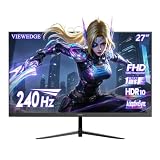
Viewedge 27″ 240Hz
This is the speed pick of the lineup: a 1ms response time and 240Hz refresh rate make it well-suited for competitive shooters, provided your PC can consistently hit high frame rates to take advantage of it.
What to Look For in a Budget Gaming Monitor
Marketing sheets bundle refresh rate, response time and panel technology into one tempting number. Breaking them apart shows where a limited budget is best spent.
Refresh Rate in Frame-Time Terms
Each step up in refresh rate shortens the time between screen updates: 60 Hz is about 16.7 ms per frame, 144 Hz is about 6.9 ms, 240 Hz is about 4.2 ms and 280 Hz is about 3.6 ms. The jump from 60 to 144 Hz is large and obvious. The step from 144 to 280 Hz saves only a few milliseconds and mainly benefits competitive shooters. A faster panel also needs a graphics card that can actually push those frame rates, so a 280 Hz screen paired with a modest GPU wastes its potential.
Panel Type and Its Trade-Offs
Fast TN panels, such as the one in the BenQ Zowie XL2540X+, prioritise speed at the cost of viewing angles and colour. VA panels, as in the Great voell 24 Inch curved model, offer deeper blacks and strong contrast but can show smearing in dark scenes. IPS panels, such as the Acer 27 KB272, give wider viewing angles and stronger colour. The msi MAG 274QP uses QD-OLED, which delivers excellent contrast and response, but static interface elements deserve care because OLED panels can suffer burn-in over time.
Resolution, Size and Sharpness
Pixel density depends on both numbers. A 24-inch 1080p panel works out to roughly 92 pixels per inch, a 27-inch 1080p screen to roughly 82, and a 27-inch 1440p screen to roughly 109. That is why a 27-inch Full HD monitor can look soft at desk distance while a 24-inch one looks crisper. If you sit close, either choose a smaller screen or step up to 1440p, as the msi does.
Response Time Claims and Connections
A 1 ms figure may refer to grey-to-grey (GTG) or to MPRT, a blur measure that uses a different method, so the two should not be compared directly. For connections, DisplayPort generally handles high refresh rates with the fewest limits, while older HDMI versions can cap refresh rate or resolution. Use the cable that comes with the monitor, and enable the higher refresh rate in your operating system settings, because many displays default to 60 Hz.
Which One Should You Buy?
| If you… | Choose… |
|---|---|
| Want the cheapest step up from 60 Hz in a small footprint | Sceptre 22-Inch 144Hz (E225W-FW144) |
| Want a larger 27-inch Full HD screen with a high refresh rate | BenQ MOBIUZ EX271 |
| Play fast competitive shooters and value raw speed | BenQ Zowie XL2540X+ |
| Like a curved screen with strong contrast | Great voell 24 Inch 200Hz Curved |
| Want a premium panel with sharper 1440p resolution | msi MAG 274QP QD-OLED X24 |
| Want a 27-inch Samsung gaming screen | Samsung 27 Odyssey G5 (G51F) |
| Want a wide, immersive curved 24-inch panel | Sceptre 24-inch Curved (C248W-1920RN) |
| Mix gaming with work and want wide viewing angles | Acer 27 KB272 IPS |
Common Mistakes When Buying a Gaming Monitor
- Chasing refresh rate beyond what the PC can drive. Extra hertz do nothing if the game runs at a lower frame rate.
- Leaving the refresh rate on 60 Hz. Many buyers never open display settings and miss the speed they paid for.
- Comparing response times across brands. GTG and MPRT numbers are measured differently and are not interchangeable.
- Buying a large screen at low resolution. A 27-inch 1080p panel can look noticeably less sharp up close.
- Ignoring the stand. Budget models may offer little height or tilt adjustment, so confirm VESA mounting if ergonomics matter.
Related Guides
- Huge Curved Monitor (2026)
- Best 4K Monitor For Productivity And Gaming (2026)
- What Is The Best Gaming Monitor (2026)
- Best Monitor For Gaming And Work (2026)
- Corsair Xeneon Edge Monitor (2026)
Frequently Asked Questions
Is 1080p still good enough for gaming in 2026?
Yes, especially at 24-27 inch screen sizes. 1080p lets budget GPUs hit higher frame rates, which matters more than resolution for fast-paced competitive games.
Do I need 240Hz, or is 144Hz enough?
144Hz is plenty for most players and easier on your GPU. 240Hz only pays off in competitive titles like shooters where you can reliably hit high frame rates and want every millisecond of input advantage.
What’s the difference between FreeSync and G-Sync?
Both prevent screen tearing by syncing the monitor’s refresh rate to your GPU’s output. FreeSync is AMD’s standard and generally cheaper to implement, but most FreeSync monitors also work fine with Nvidia GPUs that support adaptive sync.
Is a curved monitor worth it for gaming?
Curved panels add immersion and can slightly reduce eye strain during long sessions, but they’re a preference rather than a performance upgrade. Flat panels are just as capable for competitive play.
Final Thoughts
For most budget-conscious gamers, the Sceptre 22-Inch 144Hz monitor offers the best value as a no-frills starting point, while the Samsung Odyssey G5 is the top pick if you want sharper 1440p visuals and can spend a bit more. If competitive frame rates are your priority, the Viewedge 240Hz monitor is the clear choice for squeezing every advantage out of fast-paced games.











