Affiliate disclosure: As an Amazon Associate we earn from qualifying purchases. This post contains affiliate links — we may earn a small commission at no extra cost to you. This never affects our picks. Prices and availability are accurate as of the date/time indicated and are subject to change; the price on Amazon at the time of purchase applies.
- Quick Comparison Table
- 1. Gigabyte RTX 5080 WINDFORCE OC SFF: Best for compact 4K builds
- 2. MSI RTX 5070 Ti Gaming Trio OC: Best for 4K at the lowest entry point
- 3. ASUS Prime RTX 5080: Best for quiet, tidy 4K systems
- 4. ASUS TUF RTX 5070 Ti OC: Best for long gaming sessions on a sturdy card
- 5. NVIDIA RTX 5080 Founders Edition: Best for a reference-design 4K card
- How to Choose
- Frequently Asked Questions
- About the Author
- Related Articles
Quick answer: The best 4K gaming GPUs here are RTX 5080 and RTX 5070 Ti cards. The Gigabyte RTX 5080 WINDFORCE OC SFF is our top pick for compact builds, the MSI 5070 Ti Gaming Trio OC suits the lowest 4K entry point, and the ASUS Prime 5080 fits quiet systems.
This guide compares five graphics cards that suit 4K gaming, from RTX 5070 Ti models up to RTX 5080 designs. Every comparison uses each listing’s published specs: memory, bus width, ports and cooler details. We did not run our own benchmarks, so we avoid frame rate claims and focus on what the listing states, what it leaves out, and how each card fits a typical case.
Quick Comparison Table
| # | Model | Key specs (per listing) | Best for |
|---|---|---|---|
| 1 | Gigabyte RTX 5080 WINDFORCE OC SFF | RTX 5080, 16GB GDDR7, 256-bit, 2670MHz core clock, SFF design | compact 4K builds |
| 2 | MSI RTX 5070 Ti Gaming Trio OC | RTX 5070 Ti, 16GB GDDR7, 256-bit, 2580 extreme performance clock | 4K at the lowest entry point |
| 3 | ASUS Prime RTX 5080 | RTX 5080, 16GB GDDR7, PCIe 5.0, 2.5-slot, vapor chamber, Dual BIOS | quiet, tidy 4K systems |
| 4 | ASUS TUF RTX 5070 Ti OC | RTX 5070 Ti, 16GB GDDR7, PCIe 5.0, 3.125-slot, OC Edition | long gaming sessions on a sturdy card |
| 5 | NVIDIA RTX 5080 Founders Edition | RTX 5080 Founders Edition (other specs not listed) | a reference-design 4K card |
1. Gigabyte RTX 5080 WINDFORCE OC SFF: Best for compact 4K builds
Specs per the listing: GeForce RTX 5080, 16GB GDDR7 on a 256-bit bus, PCIe 5.0, 2670MHz core clock, three DisplayPort 2.1b and one HDMI 2.1b, DLSS 4, SFF variant of the WINDFORCE OC line.
The RTX 5080 class is where native 4K gaming at high settings stops being a compromise, and this card packs that tier into a small-form-factor design. That matters if your case is a compact mid-tower or a mini-ITX box where a three-slot monster will not fit. The three DisplayPort 2.1b outputs also leave room for a 4K high-refresh monitor plus extras.
The trade-off is cooling headroom. Shorter coolers usually run louder or hotter than full-size triple-fan designs under a sustained 4K load, so check your case airflow before buying. The listing does not give a card length or slot count, so confirm both on the maker page before ordering.
- Pros: 16GB GDDR7 suits 4K textures; DisplayPort 2.1b outputs; SFF design fits small cases
- Cons: Cooler size and noise not listed; Needs a strong power supply (check the maker page for the rating)

Gigabyte GeForce RTX 5080 WINDFORCE OC SFF 16G - Graphics Card, 16GB GDDR7, 256bit, PCI-E 5.0, 2670MHz Core Clock, 3 × DP 2.1b, 1 × HDMI 2.1b, DLSS 4, GV-N5080WF3OCV2-16GD
Included for 'Best 4K Gaming GPUs: RTX 5080 and 5070 Ti Picks' as a representative home product in this roundup; selection reflects the product set returned for this topic.
View on Amazon2. MSI RTX 5070 Ti Gaming Trio OC: Best for 4K at the lowest entry point
Specs per the listing: GeForce RTX 5070 Ti, 16GB GDDR7, 256-bit, 2580 extreme-performance clock, three DisplayPort 2.1a and one HDMI 2.1b, NVIDIA Blackwell architecture.
The RTX 5070 Ti is the step down from the 5080 class and still carries 16GB of GDDR7 on a 256-bit bus, which is the memory configuration that keeps 4K texture packs comfortable. With DLSS upscaling in supported games it is a realistic 4K card, and it is the pick for players who want 4K without paying for the flagship tier.
The Gaming Trio name points to a triple-fan cooler, though the listing does not spell out dimensions. Expect a large card, so measure your case. Native 4K at maximum settings in the newest titles will lean on upscaling more than the 5080 does.
- Pros: 16GB GDDR7 on a 256-bit bus; Three DisplayPort 2.1a ports; Lower tier than 5080 for 4K
- Cons: Large cooler; length not listed; Heavier reliance on DLSS in demanding games

msi Gaming RTX 5070 Ti 16G Gaming Trio OC Graphics Card (16GB GDDR7, 256-bit, Extreme Performance: 2580, DisplayPort x 3 2.1a, HDMI 2.1b, NVIDIA Blackwell Architecture)
Included for 'Best 4K Gaming GPUs: RTX 5080 and 5070 Ti Picks' as a representative home product in this roundup; selection reflects the product set returned for this topic.
View on Amazon3. ASUS Prime RTX 5080: Best for quiet, tidy 4K systems
Specs per the listing: GeForce RTX 5080, 16GB GDDR7, PCIe 5.0, HDMI/DP 2.1, 2.5-slot cooler, Axial-tech fans, vapor chamber, Dual BIOS, SFF-Ready.
The Prime keeps the styling plain and the cooler at 2.5 slots, which is why it appears in small builds as well as mainstream towers. A vapor chamber and Dual BIOS switch give you a way to prioritize cooling or acoustics, a useful lever when a 4K game holds the GPU at full load for hours.
It carries no factory overclock tag in the title, so expect reference-class clocks rather than a binned boost. For most 4K players that difference is small next to the cooling and size benefits. The listing does not state power connector or recommended PSU, so verify those before buying.
- Pros: 2.5-slot, SFF-Ready layout; Vapor chamber and Dual BIOS; Plain, easy-to-match styling
- Cons: No overclock tag in the title; Clock speeds not listed

ASUS Prime GeForce RTX 5080 16GB GDDR7 Gaming Graphics Card | SFF-Ready, PCIe 5.0, HDMI/DP 2.1, 2.5-slot, Axial-tech Fans, Vapor Chamber, Dual BIOS
Included for 'Best 4K Gaming GPUs: RTX 5080 and 5070 Ti Picks' as a representative home product in this roundup; selection reflects the product set returned for this topic.
View on Amazon4. ASUS TUF RTX 5070 Ti OC: Best for long gaming sessions on a sturdy card
Specs per the listing: GeForce RTX 5070 Ti, 16GB GDDR7, PCIe 5.0, HDMI/DP 2.1, 3.125-slot design, military-grade components, protective PCB coating, Axial-tech fans, OC Edition.
TUF cards focus on durability: the listing highlights military-grade components and a protective PCB coating. At 3.125 slots it is a big card, but the bulk buys a larger heatsink, which is useful at 4K where the GPU is rarely idle.
The 5070 Ti tier is the sensible choice if your target is 4K at high rather than maximum settings. The main cost is physical size, since it occupies more than three expansion slots and may block adjacent PCIe slots. Make sure the case has the clearance and the motherboard layout leaves room.
- Pros: Large heatsink, OC Edition; Protective PCB coating; 16GB GDDR7
- Cons: Over three slots thick; Boost clock not listed

ASUS TUF Gaming GeForce RTX 5070 Ti 16GB GDDR7 OC Edition Graphics Card | PCIe 5.0, HDMI/DP 2.1, 3.125-slot, Military-grade Components, Protective PCB Coating, Axial-tech Fans
Included for 'Best 4K Gaming GPUs: RTX 5080 and 5070 Ti Picks' as a representative home product in this roundup; selection reflects the product set returned for this topic.
View on Amazon5. NVIDIA RTX 5080 Founders Edition: Best for a reference-design 4K card
Specs per the listing: GeForce RTX 5080 Founders Edition. The title does not list memory, ports or cooler details; the RTX 5080 class is a 16GB card, but check the maker page to confirm for this model.
The Founders Edition is NVIDIA’s own reference design, which makes it the baseline that partner cards get compared against. If you want the standard RTX 5080 experience without partner-specific styling or overclock claims, this is the plain option.
Because the listing title is so short, you will need to confirm size, power connector and port layout on the maker page before buying. Availability of reference cards can also vary, so treat it as an option to check rather than a guaranteed fit.
- Pros: Reference design from the GPU maker; RTX 5080 performance class; Clean, simple naming
- Cons: Title lists no detailed specs; Check size and power needs first

NVIDIA GeForce RTX 5080 Founders Edition
Included for 'Best 4K Gaming GPUs: RTX 5080 and 5070 Ti Picks' as a representative home product in this roundup; selection reflects the product set returned for this topic.
View on AmazonHow to Choose
Memory and bus width come first
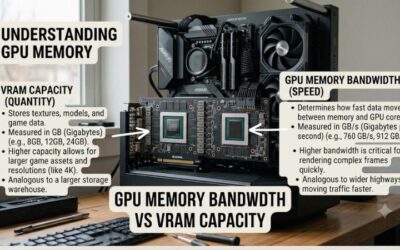
At 4K, texture memory and bandwidth matter more than at 1080p. Look for 16GB of video memory and a 256-bit bus, which every card in this list carries except where the listing does not say. Skip 8GB cards for 4K; they are fine for 1080p and some 1440p play, but demanding 4K titles can overrun that memory.
Measure the case before the card
Cards in this tier range from 2.5 to over 3 slots thick. Check your case’s maximum GPU length and the clearance beside the motherboard. Compact cases need an SFF-labeled design, and any card above three slots can block neighboring PCIe slots. If the listing omits length, read the maker page rather than guessing.
Match the power supply and connector
High-end cards draw serious power and use a modern high-current connector. Check the maker’s recommended PSU wattage on the product page, and confirm your power supply has the right connector or a supported adapter. Avoid an old or low-quality PSU with a card this size; it is the most common source of crashes.
Pair it with a real 4K monitor and ports
A 4K card needs a 4K display with a high refresh rate to be worth it. DisplayPort 2.1 outputs and HDMI 2.1b matter for 4K at high refresh. Also use a recent CPU so the card is not held back, and enable DLSS where games support it to keep frame rates smooth at maximum detail.
Frequently Asked Questions
Is an RTX 5070 Ti enough for 4K gaming?
For most players, yes, especially with DLSS upscaling in supported games. It has 16GB of GDDR7 on a 256-bit bus. Expect to lower a few settings in the newest, heaviest titles. An RTX 5080 gives more headroom if you want fewer compromises.
How much video memory do I need for 4K?
Aim for 16GB. Higher-resolution textures and ray tracing raise memory use, and 8GB cards can stutter at 4K. Every pick in this guide lists 16GB or sits in a tier that uses it, with the Founders Edition spec to be confirmed.
Will these cards fit a small case?
Only some. The Gigabyte SFF and ASUS Prime are labeled for compact builds, while the ASUS TUF is over three slots thick. Always compare listed or maker-page dimensions to your case’s GPU clearance.
Do I need PCIe 5.0 on my motherboard?
No. PCIe 5.0 cards work in PCIe 4.0 slots with little real-world difference in games. The listings call out PCIe 5.0 support, but backward compatibility means an older board will run them.
Should I buy a factory overclocked model?
It rarely matters much. OC models add a small clock boost, but cooler quality, size and noise usually matter more at 4K. Choose the design that fits your case and thermals first, then the label.