🛒 Best Price Today on Amazon
Prime members get fast, free shipping on everything above, plus member-only deals. New members get a 30-day free trial — cancel anytime.
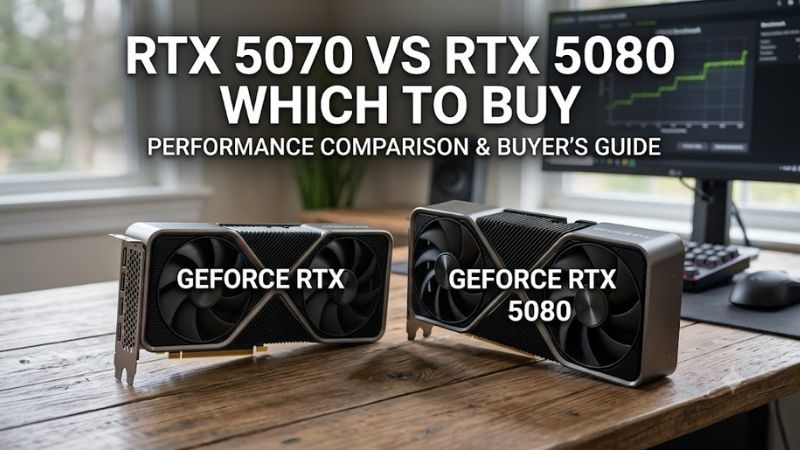
For rtx 5070 vs rtx 5080 which to buy, start with resolution: the RTX 5070 targets 1440p, while the RTX 5080 adds 16GB VRAM and substantially more bandwidth for demanding 4K gaming. NVIDIA lists 12GB GDDR7 at 672GB/s for the 5070 and 16GB at 960GB/s for the 5080.
How to Choose Between the RTX 5070 and RTX 5080
The practical choice comes down to four things: monitor resolution, graphics settings, power supply, and case space. Tom’s Hardware’s June 2026 hierarchy reports native 1440p Ultra averages of 51.5 FPS for the RTX 5070 and 74.0 FPS for the RTX 5080 in its ray-tracing suite, while native 4K Ultra reaches 22.7 and 42.1 FPS respectively.
1440p Resolution
For rtx 5070 vs rtx 5080 which to buy at 1440p, the RTX 5070 fits a conventional high-refresh setup without requiring the larger card. Its 12GB GDDR7 memory and 250W total graphics power are paired with a 650W recommended system PSU for the Founders Edition, keeping the platform requirement comparatively modest.
The RTX 5080 still has a clear performance advantage at 1440p, but that does not automatically make it necessary. Tom’s Hardware reports 128.3 FPS versus 74.1 FPS for native 1440p Ultra rasterization in its current hierarchy, using a geometric mean across its game suite without upscaling or frame generation.
4K Gaming
For rtx 5070 vs rtx 5080 which to buy at 4K, the RTX 5080 has the stronger specification for native rendering: 16GB GDDR7, a 256-bit memory interface, 960GB/s bandwidth, 10,752 CUDA cores, and 360W total graphics power. NVIDIA specifies an 850W system power requirement for its Founders Edition.
The benchmark gap also widens at 4K. Tom’s Hardware records 77.4 FPS for the RTX 5080 and 54.3 FPS for the RTX 5070 in its native 4K Ultra rasterization hierarchy, while its separate RT suite records 42.1 versus 22.7 FPS. These are suite averages, not guarantees for an individual game.
Ray Tracing and DLSS
If rtx 5070 vs rtx 5080 which to buy depends on heavy ray tracing, the RTX 5080 has more RT resources and memory headroom. Both GPUs use Blackwell and support NVIDIA’s current DLSS feature set, so the difference is primarily baseline rendering capability rather than access to an entirely different graphics feature stack.
Tom’s Hardware’s RT suite, run at native resolution without upscaling or frame generation, puts the RTX 5080 at 74.0 FPS versus 51.5 FPS for the RTX 5070 at 1440p Ultra. At 4K Ultra, the figures are 42.1 and 22.7 FPS, showing why resolution and RT settings matter together.
PSU and Case Compatibility
Compatibility can settle rtx 5070 vs rtx 5080 which to buy before performance does. The RTX 5070 Founders Edition requires a 650W system PSU and uses a 12V-2×6 connection, while the RTX 5080 Founders Edition requires 850W and supports a 450W-or-greater PCIe Gen 5 cable or the supplied adapter.
Case clearance also varies by model. NVIDIA’s RTX 5080 Founders Edition measures 304mm long and 137mm wide, while MSI’s RTX 5080 Ventus 3X OC is 303mm long and 121mm high; add-in-card dimensions therefore need to be checked against the exact chassis, not just the GPU name.
Top Picks for the RTX 5070 and RTX 5080
The four choices below separate the reference designs from practical partner cards rather than treating every RTX 5070 or RTX 5080 as physically identical. Launch MSRPs were $549 for the RTX 5070 and $999 for the RTX 5080; current retail pricing can differ substantially by model and market, so these figures should not be treated as today’s street prices.
| Product | Best For | Key Spec | Compatibility | Watch Out For |
| NVIDIA GeForce RTX 5070 Founders Edition | Best Value | 12GB GDDR7, 250W | 650W PSU, PCIe 5.0 | 12GB VRAM |
| MSI GeForce RTX 5070 Ventus 2X OC | Best Overall | 12GB GDDR7, 2542MHz boost | 650W PSU, 236mm | 250W power draw |
| NVIDIA GeForce RTX 5080 Founders Edition | Best For 4K | 16GB GDDR7, 360W | 850W PSU, 304mm | Higher system cost |
| MSI GeForce RTX 5080 Ventus 3X OC | Best For a Shorter 5080 | 16GB GDDR7, 303mm | 850W PSU, 16-pin | 3-slot-class width |
NVIDIA GeForce RTX 5070 Founders Edition
The RTX 5070 Founders Edition is the Best Value option for a buyer whose target is 1440p and whose system already accommodates a 650W PSU. It carries 12GB of GDDR7, 6,144 CUDA cores, 250W total graphics power and a 242mm card length, making its platform requirements easier to manage than the 5080.
The real weakness is the 12GB memory capacity, especially when native 4K and demanding ray tracing are combined. A buyer targeting 4K as the main display resolution should not choose this model simply because its launch MSRP was $549; the RTX 5080’s 16GB capacity provides more headroom for that workload.
MSI GeForce RTX 5070 Ventus 2X OC
The MSI Ventus 2X OC is the Best Overall option when a compact partner-card design matters. MSI lists a 2542MHz boost clock, 12GB GDDR7, 250W power consumption, one 16-pin connector, a 650W recommended PSU and dimensions of 236 × 126 × 50mm, giving buyers concrete fit information beyond the GPU tier.
Its weakness is the same 12GB memory ceiling as other RTX 5070 models, while factory overclocking does not change the underlying GPU class. It is therefore a poor fit for someone buying specifically for sustained native 4K Ultra gaming; buyers in that group should examine the RTX 5080 models instead of paying extra for a small factory clock increase.
NVIDIA GeForce RTX 5080 Founders Edition
The RTX 5080 Founders Edition is the Best For 4K choice because its reference specification combines 16GB GDDR7, a 256-bit bus, 960GB/s bandwidth and 360W total graphics power. NVIDIA specifies an 850W system PSU and a 304 × 137mm card footprint, with three expansion slots recommended for installation clearance.
The weakness is platform cost rather than missing capability. The card launched at $999, requires a substantially stronger power supply than the RTX 5070, and needs careful case clearance around its power cable. A 1080p or ordinary 1440p buyer who does not intend to raise resolution has less reason to absorb those requirements.
MSI GeForce RTX 5080 Ventus 3X OC
The MSI Ventus 3X OC is the Best For a Shorter 5080 when case length is a constraint. MSI lists 16GB GDDR7, 10,752 CUDA cores, a 2640MHz boost clock, a 303 × 121 × 49mm body, one 16-pin connector and an 850W recommended PSU, making it materially shorter than the 348mm ASUS TUF RTX 5080.
Its real limitation is that shorter length does not mean a small card overall: the three-fan design remains 49mm wide and occupies substantial expansion space. Buyers with a narrow case should verify the complete slot and cable clearance, while anyone using a modest PSU should address power capacity before choosing this card.
FAQ
The short answers below cover the four buying questions that most directly change the choice: 1440p versus 4K, memory capacity, power requirements, and DLSS support. The performance figures use Tom’s Hardware’s June 2026 hierarchy, which separates rasterization and ray-tracing results and reports native-resolution results without upscaling or frame generation.
Is the RTX 5070 enough for 1440p?
Yes, the RTX 5070 is enough for many 1440p gaming setups, although demanding ray tracing and very high refresh targets can require lower settings or supported upscaling. Tom’s Hardware reports a 1440p Ultra rasterization average of 74.0 FPS for the RTX 5070 in its 2026 hierarchy, while its RT suite records 51.5 FPS.
For rtx 5070 vs rtx 5080 which to buy at 1440p, the deciding factor is therefore the desired settings and refresh target rather than resolution alone. The RTX 5080’s 128.3 FPS native 1440p Ultra raster result provides considerably more headroom, but the additional $450 launch MSRP and higher 850W platform requirement are part of the comparison.
Is 16GB VRAM worth paying more for?
Yes, 16GB gives the RTX 5080 more memory capacity than the RTX 5070’s 12GB, but the benefit depends on resolution and graphics settings rather than appearing equally in every game. NVIDIA lists 16GB GDDR7 and 960GB/s bandwidth for the 5080 versus 12GB and 672GB/s for the 5070.
For rtx 5070 vs rtx 5080 which to buy, 16GB becomes easier to justify when native 4K, high-resolution textures and demanding ray tracing are recurring requirements. At 1440p, the 5070’s 12GB remains usable across the current benchmark landscape, although it leaves less memory headroom for future demanding workloads.
What PSU does each card require?
The RTX 5070 Founders Edition is specified for a 650W system PSU, while NVIDIA specifies 850W for the RTX 5080 Founders Edition; partner cards can publish different recommendations depending on their board and cooling design. Both use a modern 16-pin power connection, with adapter options supplied for compatible older PSU cabling.
For rtx 5070 vs rtx 5080 which to buy, PSU capacity should be checked against the complete system rather than the GPU alone. The RTX 5080’s 360W total graphics power is substantially higher than the RTX 5070’s 250W, so a system upgrade can involve the PSU, available PCIe cabling and case airflow as well as the graphics card itself.
Do both cards support DLSS and Multi Frame Generation?
Yes, both RTX 5070 and RTX 5080 are Blackwell GeForce RTX 50-series GPUs with support for NVIDIA’s current DLSS feature set, including Multi Frame Generation in compatible games. The feature can increase displayed frame rates, but it does not erase the underlying difference in native rendering performance between the two GPUs.
That makes rtx 5070 vs rtx 5080 which to buy less about whether one card has access to DLSS and more about the baseline performance available before those features are applied. Tom’s Hardware therefore reports its primary hierarchy without upscaling or frame generation, keeping the native GPU comparison separate from technologies that alter the delivered frame rate.
Final Thoughts
For rtx 5070 vs rtx 5080 which to buy, match the GPU to the monitor first: the RTX 5070 suits 1440p systems with a 650W-class platform, while the RTX 5080’s 16GB memory, 360W power target and 850W requirement make more sense when 4K and heavier settings are central to the build.