Our Short List of 3
- Best for: Builders who want a full ATX system in a portable cube.
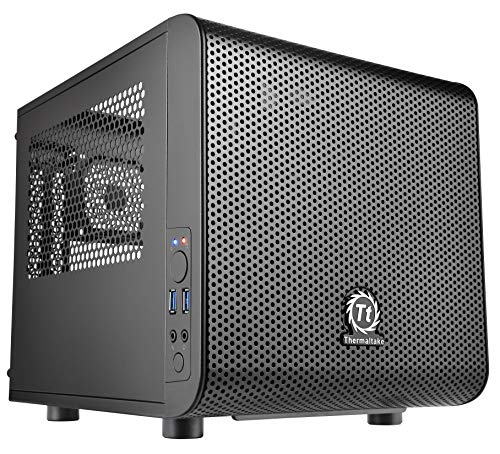
- Best for: The lightest, most compact LAN rig on a Mini-ITX board.
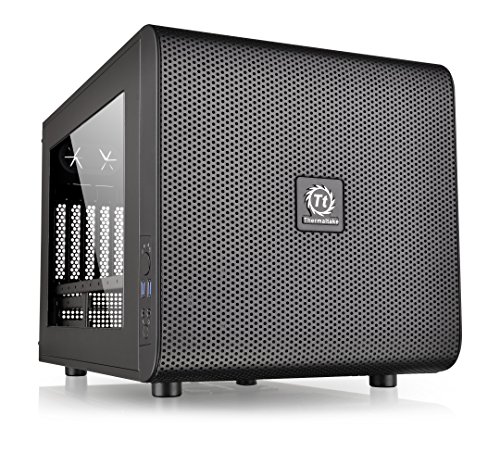
- Best for: Micro-ATX builders who want big-component clearance in a portable cube.
All 3 Picks at a Glance
| Product | Specs | Action |
|---|---|---|
| 1. Cooler Master HAF XB EVO — Best Overall LAN Box |
| Check price on Amazon |
| 2. Thermaltake Core V1 — Best Compact Mini-ITX Cube |
| Check price on Amazon |
| 3. Thermaltake Core V21 — Best Micro-ATX Middle Ground |
| Check price on Amazon |
The best pc lan box cases solve a problem that a standard tower never will: how to move a full gaming PC without dreading the trip. A LAN box is a compact, cube-shaped chassis built for transport, with a short, wide footprint, a sturdy frame, and usually a handle or grip-friendly panels that make carrying it to a friend’s house, a tournament, or a weekend LAN party far less awkward. Unlike a slim small-form-factor case that forces you to compromise on every component, a good LAN box still fits a proper graphics card, a capable air cooler or a small liquid cooler, and a standard power supply, so the rig you carry is the same rig you play on at home.
This guide compares three cube-style LAN box cases that are still listed on Amazon, covering a full-ATX option for builders who refuse to downsize, a tiny Mini-ITX cube for the lightest possible load, and a Micro-ATX middle ground that balances size and flexibility. Before you buy, check every clearance figure against your own parts, because in a compact case a few millimetres decide whether the build works or the side panel stays off.
How to Choose a LAN Box Case
Size and Form Factor
LAN boxes come in three rough sizes, and the motherboard you want to use decides the category. A Mini-ITX cube is the smallest and lightest choice, but it limits you to one expansion slot and a small board with fewer connectors. A Micro-ATX cube adds a second expansion slot and more board options while staying compact. A full-ATX LAN box is the largest of the three, yet it is still far shorter and easier to carry than a mid-tower, and it accepts the widest range of motherboards and components. Decide on the motherboard first, then let the case follow.
Handles and Portability
A true LAN box is designed to be carried, not just to be small. Look for rigid carry handles built into the frame, reinforced side panels, and a chassis that stays stiff when you lift it by one edge. A retractable handle is elegant, but fixed handles on the side panels are often stronger. Also consider weight: a steel cube with a full ATX board, a large graphics card, and a big cooler can weigh as much as a mid-tower, so the handle matters more than the raw dimensions. Measure your car boot and your desk too, because cube cases are wide and short rather than tall and narrow.
Graphics Card and Cooler Clearance
Clearance is the single most common reason a LAN box build fails. Check the maximum graphics card length against your card, and remember that a front radiator or a thick front fan can eat into that space. Check CPU cooler height as well, since many cubes cap cooler height well below what a tower allows. If you plan on liquid cooling, confirm radiator support and where it mounts, because a 240 mm radiator in the front may block long graphics cards, and a 120 mm radiator in the rear may be the only liquid option in the smallest cubes.
Airflow
Compact cases trap heat quickly, so airflow design matters more here than in a tower. Mesh panels, a large front intake fan, and a layout that separates the power supply from the main chamber all help. A horizontal motherboard tray, found in some LAN boxes, lets heat rise naturally away from the board and gives the graphics card fresh air from the side. Look for filtered intakes if you carry the case around a lot, since dust builds up fast in a case that travels, and filters you can remove and wash make maintenance simple.
Power Supply and Storage
Most LAN boxes accept a standard ATX power supply, which is good news, because it means you can reuse a unit you already own. The smallest Mini-ITX cubes sometimes need an SFX unit instead, so check the specification sheet before ordering. Storage is rarely a problem: most cubes hold at least two 2.5-inch drives and often a 3.5-inch drive as well, and hot-swap bays in the front are a bonus for players who carry extra game libraries on separate drives. Keep cable routing in mind, because a tidy build runs cooler and is easier to service at a LAN event.
Build Quality and Access
A case that travels needs to survive being bumped, lifted, and set down on unfamiliar desks. Thick steel panels, solid thumbscrews, and a frame that does not flex are worth more than a tempered glass window on a case that will spend its life in transit. Tool-free side panels and a removable motherboard tray make building and troubleshooting much faster, which matters when you are assembling a rig the night before an event. Finally, check the front input and output: two USB ports and audio jacks on the front are the minimum for a gaming setup, and a USB Type-C port is a useful extra.
Top Picks
1. Cooler Master HAF XB EVO — Best Overall LAN Box
- Best for: Builders who want a full ATX system in a portable cube.
Builders who want a full ATX system in a portable cube.
No USB Type-C port, and it is heavy once fully built.
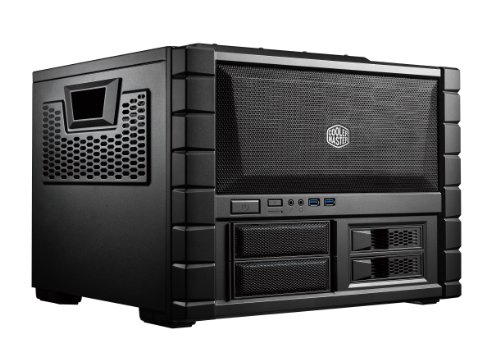
The Cooler Master HAF XB EVO is the closest thing to a purpose-built LAN box that still fits full-size hardware, and it is the pick for builders who want portability without downsizing their parts. It is a wide, low cube with a horizontal motherboard tray, mesh front and top panels, and rigid carry handles built into the side panels. The layout puts the motherboard, graphics card, and cooler on an upper level, with the power supply and drives in a lower chamber, which keeps the hot components separated from the power supply and makes the whole system easy to work on.
Motherboard support is the headline here: the HAF XB EVO accepts ATX, Micro-ATX, and Mini-ITX boards, so you can move an existing full-size build into it without buying a new board. Graphics cards up to 334 mm long fit, which covers most high-end cards, and tower CPU coolers up to 180 mm tall are supported, so a large air cooler is not a problem. A 240 mm radiator fits at the front for builders who prefer liquid cooling, and two 120 mm fans come included behind the front mesh.
Storage is generous for a portable case, with room for up to four 2.5-inch or 3.5-inch drives, plus two X-Dock bays in the front that let you slide drives in and out without opening the case. That is handy for LAN players who keep separate drives for different game libraries. The front panel carries two USB 3.0 ports and audio jacks, and the whole chassis is built from thick steel that feels ready for travel.
The trade-offs are honest ones. This is an older design, so there is no USB Type-C port and no RGB lighting, and at around 18 lb empty it is the heaviest case in this guide once fully built. It is also the widest, so measure your desk and your transport bag. But if the goal is a genuine LAN box that still holds a full ATX system with a long graphics card and a tall cooler, nothing else on this list matches it.
View the Cooler Master HAF XB EVO on Amazon
Watch out for: No USB Type-C port, and it is heavy once fully built.
2. Thermaltake Core V1 — Best Compact Mini-ITX Cube
- Best for: The lightest, most compact LAN rig on a Mini-ITX board.
The lightest, most compact LAN rig on a Mini-ITX board.
No built-in carry handle, and cooler height is limited to 140 mm.
The Thermaltake Core V1 is the smallest case in this guide and the best choice when every kilogram and every centimetre of desk space matters. It is a Mini-ITX cube with a two-chamber layout: the upper chamber holds the motherboard, graphics card, and cooler, while the lower chamber hides the power supply and cables. A large 200 mm fan is pre-installed in the front, which moves a lot of air at low speed and keeps the compact interior cool without much noise.
Despite its size, the Core V1 is surprisingly capable. Graphics cards up to 260 mm long fit inside the inner chassis, and up to 285 mm with the outer frame taken into account, which covers a wide range of mid-range and upper mid-range cards. CPU coolers up to 140 mm tall are supported, and power supplies up to 180 mm long fit in the lower chamber. Two 3.5-inch and two 2.5-inch drive positions cover storage, and the interchangeable side panels let you choose between a windowed look and a vented panel for extra airflow.
The front panel offers two USB 3.0 ports plus headphone and microphone jacks, and there are two optional 80 mm rear fan positions if you want to add exhaust airflow. The case weighs just over 7 lb empty, which makes it the easiest case here to carry by hand or pack into a bag for a LAN event.
The limits are the usual Mini-ITX ones: one expansion slot, a smaller board with fewer connectors, and restricted cooler and graphics card sizes compared with the larger cubes. There is no carry handle, so you carry it by the chassis itself or in a bag. For a lightweight secondary rig, a living-room gaming PC that travels, or a first small-form-factor build, the Core V1 is the most practical entry point.
View the Thermaltake Core V1 on Amazon
Watch out for: No built-in carry handle, and cooler height is limited to 140 mm.
3. Thermaltake Core V21 — Best Micro-ATX Middle Ground
- Best for: Micro-ATX builders who want big-component clearance in a portable cube.
Micro-ATX builders who want big-component clearance in a portable cube.
No built-in carry handle, and the windowed panel shows dust quickly.
The Thermaltake Core V21 sits between the other two picks: bigger and more flexible than the Core V1, smaller and lighter than the HAF XB EVO. It is a Micro-ATX cube that also accepts Mini-ITX boards, and its party trick is flexibility. The motherboard can be mounted in a vertical or horizontal orientation, the case is stackable if you want to add a second unit for storage or a dedicated cooling chamber, and the chambered layout keeps the power supply and cables out of the main airflow path.
Cooling is strong for a case this size. A 200 mm fan comes pre-installed in the front, and the front, top, and side panels offer mounts for additional 120 mm and 140 mm fans or radiators, so you can tune the airflow to your parts. Graphics cards up to 350 mm long fit, which is more room than the Core V1 offers and enough for most large cards, and CPU coolers up to 185 mm tall are supported, which opens the door to large tower air coolers. A standard ATX power supply fits, and drive support covers three 3.5-inch or 2.5-inch positions plus three more 2.5-inch positions.
The front panel has two USB 3.0 ports and audio jacks, and a transparent window side panel shows off the build. At roughly 14 lb empty it is a middleweight: heavier than the Core V1 but noticeably easier to move than a full ATX cube. Like the Core V1, it has no built-in carry handle, so plan on carrying it by the chassis or in a padded bag.
The Core V21 is the right pick if you want Micro-ATX flexibility, a long graphics card, and a tall cooler in a case that still qualifies as portable. It is also the best choice of the three for builders who want to experiment, since the stackable design and the rotatable motherboard tray invite layouts that a normal tower cannot offer.
View the Thermaltake Core V21 on Amazon
Watch out for: No built-in carry handle, and the windowed panel shows dust quickly.
Comparison Table
| Case | Best For | Motherboard Support | Max GPU Length | Max CPU Cooler Height | Carry Handle |
|---|---|---|---|---|---|
| Cooler Master HAF XB EVO | Full ATX LAN box | ATX, Micro-ATX, Mini-ITX | 334 mm | 180 mm | Yes, side handles |
| Thermaltake Core V1 | Lightest Mini-ITX cube | Mini-ITX | 260 mm inner, 285 mm outer | 140 mm | No |
| Thermaltake Core V21 | Micro-ATX flexibility | Micro-ATX, Mini-ITX | 350 mm | 185 mm | No |
FAQ
What exactly is a LAN box case?
A LAN box case is a compact, cube-shaped PC chassis designed to be carried to LAN parties and gaming events. It usually has a short, wide footprint, a rigid frame, and often a carry handle, and it is built to fit real gaming hardware rather than low-power parts. The term comes from the LAN party era, when players physically carried their PCs to a shared location to play together on a local network.
Is a LAN box case the same as a Mini-ITX case?
Not quite. Many LAN boxes use Mini-ITX boards, but the category is about portability and the cube layout, not the board size. Some LAN boxes, like the Cooler Master HAF XB EVO, accept full ATX motherboards, while others accept Micro-ATX. What they share is a compact, transport-friendly shape rather than a single form factor.
How much does a LAN box PC weigh when fully built?
It depends on the parts, but expect a built LAN box to weigh noticeably more than the empty case. An empty Mini-ITX cube can weigh around 7 lb, while an empty ATX cube can weigh around 18 lb, and the graphics card, cooler, power supply, and drives add several more pounds. Check the handle rating and your own carrying comfort before committing to the largest option.
Can a LAN box case fit a high-end graphics card?
Yes, if you check the clearance figures. The cases in this guide accept graphics cards from 260 mm up to 350 mm long, which covers most current mid-range and high-end cards. Always measure your exact card and compare it with the case specification, and remember that a front-mounted radiator can reduce the available length.
Do LAN box cases run hotter than tower cases?
They can, because the interior volume is smaller and the components sit closer together. Good LAN boxes compensate with mesh panels, large front intake fans, and chambered layouts that separate the power supply from the hot components. Choosing a case with a 200 mm front fan or strong mesh airflow, and keeping the build tidy with good cable routing, goes a long way toward keeping temperatures in check.
Do I need a special power supply for a LAN box?
Most LAN boxes in this guide accept a standard ATX power supply, which is one of their advantages over ultra-compact small-form-factor cases. The smallest Mini-ITX cubes sometimes require an SFX or SFX-L unit instead, so always confirm the power supply form factor in the case specification before ordering.
Conclusion
The best pc lan box cases prove that a gaming PC does not have to stay chained to one desk. The Cooler Master HAF XB EVO is the pick for builders who refuse to downsize, with full ATX support, side carry handles, and room for a 334 mm graphics card. The Thermaltake Core V1 is the lightest and most compact option, ideal for a Mini-ITX rig that travels often. The Thermaltake Core V21 splits the difference, offering Micro-ATX flexibility, a 350 mm graphics card limit, and a stackable cube design that invites experimentation.
Whichever you choose, measure twice: confirm your graphics card length, cooler height, and power supply size against the case specifications before ordering, and think about how you will actually carry the finished rig. A LAN box is only a good buy if the PC inside it still plays the games you love and the case itself survives the trip there and back.
Disclosure: As an Amazon Associate, we earn from qualifying purchases.