Our Short List of 3
All 4 Picks at a Glance
| Product | Specs | Action |
|---|---|---|
 Thermaltake Core P3 TG Pro Black | Check price on Amazon | |
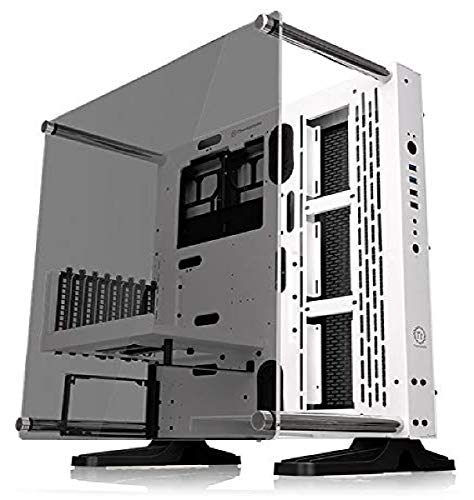 Thermaltake Core P3 TG Snow | Check price on Amazon | |
 JOYJOM PC Test Bench PC077 | Check price on Amazon | |
 DALAIBUKESI DIY Aluminium Open Case | Check price on Amazon |
An open air case removes the walls that normally trap heat around a gaming PC. Instead of solid side panels and a closed front, an open-frame chassis holds the motherboard, graphics card, and power supply on an exposed tray or frame, often behind a single tempered glass sheet or with no panel at all. That layout gives components direct access to room air, makes swapping parts far faster, and turns a build into something worth looking at rather than hiding under a desk. For builders who change graphics cards often, run custom liquid cooling, or simply want a wall-mounted showcase, an open air design solves problems that a closed tower cannot.
The trade-offs are just as clear. Dust settles directly on fans and heatsinks, there is little to no noise dampening, and exposed fans are easier to reach. Open air cases also vary enormously, from large E-ATX showcase frames to flat steel test benches. This guide compares five verified open-frame options across both ends of that range and checks the clearances that decide whether a build fits.
As an Amazon Associate, we earn from qualifying purchases.
How to Choose an Open Air Case
Start with motherboard size, because it rules out more frames than any other specification. Mini-ITX boards fit almost every open frame, while ATX is the common ceiling for showcase models. Builders running E-ATX boards need frames that list E-ATX support, since the wider board can overhang trays and block cable routing on ATX-only designs. Test benches often accept E-ATX and larger boards because nothing encloses the edges, but that freedom comes with a flat footprint.
Cooling support is the second filter. Radiators still need a solid mounting surface, and showcase frames typically offer a dedicated radiator wall for 360mm or 420mm units, which suits custom loops and large all-in-one coolers. Flat test benches may offer a raised bracket or no radiator mount at all, relying on open air around a tower cooler. Check the maximum CPU cooler height as well: frames with a glass panel set a hard limit, commonly around 180mm, while panel-free benches impose no height limit.
Graphics card clearance deserves careful reading because open frames quote it two ways. A long limit, often 450mm, usually applies with no radiator or reservoir fitted, while a much shorter limit applies once a loop occupies the space in front of the card. Measure the actual card and compare it against the shorter figure if liquid cooling is planned. Vertical GPU mounting is another consideration: several showcase frames include rotatable slots that display the card face-out, which needs the correct riser cable and enough clearance behind the card.
Placement shapes daily use. Wall mounting keeps a heavy showcase build off the desk, but it demands secure fixings into studs or solid masonry and makes rear cable access awkward. Horizontal placement suits frequent part swaps, while vertical standing suits a finished build. Weight matters: a steel and glass frame is heavy empty, and the wall or surface must support the finished system.
Finally, plan for dust from the start. Open builds collect dust faster than filtered towers, so regular cleaning with compressed air or a soft brush is part of ownership. Storage is also limited on most open frames, with room for only a few drives, so confirm bay counts before committing. Front connections vary too, from USB Type-C on newer frames to older USB 2.0 mixes on earlier designs.
Thermaltake Core P3 TG Pro Black
The Core P3 TG Pro is the current flagship of the Core P series and the most complete showcase option in this guide. It updates the original P3 formula with a recessed mounting tray, an added cooling bracket, and integrated feet borrowed from the larger Core P6 line. The frame supports motherboards up to E-ATX, uses a 4mm tempered glass panel, and can stand vertically, lie horizontally, or mount on a wall. Rotatable PCI-E slots allow the graphics card to sit horizontally or vertically.
Cooling support is generous for a mid-tower footprint. The right side and the included bracket each accept fans up to 140mm and radiators up to 420mm. Clearances are strong: CPU coolers up to 180mm, power supplies up to 200mm, and graphics cards up to 450mm without a reservoir or 330mm with one fitted. Front connections include one USB 3.2 Gen 2 Type-C port, two USB 3.0 ports, and HD Audio. Drive support covers two 3.5-inch or three 2.5-inch drives, expanding with the included HDD bracket.
Who It Suits
The P3 TG Pro suits builders who want one frame that handles almost any plan: a wall-mounted showcase, a vertical GPU display, or a liquid-cooled E-ATX system. It is the natural pick for a long-term build that will be upgraded in place rather than rebuilt, because the recessed tray and extra bracket leave room to grow. Builders short on space should measure carefully first, since the frame is tall and heavy even before components go in.
Thermaltake Core P3 TG Black
The original Core P3 TG remains a proven open-frame choice. Its dismountable modular layout lets the frame be rearranged, and the three-way placement system covers wall-mount, vertical, and horizontal setups. A 5mm tempered glass panel sits over the open frame, protecting the build from casual contact while keeping every component visible. The black SPCC steel construction supports Mini-ITX, Micro-ATX, and ATX motherboards across eight expansion slots.
On cooling, the left side accepts three 120mm or three 140mm fans and radiators up to 360mm or 420mm. Clearances match the Pro on key figures: CPU coolers up to 180mm, power supplies up to 200mm, and graphics cards up to 450mm without a reservoir and radiator or 280mm with them fitted. That shorter figure is the one liquid-cooling builders should plan around. Front I/O provides two USB 3.0 ports, two USB 2.0 ports, and HD Audio, and storage covers accessible and hidden bays for 3.5-inch and 2.5-inch drives.
Specs
| Item | Detail |
|---|---|
| Model | CA-1G4-00M1WN-06 |
| Case type | Mid Tower open frame |
| Dimensions | 512 x 333 x 470 mm |
| Weight | 11.3 kg |
| Side panel | 5mm tempered glass x 1 |
| Material | SPCC |
| Motherboard support | Mini-ITX, Micro-ATX, ATX |
| Expansion slots | 8 |
| I/O ports | USB 3.0 x 2, USB 2.0 x 2, HD Audio x 1 |
| Radiator support | Up to 360mm or 420mm |
| CPU cooler limit | 180mm |
| GPU length limit | 280mm with reservoir and radiator, 450mm without |
| PSU length limit | 200mm |
| ASIN | B07BFGB8Z6 |
Who It Suits
The Core P3 TG Black suits ATX builders who want the established open-frame layout without paying for the Pro revisions. It fits a wall-mounted gaming build, a vertical GPU showcase using the rotatable slot arrangement, or a horizontal bench for a system that changes often. Builders who need E-ATX support, front USB Type-C, or the longest possible card clearance with a reservoir fitted should step up to the Pro instead.
Thermaltake Core P3 TG Snow
The Core P3 TG Snow takes the same open-frame chassis as the black edition and finishes it in white. A white frame makes colored coolant and white components blend into a single clean display, and it shows dust sooner, which many owners treat as a useful cleaning prompt. Every structural figure carries over: the same 512 x 333 x 470 mm footprint, 5mm tempered glass panel, and SPCC steel frame at 11.3 kg.
Compatibility is identical. The Snow edition supports Mini-ITX, Micro-ATX, and ATX motherboards, eight expansion slots, and the same three-way placement layout. Radiator support runs to 360mm or 420mm, CPU coolers can stand up to 180mm, and graphics cards reach 450mm without a reservoir and radiator or 280mm with them installed. Front I/O and drive support match the black model.
Who It Suits
The Snow edition suits builders planning a white or pastel themed showcase, especially a wall-mounted build where the frame itself is part of the room display. It also suits anyone building around white radiators, fans, and graphics cards who wants the chassis to match rather than contrast. Builders who prefer to hide dust and cable colors for longer between cleanings will find the black edition more forgiving.
JOYJOM PC Test Bench PC077
At the opposite end of the category, the JOYJOM PC077 is a flat open-frame test bench built for access rather than display. There is no glass and no enclosure at all: the motherboard sits on a 0.8mm SPCC steel plate with a black sandblasted finish, and every slot and header stays within easy reach. The listing covers E-ATX, ATX, Micro-ATX, and Mini-ITX boards up to 305 x 330mm, and because nothing surrounds the board, graphics card length and width are not limited by the frame.
The assembled frame measures 440 x 345 x 128mm, rising to 160mm once a standard ATX power supply is installed. The power supply mount accepts units sized 150 x 86mm with lengths from 140mm to 250mm, and storage support covers two hard drives and two solid-state drives. Cooling is by open air, with no panel restricting a tower cooler of any height. The package includes the bench frame and accessory fittings, including a power switch.
Who It Suits
The PC077 suits reviewers, repair benches, system builders, and hobbyists who change hardware weekly and value speed over appearance. It also suits a permanent open workstation or mining frame where unrestricted card size matters more than dust control. Anyone building a living-room or bedroom showcase should choose one of the glass showcase frames instead, since this bench offers no protection and no noise control.
DALAIBUKESI DIY Aluminium Open Case
The DALAIBUKESI DIY Aluminium Open Case rebuilds the test bench idea in aluminum, with vertical and horizontal graphics card mounting. The frame supports ITX, Micro-ATX, ATX, and E-ATX motherboards in its largest configuration, mounts the power supply at the rear, and accepts ATX, SFX, and 1U power supplies. Two included PCI-E brackets allow the graphics card to sit horizontally or vertically, and the listing states no size requirement for the card in vertical layouts.
Cooling support covers both air and water, with multiple radiator mounting options for flexible loop layouts. The frame measures 8.7 x 15 x 15 inches in the listed configuration and weighs 2 kilograms in base form, far lighter than the steel and glass showcase frames. Storage mounting is flexible, with support for varied SSD and HDD arrangements and one internal bay listed at 3.5 inches. An upgraded switch integrates power and restart functions.
Who It Suits
This aluminum frame suits DIY builders who want a light, portable open chassis that still handles E-ATX boards and vertical GPU layouts. It fits a compact custom loop project, a frequently moved test system, or a minimalist desk build where a bare metal frame is the intended look. Builders who want tempered glass protection, extensive front I/O, or a finished furniture-like presence should look at the Thermaltake showcase frames instead.
FAQ
Do open air cases run cooler than closed cases?
Open air cases remove the enclosure that traps warm air, so components draw directly from the room and exhaust without restriction. That usually helps graphics card and motherboard temperatures. Results still depend on room temperature and cooler quality, and a well-designed airflow tower can perform similarly. The open layout also means fan noise reaches the room unfiltered.
How much dust maintenance does an open air build need?
Expect noticeably more dust than a filtered closed case, because every fan and heatsink is exposed to room air. A practical routine is a visual check every few weeks and a clean with compressed air or a soft brush whenever a film becomes visible on fan blades and radiator fins. Homes with pets or carpeted rooms need more frequent attention. Keeping the build on a desk or wall rather than the floor slows dust buildup considerably.
Can an open air case be wall mounted safely?
Several showcase frames in this guide are designed for wall mounting, but the finished build is heavy once components, a power supply, and liquid cooling are installed. Use fixings rated well above the total weight, anchor into studs or solid masonry rather than plasterboard alone, and confirm the frame maker lists wall mounting for that model. Leave clearance behind and below the build for cables and airflow, and plan cable routing before lifting the system into place.
Are open air cases a good choice for a first build?
They can be, because access is excellent and there are no tight cable channels to fight. The cautions are that exposed components need careful handling, cable management is fully visible, and there is no protection from spills, pets, or knocks. A first-time builder who works slowly and keeps the workspace clear often finds an open frame easier than a cramped tower. Builders who need a PC that survives a busy household are better served by a closed case.
Final Verdict
The right open air case depends on whether the build is meant to be displayed or worked on. For a showcase, the Thermaltake Core P3 TG Pro is the most complete choice, with E-ATX support, 420mm radiator capacity, and front USB Type-C. The original Core P3 TG in black or Snow covers the same wall-mount showcase role for ATX builds at the earlier specification, with the color deciding which theme it serves. For pure access, the JOYJOM PC077 bench removes every barrier between the builder and the hardware, while the DALAIBUKESI aluminum frame adds vertical GPU mounting and portability for DIY projects. Match the frame to the motherboard size, radiator plan, and cleaning routine first, and any of these five will hold an open build securely.
Product and ASIN Reference
| Product | ASIN |
|---|---|
| Thermaltake Core P3 TG Pro Black | B0BDQP3PMB |
| Thermaltake Core P3 TG Black | B07BFGB8Z6 |
| Thermaltake Core P3 TG Snow | B07BFGYLJZ |
| JOYJOM PC Test Bench PC077 | B0FPFXVQ1H |
| DALAIBUKESI DIY Aluminium Open Case | B0D76QCZ8B |