🛒 Best Price Today on Amazon
Prime members get fast, free shipping on everything above, plus member-only deals. New members get a 30-day free trial — cancel anytime.
Choosing the best hyte pc case means balancing panoramic design, graphics card clearance, cooling, and your budget. HYTE’s Y-series cases suit showcase gaming PCs, but the Y40, Y60, and Y70 serve different builds. This guide compares their specifications, limitations, and compatibility to help you choose confidently.
How to Choose the Right HYTE PC Case
The right HYTE chassis depends on the components you plan to install, not just its appearance. Before choosing a model, check your GPU dimensions, motherboard format, cooling hardware, and available desk space. These factors determine whether a case accommodates your build without expensive changes or unnecessary accessories.
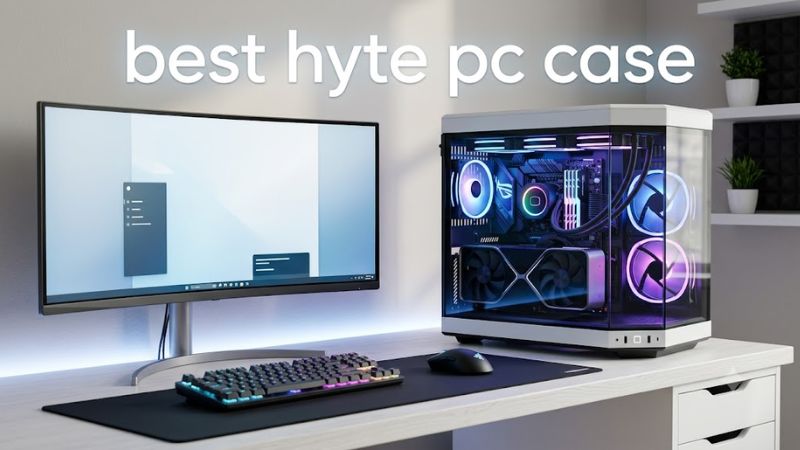
GPU clearance and vertical mounting
HYTE’s panoramic cases emphasize vertical graphics card mounting, placing the GPU prominently behind the glass. The Y40 and Y70 support four-slot graphics cards, while the Y60 uses a narrower three-slot-oriented layout. Card thickness matters alongside length because a large cooler can sit close to the glass and restrict its intake airflow.
Check the exact graphics card manufacturer’s dimensions rather than relying on the GPU model name alone. Board partners often produce different cooler sizes for the same GPU. Also account for the included PCIe 4.0 riser cable: it supports a compatible PCIe graphics card, but it does not turn the case into a PCIe 5.0 riser system.
Cooling capacity and airflow
Radiator support is particularly important if you intend to use a liquid-cooled CPU or build a system with multiple radiators. The Y70 supports radiators up to 360 mm at the side and top, subject to thickness limits. The Y40 also supports a 360 mm radiator, while the Y60 provides top-mounted 360 mm support with its own clearance restrictions.
Fan capacity alone does not determine temperatures. GPU cooler design, fan placement, radiator thickness, and the gap between the GPU and glass all influence cooling. Budget for additional fans if your chosen configuration needs them, and check the manufacturer’s clearance diagrams before purchasing a thick radiator or an oversized graphics card.
Motherboard, PSU, and component compatibility
All three main Y-series models support Mini-ITX, Micro-ATX, and standard ATX motherboards. The Y70 and Y60 also list E-ATX support, although the motherboard’s actual width and connector placement should be checked before buying. An oversized board can obstruct cable-routing openings even when it fits the mounting area.
Check the power supply’s length, the CPU cooler’s height, and the number of storage drives you need. The Y40 allows a CPU air cooler up to 183 mm tall, compared with 180 mm in the Y70 and 160 mm in the Y60. These differences can determine whether an existing cooler can be reused.
Price, appearance, and desk space
HYTE cases appeal to builders who want a clean showcase interior, but their glass-heavy design and vertical GPU arrangement are not automatically the most economical choices. Compare the chassis price with the cost of extra fans, cooling hardware, and any display accessories you want. A more expensive case may provide useful clearance, but it does not automatically improve gaming performance.
Measure the desk and the area around the PC before committing. The Y70 is approximately 470 × 320 × 470 mm, making it a substantial mid-tower. Its dual-chamber design conceals much of the cable clutter, but the chassis still needs room for ventilation and access to its rear connections.
Top HYTE PC Cases Compared
The strongest HYTE options offer different balances of price, GPU layout, included fans, and cooling flexibility. The Y70 is suited to premium showcase systems, the Y40 offers vertical GPU styling in a smaller chassis, the Y60 prioritizes panoramic presentation, and the Y50 RGB adds four included RGB fans and horizontal GPU mounting.
| Product | Best For | Key Spec | Compatibility | Watch Out For |
| HYTE Y70 | Best overall | 422 mm GPU length; four-slot vertical GPU layout | ITX, mATX, ATX, E-ATX | Large footprint; fans may need adding |
| HYTE Y40 | Best value for vertical GPU builds | 422 mm GPU length; 360 mm top radiator support | ITX, mATX, ATX | Limited storage capacity |
| HYTE Y60 | Best panoramic showcase | 375 mm GPU length; 360 mm top radiator support | ITX, mATX, ATX, E-ATX | Three-slot-oriented GPU layout |
| HYTE Y50 RGB | Best for built-in RGB | Four included RGB fans; horizontal GPU mounting | ITX, mATX, ATX, E-ATX, supported rear-connect ATX | 360 mm GPU length limit |
1. HYTE Y70 — Best Overall
The HYTE Y70 is the strongest all-around choice for a premium showcase gaming PC that needs room for large graphics cards and elaborate cooling. Its dual-chamber design separates the main components from much of the cable clutter, while its three-piece panoramic glass makes the hardware visible from multiple angles.
The chassis measures 470 × 320 × 470 mm and supports graphics cards up to 422 mm long, with a maximum listed thickness of 105 mm. It accommodates up to ten fans and supports 360 mm radiators at the side and top, subject to the specified thickness limits. The included PCIe 4.0 riser supports vertical GPU mounting.
Its main drawback is the size and the potential extra cost of completing the cooling setup. The standard Y70 does not include the integrated touchscreen found on the Y70 Touch Infinite. Choose the Y70 if you want the larger interior without paying for an integrated display; consider the Y50 RGB if you prefer horizontal graphics mounting and included lighting.
2. HYTE Y40 — Best Value for Vertical GPU Builds
The HYTE Y40 is a sensible choice for builders who want the signature HYTE showcase aesthetic without moving up to the larger Y70. Its 50-liter interior and dimensions of 439 × 240 × 472 mm make it narrower than the Y70 while retaining ATX motherboard support and a dedicated vertical graphics card arrangement.
HYTE specifies GPU clearance of 422 mm in length and 94 mm in height, with a recommendation to keep GPU height at or below 80 mm for better cooling. The case supports a 360 mm top radiator, a side radiator up to 280 mm, and CPU air coolers up to 183 mm tall. Two 120 mm fans are included, one beneath the floor and one at the rear.
The main compromises are its limited storage provisions and smaller motherboard compatibility range compared with the Y70. Its listed storage capacity is one 3.5-inch drive or two 2.5-inch drives. Builders using a large air cooler should also budget for two additional side intake fans, as HYTE recommends this configuration for improved airflow. Choose the Y40 for a streamlined vertical-GPU build rather than a storage-heavy workstation.
3. HYTE Y60 — Best for Panoramic Presentation
The HYTE Y60 remains appealing for gaming PCs built around carefully arranged components, coordinated lighting, and a clean display interior. Its three-piece panoramic glass and dual-chamber layout give it a distinctive appearance, while the included PCIe 4.0 riser keeps the graphics card in a vertical position.
The Y60 measures 456 × 285 × 462 mm and supports graphics cards up to 375 mm long. It accepts ATX, Micro-ATX, Mini-ITX, and E-ATX motherboards, subject to board dimensions and cable clearance. Cooling options include a top radiator up to 360 mm, a side radiator up to 280 mm, and three pre-installed 120 mm fans.
The key limitation is GPU thickness. Its graphics layout is less accommodating of very thick cards than the Y40 and Y70, and a GPU close to the glass can have restricted airflow. HYTE also states that the Y60 is designed exclusively for vertical GPU mounting rather than a conventional horizontal layout. Choose it if visual presentation is your priority and your specific graphics card fits comfortably.
4. HYTE Y50 RGB — Best for Included RGB Lighting
The HYTE Y50 RGB is worth considering if you want the HYTE design language with lighting included from the start. Unlike the vertical-GPU layouts of the Y40, Y60, and Y70, it uses horizontal graphics card mounting, leaving conventional full-height expansion slots available for compatible add-in cards.
Its 63.8-liter interior measures 473 × 288 × 461 mm. HYTE lists support for GPUs up to 360 mm long, CPU air coolers up to 160 mm tall, and ATX power supplies up to 250 mm long with conventional motherboards. Rear-connect ATX boards are supported for compatible designs, including ASUS BTF, Gigabyte STEALTH, and MSI Project Zero; the PSU length limit falls to 225 mm with these boards.
Four RGB fans are included: a 360 mm side-mounted fan assembly with reverse-blade design and a 120 mm rear fan. The case also supports radiators up to 410 mm long at the top and side, within specified thickness limits. Its main drawback is the 360 mm GPU length ceiling, so unusually long cards may require another chassis. Choose the Y50 RGB if you prefer horizontal mounting and want to reduce the number of separate fan purchases.
FAQ
Is the HYTE Y70 better than the Y60?
The HYTE Y70 is generally the more flexible choice for large GPUs and elaborate cooling, while the Y60 is attractive for a more compact panoramic build. The Y70 supports four-slot graphics cards, compared with the Y60’s narrower GPU layout, and allows more room between the GPU and glass. Your exact card dimensions and cooling plan should determine the final choice.
Will an RTX 5090 fit in a HYTE case?
An RTX 5090 may fit in a HYTE case, but compatibility depends on the exact card model and cooler dimensions. The Y40 and Y70 list a maximum GPU length of 422 mm, but thickness and height also matter. Check the graphics card manufacturer’s specifications against HYTE’s compatibility guidance before purchasing, especially for unusually thick partner cards.
Are HYTE PC cases good for airflow?
HYTE cases can support capable cooling configurations, but airflow depends on the model, fan placement, GPU clearance, and component selection. The Y40 and Y70 provide additional clearance for vertical GPUs, while the Y60’s narrower layout can constrain some cards near the glass. Add appropriate intake and exhaust fans when needed, and verify clearances before installing a radiator.
Is the HYTE Y50 RGB worth buying?
The HYTE Y50 RGB is worth considering if you want panoramic glass, four included RGB fans, and horizontal GPU mounting in one package. Its 360 mm GPU length limit and 160 mm CPU cooler height limit are important constraints. Compare those restrictions with your parts list and the Y40’s vertical layout before deciding which case offers better value for your build.
Final Thoughts
The best hyte pc case depends on your priorities: choose the Y70 for a premium showcase, the Y40 for a vertical-GPU build at a lower entry price, the Y60 for panoramic presentation, or the Y50 RGB for included lighting and horizontal mounting. Confirm your GPU, cooler, PSU, and motherboard dimensions before ordering.