🛒 Best Price Today on Amazon
Prime members get fast, free shipping on everything above, plus member-only deals. New members get a 30-day free trial — cancel anytime.
Choosing the best full tower PC case means finding enough room for your graphics card, motherboard, cooling system, and future upgrades without paying for space you will never use. These cases suit ambitious gaming PCs, workstation builds, and custom liquid-cooling projects. The right choice depends on compatibility, airflow, storage, and budget.
How to Choose a Full Tower PC Case
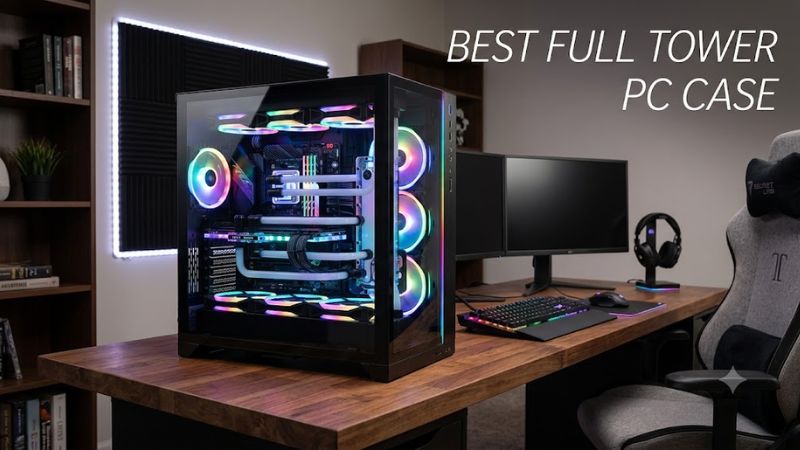
A full tower is most useful when a standard mid-tower limits your cooling layout, expansion options, or component clearance. Before buying, compare the manufacturer’s dimensions and installation limits against your planned hardware. A larger chassis offers flexibility, but it does not automatically deliver lower temperatures or quieter operation.
1. Check motherboard and component compatibility
Start with your motherboard’s exact form factor. Most large cases support Mini-ITX, Micro-ATX, and ATX, while E-ATX and workstation boards require closer inspection. E-ATX is not one universal size, so verify the maximum supported motherboard width and whether cable-routing openings remain accessible.
Next, check GPU length, CPU cooler height, and power supply dimensions. The advertised maximum GPU clearance may change when front fans, a radiator, or other hardware occupies the same space. Measure the complete cooling assembly, including fans and fittings, rather than relying on the case’s largest published clearance figure alone.
2. Prioritize airflow and cooling capacity
High-end CPUs and GPUs can produce substantial heat during demanding games, rendering, and extended workloads. A mesh front panel can help intake airflow, while a suitable exhaust arrangement moves warm air out. However, fan quality, fan placement, radiator restrictions, and the components themselves also influence cooling and noise.
If you plan to use liquid cooling, check the supported radiator sizes and mounting positions. A case may support a large radiator at the front but offer less space at the top once motherboard components are installed. Confirm the manufacturer’s layout guidance before buying a radiator, pump, or reservoir.
3. Consider storage, expansion, and build layout
Full towers can accommodate more drives, expansion cards, and cable-routing options than many compact cases. This matters if your PC will hold several game libraries, local media projects, or large working files. Check how many drive brackets are included, because a published maximum may require optional accessories or a different internal configuration.
Also consider front-panel connections, removable brackets, dust filters, and access to the rear of the motherboard tray. Convenient cable management makes maintenance easier, particularly when replacing a GPU or adding storage. If you want a dual-system build, verify that the case supports the required second motherboard and power supply arrangement.
4. Match the case to your room and budget
A full tower takes up considerable desk or floor space and can be difficult to move once assembled. Measure the intended location, including clearance for the side panels, front intake, top exhaust, and cable connections. Check the chassis dimensions and weight before ordering, especially if the PC will sit under a desk.
Budget for more than the case itself. Additional fans, radiator brackets, drive cages, and liquid-cooling hardware can increase the total cost. If you only need one ATX motherboard, one graphics card, and a conventional air cooler, a good mid-tower may deliver better value with fewer installation compromises.
Top Full Tower PC Cases Worth Considering
These four chassis serve different priorities: straightforward airflow, extreme custom cooling, extensive storage, and quieter everyday operation. The recommendations are based on manufacturer-published specifications and intended use, not firsthand testing by PC Gaming Universe. Check current US availability and the exact model configuration before purchasing.
| Product | Best For | Key Spec | Compatibility | Watch Out For |
| Corsair 7000D Airflow | Best overall for airflow-focused builds | GPU clearance up to 450 mm; support for radiators up to 480 mm in specified positions | Mini-ITX through E-ATX up to 305 × 277 mm | Large footprint; radiator placement affects available space |
| Lian Li V3000 PLUS | Best for custom water cooling | Supports up to three 480 mm radiators and one 360 mm radiator in its standard layout | EEB, E-ATX, ATX, Micro-ATX, Mini-ITX | Expensive, heavy, and more case than ordinary gaming builds need |
| Phanteks Enthoo Pro II | Best for storage and expansion | Up to 12 internal 3.5-inch drives with the listed configuration; GPU clearance up to 503 mm | SSI-EEB, E-ATX up to 330 mm wide, ATX, Micro-ATX, Mini-ITX | Drive capacity and cooling options depend on the installed layout |
| Fractal Design Define 7 XL | Best for a storage-focused, understated build | 185 mm maximum CPU cooler height; 604 × 240 × 566 mm chassis dimensions | Supports numerous motherboard sizes, including E-ATX and SSI-EEB | Sound-dampened design prioritizes a different balance from mesh-first cases |
1. Corsair 7000D Airflow — Best Overall
The Corsair 7000D Airflow is a strong starting point for a high-end gaming tower that needs substantial component clearance and flexible cooling. Its published specifications include support for graphics cards up to 450 mm long, CPU coolers up to 190 mm tall, and motherboards through E-ATX measuring up to 305 × 277 mm. Three 140 mm AirGuide fans are included.
Cooling flexibility is a major advantage: supported layouts accommodate multiple radiators, including configurations with up to three 360 mm radiators or two 420 mm radiators. The case also provides six 3.5-inch drive positions, four 2.5-inch positions, and front USB Type-C connectivity. These features make it practical for gaming and content creation alike.
The main trade-off is size. At approximately 600 × 248 × 550 mm, it requires substantial room, and the listed GPU clearance must be checked against the installed front cooling hardware. Choose it for a large, airflow-oriented gaming build; consider a smaller chassis if your system does not need its extra capacity.
2. Lian Li V3000 PLUS — Best for Custom Water Cooling
The Lian Li V3000 PLUS is aimed at enthusiasts who want to build a complex cooling loop or an unusually expansive system. In its standard layout, it supports graphics cards up to 589 mm long, CPU coolers up to 198 mm tall, and multiple large radiators, including 480 mm units. It also offers a modular interior and support for up to 16 fans.
Its defining feature is flexibility beyond a conventional single-system gaming PC. The chassis offers standard, rotated, and dual-system configurations, with support for an EEB motherboard and a second Mini-ITX system in the appropriate layout. Storage provisions include a drive cage for up to eight 2.5-inch SSDs or eight 3.5-inch hard drives, plus additional 2.5-inch mounting positions.
That flexibility comes with significant space and planning requirements. Maximum component clearances vary by layout, and a dual-system configuration has different limits from the standard arrangement. Choose this case for a carefully planned custom loop or specialized enthusiast build, not simply because you want a roomy case for a conventional gaming PC.
3. Phanteks Enthoo Pro II — Best for Storage and Expansion
The Phanteks Enthoo Pro II suits builders who need room for numerous drives, expansion cards, or a larger workstation motherboard. Its published specifications list support for SSI-EEB and E-ATX motherboards up to 330 mm wide, alongside standard consumer motherboard sizes. Graphics cards can measure up to 503 mm long, subject to the installed configuration.
Storage and cooling are its major selling points. The specifications list 12 internal 3.5-inch drive positions, with four included, and 11 internal 2.5-inch positions. The chassis also supports multiple radiator locations, including up to 480 mm at the front and side. A vertical GPU mount and GPU anti-sag bracket are listed among the included accessories.
The caveat is that a large number of mounting positions does not mean every drive, radiator, and fan arrangement can be used simultaneously. The exact layout matters, particularly for builds with multiple radiators. Choose it if you need a combination of storage capacity and component flexibility; for a simple gaming rig, its expansion potential may go unused.
4. Fractal Design Define 7 XL — Best for a Storage-Focused, Understated Build
The Fractal Design Define 7 XL takes a more restrained approach than mesh-forward gaming cases. It is designed for builders who value a clean exterior, flexible internal arrangements, and extensive storage options. Its published dimensions are 604 × 240 × 566 mm, and its maximum CPU cooler height is 185 mm.
Its layout supports multiple motherboard formats, and Fractal Design provides guidance for changing between standard and storage-oriented configurations. The case supports sound-dampened steel panel options, while a tempered-glass version is available for builders who want to display their components. Its modular interior makes it useful for systems that need more than a typical gaming PC’s storage capacity.
The trade-off is that the emphasis on sound damping and a more enclosed exterior differs from the airflow-first approach of the Corsair 7000D Airflow. That does not establish that one case will always run cooler or quieter; the result depends on the complete system and fan configuration. Pick the Define 7 XL for a discreet, adaptable build with substantial storage needs, and compare the cooling layout carefully if you plan to install several high-power components.
FAQ
Is a full tower PC case better for gaming?
A full tower is better for gaming when your build needs extra GPU clearance, extensive cooling, or more expansion room. It does not inherently improve frame rates. Gaming performance depends primarily on the CPU, GPU, memory, and cooling effectiveness of the complete system. A well-designed mid-tower can be sufficient for most single-GPU gaming PCs.
Will any ATX motherboard fit a full tower case?
Most full towers support standard ATX motherboards, but you should still verify the manufacturer’s compatibility list. E-ATX, EEB, and XL-ATX boards have different dimensions and mounting requirements. Check motherboard width, mounting points, cable openings, and radiator clearance before buying, especially for workstation-class hardware.
Does a full tower need extra fans?
Not necessarily, because the number and quality of included fans vary by model. Start with the manufacturer’s supplied configuration and monitor CPU and GPU temperatures under your normal workload. Add fans only if the airflow layout or measured temperatures justify them, and confirm that the motherboard or fan hub can support the additional connections.
Is a full tower PC case worth the extra money?
A full tower is worth the extra cost if you need its specific expansion, cooling, or storage capabilities. For a standard gaming build with one GPU and a conventional cooler, a mid-tower may provide better value. Compare the complete build cost, including extra fans, radiators, drive mounts, and any other accessories your chosen layout requires.
Final Thoughts
The best full tower PC case depends on what your build needs beyond basic component fit. The Corsair 7000D Airflow is a sensible starting point for airflow-focused gaming, the Lian Li V3000 PLUS suits ambitious custom loops, the Phanteks Enthoo Pro II favors expansion, and the Fractal Design Define 7 XL emphasizes storage and a restrained design. Verify clearances before ordering.