Affiliate disclosure: As an Amazon Associate we earn from qualifying purchases. This post contains affiliate links — we may earn a small commission at no extra cost to you. This never affects our picks. Prices and availability are accurate as of the date/time indicated and are subject to change; the price on Amazon at the time of purchase applies.
- Quick Comparison Table
- 1. NZXT H5 Flow: Best for a First Airflow Build
- 2. Lian Li O11D Mini V2 Flow: Best for Display Builds
- 3. Fractal Design Pop 2 Air: Best for Quiet Airflow
- 4. Corsair 4000D RS ARGB Frame: Best for Modular Builds
- 5. Montech AIR 903 Max: Best for Large Boards
- How to Choose
- Frequently Asked Questions
- About the Author
- Related Articles
Quick answer: For the best PC cases for gaming, the NZXT H5 Flow is the top pick for a first airflow build. The Lian Li O11D Mini V2 Flow suits showpiece builds, the Fractal Pop 2 Air fits quiet airflow, the Corsair 4000D RS Frame suits modular tinkerers, and the Montech Air 903 Max serves large boards.
This guide compares five gaming cases that cover compact airflow, glass showpieces and roomy E-ATX options. We use each listing’s published specs, such as fan count, radiator support and board sizes, because we did not run our own benchmarks. Case choice affects cooling, noise and how easy the build is, so the notes below focus on those trade-offs rather than looks alone.
Quick Comparison Table
| # | Model | Key specs (per listing) | Best for |
|---|---|---|---|
| 1 | NZXT H5 Flow | Compact ATX mid-tower, 2x 120mm fans, 360mm front radiator support | First airflow build |
| 2 | Lian Li O11D Mini V2 Flow | 5x 120mm reverse-blade fans, panoramic glass, ATX/M-ATX/Mini-ITX | Display builds |
| 3 | Fractal Design Pop 2 Air | Mesh front, 3x 120 mm fans, ATX/mATX/ITX | Quiet airflow |
| 4 | Corsair 4000D RS ARGB Frame | 3 pre-installed fans, InfiniRail mounting, GPU anti-sag, reverse board support | Modular builds |
| 5 | Montech AIR 903 Max | E-ATX mid tower, high airflow, fans pre-installed | Large boards |
1. NZXT H5 Flow: Best for a First Airflow Build
Specs per the listing: Compact ATX mid-tower, 2 included 120mm fans, 360mm front radiator support, tempered glass, black.
The H5 Flow has a simple recipe: a perforated front, two included fans and room for a 360mm radiator. That makes it forgiving for a first build, since air reaches the components without extra work. The compact mid-tower size keeps it easy to place on a desk, and tempered glass lets you show off the parts.
Because the listing describes it as compact, check the maker page for graphics card length and cooler height limits before choosing a large card. With only two fans included, many builders add one or two more to keep a hot graphics card cool.
- Pros: Airflow-focused front; 360mm radiator support; tempered glass; compact footprint
- Cons: Only two fans included; compact size limits some large parts
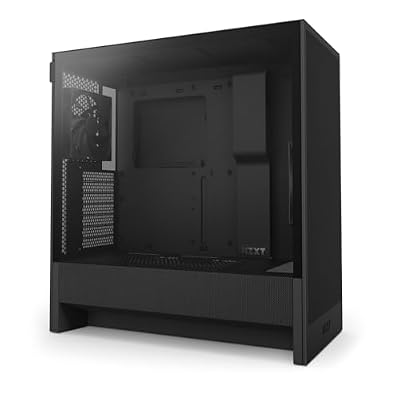
NZXT H5 Flow - Compact ATX Mid-Tower PC Case - Black | Compact mid-tower with 2 included 120mm fans, 360mm front radiator support, and tempered glass. A great first airflow build.
Included for 'Best PC Cases for Gaming: Airflow, Glass and E-ATX Options' as a representative home product in this roundup; selection reflects the product set returned for this topic.
View on Amazon2. Lian Li O11D Mini V2 Flow: Best for Display Builds
Specs per the listing: ATX case with five non-RGB reverse fans, panoramic glass, five 120mm reverse-blade fans, 10 degree angled intake, supports ATX, M-ATX and Mini-ITX builds.
This case is built to show off a build. Panoramic glass shows the interior, and five included fans mean airflow is ready from day one without buying extras. The angled intake and reverse-blade fans face the glass side, so the components get fresh air while the exterior stays clean.
Display cases reward tidy cable work and component choices, since everything is visible. Check the maker page for graphics card clearance and radiator limits if you plan to run liquid cooling, as the Mini size trades space for a smaller footprint.
- Pros: Five fans included; panoramic glass; angled intake; supports three board sizes
- Cons: Interior is on show; space is tighter than larger cases

Lian Li O11D Mini V2 Flow ATX PC Case with 5 Non-RGB Reverse Fans, Black | Includes five 120mm reverse-blade fans, panoramic glass, 10° angled intake and support for ATX, M-ATX and Mini-ITX builds.
Included for 'Best PC Cases for Gaming: Airflow, Glass and E-ATX Options' as a representative home product in this roundup; selection reflects the product set returned for this topic.
View on Amazon3. Fractal Design Pop 2 Air: Best for Quiet Airflow
Specs per the listing: Performance airflow PC gaming case, mesh front panel, three 120 mm fans included, spacious interior, ATX/mATX/ITX motherboard support, black solid side panel.
The Pop 2 Air pairs a mesh front with a solid side panel. That combination moves air through the front while keeping fan noise and cable clutter hidden from view, which suits a desk beside your seat. Three 120 mm fans are included, so the build is ready to cool without extra purchases.
The solid panel means no glass view of your parts, and that is the trade. If you want lighting and a showpiece, look at the glass versions in the same family. For a quiet, cool daily gaming PC, this is a sensible choice.
- Pros: Mesh front for airflow; three fans included; spacious interior; solid panel hides cables
- Cons: No glass window on this version; basic looks

Fractal Design Pop 2 Air Black Solid - Performance Airflow PC Gaming Case - Mesh Front Panel - Three 120 mm Fans Included - Spacious Interior - ATX/mATX/ITX Motherboard Support
Included for 'Best PC Cases for Gaming: Airflow, Glass and E-ATX Options' as a representative home product in this roundup; selection reflects the product set returned for this topic.
View on Amazon4. Corsair 4000D RS ARGB Frame: Best for Modular Builds
Specs per the listing: Customisable mid-tower PC case, 3 pre-installed fans, high airflow, fully modular, InfiniRail fan mounting, GPU anti-sag, reverse motherboard support.
The Frame design lets you rearrange and swap panels and fan positions, so the case can change as your build does. InfiniRail mounting makes fan placement easier, and the GPU anti-sag bracket supports heavy graphics cards, which is useful with modern long cards. Three fans come pre-installed.
The modular approach rewards people who like to adjust their setup. The listing does not give a maximum graphics card length or radiator size, so check the maker page before pairing it with a large cooler.
- Pros: Customizable layout; fan rails; GPU anti-sag; three fans included
- Cons: Dimensions not listed; the customizing options take some setup time
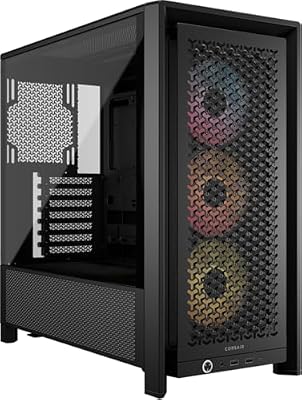
CORSAIR 4000D RS ARGB FRAME Customisable Mid-Tower PC Case – Black | 3x Pre-Installed Fans, High Airflow, Fully Modular, Easy InfiniRail Fan Mounting, GPU Anti-Sag, Reverse Motherboard Support
Included for 'Best PC Cases for Gaming: Airflow, Glass and E-ATX Options' as a representative home product in this roundup; selection reflects the product set returned for this topic.
View on Amazon5. Montech AIR 903 Max: Best for Large Boards
Specs per the listing: Montech AIR 903 Series, E-ATX mid tower, high airflow, fans pre-installed, Air 903 Max, white.
E-ATX support is the reason to look at this case. If you have an extended board or want extra room for cabling and cooling, a mid tower that accepts larger boards is a rare find. The listing also stresses high airflow with fans pre-installed, which helps keep a powerful system cool.
The title lists few other details, so check the maker page for fan count, radiator support and clearance. Choose this one when board size is the main concern rather than a compact footprint.
- Pros: E-ATX board support; high-airflow design; fans pre-installed
- Cons: Fan count and clearances not listed; larger footprint

Montech AIR 903 Series, E-ATX Mid Tower Case, High Airflow, Fans Pre-Installed Gaming case (Air 903 Max White)
Included for 'Best PC Cases for Gaming: Airflow, Glass and E-ATX Options' as a representative home product in this roundup; selection reflects the product set returned for this topic.
View on AmazonHow to Choose
Check motherboard size first
Match the case to your board: ATX boards fit most mid towers, micro-ATX and Mini-ITX fit smaller ones, and E-ATX needs a case that says it supports it. A case that supports smaller sizes is fine for a bigger case, but not the other way around.
Look at the front panel and fans
Mesh or perforated fronts move more air than solid ones. Aim for at least two intake fans at the front and one exhaust at the rear. Many cases ship with two or three fans, and adding one or two more usually lowers temperatures without raising noise much.
Measure graphics card and cooler clearance
Modern cards can be over 300 mm long and thick enough to cover three slots. Check the case’s maximum card length and CPU cooler height on the maker page. If you plan a 360mm radiator, confirm whether it mounts at the top or front and whether memory clearance is affected.
Decide between glass and solid panels
Glass shows off components but also shows cable clutter and dust. A solid or mesh panel hides the interior and can reduce noise. If you want a visible build, choose a case with cable routing space and consider how you will clean it.
Frequently Asked Questions
How many fans does a gaming case need?
Two intake fans at the front and one exhaust at the rear are a good baseline. High-end graphics cards and processors may benefit from extra fans.
Is a bigger case always better for cooling?
Not always. A bigger case gives more room, but airflow depends on fan placement and the front panel. A well-designed compact case can cool well.
What does reverse-blade mean?
Reverse-blade fans spin the same way but have blades that face the other direction, so the clean side faces the glass. They look tidy and move air similarly to normal fans.
Will my graphics card fit?
Check the case’s maximum graphics card length against the card’s length on its maker page. Leave a few millimeters of room for front fans or a radiator.
Do I need RGB fans?
No. RGB is cosmetic. Pick fans for airflow and noise first, and add lighting only if you like the look.