🛒 Best Price Today on Amazon
Prime members get fast, free shipping on everything above, plus member-only deals. New members get a 30-day free trial — cancel anytime.
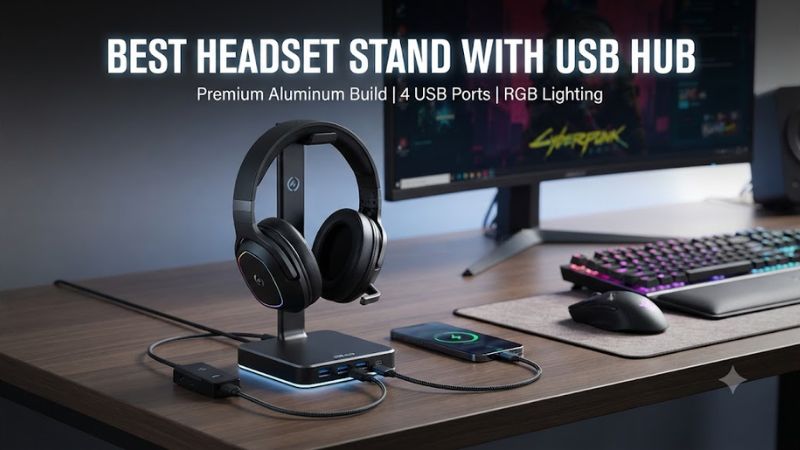
A best headset stand with usb hub combines headphone storage with convenient desktop connectivity, helping gamers organize cables and access frequently used ports. The right model depends on whether you need faster data connections, analog headset audio, RGB lighting, or mouse cable management. Comparing verified manufacturer specifications helps match these extras to your PC setup.
How to Choose a Headset Stand With USB Hub
A headset stand with integrated USB ports should suit your peripherals, available desk space, and connection requirements. Before buying, distinguish data ports from charging connections, check whether the stand needs software, and confirm that its upstream cable reaches your computer. The following criteria help identify which features matter for your particular setup.
USB Speed and Port Compatibility
USB speed matters when you connect storage devices or transfer files. USB 3.0 and USB 3.1 Gen 1 both support a theoretical maximum of 5 Gbps, while USB 2.0 tops out at 480 Mbps. These figures describe interface limits, not guaranteed transfer speeds. A USB 3.x stand also needs a compatible host connection to reach its rated speed.
For everyday gaming accessories, USB 2.0 can handle many keyboards and mice. If you regularly connect flash drives or external storage, a faster hub is more suitable. Check the upstream connection before choosing a best headset stand with usb hub, because the stand cannot exceed the capabilities of its host connection.
Analog Audio and Virtual Surround
Some stands include a 3.5 mm audio jack and a built-in digital-to-analog converter (DAC), allowing a compatible wired headset to connect directly to the stand. The Razer Base Station V2 Chroma and Corsair ST100 RGB both offer analog audio connectivity and virtual 7.1 surround processing through their respective software ecosystems.
This feature is useful when your headset uses a 3.5 mm analog plug and you want an additional desktop audio connection. It is less relevant for headsets that connect exclusively through USB or wireless receivers. Before paying for audio features, confirm that your headset connector and preferred audio software are compatible with the stand.
Desk Space, Stability, and Cable Management
The stand should remain stable when you lift your headset and return it after gaming. A weighted base and non-slip underside can help prevent movement, while a suitably shaped support reduces unnecessary pressure on the headband. Measure the available desktop area and vertical clearance before purchasing a tall stand, especially if your monitor shelf is low.
Cable management can matter as much as appearance. The Tilted Nation RGB stand combines headphone storage with a mouse bungee, helping guide a wired mouse cable while keeping the headset accessible. However, its additional hardware occupies desk space, so a simple stand may suit minimalist setups better.
Software, Lighting, and Operating System Support
RGB customization varies by manufacturer. Razer uses Synapse for Chroma lighting, while Corsair provides iCUE controls for lighting and supported audio features. Tilted Nation advertises plug-and-play operation for its RGB stand, making it an option for buyers who prefer fewer software dependencies.
Check software requirements separately from basic USB connectivity. A stand may connect to a computer without additional configuration, while its lighting synchronization or virtual surround features may require manufacturer software. For the best headset stand with usb hub for your desk, prioritize the functions you will actually use rather than paying for lighting or audio processing that your setup does not need.
Top Picks: Best Headset Stands With USB Hubs
The following comparison covers four models with distinct feature sets. The recommendations are based on manufacturer specifications and published product information, not hands-on evaluations by PC Gaming Universe. Prices and availability can change, so check the manufacturer’s current listing before ordering.
| Product | Best For | Key Spec | Compatibility | Watch Out For |
| Razer Base Station V2 Chroma | Overall features | Two USB 3.1 ports; 3.5 mm combo jack with DAC | PC USB connection; analog headset | Some audio features require software and activation |
| Corsair ST100 RGB | Audio control | Two USB 3.1 Gen 1 Type-A ports; 3.5 mm audio | PC USB connection; analog headset | Advanced features use iCUE |
| Tilted Nation RGB Stand | Mouse cable management | Two USB 3.0 ports; integrated mouse bungee | Compatible USB host; wired mouse | No listed analog DAC |
| New Bee RGB Headphone Stand Z8 | Compact charging access | USB-A and USB-C ports; RGB lighting | Check host and device requirements | Exact port speeds and power output need confirmation |
Razer Base Station V2 Chroma: Best for Feature Integration
The Razer Base Station V2 Chroma combines a headset support with two USB 3.1 ports, a 3.5 mm combo port, a built-in DAC, and Chroma RGB lighting. Its anti-slip base helps keep the stand in place, while the support design is intended to reduce pressure on headset headbands. It suits users who want audio connectivity and lighting controls alongside storage.
The main limitation is that not every feature benefits every headset. USB-only models do not use the stand’s analog audio jack, and Chroma customization depends on Razer software. Buyers should also confirm that the stand fits their headset’s height and that their computer has a suitable USB port. Choose another model if you only need a simple holder and extra USB connections.
Corsair ST100 RGB: Best for Analog Audio Control
The Corsair ST100 RGB features an aluminum construction, a rubberized base, nine customizable RGB lighting zones, and two USB 3.1 Gen 1 Type-A ports. Its 3.5 mm analog jack supports stereo output and software-enabled virtual 7.1 surround sound. Corsair lists a weight of 1 kg, which gives buyers a useful reference when considering its desktop footprint and stability.
Its main drawback is the dependence on iCUE for advanced audio and lighting customization. The stand connects to a computer by USB and does not provide wireless charging. It is suitable for gamers with analog headsets who want centralized audio controls and Corsair lighting integration. Users with USB-only headsets may prefer a less feature-heavy stand.
Tilted Nation RGB Stand: Best for Wired Mouse Management
Tilted Nation’s RGB Gaming Headset Stand combines a headset holder, a two-port USB 3.0 hub, RGB lighting, and a built-in mouse bungee. Its weighted base and non-slip grips are designed to improve stability during everyday use. The integrated cable guide makes it particularly relevant for gamers who use a wired mouse and want fewer separate accessories on their desks.
The trade-off is that the stand prioritizes cable management rather than advanced audio processing. Its manufacturer does not list a built-in DAC or analog audio jack on the product page. The extra bungee may also be unnecessary for wireless mouse users. Check your available desk space and upstream USB connection before choosing this model for a compact gaming setup.
New Bee RGB Headphone Stand Z8: Best for Charging Access
The New Bee RGB Headphone Stand Z8 combines headset storage with RGB lighting and USB-A and USB-C connections. Its manufacturer advertises a touch control for lighting and describes the integrated connections as suitable for charging and data transfer. This layout can make frequently used connections easier to reach without placing a separate hub beside the monitor.
The important limitation is the lack of clearly verified port-speed and power-output figures in the available product information. Do not assume that USB-C automatically means high-speed data or USB Power Delivery. This model suits buyers who want accessible charging connections and lighting, but users who regularly transfer large files should confirm the port specifications before purchasing.
FAQ
Does a headset stand with a USB hub increase the number of PC ports?
Yes, it can provide additional accessible USB connections, but the stand shares its upstream connection with the computer. The available bandwidth and power depend on the stand’s hub design and host port. It is useful for compatible accessories, but it should not be treated as a replacement for a powered docking station when several demanding devices need simultaneous power or data throughput.
Can I use a USB headset with these stands?
Yes, a USB headset can generally connect to a compatible USB hub, provided the hub supports the headset’s requirements. However, a USB headset will not use the stand’s separate 3.5 mm analog audio jack. Check whether the headset needs a dedicated receiver, additional power, or a direct connection to the computer for specific features.
Is USB 3.0 necessary for a gaming headset stand?
No, USB 3.0 is not necessary for basic accessories such as many keyboards and mice. USB 2.0 provides sufficient bandwidth for many low-data peripherals, while USB 3.0 is more appropriate when faster file transfers matter. Check the upstream connection and actual device requirements instead of choosing solely by the advertised USB version.
Will RGB lighting work without manufacturer software?
Sometimes, but support depends on the individual model. Tilted Nation advertises plug-and-play operation, while Razer and Corsair provide software for their advanced lighting controls. Basic illumination may work without extensive configuration, but synchronization and custom effects can require the relevant application. Check the manufacturer’s documentation if avoiding background software is a priority.
Final Thoughts
The best headset stand with usb hub depends on the connections and desk features you need. Razer and Corsair combine USB access with analog audio, Tilted Nation adds wired mouse management, and New Bee offers USB-A and USB-C connections. Verify port speeds, charging output, software support, and headset compatibility before choosing a model for your setup.