🛒 Best Price Today on Amazon
Prime members get fast, free shipping on everything above, plus member-only deals. New members get a 30-day free trial — cancel anytime.
Modern graphics hardware requires raw rasterization performance and dedicated neural cores to execute real-time upscaling alongside local generative models. Finding the best ai gaming gpu depends on balancing Tensor core density, memory bandwidth, and PSU capacity. Desktop builds also require deliberate slot planning for PCIe bandwidth.
How to Choose an AI Gaming GPU
Selecting graphics hardware for machine learning and rendering requires evaluating specific architecture features alongside total VRAM footprint. An ideal best ai gaming gpu combines dedicated tensor compute cores with high-speed memory bandwidth to process complex neural models. System builders must also inspect power connectors and case clearance.
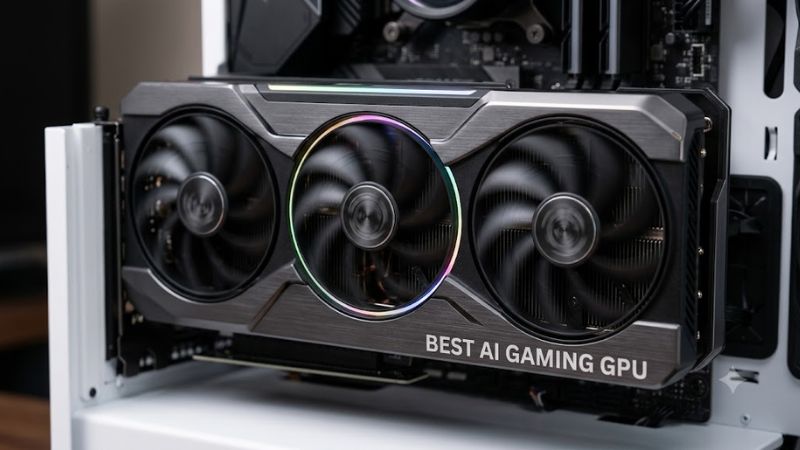
Tensor Core Architecture and Upscaling
Hardware-based neural acceleration relies on dedicated matrix math units integrated directly into the graphics silicon. NVIDIA Tensor cores execute FP16 and INT8 matrix operations required for real-time DLSS image reconstruction and frame generation. AMD AI accelerators use WMMA instructions on RDNA 3 architecture to accelerate spatial upscaling.
Processing neural models on graphics hardware demands high instruction throughput to maintain frame pacing without latency spikes. Benchmarks from UL Procyon AI Computer Vision tests show fourth-generation Tensor cores operating at higher FP16 TFLOPS rates than preceding designs. Modern matrix cores ensure full support for advanced neural rendering.
Local VRAM Capacity for Generative AI Models
Video memory capacity dictates the size of deep learning models that load directly into GPU cache without swapping to system RAM. Running quantized 7B or 13B parameter language models alongside high-resolution textures requires at least 16GB VRAM. Choosing a best ai gaming gpu with 24GB prevents memory allocation errors during heavy workloads.
Memory bus width directly impacts how fast weights transfer to execution units during image synthesis in Stable Diffusion XL. A 384-bit bus delivering over 1,000 GB/s of bandwidth processes batch generation faster than a 128-bit bus capped at 288 GB/s. High memory bandwidth also maintains high average frame rates when high-resolution textures load.
Platform Compatibility and System Power Delivery
High-performance graphics cards place strict demands on motherboard expansion slots and power supply unit connectors. Modern cards require a full PCIe 4.0 or PCIe 5.0 x16 slot operating at full bandwidth to prevent bus bottlenecks during heavy transfers. Motherboard layouts must provide clear physical clearance, as triple-slot designs exceed 300 mm.
Power delivery standards have shifted toward ATX 3.0 power supplies featuring 12VHPWR or 12V-2×6 16-pin power cables. These power connections supply up to 600 Watts through a single cable, replacing multiple traditional 8-pin PCIe cables. Systems using older power supplies require dual or triple 8-pin adapter cables connected to dedicated power rails.
Memory Bandwidth and Ray Tracing Performance
Ray tracing algorithms rely heavily on bounding volume hierarchy traversal acceleration to calculate real-time lighting. Combining dedicated ray tracing cores with neural upscaling allows system hardware to render path-traced titles at high frame rates. Third-generation RT cores process bounding box intersections in parallel with matrix math execution.
Graphics memory speed measured in Gbps per pin determines how quickly frame buffers and denoising passes update each refresh cycle. GDDR6X memory running at 21 Gbps provides the necessary throughput for path-traced rendering at 3840×2160 resolution. High memory throughput prevents bottlenecking the primary compute units during complex ray tracing scenes.
Top Picks for AI Gaming GPUs
Evaluating current graphics cards involves comparing tensor throughput, memory bandwidth, physical dimensions, and power requirements across price tiers. Selecting the best ai gaming gpu for a specific desktop build requires matching the card’s VRAM pool to intended gaming resolutions and local AI models. The table below outlines key technical specifications.
| Product | Best For | Key Spec | Compatibility | Watch Out For |
| NVIDIA GeForce RTX 4090 | Best Overall | 24GB GDDR6X, 384-bit bus | PCIe 4.0 x16, 850W PSU, 16-pin cable | High 450W power draw and 304 mm length |
| NVIDIA GeForce RTX 4080 Super | High-End 1440p / 4K | 16GB GDDR6X, 256-bit bus | PCIe 4.0 x16, 750W PSU, 16-pin cable | Requires 16-pin power adapter on ATX 2.0 PSUs |
| NVIDIA GeForce RTX 4070 Super | Best Value | 12GB GDDR6X, 192-bit bus | PCIe 4.0 x16, 650W PSU, 16-pin cable | 12GB VRAM limits large 13B parameter AI models |
| NVIDIA GeForce RTX 4060 Ti 16GB | Best Budget AI | 16GB GDDR6, 128-bit bus | PCIe 4.0 x8, 550W PSU, 8-pin cable | 128-bit memory bus caps bandwidth at 288 GB/s |
NVIDIA GeForce RTX 4090
The NVIDIA GeForce RTX 4090 is designed for enthusiasts who require uncompromised 4K frame rates and maximum local AI processing capacity. Equipped with 24GB of GDDR6X memory on a 384-bit bus, this card delivers 1,008 GB/s of bandwidth. In Cyberpunk 2077 at 3840×2160 with Ray Tracing Overdrive settings, TechPowerUp benchmarks show it reaching 83 FPS with DLSS 3.
Buyers seeking a best ai gaming gpu for running 13B parameter LLMs or SDXL image generation benefit from its 16,384 CUDA cores and 512 Tensor cores. System requirements include an ATX 3.0 850W power supply and a chassis accommodating its 304 mm length and triple-slot footprint. Builders with compact micro-ATX cases or lower PSUs should avoid this card.
NVIDIA GeForce RTX 4070 Super
The NVIDIA GeForce RTX 4070 Super offers exceptional performance-per-dollar for 1440p gaming and mid-tier local artificial intelligence workloads. Featuring 12GB of GDDR6X video memory across a 192-bit bus, it provides 504 GB/s of bandwidth. Eurogamer benchmarks in Alan Wake 2 at 2560×1440 with High Ray Tracing and DLSS Quality mode yield a stable 74 FPS.
This graphics card features 7,168 CUDA cores and 224 Tensor cores, making it suitable for light fine-tuning and running quantized 7B language models. Power requirements are modest with a 220W Total Graphics Power rating requiring a 650W power supply. However, users targeting heavy 24GB VRAM machine learning workloads should select higher VRAM alternatives.
NVIDIA GeForce RTX 4080 Super
The NVIDIA GeForce RTX 4080 Super targets users needing robust 4K gaming capabilities alongside substantial AI matrix calculation capacity. It features 16GB of GDDR6X memory running on a 256-bit bus to deliver 736 GB/s of bandwidth. Tom’s Hardware testing in Warhammer 40,000: Space Marine 2 at 3840×2160 Ultra settings yields 68 FPS native and 102 FPS with DLSS.
With 10,240 CUDA cores and 320 Tensor cores, this card handles complex Stable Diffusion image generation batches without memory starvation. Physical installation requires a computer case supporting 304 mm card length and a 750W power supply unit with a 12VHPWR connector. Builders on a strict budget under eight hundred dollars should select lower tier models.
NVIDIA GeForce RTX 4060 Ti 16GB
The NVIDIA GeForce RTX 4060 Ti 16GB provides an entry point for developers and gamers wanting extra VRAM without paying flagship prices. It combines 16GB of GDDR6 memory with a 128-bit bus, generating 288 GB/s of memory bandwidth. Hardware Unboxed benchmarks in Hogwarts Legacy at 2560×1440 High settings show 65 FPS using DLSS Quality mode for smooth play.
Its 4,352 CUDA cores and 136 Tensor cores excel at hosting medium language models that demand capacity over raw bus speed. Operating at a low 165W TGP, it connects via a standard 8-pin PCIe cable and requires only a 550W power supply unit. Gamers prioritizing high native 4K frame rates without upscaling should skip this card due to its 128-bit memory bus.
Frequently Asked Questions
Understanding hardware specifications helps gamers choose the right graphics processor for both high frame rate gaming and local AI computation. Selecting a best ai gaming gpu involves evaluating memory capacity, system power constraints, and motherboard interface speeds. Below are answers to common questions regarding graphics card selection and system compatibility.
How much VRAM is required for local AI workloads?
A minimum of 16GB VRAM is recommended for running local generative AI models while maintaining space for modern game textures. Investing in a best ai gaming gpu ensures that large language models with 7B or 13B parameters compressed to 4-bit quantization consume between 6GB and 10GB of video memory without causing desktop system slowdowns or application crashes.
Running unquantized FP16 models or fine-tuning datasets locally demands 24GB of video memory to avoid out-of-memory crashes. Graphics cards with 12GB or 8GB can still run smaller image generation models like Stable Diffusion 1.5 using optimized runtimes like ONNX. However, opting for higher VRAM pools provides necessary headroom as neural rendering engines advance.
Does AMD offer competitive AI gaming performance?
NVIDIA maintains a strong lead in AI workloads due to CUDA software optimization, though AMD provides competitive raw gaming performance and generous VRAM pools. NVIDIA CUDA libraries and TensorRT frameworks offer broad native software support for local AI tools like ComfyUI and Ollama. AMD RDNA 3 graphics cards support ROCm, but Windows implementation remains limited.
For gaming upscaling, AMD FSR 3 uses software-based spatial and temporal upscaling that runs on any modern GPU architecture. However, NVIDIA DLSS 3.5 leverages hardware Tensor cores to execute neural ray reconstruction and frame generation with superior image clarity. Gamers prioritizing local AI execution alongside path tracing generally achieve superior results with NVIDIA hardware.
Will PCIe 4.0 limit an AI gaming GPU?
A PCIe 4.0 x16 slot provides 31.5 GB/s of bidirectional bandwidth, which is fully sufficient to run modern high-end graphics cards without performance loss. Independent benchmarks indicate that running current GPUs on PCIe 4.0 compared to PCIe 5.0 results in less than a two percent frame rate difference in 4K gaming. System bus bottlenecks only occur if bandwidth is restricted.
When loading large language model weights into video memory, PCIe bandwidth determines the initial loading time into VRAM. A full x16 PCIe 4.0 connection transfers a 10GB model file into GPU memory in under half a second. Upgrading an entire motherboard and CPU platform solely for PCIe 5.0 support is unnecessary for maintaining maximum graphics card performance in desktop PCs.
What power supply unit is needed for high-end AI cards?
High-end graphics cards require a quality power supply rated between 750W and 850W featuring native ATX 3.0 power delivery support. A flagship best ai gaming gpu exhibits transient power spikes that demand robust voltage regulation on the +12V rail. ATX 3.0 compliant PSUs ensure stable power delivery through dedicated 12VHPWR cables without tripping system power protections.
Mid-range graphics cards running at 200W to 250W TGP operate reliably on standard 650W power supply units equipped with PCIe 8-pin connectors. When installing a high-draw card using power adapters, ensure separate cable trunks from the power supply are connected rather than daisy-chained lines. Proper power headroom prevents sudden system shutdowns during peak heavy compute loads.
Final Thoughts
Selecting the best ai gaming gpu requires matching dedicated tensor compute capabilities and VRAM capacity with your desktop motherboard and power supply setup. High-end cards with 16GB or 24GB of video memory provide necessary headroom for local AI inference and high-resolution path tracing. Choose a card that fits your chassis dimensions and power budget for reliable long-term performance.