Choosing an Intel mini PC for data work comes down to a different question than choosing one for gaming. You need enough threads to keep a notebook, a database client and a browser responsive at once, enough memory to hold wide tables without swapping, and enough storage headroom that raw files and cleaned extracts do not fight for the same drive. A chip that looks fast on paper will still frustrate you if the box around it is short on memory or ports.
This guide is for analysts, researchers, students and home-office workers who want a compact Intel machine for spreadsheets, SQL, Python notebooks and dashboard tools. Each system below was picked from the processor, memory, storage and connectivity stated in its Amazon listing, so the comparison rests on what each box actually ships with.
Quick Picks
As an Amazon Associate we earn from qualifying purchases
| Product | Best for | Key spec from title |
|---|---|---|
| Minisforum UN1265 Core i7-12650H | A reliable daily desk for spreadsheets and SQL | Core i7-12650H, 32GB RAM, 1TB SSD |
| GMKtec M3 Plus Core i9-12900HK | A compact box for heavier parallel workloads | Core i9-12900HK, 32GB DDR4, 1TB SSD |
| GMKtec K10 Core i9-13900HK | A workstation-style desk with many USB devices | Core i9-13900HK, 32GB DDR5, 1TB SSD |
| GMKtec EVO-T1 Core Ultra 9 285H | A large-memory desk for very wide datasets | Core Ultra 9 285H, 96GB DDR5, 2TB SSD |
| Beelink EQi12 Core i5-1235U | A small, quiet box for lighter analysis work | Core i5-1235U, 16GB DDR4, 500GB SSD |
How to Choose
Let memory decide the shortlist first
Analysis work expands to fill the memory you give it. A table with millions of rows, a notebook holding several dataframes and a browser full of documentation can push a 16GB machine into swapping, and that slowdown shows up in every interaction. For regular analysis, 32GB is the sensible baseline, and 64GB or more is worth considering if you work with very wide datasets or several large files at once. Check whether the memory uses standard SODIMM slots, because a box with two slots lets you upgrade later instead of replacing the whole machine.
Read the core and thread count, not just the brand
Intel mobile chips mix performance and efficiency cores, so the headline clock speed tells only part of the story. A Core i7-12650H with ten cores and sixteen threads, or a Core i9 with fourteen cores and twenty threads, keeps background tasks out of the way while your main query runs. That matters when a scheduled refresh, a sync tool and a notebook are all active at once. For lighter work a ten-core Core i5 is enough, but step up when your day involves parallel loads, large joins or several tools running together.
Plan storage as two jobs, not one drive
Raw downloads, cleaned extracts, model outputs and backups all compete for space, and a single 500GB drive fills quickly. A 1TB PCIe SSD is a good starting point, and a second M.2 slot or an expandable drive bay lets you separate working data from the system drive. That separation also makes backups simpler: your project folder lives in one place and can be copied as a unit. Check the listing for the number of M.2 slots and the maximum supported capacity before you buy.
Check the ports your workflow actually uses
A data desk usually needs more than a keyboard and a mouse. Count the display outputs first, because code, results and reference material each deserve a screen, then count USB ports for external drives, a headset and any lab or office hardware. A 2.5GbE wired port helps when you pull large files from local network storage, and Wi-Fi 6 keeps cloud tools responsive. If the box will sit under a monitor, confirm the VESA mount and the power brick arrangement, because a bulky adapter can eat the space you were trying to save.
The 5 Best Options
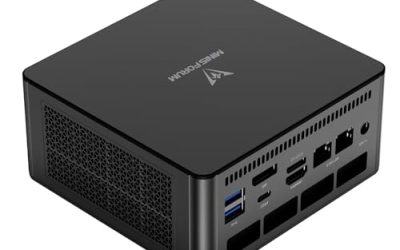
Minisforum UN1265 Core i7-12650H

The UN1265 is a steady, well-balanced choice for everyday analysis. Its ten-core Core i7-12650H and 32GB of RAM handle spreadsheets, SQL clients and notebook sessions without drama, while the 1TB SSD and expandable drive slot give your files room to grow. Triple display output through HDMI, DisplayPort and USB-C covers the usual code, results and reference layout, and the 2.5G LAN port suits a desk wired into local storage.
Specs
- Intel Core i7-12650H, 10 cores and 16 threads, up to 4.7GHz
- 32GB DDR4 RAM
- 1TB SSD
- Intel UHD Graphics
- HDMI, DisplayPort and USB-C 4K outputs
- Wi-Fi 6E and Bluetooth 5.2
- 2.5G LAN
- Expandable HDD slot and 4x USB ports
Best for: A reliable daily analysis desk built around spreadsheets, SQL and notebooks.
Watch out for: The memory is DDR4 rather than DDR5, so compare the full configuration, not just the processor name, when weighing it against newer boxes.
GMKtec M3 Plus Core i9-12900HK

The M3 Plus suits analysts who run heavier parallel work in a small box. Its fourteen-core Core i9-12900HK and 32GB of DDR4 memory keep large filters, group-by operations and multi-tool sessions moving, while Iris Xe graphics drive three 4K displays for code, tables and charts. The 1TB NVMe SSD covers working files, and the second M.2 slot lets you add a dedicated data drive when your project folders grow.
Specs
- Intel Core i9-12900HK, 14 cores and 20 threads, up to 5.0GHz
- 32GB DDR4 RAM
- 1TB NVMe SSD
- Intel Iris Xe Graphics, 1450MHz
- Triple 4K display support
- Wi-Fi 6 and Bluetooth 5.2
- USB-C port
- Windows 11 Pro
Best for: Heavier parallel analysis in a compact chassis with three displays.
Watch out for: Check the listing for the exact storage layout, because the second M.2 slot uses a shorter 2242 form factor.
GMKtec K10 Core i9-13900HK

The K10 is the pick for a desk crowded with devices. Its fourteen-core Core i9-13900HK and 32GB of DDR5 memory handle demanding analysis sessions, and the eight USB ports leave room for external drives, a headset, a printer and lab hardware without a hub. Quad 8K display support sounds like overkill for analysis, but in practice it means you will not run out of outputs when a third monitor and a portable display both join the desk.
Specs
- Intel Core i9-13900HK, 14 cores and 20 threads, up to 5.4GHz
- 32GB DDR5 RAM
- 1TB SSD
- Intel Iris Xe Graphics, 1.5GHz
- Quad 8K display support through HDMI and DisplayPort
- 8x USB ports
- COM port
- 2.5G LAN, Wi-Fi 6 and Bluetooth 5.2
Best for: A device-heavy analysis desk where USB ports and display outputs are always in demand.
Watch out for: The K10 is a workstation-style box, so confirm its footprint and ventilation needs before placing it in a tight shelf.
GMKtec EVO-T1 Core Ultra 9 285H

The EVO-T1 is for analysts whose datasets are simply too wide for a standard 32GB box. With 96GB of DDR5 and a 2TB PCIe 4.0 SSD, it holds large tables in memory and keeps raw and cleaned files on the same fast drive, while the Core Ultra 9 chip and Arc graphics handle demanding multitasking and visual work. Three M.2 expansion slots and an OCuLink port give you room to grow storage or add an external GPU later, which is rare in a box this size.
Specs
- Intel Core Ultra 9 285H, up to 5.4GHz
- 96GB DDR5 RAM
- 2TB PCIe 4.0 SSD
- Intel Arc 140T GPU, 2.35GHz
- 3x M.2 expansion slots
- OCuLink port
- Quad screen 8K display support
- Windows 11 Pro
Best for: Very wide datasets and long sessions where memory headroom is the limiting factor.
Watch out for: Confirm the exact configuration in the listing, because the EVO-T1 is sold in several memory and storage combinations.
Beelink EQi12 Core i5-1235U

The EQi12 fits lighter analysis work and smaller desks. Its ten-core Core i5-1235U, 16GB of DDR4 and 500GB SSD handle spreadsheets, SQL queries and notebook sessions comfortably, and the dual HDMI outputs cover a two-screen layout for code and results. The built-in power supply removes the external brick, which helps in a tidy setup, and the compact chassis sits neatly behind a monitor or on a shelf. The 16GB of memory also leaves room for a browser alongside your tools, so documentation and results stay open while you work.
Specs
- Intel Core i5-1235U, 10 cores and 12 threads, up to 4.4GHz
- 16GB DDR4 RAM, 3200MHz
- 500GB PCIe 4.0 SSD
- Intel UHD Graphics
- Dual HDMI 4K display output
- Dual Gigabit LAN
- Wi-Fi 6 and Bluetooth 5.4
- Built-in power supply
Best for: Lighter analysis work on a small desk where a tidy, brick-free setup matters.
Watch out for: The 500GB drive and 16GB of memory suit moderate datasets, so check your largest files before choosing this smaller configuration.
Which One Fits Your Situation
You analyse data every day and want a dependable box
Choose the Minisforum UN1265. Its Core i7, 32GB of RAM and 1TB SSD cover the daily mix of spreadsheets, SQL and notebooks, and the expandable drive slot gives you a simple growth path when files accumulate. The 32GB of memory also keeps a browser, a notebook and a database client open together, so you can move between tools without closing anything to free up space.
Your workloads are heavily parallel
Choose the GMKtec M3 Plus. The fourteen-core Core i9 keeps large operations moving while other tools stay open, and the triple-display output suits a desk where code, tables and charts are always visible. The fourteen cores also handle scheduled refreshes and background jobs while you keep working, so a long query does not freeze the rest of your desk.
Your desk is full of devices
Choose the GMKtec K10. Eight USB ports, quad display support and a COM port cover external drives, headsets and office hardware without a hub, and the Core i9 and 32GB of DDR5 keep the analysis itself responsive. The quad-display output also suits a desk with several screens, so code, tables, charts and documentation can each have their own space.
Your datasets are too wide for a standard box
Choose the GMKtec EVO-T1. Its 96GB of DDR5 and 2TB SSD hold large tables in memory and on fast storage, and the extra M.2 slots leave room for more data later. The 96GB of memory also leaves room for a browser and a dashboard alongside your analysis tools, so wide tables and live results can stay open together.
Common Mistakes
- Buying 16GB of memory for work that regularly holds wide tables, then losing time to swapping.
- Picking a chip by clock speed alone and ignoring the core and thread count.
- Choosing a single-drive box with no second slot for a dedicated data drive.
- Forgetting to count display outputs before adding a third monitor.
- Placing a hard-working mini PC in a closed cabinet where its vents cannot breathe.
Frequently Asked Questions
How much RAM do I need for data analysis on an Intel mini PC?
For most analysis work, 32GB is the practical baseline. It holds large tables, a notebook, a database client and a browser together without forcing the system to swap. Lighter spreadsheet and SQL work can run on 16GB, but choose a model with SODIMM slots if you think your datasets will grow, so you can add memory later.
Is a Core i9 worth it over a Core i7 for analysis?
It depends on how parallel your work is. A Core i9 with fourteen cores helps when large operations, scheduled refreshes and several tools run at the same time. A Core i7 with ten cores handles daily notebook and spreadsheet work well. If your current machine rarely feels busy, spend the difference on memory or a second SSD instead.
Can an Intel mini PC run three monitors?
Yes, when the listing states triple-display support and you use the right port combination. The models in this guide offer HDMI, DisplayPort and USB-C outputs. Check the listing for the exact combination, because some boxes share an output between two ports.
Do I need a discrete GPU for data analysis?
Usually not. Integrated Intel graphics handle spreadsheets, notebooks, dashboards and multiple monitors. A discrete or external GPU only becomes useful for heavy visualisation, machine learning or video work. If that is a possibility, choose a model with an OCuLink or Thunderbolt-style port so the option stays open.