🛒 Best Price Today on Amazon
Prime members get fast, free shipping on everything above, plus member-only deals. New members get a 30-day free trial — cancel anytime.
Understanding ray tracing vs path tracing performance helps PC gamers decide how much graphical realism is worth sacrificing FPS. Both techniques simulate light more realistically than traditional rasterization, but they differ in complexity, visual results, and GPU requirements. This guide explains their differences and how to choose practical settings.
What Ray Tracing vs Path Tracing Performance Really Comes Down To
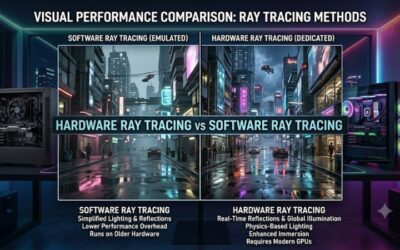
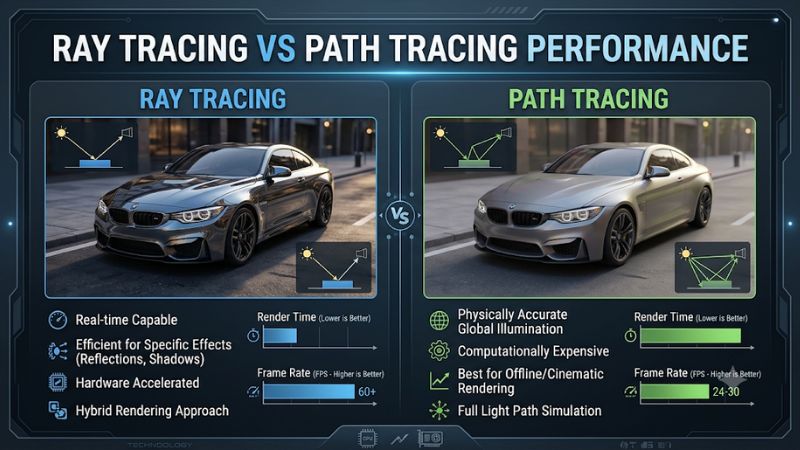
Ray tracing and path tracing belong to the same family of rendering techniques, but they do not represent the same workload. Traditional ray tracing adds selected effects, such as reflections, shadows, or global illumination, to a rasterized scene. Path tracing takes a more comprehensive approach to calculating light interactions, making it substantially more demanding in many games.
1. How Traditional Ray Tracing Works
Traditional ray tracing generally combines rasterization with selected ray-traced effects. Instead of calculating every lighting interaction through one unified process, a game uses conventional rendering for much of the scene and applies ray tracing to specific elements.
For example, a game might use ray tracing for reflective windows, realistic shadows, or ambient lighting while keeping other effects rasterized. This hybrid approach limits the computational workload while improving visual quality in areas where conventional techniques have noticeable limitations.
The performance cost depends on how many effects the developer implements. Ray-traced reflections can be relatively manageable in one game but considerably more expensive in another, particularly when the scene contains numerous reflective surfaces or complex geometry.
2. Why Path Tracing Requires More GPU Power
Path tracing is a more comprehensive rendering approach that follows simulated light paths through multiple interactions with scene surfaces. These interactions help calculate direct lighting, indirect illumination, reflections, shadows, and color bleeding within a unified lighting model.
Rather than applying a separate approximation to every lighting effect, path tracing uses multiple light bounces to produce a more consistent representation of how illumination behaves. This can create more natural indoor lighting, realistic reflections, and convincing transitions between bright and dark areas.
However, the additional calculations increase GPU workload significantly. The graphics card must process complex lighting information and reconstruct a usable image from noisy sampling results. Denoising and reconstruction techniques help manage this workload, but they do not make path tracing computationally inexpensive.
3. Why the FPS Difference Changes Between Games
There is no universal FPS penalty separating ray tracing from path tracing. Performance depends on the game’s rendering implementation, scene complexity, resolution, GPU architecture, and selected quality settings.
A game with a relatively lightweight ray-traced reflection option might retain a substantial amount of its rasterized performance. Another title using extensive ray-traced global illumination can create a much heavier workload, even without full path tracing.
Path tracing generally introduces a larger performance challenge because it calculates more lighting interactions. However, comparisons must account for the actual settings being used. Comparing medium ray tracing against maximum path tracing does not reveal the isolated performance difference between the two techniques.
4. What Doesn’t Help
Reducing unrelated graphics settings does not necessarily recover enough performance when path tracing is the primary bottleneck. Lowering texture quality, for example, may have little effect if the GPU has sufficient VRAM and the lighting calculations are consuming most of its rendering resources.
Similarly, increasing GPU memory capacity does not automatically improve ray tracing performance. VRAM helps accommodate rendering data, textures, and scene assets, but it cannot replace the processing power needed for complex ray calculations.
The more effective approach is to adjust ray tracing quality, render resolution, and supported upscaling options. These settings directly influence the workload responsible for the performance loss.
How to Compare and Optimize Ray Tracing vs Path Tracing Performance
A useful comparison requires more than looking at average FPS. You should consider image quality, frame consistency, input responsiveness, and the rendering settings behind each result. The following comparison explains what changes when moving from conventional ray tracing to path tracing and how to make that transition more practical.
Ray Tracing vs Path Tracing: Key Differences
| Comparison | Traditional Ray Tracing | Path Tracing |
| Rendering approach | Hybrid rasterization and ray tracing | More comprehensive ray-based lighting |
| Reflections | Selected ray-traced surfaces | More complete light interactions |
| Global illumination | May use approximations or ray tracing | Calculated through multiple light bounces |
| Shadows | Selected ray-traced shadows | More comprehensive lighting and shadow calculations |
| GPU workload | Low to very high, depending on implementation | Generally extremely demanding |
| FPS impact | Varies by effect and game | Usually substantially higher |
| Image quality | Improved realism in selected effects | More consistent and comprehensive lighting |
| Best application | Everyday gaming with visual improvements | High-end visual quality and cinematic gaming |
1. Compare Performance Using the Same Hardware
The most reliable way to understand ray tracing vs path tracing performance is to compare both modes on the same graphics card, processor, and memory configuration.
Keep resolution, graphics presets, upscaling settings, and test locations consistent. Ideally, use a built-in benchmark or repeatable in-game sequence. This reduces the chance that different environments or background activity distort the results.
Independent testing illustrates why this matters. TechSpot’s October 2024 investigation examined ray tracing performance across numerous games. In Alan Wake 2, its GeForce RTX 4090 results showed a 38% performance reduction with low ray tracing and a 52% reduction with high ray tracing compared with the corresponding non-RT baseline.
Cyberpunk 2077 produced a different result: its Ultra ray tracing setting reduced RTX 4090 performance by 22%, while Overdrive path tracing approximately halved performance. These figures belong to that particular test configuration, not a universal prediction for other GPUs.
2. Choose DLSS or FSR When Native Performance Is Too Low
Upscaling technologies can make demanding lighting effects more practical by rendering the game internally below the display resolution and reconstructing the output.
NVIDIA DLSS Super Resolution uses AI-based reconstruction on supported GeForce RTX hardware. AMD FSR offers an alternative for supported games and hardware. The available quality modes and implementation vary between titles.
For example, switching from native rendering to a quality-focused upscaling mode can improve performance while retaining much of the visual detail. More aggressive modes can recover additional FPS but may introduce softer details, ghosting, or reconstruction artifacts.
Do not assume that upscaling makes every path-traced game playable. The starting frame rate still matters, and the image quality trade-off becomes more noticeable when internal resolution drops too far.
3. Understand Frame Generation and Input Latency
Frame Generation creates additional frames between conventionally rendered frames using motion information and reconstruction techniques. This can increase the displayed frame rate without requiring the GPU to render every displayed frame traditionally.
NVIDIA DLSS Frame Generation is available on supported GeForce RTX GPUs, while Multi Frame Generation provides additional generated-frame options on supported RTX 50 Series hardware. AMD also offers FSR Frame Generation in compatible games.
However, generated FPS should not be confused with native rendering performance. A displayed 100 FPS with Frame Generation does not necessarily provide the input responsiveness of 100 traditionally rendered FPS.
For competitive games, prioritize responsive controls and a strong base frame rate. For single-player adventures with demanding lighting, Frame Generation can be a reasonable compromise when the underlying performance is already acceptable.
4. Adjust Graphics Settings in the Right Order
When path tracing causes substantial performance drops, changing the most expensive settings first is more effective than lowering every graphics option.
Start by checking whether the game offers separate ray tracing and path tracing controls. Some titles provide multiple RT presets, while others expose a dedicated path-tracing option.
Use this adjustment order:
| Setting or Step | Where | Effect | Risk |
| Lower path tracing quality | Game Settings → Graphics → Ray Tracing | Reduces lighting workload where supported | Less realistic lighting |
| Enable DLSS or FSR | Game Settings → Graphics → Upscaling | Improves rendering performance | Potential reconstruction artifacts |
| Reduce render resolution | Game Settings → Display or Graphics | Reduces pixel-processing workload | Lower image sharpness |
| Enable Frame Generation | Game Settings → Graphics | Increases displayed FPS | Added latency or visual artifacts |
After each change, repeat the same gameplay sequence and compare average FPS, 1% lows when available, and input responsiveness. Change one setting at a time so you can identify which adjustment actually helps.
If the image becomes noticeably softer or controls feel less responsive, reverse the last change and try a less aggressive option.
FAQ
1. Is Path Tracing Always Slower Than Ray Tracing?
Path tracing generally requires more GPU processing than conventional hybrid ray tracing because it calculates more complete lighting interactions. However, the actual difference depends on the game’s implementation, scene complexity, resolution, and graphics settings. A particularly demanding hybrid RT implementation can also consume substantial GPU resources.
2. Does Path Tracing Require an NVIDIA RTX GPU?
No, path tracing is a rendering technique rather than an NVIDIA-exclusive technology. However, individual games can impose specific hardware or feature requirements. Performance and reconstruction support also vary between GPU architectures. Check the game’s official requirements and supported graphics features before enabling it.
3. Can DLSS Make Path Tracing Run at 60 FPS?
DLSS can significantly improve path-tracing performance, but reaching 60 FPS depends on the GPU, resolution, game, and DLSS mode. Frame Generation can increase displayed FPS further, although generated frames do not provide the same input responsiveness as traditionally rendered frames.
4. Should I Use Ray Tracing or Path Tracing for Gaming?
Traditional ray tracing is generally the more practical choice for everyday gaming because it offers selected visual improvements with a more manageable performance cost. Path tracing is better suited to high-end systems and single-player experiences where comprehensive lighting realism matters more than maximizing FPS.
Final Thoughts
Understanding ray tracing vs path tracing performance makes it easier to balance visual quality and responsiveness. Traditional ray tracing remains a practical choice for many gaming PCs, while path tracing targets more demanding cinematic experiences. Start with your preferred resolution and native FPS, then adjust lighting quality and upscaling to find a comfortable balance.