🛒 Best Price Today on Amazon
Prime members get fast, free shipping on everything above, plus member-only deals. New members get a 30-day free trial — cancel anytime.
Choosing between dp 2.1 uhbr20 vs hdmi 2.1 for gaming comes down to bandwidth, monitor compatibility, and your target resolution and refresh rate. DisplayPort 2.1 UHBR20 offers substantially more bandwidth headroom, while HDMI 2.1 remains capable of demanding gaming modes. Here’s how to choose the right connection.
What DP 2.1 UHBR20 and HDMI 2.1 Mean for Gaming
DisplayPort 2.1 UHBR20 and HDMI 2.1 both transmit high-resolution video, HDR, and gaming signals, but their bandwidth limits differ considerably. Understanding link rates, compression, and supported display features helps determine whether the extra DisplayPort capacity provides a practical advantage for your gaming monitor.
1. Bandwidth: DisplayPort Has the Advantage
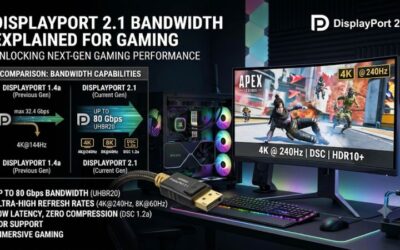
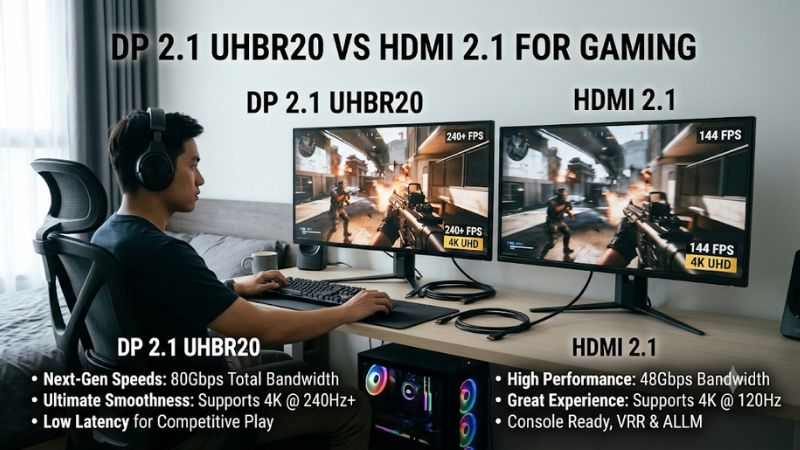
DisplayPort 2.1 UHBR20 provides an 80 Gbps link rate, with up to approximately 77.37 Gbps available for video data. HDMI 2.1 has a maximum link rate of 48 Gbps and approximately 42.67 Gbps of usable video bandwidth. This gives UHBR20 considerably more transmission capacity.
That difference matters most when combining high resolutions, high refresh rates, and greater color depth. For example, a demanding 4K gaming configuration with 10-bit RGB output and HDR requires considerable bandwidth. UHBR20 provides more room for these combinations without relying as heavily on compression.
2. Resolution and Refresh Rate
Both interfaces support demanding gaming displays, but their bandwidth limits affect which display modes are available without compression. HDMI 2.1 can support 4K at high refresh rates when the monitor and GPU implement the required features, while UHBR20 offers more headroom for extreme configurations.
NVIDIA’s GeForce RTX 5090 specifications illustrate this difference. Its DisplayPort 2.1b UHBR20 output supports up to 4K at 480Hz or 8K at 165Hz with DSC. Its HDMI 2.1b output supports up to 4K at 480Hz or 8K at 120Hz with DSC. These are manufacturer-stated capabilities, not guarantees that every monitor supports those modes.
NVIDIA
3. HDR, Color Depth, and DSC
HDR gaming depends on more than the connector. The GPU and monitor must support the required HDR format, color depth, and display mode. Higher refresh rates and 10-bit RGB output consume more bandwidth than lower-demand configurations, making UHBR20 particularly useful for high-end monitors.
Display Stream Compression (DSC) allows compatible devices to transmit demanding video modes using visually lossless compression. Both DisplayPort and HDMI 2.1 can support DSC, so HDMI is not automatically unsuitable for high-refresh gaming. However, UHBR20 offers more bandwidth before compression becomes necessary.
NVIDIA+1
4. VRR, G-SYNC, and FreeSync
Variable Refresh Rate (VRR) synchronizes the monitor’s refresh cycle with the GPU’s frame delivery to reduce screen tearing and uneven presentation. HDMI 2.1 includes gaming features such as VRR, Auto Low Latency Mode (ALLM), and Quick Frame Transport (QFT), although device manufacturers do not have to implement every feature.
DisplayPort supports Adaptive-Sync, which underpins many PC variable-refresh implementations, including compatible FreeSync and G-SYNC displays. Neither connector automatically provides lower input latency or higher FPS. The GPU, monitor, driver, and enabled synchronization mode determine the actual gaming experience.
Interface Standards for The Display Industry+1
What Doesn’t Help: Assuming Every Version 2.1 Port Is Equal
Buying a cable simply because its packaging says DisplayPort 2.1 or HDMI 2.1 is not enough. DisplayPort 2.1 includes different UHBR bandwidth tiers, while HDMI 2.1 devices can implement different bandwidth capabilities and optional features.
The same applies to claims about 4K 240Hz or 4K 480Hz. These modes depend on the complete signal configuration, including color depth, chroma format, DSC, and the capabilities of both connected devices. Check manufacturer specifications rather than relying on connector labels.
How to Choose Between DP 2.1 UHBR20 and HDMI 2.1
The best connection depends on your gaming hardware and display requirements, not simply which standard has the larger bandwidth number. Before choosing a cable or changing monitor settings, identify the GPU’s output capabilities, the monitor’s supported input modes, and whether you need uncompressed video or are comfortable using DSC.
1. Check Your GPU’s Display Outputs
Start with the graphics card specification page. Look for the exact DisplayPort version and UHBR tier, HDMI version, and supported display configurations. A GPU advertising DisplayPort 2.1 does not necessarily support UHBR20, so check the bandwidth tier explicitly.
For example, NVIDIA lists DisplayPort 2.1b with UHBR20 and HDMI 2.1b on the GeForce RTX 5090. AMD lists DisplayPort 2.1a and HDMI 2.1b on the Radeon RX 9070 XT. These specifications illustrate why GPU model numbers matter more than connector-generation labels.
NVIDIA+1
2. Verify Your Monitor’s Input Specifications
Your monitor must support the desired resolution and refresh rate through the particular input you intend to use. Some displays have different capabilities across their HDMI and DisplayPort connections, even when both are advertised as high-bandwidth interfaces.
Check the manufacturer’s specification sheet or manual for supported refresh rates, HDR modes, color depth, and DSC requirements. A monitor with UHBR20 support can take advantage of a compatible high-bandwidth GPU, but connecting it to an HDMI-only source means using the HDMI input instead.
3. Select the Correct Cable
For UHBR20, look for a VESA-certified DP80 cable. VESA identifies DP80 as supporting four-lane UHBR20 operation with an 80 Gbps maximum link rate. This certification helps establish that the cable meets the relevant DisplayPort bandwidth requirements.
For HDMI 2.1, choose a certified Ultra High Speed HDMI Cable rated for up to 48 Gbps. Check the official certification label rather than trusting generic descriptions such as 8K-ready or high-speed. Cable length and signal quality also matter, particularly with demanding high-refresh configurations.
Interface Standards for The Display Industry+2
4. Compare Your Actual Gaming Requirements
If you primarily play competitive games at 1440p or 4K with conventional refresh rates, HDMI 2.1 may already provide everything your display requires. The additional bandwidth of UHBR20 is unlikely to improve image quality or FPS when both connections already support the same output mode.
For high-end 4K 240Hz or 480Hz displays, UHBR20 becomes more attractive because it provides additional transmission capacity. However, do not assume that using DisplayPort automatically removes DSC requirements. Check the monitor’s supported signal timings and GPU specifications before deciding.
Connection Comparison Table
The following table summarizes the practical differences between the two standards for PC gaming.
| Setting or Step | Where | Effect | Risk |
| DP 2.1 UHBR20 | GPU and monitor specifications | Up to 80 Gbps link bandwidth | Requires UHBR20 support at both ends |
| HDMI 2.1 | GPU and monitor specifications | Up to 48 Gbps link bandwidth | Actual device bandwidth may be lower |
| DSC | GPU driver and monitor specifications | Enables higher-resolution and refresh-rate combinations | Requires compatible hardware |
| VRR / Adaptive-Sync | GPU software and monitor OSD | Reduces tearing and uneven frame presentation | Feature support varies by device |
| HDR and 10-bit color | Windows display settings and GPU control panel | Enables compatible high-dynamic-range output | May affect available refresh-rate modes |
| Certified cable | Cable packaging and certification records | Helps maintain the required signal bandwidth | Incorrect or unsuitable cables can cause signal problems |
Which Connection Should You Use for Different Gaming Setups?
The following recommendations focus on practical hardware combinations rather than assuming one interface is always superior.
- 1440p competitive gaming: Choose whichever connection supports your monitor’s maximum refresh rate, VRR, and desired color format. HDMI 2.1 is often sufficient.
- 4K 120Hz gaming: HDMI 2.1 is a capable option, particularly for large displays and televisions. DisplayPort is equally suitable when the monitor supports the required mode.
- 4K 240Hz gaming: Prefer UHBR20 when both devices support it and you want additional bandwidth headroom. HDMI 2.1 remains viable with compatible DSC configurations.
- 4K 480Hz gaming: UHBR20 is the stronger choice for bandwidth flexibility, although the exact display mode may still require DSC.
- 8K gaming: UHBR20 provides greater bandwidth headroom, but GPU rendering performance, DSC, and monitor compatibility remain important limitations.
One additional consideration is the newer HDMI 2.2 specification, which supports up to 96 Gbps. It is a separate standard from HDMI 2.1 and should not be confused with the 48 Gbps maximum of HDMI 2.1. If purchasing a next-generation display, check whether it supports HDMI 2.2 rather than assuming all HDMI ports have identical capabilities.
hdmi.org+1
FAQ: DP 2.1 UHBR20 vs HDMI 2.1 for Gaming
1. Is DisplayPort 2.1 UHBR20 better than HDMI 2.1 for gaming?
Yes, DisplayPort 2.1 UHBR20 offers greater bandwidth than HDMI 2.1, making it better suited to demanding high-resolution and high-refresh-rate configurations. However, this advantage matters primarily when both the graphics card and monitor support UHBR20. For many conventional gaming setups, HDMI 2.1 is already sufficient.
2. Can HDMI 2.1 support 4K 240Hz gaming?
Yes, HDMI 2.1 can support 4K 240Hz on compatible hardware, but the required signal configuration may use DSC. The GPU and monitor must both support the relevant mode, including its color depth and HDR requirements. Always check the monitor’s official input specifications before purchasing a cable.
3. Does DisplayPort 2.1 UHBR20 improve FPS compared with HDMI 2.1?
No, changing display connections does not directly increase the FPS rendered by your GPU. UHBR20 provides more bandwidth for transmitting demanding display signals, but game performance remains dependent on the GPU, CPU, graphics settings, and resolution. Its advantage is display connectivity rather than additional rendering power.
4. Do I need a special cable for DisplayPort 2.1 UHBR20?
Yes, you should use a VESA-certified DP80 cable to support the full UHBR20 bandwidth. For HDMI 2.1, choose a certified Ultra High Speed HDMI Cable rated for up to 48 Gbps. Using an unsuitable cable can prevent the connection from maintaining the intended display mode.
Final Thoughts
When comparing dp 2.1 uhbr20 vs hdmi 2.1 for gaming, DisplayPort wins on bandwidth, while HDMI remains a capable choice for most modern gaming displays. Choose UHBR20 for maximum high-refresh headroom, or HDMI 2.1 when it already meets your monitor’s requirements. Check both device specifications before upgrading.