🛒 Best Price Today on Amazon
Prime members get fast, free shipping on everything above, plus member-only deals. New members get a 30-day free trial — cancel anytime.
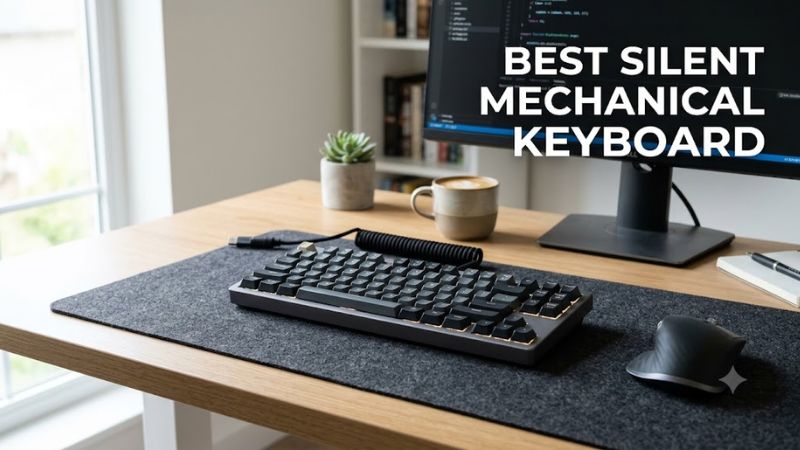
A best silent mechanical keyboard should reduce typing noise without sacrificing the key feel, layout, or responsiveness you need for gaming. The right choice depends on silent switch design, case construction, stabilizer noise, and connectivity. These recommendations cover quiet office setups, gaming desks, and customizable keyboards.
How to Choose a Silent Mechanical Keyboard
The quietest choice is not necessarily the keyboard with the most foam or the highest price. Switch dampening, stabilizer tuning, case resonance, and how forcefully you press the keys all affect the result. Prioritize the complete keyboard design rather than relying on a manufacturer’s description alone.
1. Choose the right mechanical switch
Silent linear switches move without a tactile bump and include dampening elements that soften the impact of a keystroke. CHERRY MX2A Silent Red is one example, with a linear response, a 45 cN actuation force, and 3.7 mm total travel. It suits users who prefer a smooth press without the sharp click of a clicky switch.
Silent tactile switches are worth considering if you want feedback while typing. They retain a noticeable bump but vary by design in how much noise they produce. Avoid assuming that every red switch is silent: ordinary linear switches can still make substantial impact noise when keys bottom out or return to their resting positions.
2. Look beyond switch noise
A keyboard can have quiet switches and still sound distracting because of a rattling spacebar, loose stabilizers, or a resonant case. Internal foam, gasket mounting, and carefully fitted components can reduce some of these sounds, although their effectiveness varies by model. Desk vibration and typing technique also affect the sound heard by people nearby.
If you already own a hot-swappable mechanical keyboard, replacing its switches may cost less than buying another board. Check the socket type and switch compatibility before ordering replacements. Some keyboards accept only specific switch formats, while soldered-switch models generally require soldering work to change the switches.
3. Select a layout that suits your desk
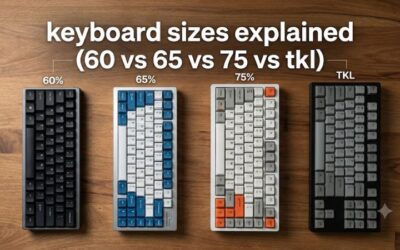
A full-size keyboard provides a dedicated number pad for spreadsheets, data entry, and productivity tasks. A tenkeyless (TKL) model removes the number pad, while a 75% layout retains most navigation functions in a smaller footprint. Compact layouts leave more desk space for mouse movement, which can be useful for low-sensitivity gaming.
Low-profile mechanical keyboards can also be attractive for shared workspaces because their shorter key travel may reduce the distance keys move before reaching the bottom. However, low-profile switches are not automatically silent. Verify the specific switch design, key layout, and availability of replacement switches before choosing a model.
4. Check connectivity and gaming features
Wired USB is a straightforward choice for a stationary gaming PC because it avoids battery charging and wireless interference. Wireless keyboards offer a cleaner desk, but Bluetooth and 2.4 GHz connections serve different priorities. A dedicated 2.4 GHz receiver is generally preferable to Bluetooth when gaming responsiveness matters, although actual latency depends on the keyboard and connection.
Also check operating-system support, software compatibility, backlighting, and whether the keyboard supports remapping or hot-swappable switches. A quieter keyboard does not inherently improve game performance. Choose features such as programmable keys or a compact layout for their practical benefits, not because they promise additional FPS.
Top Picks: Best Silent Mechanical Keyboards
These four keyboards cover different approaches to quiet typing, from a low-profile model with a dedicated silent switch to customizable boards that can accept compatible aftermarket switches. The key distinction is whether the keyboard arrives with quiet switches installed or requires an upgrade. That difference affects the total cost, setup effort, and suitability for a shared room.
| Product | Best For | Key Spec | Compatibility | Watch Out For |
| NuPhy Air75 V3 | Quiet typing out of the box | 75% low-profile layout; Blush Nano silent switch option | Windows and macOS support | Compact layout takes adjustment |
| Keychron V1 Max | Best value for customization | 75% layout; hot-swappable switches; gasket mount | Windows, macOS, Linux | Stock switches are not silent-specific |
| Keychron Q1 Max | Premium custom build | Aluminum case; double-gasket mount; multiple acoustic layers | Windows, macOS, Linux | High cost and heavy construction |
| Logitech MX Mechanical | Office work and everyday typing | Low-profile mechanical switches; Tactile Quiet option | Desktop and supported Bluetooth devices | Switches are not hot-swappable |
1. NuPhy Air75 V3 — Best for Quiet Typing Out of the Box
The NuPhy Air75 V3 is a strong option for people who want a compact mechanical keyboard without assembling a custom configuration. Its low-profile 75% layout preserves a useful set of navigation keys, while the Blush variant of NuPhy’s Nano Switch 3.0 family is specifically designed for quieter operation. Confirm the switch option before ordering because configurations can differ.
The low-profile format is particularly appealing for shared offices and smaller gaming desks. Its compact footprint leaves more room for mouse movement, and its wireless design suits users who switch between work and personal devices. The main trade-off is keycap shape and reduced travel compared with traditional mechanical keyboards, which may take time to get used to.
2. Keychron V1 Max — Best Value for Customization
The Keychron V1 Max is a practical starting point for a quieter custom keyboard. It has a 75% layout, gasket mounting, sound-absorbing foam, hot-swappable MX-style switches, and 2.4 GHz, Bluetooth, and USB connectivity. Its stock Gateron Jupiter switch options are not dedicated silent switches, so budget for a compatible silent replacement set if noise reduction is the priority.
This model is suitable for gamers who also type, program, or work at the same desk. Keychron lists support for Windows, macOS, and Linux, and the keyboard supports QMK-based customization through its software ecosystem. Its plastic case costs less than the aluminum Q1 Max, but buyers should still account for the cost of silent switches and any additional acoustic tuning.
3. Keychron Q1 Max — Best Premium Custom Build
The Keychron Q1 Max combines a 75% layout with an aluminum case, a double-gasket mounting design, multiple acoustic layers, and hot-swappable switches. Its wired USB-C, 2.4 GHz wireless, and Bluetooth connections make it versatile for both gaming and productivity. These features provide a solid foundation for a quiet build, but the standard switch options are not dedicated silent models.
Choose the Q1 Max if you want to customize switch feel, keycaps, and stabilizers over time. Its heavier aluminum construction and premium price make it less suitable for frequent travel or buyers on a tight budget. For the best noise reduction, pair it with compatible silent switches and check the spacebar and other stabilized keys for rattle rather than assuming the case alone will make it quiet.
4. Logitech MX Mechanical — Best for Office Work
The Logitech MX Mechanical is aimed at people who want a ready-to-use, low-profile mechanical keyboard for productivity. Logitech offers a Tactile Quiet switch option alongside Linear and Clicky variants, and the keyboard includes wireless connectivity and the ability to switch among supported paired devices. Select the correct switch version because the Clicky model is not intended for quiet shared spaces.
Its full-size layout provides a dedicated number pad, while the MX Mechanical Mini is an alternative if you prefer a smaller footprint. The low-profile keys suit users who prefer a shorter key travel than conventional mechanical boards. However, the switches are not hot-swappable, which limits future switch customization compared with the Keychron models.
FAQ
Are silent mechanical keyboards actually silent?
No, silent mechanical keyboards reduce typing noise but do not eliminate it entirely. Internal switch dampeners soften key impacts, while stabilizer tuning and case construction influence rattling and resonance. Heavy typing, desk vibration, and the spacebar can remain audible, so choose a well-dampened model rather than relying on the word “silent” alone.
Which switch type is best for a quiet gaming keyboard?
Silent linear switches are a strong choice for quiet gaming because they combine smooth movement with dampened impacts. CHERRY MX2A Silent Red is one example, with a 45 cN actuation force and 3.7 mm total travel. Silent tactile switches suit users who prefer a noticeable bump, but the actual sound depends on the specific switch and keyboard.
Can I make my existing mechanical keyboard quieter?
Yes, you can often reduce noise by installing compatible silent switches in a hot-swappable keyboard. Check the socket, switch pin configuration, and physical clearance before buying replacements. You can also address stabilizer rattle and desk vibration. If the keyboard has soldered switches, replacement requires soldering, making a new keyboard or professional modification worth considering.
Is a silent mechanical keyboard worth buying for gaming?
Yes, a silent mechanical keyboard can be worthwhile if you game in a shared room, stream with an open microphone, or type late at night. However, quieter switches do not automatically improve latency or gaming performance. Prioritize wired USB or a suitable 2.4 GHz connection, reliable key registration, and the layout you prefer before paying extra for acoustic features.
Final Thoughts
The best silent mechanical keyboard depends on how much noise reduction you need and how much customization you want. The NuPhy Air75 V3 is a strong starting point for quiet typing, while the Keychron V1 Max offers flexibility for custom builds. Confirm the switch configuration before buying, especially if a shared room demands quieter keystrokes.